Oil, gas, and energy field operations create UKG time tracking challenges that proprietary hardware cannot solve: offline remote sites, rotational hitch schedules, multi-project cost allocation, and safety attestation. This guide covers native UKG capabilities, where the hardware gaps show up, and how CloudApper AI TimeClock closes them.



Table of Contents
- What Makes Energy Sector Time Tracking Structurally Different
- What UKG Does Well for Energy Workforce Management
- Where UKG Time Tracking Breaks Down in the Field
- What to Configure in UKG Before Field Deployment
- How CloudApper AI TimeClock Handles Energy Sector Field Operations
- Frequently Asked Questions
- Closing
For oil, gas and energy field crews, UKG time tracking has to work at a remote site, during a crew change, often without a network. At 5:00 a.m. on a wellpad in West Texas or an offshore rotation point in Louisiana, 40 workers are coming off a 14-day hitch and another 40 are starting theirs. The outgoing crew needs to clock out. The incoming crew needs to clock in, confirm their safety attestation and log the right cost center, all in under 10 minutes before transport leaves.
If the time clock at a remote site has no connection to the main network, you’re capturing paper or relying on supervisors to batch-enter punches later. If employees have to type cost centers at the terminal, errors enter project billing from the first hour of every hitch. And without a safety attestation prompt at clock-in, the safety officer spends the day chasing sign-offs.
CloudApper AI TimeClock for UKG runs on standard Android tablets and iPads, syncs with UKG Ready and Pro WFM, and captures the full clock-in workflow at the terminal: biometric identity verification, cost center assignment and safety attestation, offline if needed, with automatic sync when connectivity returns. Where field time records drive billing, compliance and safety documentation, the terminal is where the data chain starts.
What Makes Energy Sector Time Tracking Structurally Different
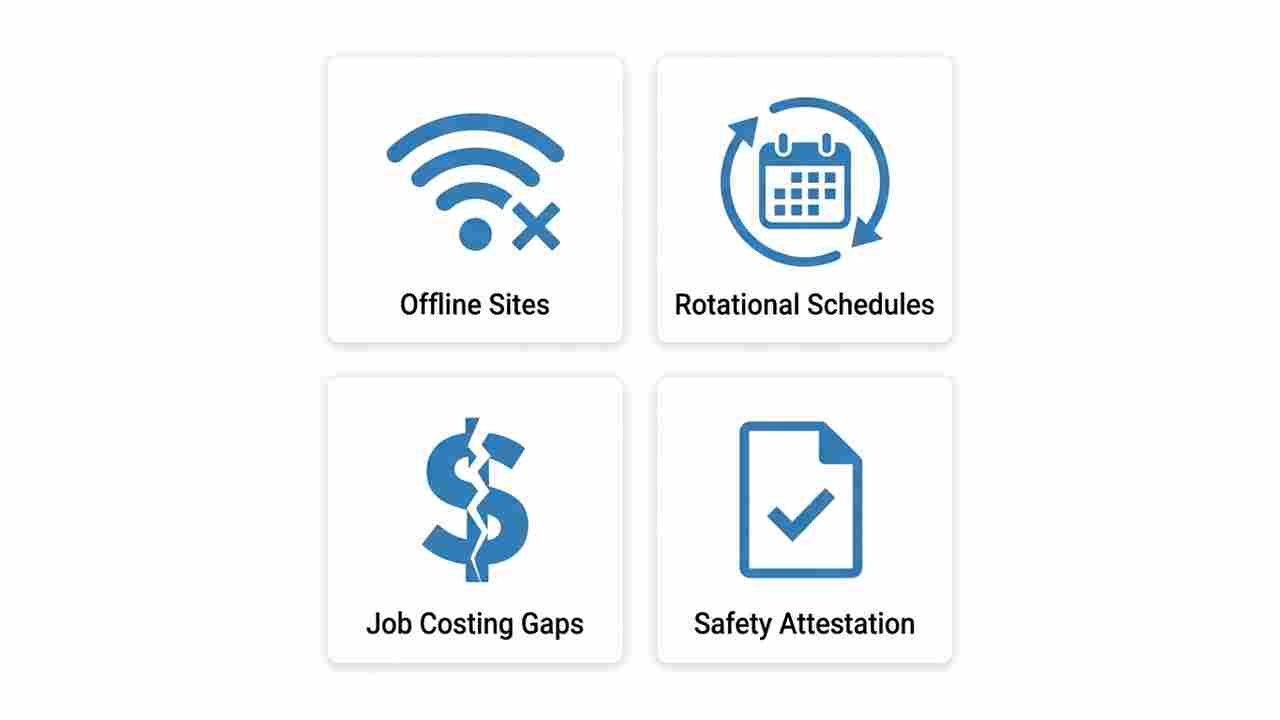
Oil, gas, and energy workforces don’t follow the scheduling patterns that most enterprise time tracking systems are built around. The challenges are specific, and UKG administrators in this sector encounter them at every configuration layer.
Rotational and hitch schedules. The standard 28-and-14 (28 days on, 14 off) or 14-and-14 hitch schedule in upstream oil and gas has no equivalent in retail or healthcare. UKG’s scheduling engine can model these rotations, but the overtime calculations that flow from them — particularly in states with daily overtime rules — require careful pay rule configuration. A crew member who works 12-hour days for 14 consecutive days accumulates overtime against both daily and weekly thresholds simultaneously, at different multipliers, in different states. The FLSA calculation is not ambiguous; the configuration to execute it correctly across multiple field locations and jurisdictions is.

Multiple cost centers and job codes per shift. In midstream and downstream operations, field technicians frequently move between jobs, cost centers, or contract codes within a single shift — a pipeline technician may work maintenance on two different assets charged to separate project codes during the same 12-hour day. If your time capture terminal cannot prompt for a job transfer at the point of task change, those hours are recorded against a single cost center regardless of where the work actually occurred. The discrepancy surfaces at billing — not in real time when it’s correctable, but at month-end when it’s already in the client invoice.
Remote and off-grid locations. Production sites, compressor stations, pipeline rights-of-way, and wellpads frequently operate outside the range of reliable cellular or Wi-Fi coverage. Proprietary UKG terminal hardware — Intouch DX, 9000, 9100 — requires a network connection to record a punch. Without connectivity, there is no punch record. The workaround — paper timesheets, supervisor-entered corrections — is the same one the industry has used for decades, and it produces the same payroll accuracy problems.
Safety attestation as a compliance record. OSHA, DOT, and site-specific safety programs in the energy sector require documentation that workers have acknowledged pre-shift safety briefings, fit-for-duty conditions, and hazardous conditions at their specific location. A paper sign-in sheet satisfies the documentation requirement the way a receipt satisfies a reimbursement — until someone challenges it. A digital attestation captured at the time clock terminal, tied to the employee’s verified identity, with a timestamp and location record, is a different category of documentation.
What UKG Does Well for Energy Workforce Management
UKG Ready and UKG Pro WFM have specific capabilities that energy sector organizations rely on, and any honest assessment of the platform starts with what works.
UKG’s scheduling engine handles rotational hitch schedules. The platform can configure 14-on/14-off or 28-on/14-off patterns, assign employees to rotation groups, and propagate schedule changes across the hitch without manual rebuild. For operations managers scheduling crews across multiple rigs or platforms, this is a genuine time-saving capability.
UKG’s pay rules engine can model the layered overtime calculations that rotational schedules create — daily and weekly thresholds, state-specific multipliers, and shift differential pay for overnight or hazardous conditions. Cost center-specific overtime calculations in UKG allow payroll teams to allocate overtime costs to the correct project budget rather than a general labor pool — a distinction that matters significantly for project-based energy operations where labor is billed against specific contracts.
UKG’s reporting capabilities support the documentation requirements that energy sector audits and DOT compliance reviews generate. Employee-level time records, pay period summaries, and cost center allocations are accessible through UKG’s reporting engine within the retention window. The audit trail for timecard corrections — who edited, when, what changed — is maintained at the transaction level.
Where UKG’s native capabilities reach their limit is at the hardware layer, in the field, where the actual time data originates.
Where UKG Time Tracking Breaks Down in the Field
The offline gap at remote sites. The single most consistent timekeeping problem in upstream oil and gas is punch data that never makes it into UKG because the terminal at the wellpad or compressor station had no network connectivity when the crew clocked in. The standard workaround — paper sheets collected and entered by a supervisor — introduces a delay of hours to days between when the work occurred and when the UKG record exists. Offline time capture for UKG addresses this directly: punch data is recorded at the terminal regardless of connectivity, stored locally, and synced to UKG when the network is available. For remote energy sites, this is not a convenience feature — it is the difference between contemporaneous time records and reconstructed ones.
Identity verification at shared terminal stations. At a crew change point serving 40 or 80 workers, badge and PIN-based terminals present an identity problem that biometric terminals do not. When a badge is shared, lost, or scanned by a supervisor on behalf of a crew member who hasn’t arrived yet, the UKG punch record does not reflect the employee who actually worked. For energy contractors who bill time-and-materials to clients, this is a billing integrity problem. For operations subject to OSHA-mandated headcount and evacuation tracking, it’s a safety problem.
Job transfer capture at the terminal. Shift work and job costing in UKG Pro require that employees accurately report which cost center or project code applies to each segment of their work. If the terminal cannot prompt for a job transfer mid-shift — if the only options are clock-in and clock-out — the cost center allocation defaults to whatever was assigned at the start of the shift, regardless of where the employee worked. For operations billing against multiple project codes, the reconciliation happens in accounting, not in UKG, and it is manual.
Safety attestation separate from the punch record. When safety attestation documentation — pre-shift fit-for-duty confirmation, site hazard acknowledgment, PPE compliance — is collected separately from the time clock workflow, two records exist where one integrated record should. The employee clocks in on the terminal and signs a paper sheet. If the paper sheet is missing for a specific shift during a safety audit, there is no way to establish that the attestation occurred — even though the UKG punch record proves the employee was on site.
Geofencing at dispersed, remote locations. For energy operations with field crews working across geographically dispersed sites — pipeline rights-of-way, transmission infrastructure, distributed generation assets — geofencing in UKG Ready restricts clock-in to a defined geographic boundary. This prevents remote clock-in from a crew truck parked three miles from the actual work site. For operations where labor is billed per site, location-verified punches are a billing accuracy requirement, not just a policy enforcement mechanism.
What to Configure in UKG Before Field Deployment
Map your rotational pay rules to every operating state. If you have field crews working in Texas, North Dakota, New Mexico, and offshore Gulf of Mexico federal waters, each jurisdiction applies different overtime rules to the same 14-day hitch schedule. Build pay rule configurations for each operating location before those locations go live in UKG — do not assume that Texas rules apply to all onshore operations or that federal FLSA rules cover offshore. Review with payroll counsel before your next crew rotation.
Audit your cost center and job code assignment workflow. Pull a sample of timecard records from the last pay period and trace how cost center assignments reached UKG. If the answer involves any manual entry step — supervisor spreadsheets, end-of-hitch data entry, retroactive corrections — identify where the terminal-level capture is missing and what it would need to do to replace the manual step. Portable time clock deployments at field sites are the reference architecture for this problem — the same pattern applies in oil and gas as in construction.
Establish your safety attestation integration approach. Determine whether safety attestation should be captured as part of the clock-in workflow or as a separate step before the punch is recorded. Either approach requires a terminal that can surface configurable prompts — a standard UKG hardware terminal cannot do this without expensive custom configuration. Confirm whether your current terminal hardware supports the attestation workflow your safety officer needs before assuming it does.
Confirm retention configuration for DOT and OSHA records. Energy sector operators subject to DOT pipeline safety regulations or OSHA process safety management requirements may have timekeeping record retention obligations that exceed the FLSA two-to-three-year standard. Confirm that your UKG data retention settings match the most demanding regulatory requirement that applies to your operations, not just the FLSA default. DOL and regulatory audit readiness in UKG covers the documentation framework in detail.
How CloudApper AI TimeClock Handles Energy Sector Field Operations
CloudApper AI TimeClock for UKG runs on standard Android tablets or iPads and syncs directly with UKG Ready and Pro WFM. For energy sector operators, specific capabilities address the field-level gaps that proprietary UKG hardware cannot close without site-by-site custom installation.
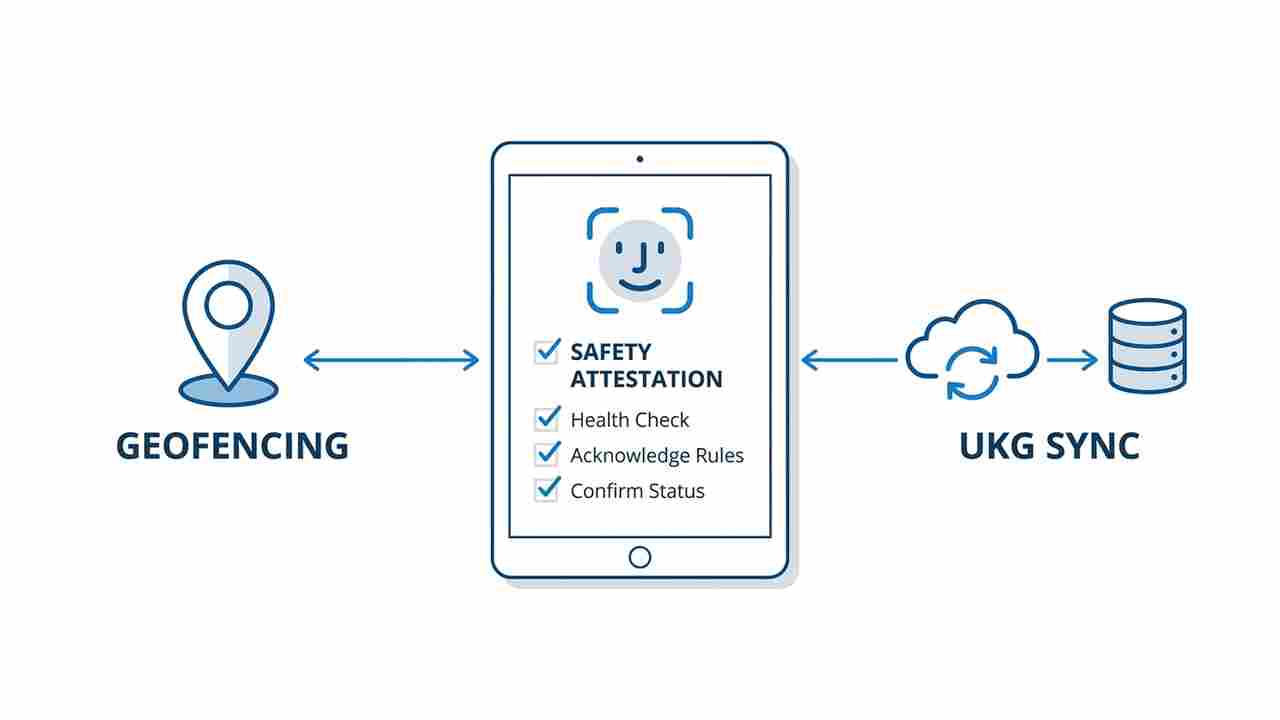
Offline punch capture with automatic UKG sync. Punch data is recorded at the terminal and stored locally when the site has no connectivity. When Wi-Fi or cellular service is available — at shift end, when the crew returns to a connected staging area, or when a portable hotspot is brought on site — the stored punches sync to UKG automatically and in chronological order. No supervisor data entry. No paper reconstruction. The UKG record reflects what actually happened at the terminal, when it happened. Organizations with remote production sites have used this offline sync capability for UKG Ready to eliminate the paper reconciliation cycle entirely at field locations.
Biometric identity at crew change. Facial recognition verification is included in standard CloudApper AI TimeClock licensing at no additional cost. At a crew change point serving 40 or 80 workers, biometric clock-in confirms that the person clocking in is the employee of record — not a badge proxy. For operators billing time-and-materials to clients, the identity verification is also a billing integrity mechanism.
Job transfer prompts at the terminal. CloudApper AI TimeClock supports configurable data capture forms at clock-in and clock-out — employees select the applicable cost center or project code from a configured list, or the terminal auto-assigns based on their location profile. When a field technician moves between project codes during a shift, the transfer is captured at the terminal and written to UKG as a labor allocation, not reconstructed from a supervisor’s notes at end of hitch. Multi-location hour tracking in UKG Pro WFM applies the same principle across state lines — each segment of work is assigned to the correct jurisdiction and cost center at the point of capture.
Safety attestation integrated with the punch record. Configurable attestation prompts fire at clock-in or clock-out: employees acknowledge the pre-shift safety briefing, confirm fit-for-duty status, or confirm PPE compliance before the punch is recorded. The attestation is stored with the time record — the same timestamp, the same identity verification, the same UKG sync. A safety audit request for employee attestation records from a specific date pulls from the same data source as the payroll audit for the same period. Role-specific attestation workflows for UKG allow different prompt sets for different job classifications — a field technician sees a different attestation flow than a site administrator.
Geofencing at dispersed field locations. GPS-based geofencing restricts clock-in to a defined geographic radius around the actual work site. For pipeline corridor operations or distributed generation facilities, each site has its own geofence — employees cannot clock in unless the terminal’s location matches the assigned work site. This eliminates the category of payroll errors where a field worker clocks in from a staging area or a truck rather than from the work location itself. Setting up geofencing for specific employee groups in UKG is the configuration foundation — CloudApper AI TimeClock enforces it at the physical terminal.
For energy sector operators with field crews at remote sites, rotational hitch schedules, multi-project cost allocation requirements, and safety documentation obligations, CloudApper AI TimeClock for UKG closes the hardware-layer gaps that UKG’s software platform cannot address alone — at 25% of the cost of proprietary UKG Intouch terminal hardware. How compliance-focused UKG customers configure their time clock environment provides additional context on the configuration decisions that matter most at the hardware layer.
Frequently Asked Questions
Q: Can UKG Pro WFM handle 14-day or 28-day rotational hitch schedules?
Yes. UKG Pro WFM and UKG Ready support rotational schedule configuration. Hitch patterns — 14-on/14-off, 28-on/14-off, 7-and-7 — can be configured as schedule templates and assigned to rotation groups. The scheduling engine propagates the pattern forward automatically without manual rebuild for each hitch. The pay rule configuration for the overtime calculations generated by these schedules requires separate attention, particularly for operations in states with daily overtime thresholds like California, Alaska, and Nevada.
Q: How does offline punch capture work in areas with no cellular or Wi-Fi coverage?
CloudApper AI TimeClock stores punch data locally on the device when no network connection is available. The biometric verification runs against the locally stored employee template database, so identity confirmation continues to function without connectivity. When connectivity is restored — at the end of the shift, on return to a connected staging area, or when a mobile hotspot comes within range — the stored punches sync to UKG in chronological order automatically. No manual intervention is required, and there is no punch data loss from a connectivity outage.
Q: How does job costing work at the terminal level for multi-project field operations?
CloudApper AI TimeClock supports configurable data capture forms at clock-in and clock-out. Employees can select from a list of active project codes or cost centers at the terminal, or the terminal can auto-assign based on the employee’s scheduled assignment. Job transfer prompts can fire mid-shift to capture the transition between project codes without requiring the employee to fully clock out and back in. The cost center allocation is written to UKG as part of the time record, eliminating the manual reconciliation step that occurs when cost center assignment is entered after the fact.
Q: What safety attestation documentation can be captured at the time clock terminal?
CloudApper AI TimeClock supports configurable attestation prompts at clock-in or clock-out. Prompt content, timing, and response options are configurable per location and per job classification. Common energy sector applications include pre-shift fit-for-duty confirmation, hazardous condition acknowledgment, PPE compliance confirmation, and site-specific safety briefing acknowledgment. Each attestation response is stored with the employee’s time record — same timestamp, same identity verification — and is available for audit response through the same reporting channel as payroll records.
Q: Does geofencing work at remote field locations with limited connectivity?
Yes. CloudApper AI TimeClock’s geofencing uses the device’s built-in GPS to verify the terminal’s physical location against the configured geofence boundary. GPS location data does not require cellular or Wi-Fi connectivity — it is determined by satellite signal. A terminal at a remote wellpad with no cellular coverage can still enforce a geofence boundary using GPS. The punch record includes the verified location data, which is synced to UKG when connectivity is restored.
Q: How does UKG handle overtime for rotational field crews working in multiple states?
UKG Pro WFM and UKG Ready can be configured with state-specific pay rules that apply the correct overtime thresholds for each operating state. For field crews who work across state lines during a single hitch — common in pipeline corridor operations — the pay rule configuration must apply the correct state rule to each segment of the employee’s work record, not a single blended rule. This requires careful mapping of employee location records to state-specific pay groups in UKG. Payroll counsel familiar with multi-state energy sector operations should review the configuration before the first multi-state hitch period closes.
Q: Can CloudApper AI TimeClock be deployed on tablets that field crews carry, rather than at fixed terminal points?
Yes. CloudApper AI TimeClock runs on standard Android tablets, which can be configured as portable terminals for field crew supervisors or safety coordinators rather than fixed kiosk installations. A supervisor on a pipeline right-of-way can carry the tablet to the work location, allow crew members to clock in with facial recognition, and have the punches queued for UKG sync when connectivity is available. This portable time clock approach applies directly to pipeline, transmission, and distributed energy field operations.
Closing
Oil, gas, and energy field operations impose time tracking requirements that most enterprise timekeeping platforms were not designed for at the terminal level — remote sites with no connectivity, crew changes under time pressure, multi-project cost allocation at the point of work, safety attestation as a compliance record alongside the punch, and rotational schedules that generate complex overtime calculations across multiple jurisdictions.
UKG’s pay rules engine and scheduling capabilities handle the back-end complexity. The terminal layer is where field operations most often introduce the data quality problems that appear later in payroll, billing, and safety audits.
If your current UKG time capture setup at field sites involves paper, manual supervisor entry, or terminals that cannot operate offline, those are addressable problems — not permanent constraints of operating in the field. Explore how CloudApper AI TimeClock handles energy sector field operations at https://ukg.cloudapper.ai/affordable-ukg-kronos-time-clock/



October 19, 2026
Nurse Mandatory Overtime Limits in UKG: Documenting Voluntary Overtime at Clock-Out
New York, Pennsylvania and Washington restrict mandatory overtime for nurses, which makes documented consent the key record. Learn how UKG Pro WFM and UKG Ready separate voluntary and mandated overtime, and how CloudApper AI TimeClock captures consent on an affordable unit tablet.

October 16, 2026
Heat Illness Recovery Breaks in UKG for Construction and Logistics Crews
State heat rules in California, Washington and beyond require cool-down breaks that payroll must be able to prove. Learn how UKG Ready and UKG Pro WFM track recovery periods, and how CloudApper AI TimeClock captures them on an affordable jobsite tablet that works offline.
October 15, 2026
PUMP Act Lactation Breaks in UKG: Tracking Them Without Breaking Meal Rules
Lactation breaks protected by the PUMP Act often show up as meal break exceptions in UKG. Learn what federal law requires, how to configure UKG Ready and UKG Pro WFM pay codes, and how CloudApper AI TimeClock records these breaks privately on an affordable tablet clock.
October 14, 2026
Enforcing Minor Work Hour Limits at the UKG Time Clock
Child labor hour limits are usually built into UKG schedules, but violations happen at the punch. Learn the federal rules for 14 to 17 year olds, how UKG Pro WFM and UKG Ready handle minor rules, and how CloudApper AI TimeClock adds age-based checks on an affordable tablet clock.