A UKG time clock RFP stalls when HR, IT, payroll, finance, and procurement each score differently. Use this weighted scorecard to evaluate UKG Intouch devices and tablet options like CloudApper AI TimeClock on the same terms, test them in your own UKG tenant, and keep UKG as the system of record.



Table of Contents
- Start With What UKG Already Provides
- Where Evaluations Usually Stall
- Do This Inside UKG Before You Issue the RFP
- The Weighted Scorecard
- Where a Tablet Option Belongs on the Sheet
- Scoring CloudApper AI TimeClock
- Frequently Asked Questions
- Put the Scorecard to Work
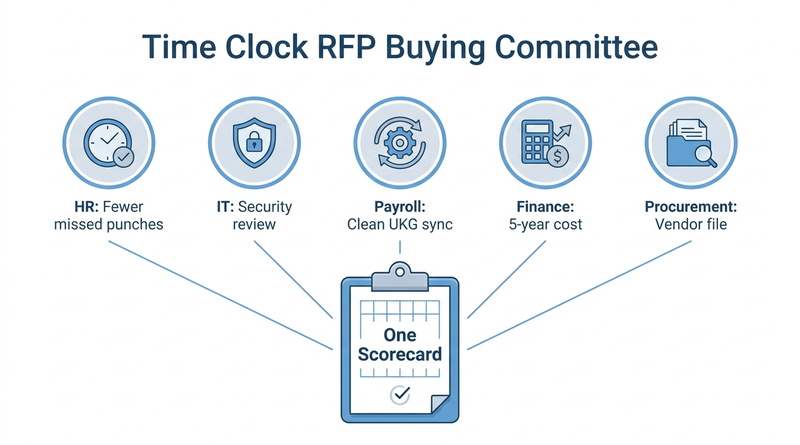
Five people join the time clock evaluation call, each with a different idea of “done.” HR wants fewer missed punches, IT wants a clean security review, payroll wants zero reconciliation, and finance wants a five-year number. Write the RFP from one seat and it stalls at the next. This scorecard gives the whole committee one document to score UKG Intouch devices and tablet options such as CloudApper AI TimeClock on the same terms, with UKG staying the system of record either way.
Start With What UKG Already Provides
UKG Ready and UKG Pro WFM hold the pay rules, schedules, accruals, and timecards. The time clock is only the capture layer. UKG’s Intouch devices are built and supported for that job, and the UKG Marketplace lists certified partner applications. Your RFP is choosing how punches enter UKG, not whether UKG handles them.

Where Evaluations Usually Stall
Gartner research finds that a typical buying group for a complex B2B purchase includes six to ten decision makers, each arriving with separate information. In time clock projects, IT raises questions late about tablet security review and approval. Payroll finds out after go-live that union rules or job transfers weren’t tested.
Do This Inside UKG Before You Issue the RFP
- Pull missed-punch and timecard-edit counts from UKG reports as your baseline.
- Inventory devices by site, model, and support status with your UKG account team.
- List the attestations and union and CBA configurations the clock must feed.
The Weighted Scorecard
| Category | Weight | What to test |
|---|---|---|
| UKG Ready/Pro WFM sync and data integrity | 20% | Punches, transfers, pay codes land in a test tenant |
| Capture accuracy and buddy-punch controls | 15% | Biometric or PIN verification |
| Security, privacy, and device management | 15% | Encryption, biometric consent and retention |
| Payroll, attestation, and labor-rule workflows | 15% | Breaks, attestations, union rules |
| Offline and remote-site resilience | 10% | Punches sync after an outage |
| Frontline usability | 10% | Time to punch, languages |
| Five-year total cost of ownership | 10% | Devices, refresh, support |
| Support, implementation, references | 5% | Go-live time, references |
Score each item as Demonstrated, Documented, or Contractual. A feature you watched work in your tenant outscores one a vendor only describes.
Where a Tablet Option Belongs on the Sheet
Where Intouch coverage is in place and budgeted, Intouch may score highest, and that is a valid outcome. The scorecard earns its keep at smaller, remote, or expanding sites, where five-year cost and offline capture weigh heavily. That is where CloudApper AI TimeClock usually gets its column.
Scoring CloudApper AI TimeClock
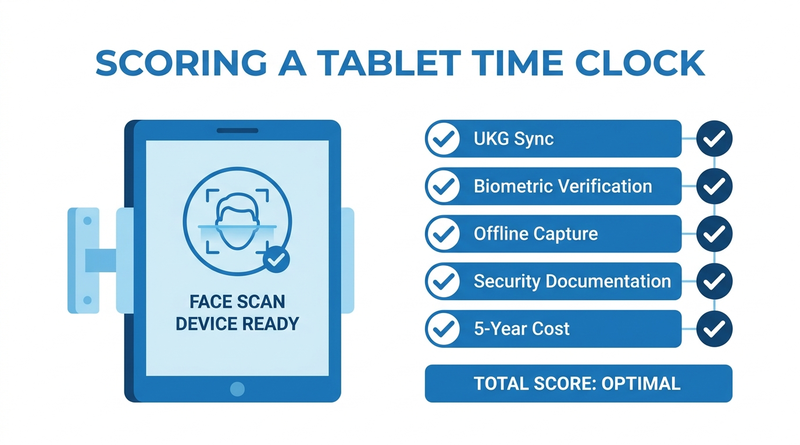
CloudApper’s UKG time clock runs on an iPad or Android tablet and syncs directly with UKG Ready and UKG Pro WFM. It includes facial recognition, QR and NFC punching, offline capture, attestation, and employee self-service. CloudApper prices it at roughly 25% of the cost of traditional UKG clocking hardware and provides HIPAA, GDPR, CCPA, and FIPS 140-2 documentation for IT. A time clock ROI case for your CFO fills the cost row, and the enterprise rollout guide covers implementation.
Frequently Asked Questions
Q: What should a UKG time clock RFP include?
It should cover UKG sync, capture accuracy, security and biometric privacy, labor-rule workflows, offline resilience, usability, five-year cost, and support, weighted so every function scores on the same terms.
Q: Can I replace UKG Intouch clocks without replacing UKG?
Yes. The clock is the capture layer, and UKG Ready or Pro WFM stays the system of record. CloudApper AI TimeClock, for example, syncs tablet punches directly into UKG.
Q: Who should be on a time clock evaluation committee?
Typically the UKG admin, HR, payroll, IT, operations, finance, and procurement. Involving IT and payroll early prevents late stalls.
Q: How do I test a UKG-compatible time clock before buying?
Run punches, job transfers, pay codes, and an offline scenario in a UKG test tenant, then check the timecards.
Q: How do I compare time clock costs fairly?
Use five-year total cost of ownership, including devices, refresh cycles, support, and per-site deployment.
Put the Scorecard to Work
Building an RFP now? Add CloudApper AI TimeClock as a column and test it in your own tenant. Book a walkthrough of CloudApper AI TimeClock for UKG.



October 19, 2026
Nurse Mandatory Overtime Limits in UKG: Documenting Voluntary Overtime at Clock-Out
New York, Pennsylvania and Washington restrict mandatory overtime for nurses, which makes documented consent the key record. Learn how UKG Pro WFM and UKG Ready separate voluntary and mandated overtime, and how CloudApper AI TimeClock captures consent on an affordable unit tablet.

October 16, 2026
Heat Illness Recovery Breaks in UKG for Construction and Logistics Crews
State heat rules in California, Washington and beyond require cool-down breaks that payroll must be able to prove. Learn how UKG Ready and UKG Pro WFM track recovery periods, and how CloudApper AI TimeClock captures them on an affordable jobsite tablet that works offline.
October 15, 2026
PUMP Act Lactation Breaks in UKG: Tracking Them Without Breaking Meal Rules
Lactation breaks protected by the PUMP Act often show up as meal break exceptions in UKG. Learn what federal law requires, how to configure UKG Ready and UKG Pro WFM pay codes, and how CloudApper AI TimeClock records these breaks privately on an affordable tablet clock.
October 14, 2026
Enforcing Minor Work Hour Limits at the UKG Time Clock
Child labor hour limits are usually built into UKG schedules, but violations happen at the punch. Learn the federal rules for 14 to 17 year olds, how UKG Pro WFM and UKG Ready handle minor rules, and how CloudApper AI TimeClock adds age-based checks on an affordable tablet clock.