Learn how to build a compelling UKG time clock ROI case for your CFO — with hardware cost analysis, missed punch quantification, payback period math, and the financial framing that moves budget approvals forward.


Table of Contents
- What UKG Handles Well
- Where the Financial Exposure Is Hiding
- What to Quantify Before the CFO Meeting
- Where the Native UKG Hardware Model Runs Out
- How CloudApper AI TimeClock for UKG Changes the Financial Model
- Building the Payback Period Slide
- How to Structure the CFO Presentation
- CloudApper AI TimeClock for UKG: The Financial Summary
- Frequently Asked Questions
A UKG time clock ROI case for your CFO needs four numbers: what your current setup costs, what a change would cost, what you get back and when, and what happens if you do nothing. CFOs rarely weigh in on facial recognition, tablet compatibility or the age of your Intouch 9000 terminals. They decide on those four answers, backed by figures specific to your organization rather than generic vendor estimates. Bring that and you are likely to leave with an approval. Bring a brochure and a vague promise of time savings, and you will leave with a request for more analysis.
This guide shows how to quantify the cost of your current UKG time clock setup, where the financial exposure sits, and how to frame a replacement as a financial decision rather than a technology one, using CloudApper AI TimeClock for UKG as the worked example.
What UKG Handles Well
UKG Ready and UKG Pro WFM are mature workforce management platforms. They handle scheduling complexity, labor rule enforcement, shift differentials, overtime calculation, and payroll integration with real depth. The software layer is not the problem your CFO is looking at.
The issue is the physical layer: the time clock hardware that sits on your factory floor, in your distribution center, at your retail service counter. UKG’s proprietary hardware ecosystem — Intouch DX, 9000, 9100, 4500 series terminals — was designed to work reliably within the UKG environment. It does. But reliability has a cost structure that most HR teams have not formally quantified, and CFOs rarely see as a line item until renewal time or a hardware failure forces the conversation.
Where the Financial Exposure Is Hiding
The ROI case for changing your UKG time clock infrastructure starts by making visible what is already being spent — often across several budget lines that do not appear connected.
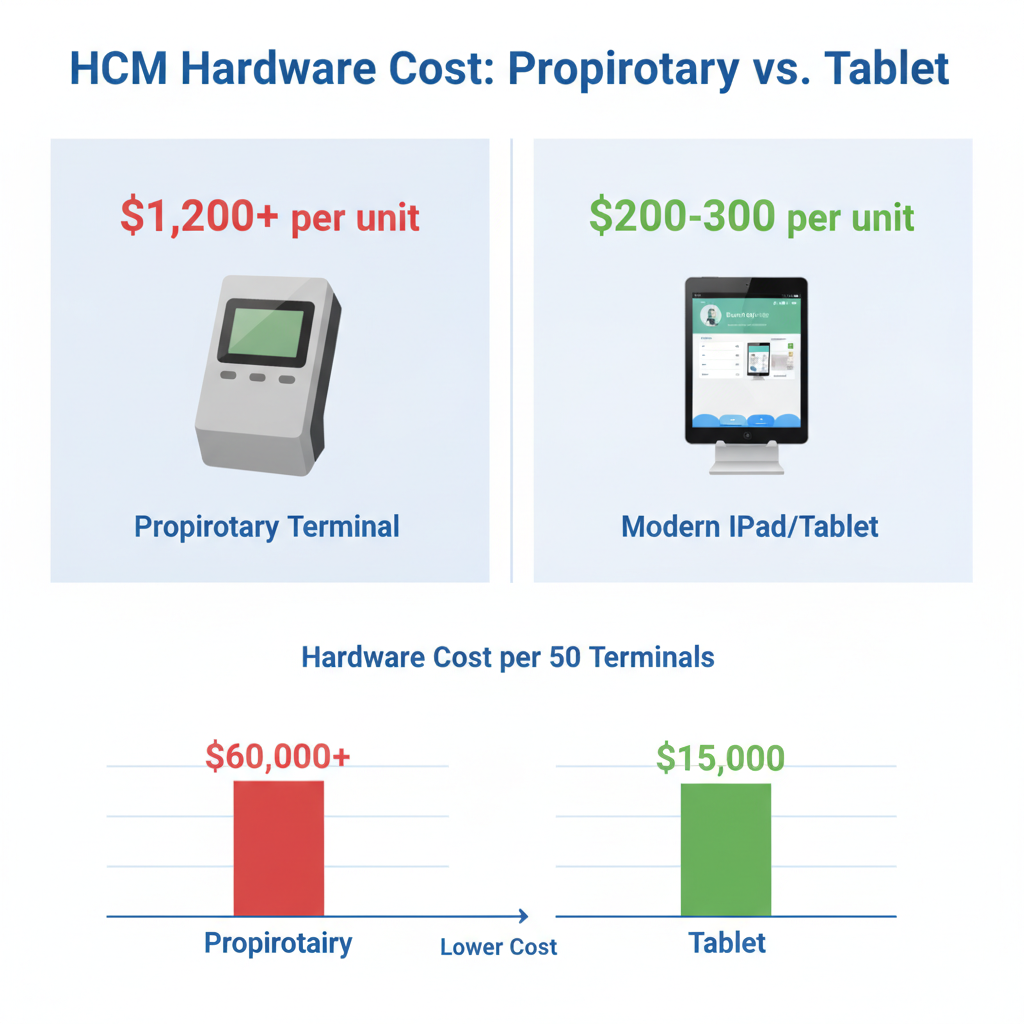
Terminal acquisition and replacement cost. UKG Intouch hardware runs $1,200 or more per terminal, per unit, before any installation, mounting, or network configuration. Organizations running 20, 50, or 100 terminals across locations are carrying meaningful capital exposure that refreshes on a 5–7 year cycle. That cycle is often accelerated by hardware failures, location expansions, or end-of-support timelines. As explored in the per-terminal hardware cost problem, this is frequently the largest hidden item in a time clock total cost of ownership calculation.

Missed punch reconciliation. The industry baseline for missed punch rates is 25–30% of hourly punches per week without biometric verification. At organizations with 500 or more frontline workers, that translates to hundreds of manual corrections per payroll cycle. Each manual correction requires a manager approval, an HR ticket, and a payroll adjustment — conservatively 10–15 minutes of combined labor per incident. If your payroll team is running 200 corrections per cycle at two payroll periods per month, you are absorbing 400+ hours per year in direct administrative labor. Missed punch policies in UKG Pro can help reduce that volume, but policy alone does not eliminate the root cause when the hardware has no identity verification.
Buddy punching and time theft. Without biometric verification at the terminal, shared-badge clock-ins are undetectable through standard UKG reporting. An American Payroll Association study cited a 75% rate of time theft among hourly workers in some industries. Even conservative estimates — 5 minutes per shift per employee, at 500 employees, 250 working days — produce more than $200,000 in unverified labor cost annually at median hourly wages. This number lands with CFOs.
Support and maintenance contracts. Proprietary hardware carries its own support overhead: manufacturer service contracts, spare unit procurement, on-site repair logistics, and IT staff time for device management. These costs compound across large terminal fleets and are easy to overlook until a contract renewal surfaces them.
Compliance exposure. Unverified punch data creates exposure in Department of Labor wage and hour audits. If timekeeping records cannot demonstrate accurate, identity-verified punch data, the remediation cost — legal fees, back-pay settlements, audit response overhead — can exceed the entire time clock budget many times over. Common UKG timekeeping errors by industry illustrate exactly where audit exposure tends to surface first.
What to Quantify Before the CFO Meeting
Building a credible ROI model requires three numbers from your own environment. Your CFO will ask for them anyway — surface them first.
Current hardware inventory and age. Count your active terminals, their model numbers, and their approximate installation date. Estimate the replacement timeline based on manufacturer support windows. Calculate the total capital outlay to refresh the fleet at current hardware prices. This is your “do nothing” cost — the amount you will spend anyway if you maintain the status quo.
Annual missed punch volume and correction cost. Pull one full payroll cycle of missed punch corrections from UKG. Count the number of incidents. Multiply by an estimated resolution time (manager + HR + payroll, combined). Multiply by average loaded labor cost for those roles. Annualize. This is direct, recoverable cost — a CFO can draw a line from current spend to future savings.
Headcount and shift profile. How many frontline hourly employees are clocking in at physical terminals each day? What is average hourly pay? These two numbers feed the buddy punching exposure estimate. Run it conservatively — 3 minutes per shift per 1% of workforce — and let the CFO’s skepticism land somewhere it can still be defended.
Where the Native UKG Hardware Model Runs Out
UKG’s software platform does not create the financial problem. The hardware ecosystem does, in three specific ways that matter to a CFO.
First, the pricing model is terminal-by-terminal capital expenditure. Every location expansion, every new site, every hardware failure requires a purchase order at $1,200+ per unit. There is no consumption-based pricing, no tablet reuse, and no path to reducing per-terminal cost as you scale.
Second, proprietary terminals do not include employee self-service. Frontline workers cannot submit PTO requests, view schedules, or swap shifts at the time clock. That function either lives in a separate kiosk, a separate application, or — more commonly — routes through HR as a phone call or walk-in. The UKG software supports self-service workflows, but the hardware does not surface them at the point of time capture.
Third, biometric verification is either absent or limited on older hardware models. The facial recognition capability available in newer UKG devices comes at higher per-unit cost and does not retrofit to existing terminal installations.
When your CFO sees these constraints laid against the cost model, the question shifts from “why change?” to “why haven’t we already?” Solving the time clock hardware cost problem is a question most UKG organizations are already living — the CFO presentation is the mechanism for turning that lived experience into a funded decision.
How CloudApper AI TimeClock for UKG Changes the Financial Model
CloudApper AI TimeClock for UKG is a hardware replacement — not a software replacement. It runs on standard Android tablets or iPads, syncs directly with UKG Ready and UKG Pro WFM, and replaces the Intouch DX, 9000, 9100, and 4500 series without touching your UKG configuration.
The financial case rests on four concrete inputs.
Hardware cost reduction. A standard Android tablet procured for $200–$300 replaces a $1,200+ proprietary terminal. At 25% of the cost of traditional UKG clocking hardware — and with organizations reporting over 80% in total expense savings when factoring in included features — the CapEx comparison closes the ROI argument on hardware alone for most fleet sizes above 15 terminals. For a breakdown of available models, see affordable UKG time clock models as alternatives to proprietary hardware.
Missed punch elimination. CloudApper AI TimeClock includes facial recognition biometric verification at no extra cost. Customers have moved from 25–30% missed punch rates per week to below 5%. Apply that reduction to your own missed punch correction cost calculation from above. The payroll reconciliation labor saving is typically measurable within the first payroll cycle after deployment.
2-in-1 device consolidation. Each tablet functions as both a time clock and an employee self-service kiosk — PTO requests, schedule viewing, shift swaps, HR policy queries via the built-in AI assistant — without a second device, a second application license, or a second vendor contract. The consolidation saving is real and quantifiable when you carry a separate self-service system today.
Compliance infrastructure included. Attestation workflows, audit trails, geofencing, offline capture with automatic sync — all included in the standard licensing. Role-specific attestation for UKG is a common add-on need that CloudApper handles natively, without additional configuration cost.
A 50-terminal fleet switching from Intouch hardware to CloudApper AI TimeClock on standard tablets generates a direct hardware cost saving of $45,000–$50,000 on the first refresh cycle alone — before any labor saving from missed punch reduction or self-service deflection.
Building the Payback Period Slide
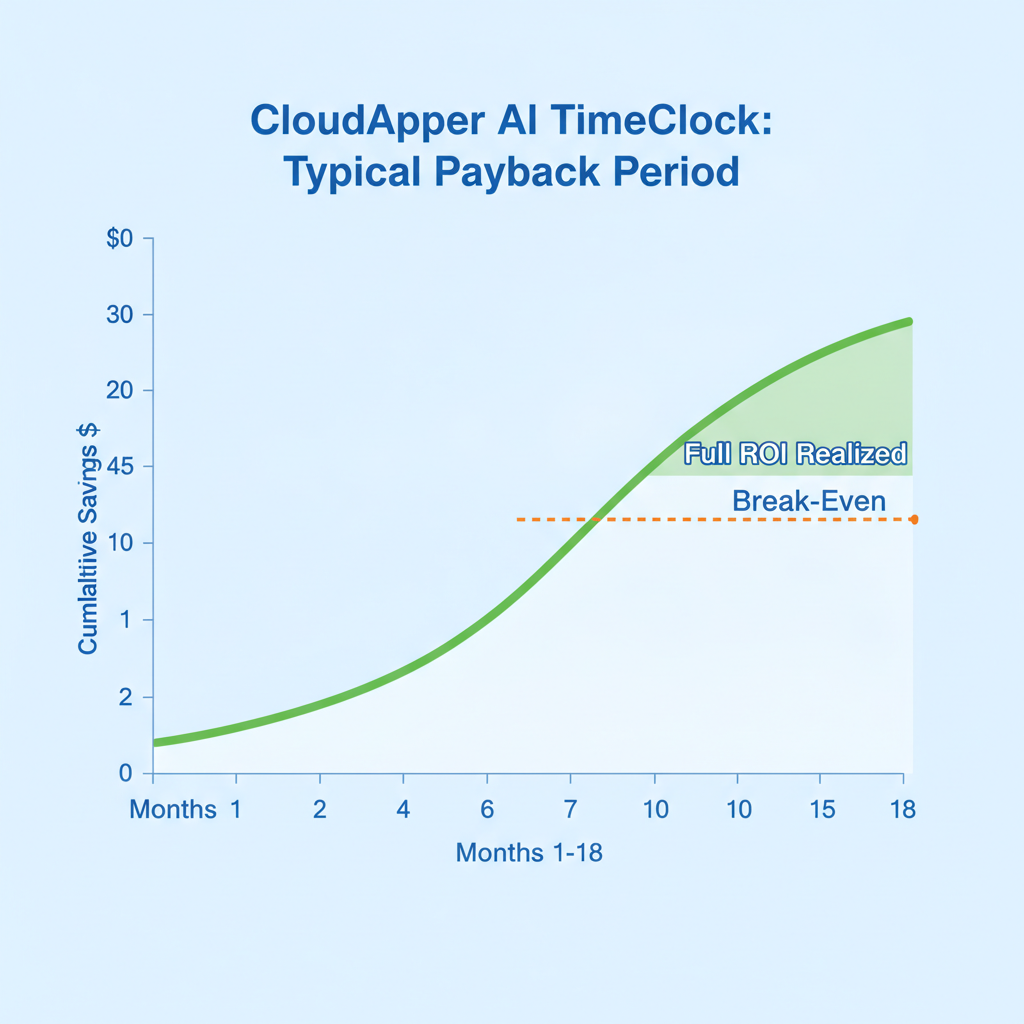
Every CFO presentation needs a payback period — the month at which cumulative savings exceed the cost of change. Here is the structure.
Year 1 investment: Tablets (at cost per unit × fleet size) + licensing (annual, per device) + one-time implementation (typically low for CloudApper given the fast deployment model — hours, not weeks).
Year 1 savings: Hardware delta (proprietary cost avoided) + missed punch correction labor reduction + any self-service system consolidation saving + compliance risk mitigation (conservative estimate, or leave as qualitative for the CFO to weight).
Payback period: Divide Year 1 investment by monthly savings run rate. Most organizations in the 25–100 terminal range hit payback within 6–18 months on hardware cost alone, before adding missed punch savings.
5-year NPV: Run the savings forward at your organization’s discount rate. The 5-year picture typically shows $200,000–$800,000 in net value for mid-size fleet replacements — a number that justifies a board-level conversation, not just a departmental budget request. Maximizing ROI on your UKG time clock investment requires quantifying all three value streams — hardware, labor, and compliance — not just the one that feels most defensible in a first conversation.
How to Structure the CFO Presentation
Answer the four questions in order.
What does this cost today? Current hardware age, fleet count, replacement cost at current prices, annual missed punch correction labor, any compliance incidents or risk exposure.
What will it cost to change? Tablet procurement, licensing, implementation. Keep this section short — it is the smallest number in the room.
What do we get back, and when? Hardware savings, missed punch labor reduction, self-service consolidation saving, payback month, 5-year NPV.
What happens if we don’t? Hardware end-of-support timeline, projected CapEx for next refresh cycle on proprietary hardware, continued missed punch exposure, compliance risk carry. Present the fourth question last, not first. The decision is easier when the CFO has already mentally committed to the ROI before seeing the downside of inaction.
CloudApper AI TimeClock for UKG: The Financial Summary
CloudApper AI TimeClock for UKG is a direct hardware replacement for UKG Intouch terminals. It runs on any standard Android tablet or iPad, syncs with UKG Ready and Pro WFM, includes facial recognition biometric verification, offline capture, employee self-service, attestation compliance, and geofencing — at 25% of the cost of traditional UKG clocking hardware, with customers reporting over 80% total expense savings.
The deployment timeline is hours, not weeks. The integration with UKG is direct and does not require middleware. The compliance certifications — HIPAA, FIPS 140-2, GDPR, CCPA — are included in the standard offering. The 90% customer retention rate confirms that the financial model holds past the first year. For HR and operations leaders who need a budget approval before the next hardware refresh cycle, the ROI case is not hard to build — the numbers are already in your UKG data.
Frequently Asked Questions
Q: What is the typical hardware cost difference between UKG Intouch terminals and a tablet-based alternative?
UKG Intouch terminals typically run $1,200 or more per unit. Standard Android tablets used with CloudApper AI TimeClock cost $200–$300 each. For a 50-terminal fleet, that difference represents $45,000–$50,000 in avoided capital expenditure on the first replacement cycle alone, before any labor or compliance savings are counted.
Q: How do I calculate the cost of missed punches for my CFO presentation?
Pull one payroll cycle of missed punch corrections from UKG. Count the total incidents, then multiply by the combined resolution time — typically 10–15 minutes across manager, HR, and payroll touchpoints — and apply your loaded labor cost for those roles. Annualize the result. For a 500-person hourly workforce, this commonly produces $40,000–$80,000 in annual administrative cost that is directly recoverable with biometric verification.
Q: Will replacing UKG hardware require changes to UKG Ready or UKG Pro WFM configuration?
No. CloudApper AI TimeClock connects directly to UKG Ready and Pro WFM via the UKG integration layer. Your existing pay rules, overtime calculations, and scheduling configurations remain unchanged. The hardware swap is transparent to the UKG software layer.
Q: What is a realistic payback period for switching from proprietary UKG hardware to tablets?
For most organizations in the 25–100 terminal range, payback on hardware cost alone lands between 6 and 18 months. Adding missed punch correction savings and any self-service system consolidation typically shortens that window to 6–10 months for organizations with high frontline hourly headcount.
Q: How does buddy punching translate into a dollar figure for a CFO?
The calculation starts with a conservative assumption — 3–5 minutes of unverified time per shift per day, applied to 1–2% of the frontline workforce. At median frontline hourly wages of $18–$22, a 500-person workforce with 1% buddy punching running 250 shifts per year produces $34,000–$68,000 in unverified labor cost annually. Biometric verification eliminates this category entirely.
Q: Does CloudApper AI TimeClock work at locations without reliable internet connectivity?
Yes. CloudApper AI TimeClock captures punches offline and syncs automatically when connectivity is restored. This makes it viable for remote sites, manufacturing floors, and field locations where constant connectivity is not guaranteed.
Q: What compliance certifications does CloudApper AI TimeClock carry, and does that affect the ROI case?
CloudApper AI TimeClock is certified under HIPAA, FIPS 140-2, GDPR, and CCPA. These certifications are included in the standard offering. For organizations in regulated industries or those carrying compliance risk from wage and hour exposure, the cost of a regulatory incident — legal fees, back-pay settlements, audit response — is a legitimate line in a CFO ROI presentation. That risk belongs in the “do nothing” cost column.
If your UKG hardware refresh is coming up in the next 12–18 months, the CFO conversation is not optional — it is coming regardless. The difference is whether you frame it reactively, defending a proprietary hardware cost that does not compare well, or proactively, presenting a cost-reduction and capability-improvement case that answers every question your CFO will ask before they ask it. To see how the model applies to your specific fleet size and missed punch rate, visit the CloudApper AI TimeClock for UKG page and request a demonstration.



October 19, 2026
Nurse Mandatory Overtime Limits in UKG: Documenting Voluntary Overtime at Clock-Out
New York, Pennsylvania and Washington restrict mandatory overtime for nurses, which makes documented consent the key record. Learn how UKG Pro WFM and UKG Ready separate voluntary and mandated overtime, and how CloudApper AI TimeClock captures consent on an affordable unit tablet.

October 16, 2026
Heat Illness Recovery Breaks in UKG for Construction and Logistics Crews
State heat rules in California, Washington and beyond require cool-down breaks that payroll must be able to prove. Learn how UKG Ready and UKG Pro WFM track recovery periods, and how CloudApper AI TimeClock captures them on an affordable jobsite tablet that works offline.
October 15, 2026
PUMP Act Lactation Breaks in UKG: Tracking Them Without Breaking Meal Rules
Lactation breaks protected by the PUMP Act often show up as meal break exceptions in UKG. Learn what federal law requires, how to configure UKG Ready and UKG Pro WFM pay codes, and how CloudApper AI TimeClock records these breaks privately on an affordable tablet clock.
October 14, 2026
Enforcing Minor Work Hour Limits at the UKG Time Clock
Child labor hour limits are usually built into UKG schedules, but violations happen at the punch. Learn the federal rules for 14 to 17 year olds, how UKG Pro WFM and UKG Ready handle minor rules, and how CloudApper AI TimeClock adds age-based checks on an affordable tablet clock.
