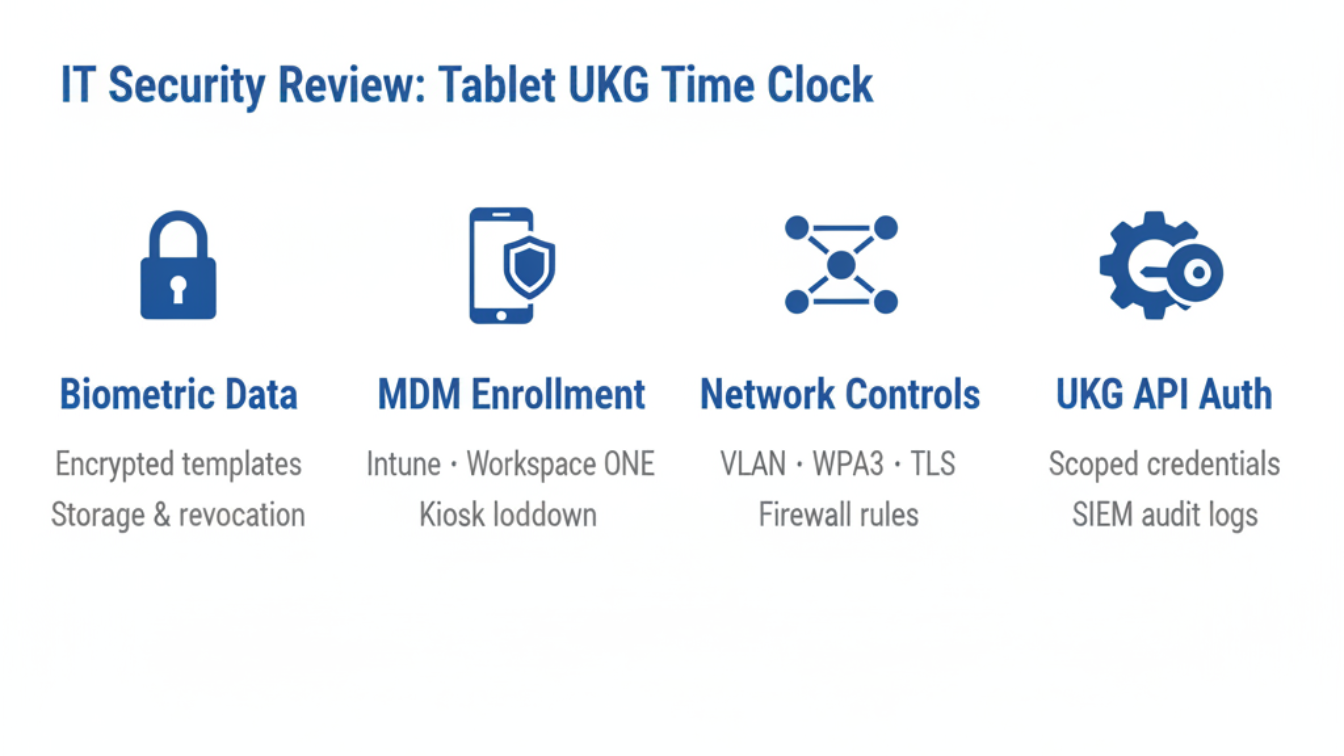
When HR sends the tablet time clock proposal to IT, four security questions surface that no vendor presentation answers directly: where biometric data lives, what FIPS 140-2 actually certifies, whether MDM enrollment is supported, and how the UKG integration authenticates. Here is the complete IT review framework.



Table of Contents
- The Question IT Asks First: Where Does Biometric Data Actually Live?
- What Certification Actually Means for a Time Clock Deployment
- The MDM Question Vendors Expect IT to Skip
- How the UKG Integration Authenticates — and Why IT Cares
IT security review is where most UKG time clock replacements stall, and the questions it raises are predictable enough to answer before the project starts. The request usually reaches the IT Director after the business case is approved: HR wants tablet kiosks as UKG time clocks in every building, for cost savings, biometric coverage and a faster payroll close. IT then works through security, integration and device management questions that the vendor presentations rarely addressed directly. CloudApper AI TimeClock for UKG is designed to answer each of them, but this article focuses on the questions themselves, because the same framework applies to any solution your organization evaluates.
The Question IT Asks First: Where Does Biometric Data Actually Live?
This is not a general encryption question. IT wants to know exactly where biometric templates are created, where they are stored, how they are accessed, and what happens when a tablet is reported lost or stolen. The distinction matters: a solution that stores templates locally on the device has a different risk profile from one that holds them in a cloud backend — and neither answer is automatically disqualifying, but IT needs to map the architecture to their existing data classification policy and breach notification requirements.

For any tablet-based UKG time clock under evaluation, the correct answers to demand are: whether the device stores only mathematical templates (not raw face or fingerprint images), what encryption standard applies to templates at rest, how template revocation works when a device is decommissioned, and how long punch photos are retained. The biometric template purge process at decommissioning deserves explicit documentation before deployment, not after.
What Certification Actually Means for a Time Clock Deployment
FIPS 140-2 gets invoked frequently in vendor security claims without context. For an IT Director, the relevant question is not whether a solution has achieved it, but what it certifies — specifically, which cryptographic module is validated, at which level, and whether that module is in the active code path for the data your deployment will handle. A FIPS 140-2 certification that applies to a backend storage layer is a different claim from one that applies to biometric template encryption at the device level. Demand the validation certificate and module name, not just the claim.
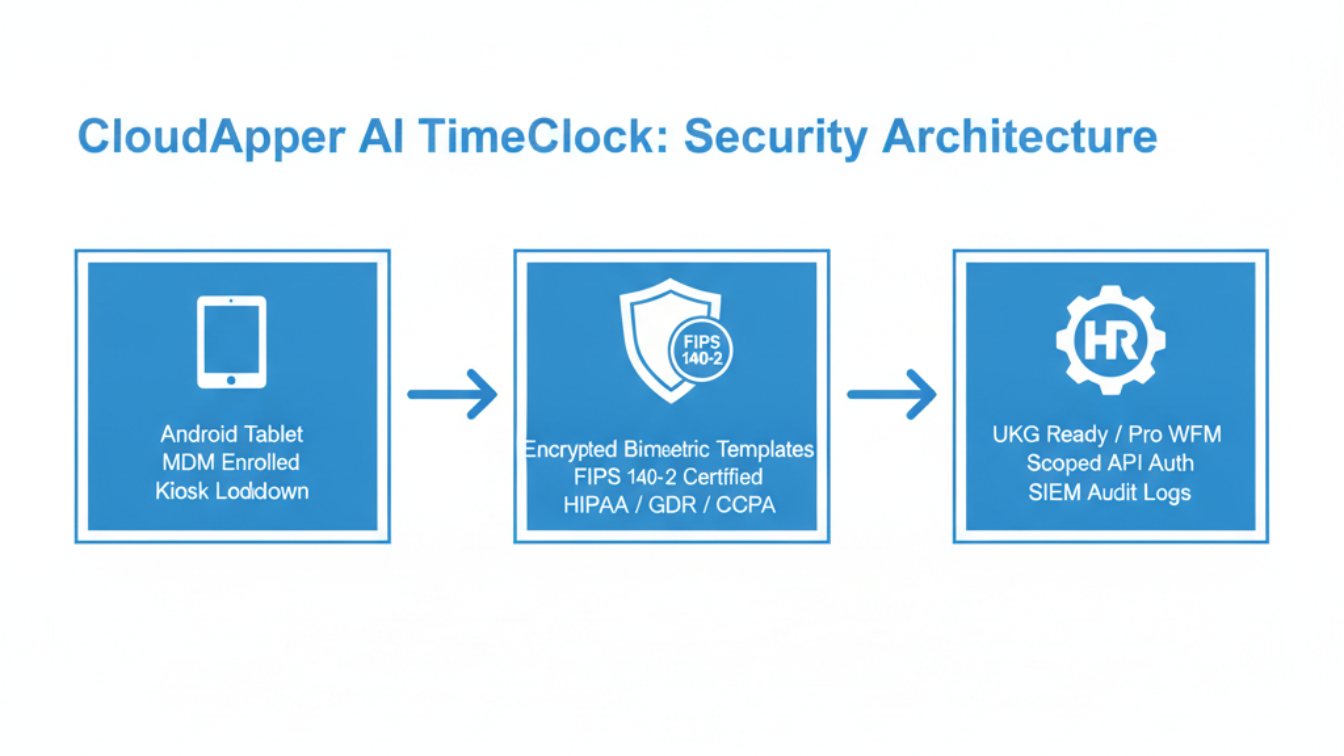
The same applies to HIPAA, GDPR, and CCPA alignment. These are not certifications; they are compliance postures. IT should ask for the vendor’s data processing agreement, data residency options for employee biometric and time data, and confirmation of BIPA and state biometric privacy law handling if the deployment spans Illinois, Texas, or Washington. CloudApper AI TimeClock for UKG holds HIPAA, GDPR, CCPA, and FIPS 140-2 certification and provides a full security package to IT Directors and Legal teams conducting due diligence — the documentation is available before any contract commitment.
The MDM Question Vendors Expect IT to Skip
Sixty-eight percent of enterprises use mobile device management to govern corporate devices. IT should not make an exception for time clock tablets. The questions to ask: Can these tablets be enrolled in your existing MDM (Intune, Workspace ONE, Jamf)? Does the time clock application support kiosk mode lockdown via MDM policy — disabling the browser, app store, and USB access — or does it rely on a proprietary kiosk layer that sits outside your existing management tooling? What is the OS patching cadence, and who controls the update window?
A tablet that cannot be enrolled in enterprise MDM is not a managed endpoint — it is an unmanaged device on your network, and 34% of enterprise security incidents already involve mobile devices. Any vendor unwilling to provide MDM enrollment documentation before deployment approval should be considered a red flag. The IT planning guide for enterprise UKG tablet rollout covers the network segmentation and MDM enrollment model in detail.
How the UKG Integration Authenticates — and Why IT Cares
When the tablet time clock syncs punch data to UKG Ready or Pro WFM, it is making an authenticated API call. IT needs to know what credential model is used, how that credential is stored on the device or backend, what the rotation policy is, and whether the integration requires a UKG service account with broader permissions than necessary for time capture alone. API tokens with excessive scope, stored in plaintext in a configuration file on the tablet, have caused real incidents at enterprises that approved vendor integrations without asking these questions.
The correct answer is least-privilege API scoping — the integration should request only the permissions required for time punch read/write and employee record lookup, nothing broader. IT should also verify that integration logs are available for SIEM ingestion without requiring additional agents on the tablet, and that the authentication model does not create service account sprawl in the UKG instance. For offline deployments at remote sites, confirm how the punch queue authenticates and reconciles with UKG when connectivity returns, since offline time capture sync behavior can create reconciliation edge cases if the integration design does not handle conflict resolution explicitly.
CloudApper AI TimeClock for UKG: What the IT Review Finds
CloudApper UKG time clock addresses each of these checkpoints with documentation available before contract. Biometric templates are stored encrypted and are never transmitted as raw images. FIPS 140-2, HIPAA, GDPR, and CCPA certifications are available with the module-level detail IT requires. Tablet enrollment in enterprise MDM is supported, with kiosk mode lockdown compatible with Intune and Workspace ONE. The UKG integration uses scoped API authentication with audit logging that can be streamed to existing SIEM tools without additional agents. And the offline sync model handles reconciliation without requiring manual HR intervention when connectivity returns.
The trade-off IT should acknowledge honestly: a standard Android tablet does not have the physical tamper resistance of a dedicated UKG Intouch terminal. The mitigating controls are MDM enrollment, kiosk lockdown, physical mounting in a fixed location, and remote wipe capability — all of which are standard in a properly governed deployment. For organizations that have already built an ROI case for replacing Intouch hardware, the security posture is an acceptable risk trade-off, not a blocking issue, once these controls are confirmed. The cost differential at 25% of Intouch hardware pricing across a full multi-site deployment funds a significant security control investment and still delivers net savings.
Frequently Asked Questions
Q: Does a tablet-based UKG time clock need to be enrolled in our enterprise MDM?
Yes — any tablet deployed as a time clock should be enrolled in your existing MDM (Intune, Workspace ONE, Jamf) to enforce kiosk lockdown, OS patching, and remote wipe capability. A tablet operating outside MDM is an unmanaged endpoint regardless of the application running on it. Confirm that the time clock application supports MDM-enforced kiosk mode before approving deployment.
Q: Where is biometric data stored on a tablet UKG time clock, and how is it protected?
The correct architecture for a tablet time clock is mathematical template storage — the system captures and stores a mathematical representation of the biometric, not a raw image. Templates should be encrypted at rest using a validated cryptographic module. Confirm the encryption standard, storage location (device-local vs cloud backend), and revocation process when a device is decommissioned or reported stolen before approving the solution.
Q: What FIPS 140-2 documentation should we request from a tablet time clock vendor?
Request the specific NIST validation certificate and cryptographic module name, not just a claim of certification. Confirm which code path the certified module covers — backend storage, biometric template encryption, or both — and verify that the certified module is in active use for the data your deployment will handle. CloudApper AI TimeClock for UKG provides full FIPS 140-2 documentation to IT Directors during the security review process.
Q: How does a tablet time clock authenticate to UKG Ready or Pro WFM?
The integration should use scoped API authentication — credentials that allow only the permissions required for time punch write and employee record read, with no broader UKG instance access. Confirm that credentials are stored securely (not in plaintext configuration files on the tablet), that a rotation policy exists, and that integration audit logs are available for SIEM ingestion without additional agents on the device.
Q: What is the physical security risk of using a tablet instead of a UKG Intouch terminal?
A standard Android tablet lacks the physical tamper resistance of purpose-built hardware. The mitigating controls are MDM enrollment, kiosk lockdown (no browser, app store, or USB access), fixed physical mounting with a case or enclosure, and remote wipe capability. When these controls are in place, the risk profile is acceptable for the majority of frontline deployments. The cost savings over Intouch hardware provide budget for these controls and still deliver net savings across a multi-site deployment.
Q: Can we stream time clock device logs to our SIEM without installing extra agents on every tablet?
Confirm this directly with any vendor under evaluation. CloudApper AI TimeClock for UKG supports audit log export compatible with standard SIEM tools without requiring additional agents on enrolled tablets. The integration audit trail covers punch events, authentication calls to UKG, and offline sync reconciliation records.
Organizations moving from proprietary UKG Intouch hardware to a tablet-based time clock do not have to choose between cost savings and a defensible security posture. The security review has a defined scope and answerable questions — and a vendor that cannot provide documentation for each of them before contract is not ready for enterprise deployment. Review the full solution and security documentation at ukg.cloudapper.ai.




October 28, 2026
The UKG Time Clock Pilot Memo: Success Criteria Your CFO and Admin Will Both Sign
A UKG time clock pilot succeeds or fails on criteria written before day one. This guide shows UKG admins and CFOs how to set scope, baseline, pass marks, and rollback triggers, and where CloudApper AI TimeClock fits as a tablet-based challenger beside existing UKG terminals.
October 27, 2026
Multilingual Time Clocks for UKG: Making Sure Workers Understand What They Attest To
An attestation is only as defensible as the employee's understanding of the question. Learn how UKG Pro WFM and UKG Ready handle languages, where custom prompts fall short, and how CloudApper AI TimeClock delivers multilingual attestation on affordable tablets.
October 26, 2026
California Seventh Consecutive Day Overtime in UKG: Flagging It at Clock-In
California pays premium rates on the seventh consecutive workday in a workweek, even when total hours stay at 40. Learn how UKG Pro WFM and UKG Ready calculate it, why the cost decision happens before the punch, and how CloudApper AI TimeClock flags it at clock-in.
October 23, 2026
New York Spread of Hours Pay in UKG: Catching the 10-Hour Span Before Payroll Does
New York owes an extra hour of pay when a workday spans more than 10 hours or includes a split shift. Learn how UKG Pro WFM and UKG Ready calculate the premium, why missed split-shift punches hide it, and how CloudApper AI TimeClock keeps punches accurate on affordable tablets.