Deploying facial recognition time clocks in a UKG environment means navigating BIPA, Texas CUBI, and Washington biometric laws. Learn exactly what each law requires from employers and how to build a defensible compliance program before your first biometric scan.


Table of Contents
- What UKG Does — and Does Not — Handle Natively
- Illinois BIPA: The Law That Changed the Calculus
- Texas CUBI: Different Mechanism, Comparable Stakes
- Washington State: Employment Exemptions With Conditions
- Where Native UKG Hardware Reaches Its Limits
- How CloudApper AI TimeClock for UKG Handles the Compliance Layer
- Building a Defensible Biometric Compliance Program for UKG Deployments
- Frequently Asked Questions
BIPA, Texas CUBI and Washington’s biometric law all place obligations on the employer that collects the data, and for a UKG biometric time clock those obligations start before the first employee scans in. Under Illinois BIPA, collecting a face scan without prior written consent is a violation whether the system works perfectly or not. Plaintiffs’ firms have filed thousands of BIPA class actions, and most defendants were not reckless. They were HR teams that assumed the vendor handled compliance, IT teams that treated biometric data like any other punch record, and legal teams that relied on a general privacy policy.
CloudApper AI TimeClock for UKG syncs with UKG Ready and Pro WFM on standard tablets, with configurable consent capture and FIPS 140-2 certified encryption. The compliance obligations still sit with the employer, whatever device does the scanning. This article covers what each law requires, which parts of the program the employer builds alongside UKG, and how to have it in place before the first scan. This is general information, not legal advice.
What UKG Does — and Does Not — Handle Natively
UKG Ready and UKG Pro WFM are workforce management platforms. They store punch records, apply pay rules, manage schedules, and process timekeeping data. UKG’s native hardware — Intouch DX, 9000, 9100, 4500 series — offers fingerprint authentication on select models.
What UKG does not provide is a legal compliance framework for biometric data collection. UKG’s role is to receive and process the punch event. The data capture layer — including any facial recognition scan — sits at the device and application level. That means consent collection, retention policy enforcement, data destruction on termination, and written disclosure documentation are all employer responsibilities, not UKG defaults.
This distinction matters because it is where compliance gaps form. HR assumes the vendor handled it. IT assumes HR handled it. No one documented consent before day one of the rollout.
Illinois BIPA: The Law That Changed the Calculus
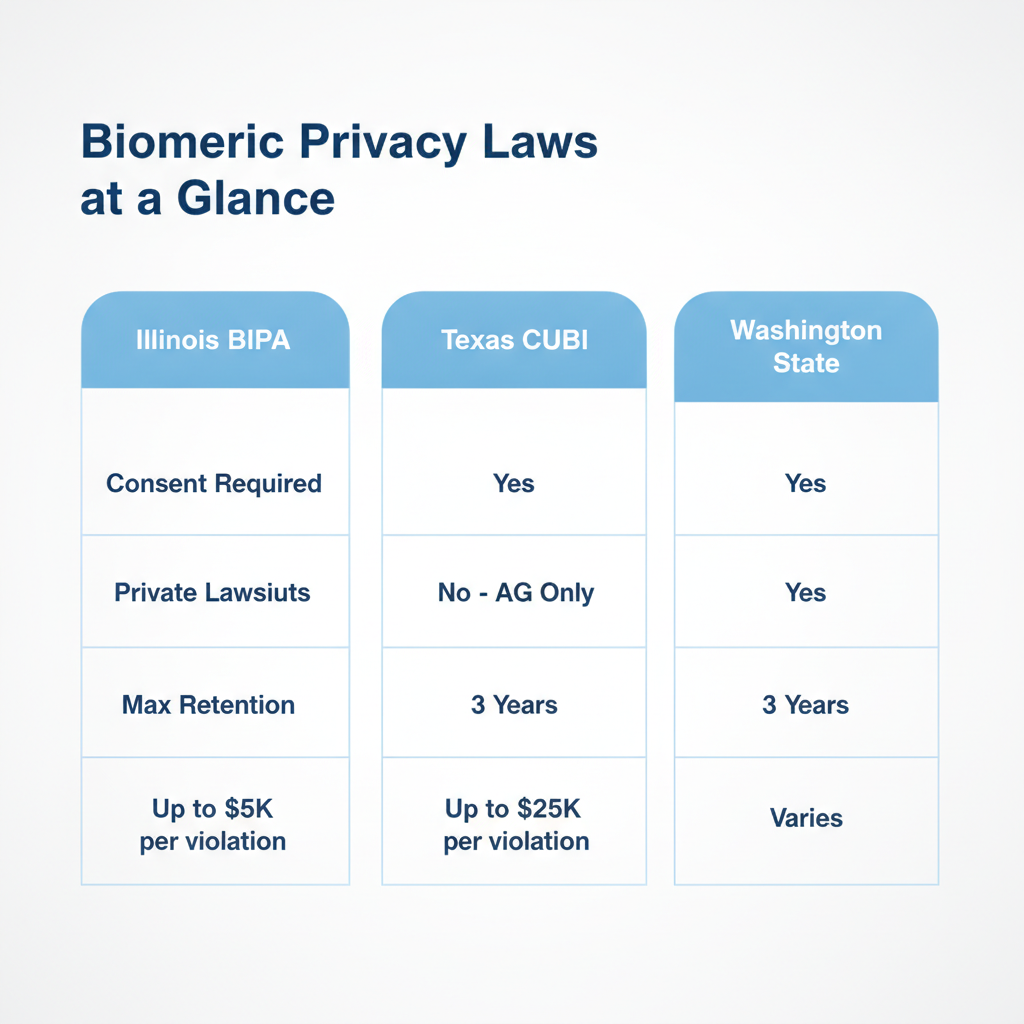
The Illinois Biometric Information Privacy Act, in force since 2008, remains the most litigated biometric privacy statute in the country. If any of your employees are based in Illinois, BIPA applies to you — regardless of where your company is headquartered.
BIPA requires employers to complete three steps before collecting a single biometric scan. First, notify the employee in writing that biometric data will be collected. Second, disclose the specific purpose of collection and the retention duration in writing. Third, obtain a signed written release. Electronic signatures satisfy this requirement following the 2024 amendment to the statute.

Employers must also publish and maintain a written retention and destruction policy. That policy must specify when biometric data will be destroyed — either when the collection purpose is satisfied (employee termination, in most HR contexts) or within three years of the last interaction with the employee, whichever comes first. Paper policies that exist without enforcement mechanisms in the actual software are a common failure point.
Penalties run $1,000 per negligent violation and $5,000 per intentional or reckless violation. The critical exposure: BIPA permits private lawsuits, not just regulatory action. Class action litigation has been the primary enforcement mechanism, and plaintiff attorneys have filed thousands of cases in Illinois courts over the past decade. The 2024 amendment capped damages at one violation per employee per collection method — reducing but not eliminating the class action exposure for employers with Illinois workforces.
The operational question for UKG admins: is your biometric time clock vendor’s application capable of enforcing a destruction schedule at termination, or does facial data sit in the application database indefinitely?
Texas CUBI: Different Mechanism, Comparable Stakes
Texas enacted the Capture or Use of Biometric Identifier Act (CUBI) years before it became broadly enforced. The substantive requirements are similar to BIPA — affirmative consent before collection, retention capped at one year after the collection purpose expires, and strict prohibitions on selling or sharing biometric data — but the enforcement model is materially different.
Texas CUBI is enforced exclusively by the Attorney General. There is no private right of action under CUBI, which has made it a quieter statute than BIPA for most of its existence. That changed in 2024, when the Texas Attorney General began actively enforcing CUBI. Settlements with Meta in 2024 ($1.4 billion) and Google in 2025 ($1.375 billion, resolving CUBI and other privacy claims) showed that AG-only enforcement is not the safety valve many organizations assumed it was.
For UKG customers with operations in Texas, the practical requirements are similar to Illinois: document the consent conversation, configure retention limits, and verify that your time clock application does not retain facial data past termination. Each employee whose data is captured without proper consent represents a separate $25,000 violation exposure.
The distinction from BIPA that matters for HR teams: CUBI does not require a published written policy in the same way BIPA does, but documented consent processes and retention schedules are still the operational defense in any AG investigation.
Washington State: Employment Exemptions With Conditions
Washington’s biometric framework is more nuanced than Illinois or Texas for employment contexts. The state’s 2017 Biometric Identifier Law and the My Health My Data Act generally contain exemptions for biometric data collected for employment or internal security purposes — which reduces the formal statutory consent burden compared to BIPA in some interpretations.
However, employment law attorneys advising Washington employers consistently recommend treating the Washington standard as effectively equivalent to BIPA for practical compliance purposes. The reasoning: biometric identifiers cannot be changed after a breach, elevating the identity theft risk beyond what routine personnel data carries; Washington’s data breach notification law applies to biometric data; and ADA intersections emerge when facial recognition systems capture or derive any health-related inferences from the scan.
For UKG customers operating in Washington, the safeguards recommended by employment counsel include storing biometric data separately from general personnel files, restricting system access to authorized personnel only, encrypting stored facial data, and defining a written destruction timeline tied to employee termination. For healthcare UKG customers already navigating healthcare shift attestation compliance, the biometric privacy layer adds another dimension to the compliance conversation — one that CloudApper AI TimeClock is designed to address at the hardware and application level simultaneously.
The floor-level guidance from practitioners: build your biometric compliance program to satisfy Illinois BIPA, and you will satisfy Washington and Texas in the process. BIPA is the most demanding standard of the three, and designing to it creates a defensible posture in any state.
Where Native UKG Hardware Reaches Its Limits
UKG’s proprietary time clock hardware — Intouch DX and the 9000/9100 series — does not include a compliance layer for BIPA, CUBI, or Washington biometric requirements. The devices capture biometric data; enforcement of consent collection, retention policies, and destruction schedules is not a native feature of the UKG hardware or WFM platform.
Organizations running proprietary UKG terminals with fingerprint or facial authentication are responsible for building those compliance processes in adjacent systems — typically HR documentation workflows, manual offboarding checklists, and periodic database audits. This works until it does not, which is usually when a terminated employee’s biometric data surfaces months after their last day, or when a class action attorney subpoenas retention records.
The other hardware limitation: proprietary UKG devices run $1,200 or more per terminal, carry multi-year hardware refresh cycles, and offer no mechanism for configuring custom compliance workflows at the kiosk level. If your legal team requires a digital consent acknowledgment at enrollment time, a proprietary UKG terminal cannot deliver that.
How CloudApper AI TimeClock for UKG Handles the Compliance Layer
CloudApper AI TimeClock for UKG runs on any standard Android tablet or iPad — not proprietary hardware — and syncs directly with UKG Ready and Pro WFM. At 25% of the cost of traditional UKG clocking hardware, it replaces the device without replacing or competing with UKG itself.
For biometric privacy compliance, several features matter specifically:
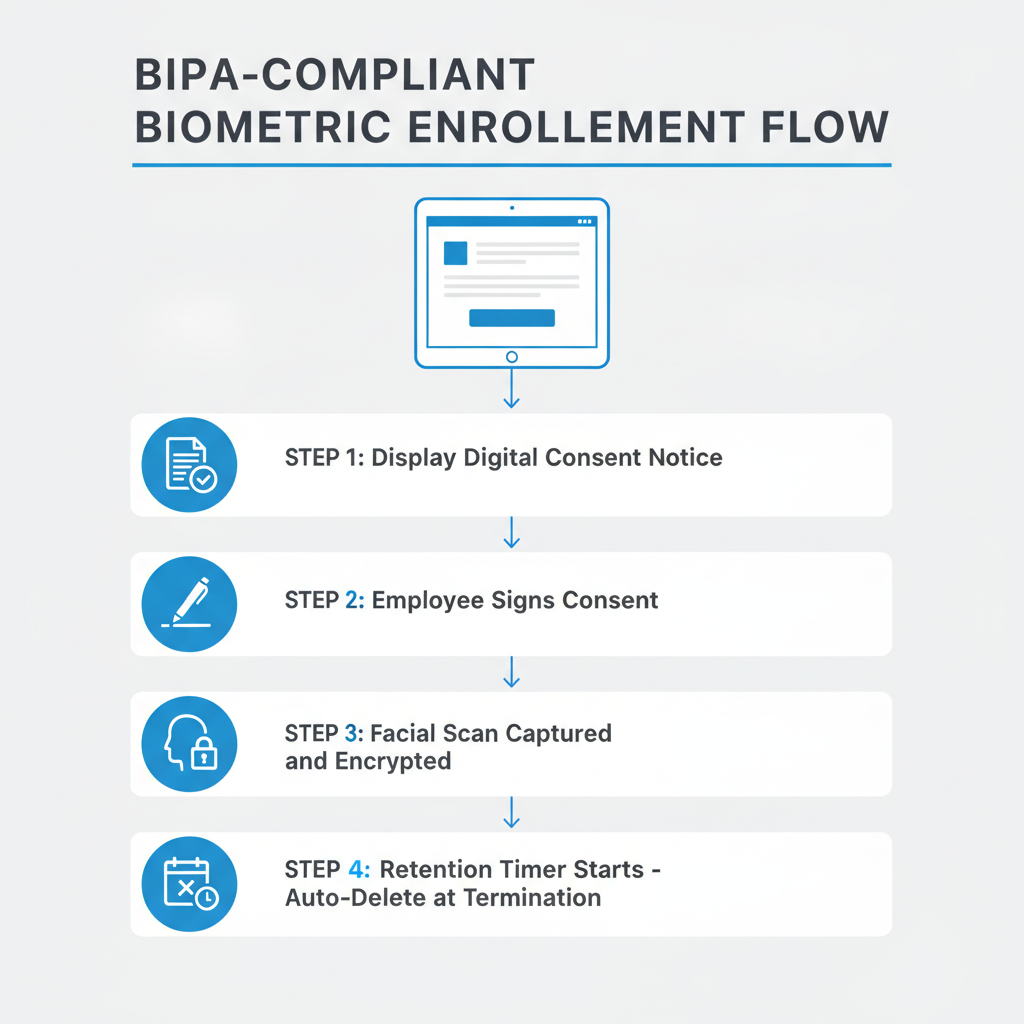
Configurable consent capture at enrollment. The CloudApper AI TimeClock kiosk can display a digital consent screen during biometric enrollment, requiring employee acknowledgment before the first facial scan is recorded. The consent event is logged with a timestamp, creating the documented record BIPA requires before collection begins.
Configurable data retention and destruction. CloudApper AI TimeClock supports configuring biometric data retention limits tied to employee status in UKG. When an employee is terminated and their UKG record reflects that status, the system can be configured to flag or trigger data destruction workflows — addressing the retention deadline requirements under BIPA (three years) and CUBI (one year post-purpose).
FIPS 140-2 certified, HIPAA, GDPR, and CCPA compliant. CloudApper AI TimeClock is certified under FIPS 140-2 for cryptographic module security, which directly addresses the data security standard BIPA requires for biometric data — that it be stored with the same care as financial records or Social Security numbers. This certification is available for IT review during the vendor evaluation process, and a full security package is available for IT Directors and Legal teams performing due diligence.
No proprietary hardware lock-in. Because CloudApper AI TimeClock runs on standard tablets, organizations can add or remove kiosk devices without capital expenditure on proprietary hardware. Deploying to a new Illinois facility does not require purchasing an Intouch DX terminal; it requires mounting a standard tablet and adding it to the CloudApper configuration.
Building a Defensible Biometric Compliance Program for UKG Deployments
Compliance with BIPA, CUBI, and Washington biometric rules is not a one-time checkbox. It is an operational process that needs to run in parallel with your HR and IT workflows. The following framework applies to UKG customers deploying any biometric time clock solution.
Step 1: Map your biometric collection footprint. Identify every location where facial or fingerprint data is captured in your UKG environment. This includes both proprietary UKG hardware and any third-party time clock applications. Illinois employees require BIPA compliance regardless of where your company is headquartered.
Step 2: Build and publish a biometric data retention policy. The policy must specify: what data is collected, why, how long it will be retained, and how it will be destroyed. BIPA requires this to be publicly available, not just stored internally. Post it in your employee handbook and ensure it is accessible to new hires before their first biometric enrollment.
Step 3: Implement consent capture at enrollment. Verbal consent is not sufficient under BIPA or CUBI. The consent event must be documented in writing (or digitally with a logged timestamp) before the first scan. Build this into your onboarding workflow, not as an afterthought after the device is already live.
Step 4: Configure data destruction triggers. Biometric data must be destroyed within the statutory window after an employee terminates. Map your UKG offboarding workflow to include a biometric data destruction step — whether that runs automatically through your time clock application or through an IT-managed process tied to UKG status changes.
Step 5: Restrict access and encrypt stored data. Biometric data should not be accessible through general HR reporting or to supervisors who do not require it for job functions. Audit your access controls in CloudApper AI TimeClock or whatever application stores the facial data, and confirm encryption is active at rest and in transit. The location validation controls in UKG time clocks and similar access restriction features point to the broader principle: limiting who can see what in your workforce management stack reduces both operational risk and legal exposure. On the flip side of access control: preventing unauthorized punches in UKG is a related control — unauthorized access to a biometric kiosk represents both a payroll integrity problem and a potential biometric data exposure event.
Step 6: Train managers and HR on the policy. Managers who onboard new hourly employees at a tablet kiosk need to understand that the consent step is not optional. Build it into the new hire checklist and verify it is happening during the first 90 days of your deployment.
For organizations managing compliance across multiple states — a Texas distribution center, an Illinois retail location, and a Washington manufacturing plant — the safest approach is designing to the BIPA standard and applying it uniformly. State-by-state differentiation introduces administration complexity and creates the risk that a location slips into non-compliance. California UKG customers face a similar dynamic: California’s labor compliance requirements already demand more from time clock configurations than most states, and biometric privacy adds another layer to that compliance surface.
The missed punch problem is what typically drives UKG customers toward biometric time clocks: industry data consistently shows missed punch rates of 25–30% per week at organizations relying on non-biometric time capture. Facial recognition drops that rate below 5% at most deployments. The business case is not in question. The question is whether the compliance infrastructure is in place to support it, and that is a solvable problem with the right combination of policy, process, and the right time clock application.
Organizations running into the payroll accuracy problems that common UKG timekeeping errors create often find that biometric clock-in is the fix they were looking for — but they need to get the legal architecture right before the first scan. The same principle applies to healthcare UKG deployments specifically: buddy punching in healthcare carries Medicare fraud exposure that makes biometric time capture an operational necessity — which makes BIPA compliance at hospital and health system facilities a non-negotiable part of the rollout plan.
Frequently Asked Questions
Q: Does BIPA apply to our company if we’re headquartered outside Illinois but have employees working there?
Yes. BIPA’s jurisdiction is determined by where the employee works, not where the company is headquartered. If any employee performs work in Illinois and their biometric data is collected there, BIPA applies to that collection. Multi-state employers with Illinois locations must build BIPA-compliant processes for those facilities regardless of corporate domicile.
Q: What exactly counts as “biometric data” under BIPA and CUBI?
Both statutes define biometric identifiers to include facial geometry, fingerprints, voiceprints, retina or iris scans, and hand geometry. Photographs alone generally do not qualify — the trigger is biometric data derived from the image (facial geometry measurements, for example), not the image itself. Standard time clock photos used for visual audit purposes typically fall outside the statutory definition; facial recognition scan data does not.
Q: How does the consent requirement work for existing employees when a new biometric time clock is deployed?
You cannot grandfather existing employees. BIPA and CUBI require consent before the first biometric scan, which means a mid-deployment switch from PIN or badge to facial recognition triggers a fresh consent obligation for every existing employee. This needs to be built into the rollout plan — not discovered after go-live. A digital consent screen at the kiosk during the first facial enrollment session satisfies this requirement if the system logs the event with a timestamp.
Q: What happens to an employee’s facial scan data when they are terminated?
Under BIPA, the data must be destroyed when the initial purpose is satisfied (termination qualifies) or within three years of the last interaction — whichever is earlier. Under Texas CUBI, destruction must occur within one year of the purpose expiring. Your time clock vendor’s application must be capable of either destroying this data automatically upon termination or providing a workflow that triggers the destruction process through IT or HR.
Q: Can our time clock vendor store biometric data on their own servers and share it across customers?
No. Both BIPA and CUBI prohibit selling, leasing, trading, or sharing biometric identifiers with third parties except in narrow statutory exceptions. Vendor data pooling — where facial scan data from one customer is used to improve a shared model across multiple customers — is prohibited under both statutes. When evaluating any biometric time clock vendor, confirm in writing that biometric data is isolated per customer and not used for any purpose outside the contracted service.
Q: Our IT team is asking about FIPS 140-2 certification. What does that have to do with biometric compliance?
BIPA requires biometric data to be stored with the same level of protection applied to confidential financial data. FIPS 140-2 is the federal cryptographic security standard — it is the benchmark used to evaluate whether encryption implementations meet the “sensitive information” security level BIPA references. A time clock vendor with FIPS 140-2 certification provides a defensible answer to the IT and legal question of whether the biometric storage meets the statutory security standard.
Q: Do we need a lawyer to implement biometric compliance, or can HR and IT handle it?
Both. The policy framework — retention schedules, consent language, destruction timelines — benefits significantly from employment law review, particularly for multi-state employers with Illinois locations given BIPA’s private right of action. The operational implementation (configuring destruction workflows, building the consent screen into enrollment, restricting access controls) is an HR and IT execution question once the legal parameters are set. Skipping legal review on the policy side is the more common and more expensive mistake.
If your organization is preparing to roll out facial recognition time clocks in a UKG Ready or Pro WFM environment — or you are already running biometric capture and have not yet formalized your consent and retention program — the compliance architecture needs to be in place before scale. CloudApper AI TimeClock for UKG is built for this environment: FIPS 140-2 certified, HIPAA and GDPR compliant, and designed to run on the tablets you already own at a fraction of the cost of proprietary UKG hardware. See how it works at https://ukg.cloudapper.ai/affordable-ukg-kronos-time-clock/.




October 16, 2026
Heat Illness Recovery Breaks in UKG for Construction and Logistics Crews
State heat rules in California, Washington and beyond require cool-down breaks that payroll must be able to prove. Learn how UKG Ready and UKG Pro WFM track recovery periods, and how CloudApper AI TimeClock captures them on an affordable jobsite tablet that works offline.
October 15, 2026
PUMP Act Lactation Breaks in UKG: Tracking Them Without Breaking Meal Rules
Lactation breaks protected by the PUMP Act often show up as meal break exceptions in UKG. Learn what federal law requires, how to configure UKG Ready and UKG Pro WFM pay codes, and how CloudApper AI TimeClock records these breaks privately on an affordable tablet clock.
October 14, 2026
Enforcing Minor Work Hour Limits at the UKG Time Clock
Child labor hour limits are usually built into UKG schedules, but violations happen at the punch. Learn the federal rules for 14 to 17 year olds, how UKG Pro WFM and UKG Ready handle minor rules, and how CloudApper AI TimeClock adds age-based checks on an affordable tablet clock.
October 13, 2026
Security Screening and Bag Check Time in UKG: Where Post-Shift Minutes Become Payable
Exit bag checks and security screening can be paid time under California and Pennsylvania law. Learn how UKG Ready and UKG Pro WFM handle screening time, what to configure first, and how CloudApper AI TimeClock places an affordable tablet clock past every checkpoint.