A vendor demo proves one punch works. Before approving a third-party time clock, UKG admins should run a seven-step test script in a non-production tenant covering transfers, pay codes, attestation, offline replay, and failure handling, then reconcile results against UKG timecards. Here is the script, and how CloudApper AI TimeClock fits.



Table of Contents
- What UKG Provides for Integrations
- Where Integrations Usually Break
- Run This Script in a UKG Test Tenant
- Turning Results Into a Decision
Every vendor demo ends with a clean punch. The screen flashes green and the timestamp appears in UKG seconds later. That proves one transaction works, not a mid-shift transfer, a pay code that needs approval, or forty punches captured while the network was down. If you are evaluating a tablet option such as CloudApper AI TimeClock alongside Intouch, the test that matters is the one you run in your own tenant.
What UKG Provides for Integrations
UKG Pro WFM and UKG Ready both expose documented APIs for punches, timecards, and related time data, published through UKG’s developer resources. UKG also runs a Marketplace for partner applications, and Intouch devices are integrated natively. Any third-party clock has to land data on the same timecards, under the same pay rules, with the same audit trail.

Where Integrations Usually Break
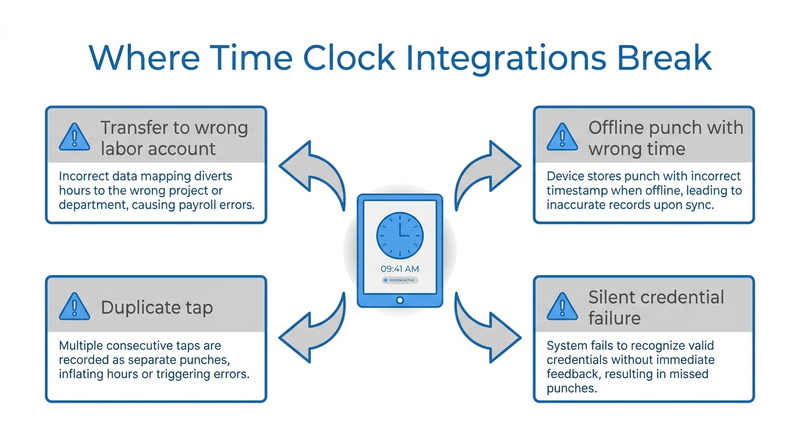
Basic punches rarely fail. The trouble is at the edges: a transfer posts to the wrong labor account, an offline punch replays with the sync time instead of the original time, a duplicate tap creates a second punch, or an expired credential stops data silently. These surface on payroll day, so they belong in the test plan.
Run This Script in a UKG Test Tenant
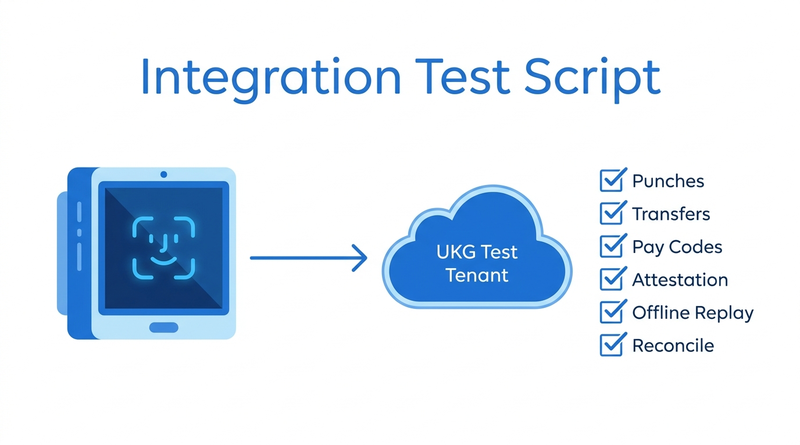
Use a non-production tenant with test employees who mirror real configurations.
- Provision employees. Confirm IDs and labor accounts map correctly and an inactive employee cannot punch.
- Test basic punches. Clock in and out, tap twice quickly, and confirm one clean pair lands with the right timestamp.
- Test job transfers. Transfer between cost centers, confirm the timecard segment, and try an invalid destination.
- Test pay codes and attestation. Submit configured pay codes and a meal attestation, then check where the audit record is stored.
- Test offline replay. Disconnect the tablet, capture an in/out pair and a transfer, reconnect, and confirm original times, order, and no duplicates.
- Test failure handling. Expire a credential and confirm the error surfaces and retries.
- Reconcile. Compare device logs against UKG timecards and exception reports.
Run the script against your union and CBA configurations and any department-specific punch flows, since those are where rules interact most.
Turning Results Into a Decision
A passed script gives finance documented proof the option meets the same integration points Intouch already meets. Record each step as passed or failed and feed it into a weighted RFP scorecard. This is the stage where CloudApper AI TimeClock asks to be tested rather than taken on trust.
Validating CloudApper AI TimeClock
CloudApper AI TimeClock runs on an iPad or Android tablet and syncs directly with UKG Ready and UKG Pro WFM. Transfers, pay codes, attestation, and offline punch buffering are all covered by the script above. CloudApper prices it at roughly 25% of the cost of traditional UKG clocking hardware, and IT can work through the tablet security review in parallel. For finance, a time clock ROI case for your CFO pairs the test results with the cost line.
Frequently Asked Questions
Q: Can a third-party time clock integrate with UKG?
Yes. UKG Pro WFM and UKG Ready expose documented APIs for punches and timecards, and partner clocks such as CloudApper AI TimeClock sync through them. UKG stays the system of record.
Q: How do I test a UKG time clock integration?
In a non-production tenant, test provisioning, punches, transfers, pay codes, attestation, offline replay, and failure handling, then reconcile against UKG timecards.
Q: What usually breaks in a UKG time clock integration?
Edge cases: transfers posting to the wrong labor account, offline punches replaying with the wrong time, duplicate taps, and silent credential failures.
Q: How do I test offline punches with UKG?
Disconnect the device, capture punches and a transfer, reconnect, and confirm original timestamps, correct order, and no duplicates on the UKG timecard.
Q: Do I need a UKG test tenant to validate a time clock?
A non-production tenant is strongly recommended so failed tests never touch live payroll. Ask your UKG account team about availability.
Run the Script Before You Sign
Ask any vendor to pass this script before purchase. Book a CloudApper AI TimeClock walkthrough and we will run it with your UKG admin.



October 23, 2026
New York Spread of Hours Pay in UKG: Catching the 10-Hour Span Before Payroll Does
New York owes an extra hour of pay when a workday spans more than 10 hours or includes a split shift. Learn how UKG Pro WFM and UKG Ready calculate the premium, why missed split-shift punches hide it, and how CloudApper AI TimeClock keeps punches accurate on affordable tablets.
October 22, 2026
Illinois One Day Rest in Seven Act: Configuring UKG for Meal and Seventh-Day Rest Rules
Since 2023, Illinois requires 24 hours of rest in every rolling seven-day period and earlier, more frequent meal periods. Learn how UKG Pro WFM and UKG Ready can enforce ODRISA rules, and how CloudApper AI TimeClock adds seventh-day and meal checks on an affordable tablet.
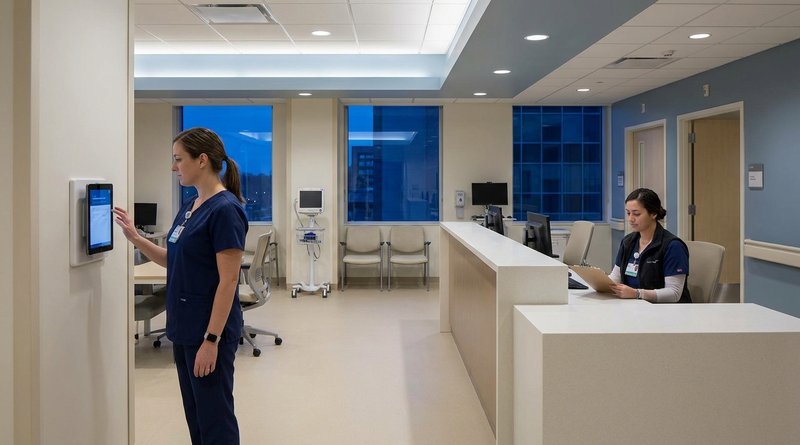
October 19, 2026
Nurse Mandatory Overtime Limits in UKG: Documenting Voluntary Overtime at Clock-Out
New York, Pennsylvania and Washington restrict mandatory overtime for nurses, which makes documented consent the key record. Learn how UKG Pro WFM and UKG Ready separate voluntary and mandated overtime, and how CloudApper AI TimeClock captures consent on an affordable unit tablet.

October 16, 2026
Heat Illness Recovery Breaks in UKG for Construction and Logistics Crews
State heat rules in California, Washington and beyond require cool-down breaks that payroll must be able to prove. Learn how UKG Ready and UKG Pro WFM track recovery periods, and how CloudApper AI TimeClock captures them on an affordable jobsite tablet that works offline.