UKG renewal is the right moment to review time clock hardware site by site. Keep UKG Ready or Pro WFM as the system of record, tag each location retain, refresh, or evaluate, and see where a tablet running CloudApper AI TimeClock is a more affordable fit for small, new, or remote sites.



Table of Contents
- What Stays the Same at Renewal
- Why Hardware Deserves Its Own Line
- Run the Site-by-Site Review Inside UKG First
- Where a Tablet Fits the Mix
- CloudApper AI TimeClock for the Right Sites
- Frequently Asked Questions
- Make Hardware Part of the Renewal Review
Count the clocks. Most UKG admins know headcount to the person, but ask how many time clocks hang across every site, when each went up, and which are under an equipment plan, and the answer takes a week of emails. Renewal is when finance, HR, and operations already look at the same numbers, so it is the right time to match each site to the clock it needs. For some locations, that clock will be a tablet running CloudApper AI TimeClock, syncing into the same UKG tenant.
What Stays the Same at Renewal
UKG Ready and UKG Pro WFM remain the system of record: pay rules, accruals, attestation, and union configurations live there, whatever clock is on the wall. Intouch devices are built for high-traffic capture, and UKG’s Equipment Support Services include Depot Exchange, which ships a replacement next business day. This review covers the hardware mix, not the platform.

Why Hardware Deserves Its Own Line
Clock fleets grow one purchase at a time. One site has since doubled, another now has twelve people, and a third is a remote yard with spotty connectivity. The mix that fit five years ago may not fit today. Some devices may also be approaching milestones such as the Intouch 9000 end of life, easier to plan inside a renewal than mid pay period.
Run the Site-by-Site Review Inside UKG First
- Inventory every device by site, model, install date, and equipment plan with your UKG account team.
- Pull punch volume per device from UKG reports to see which clocks carry the heaviest traffic.
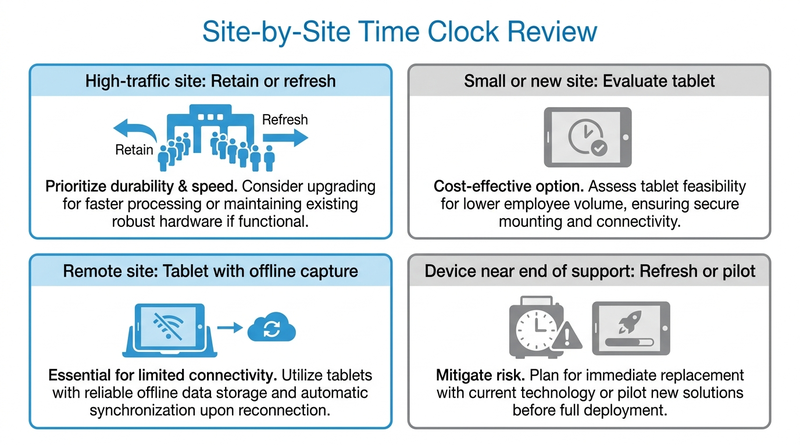
- Tag each site: retain, refresh, or evaluate an alternative.
A simple matrix keeps the conversation grounded:
| Site profile | Likely fit |
|---|---|
| High traffic, shift-change surges, clocks in place | Retain or refresh Intouch |
| Small or new location | Evaluate a tablet |
| Remote or low-connectivity site | Evaluate a tablet with offline capture |
| Device near end of support | Refresh or pilot a tablet |
Where a Tablet Fits the Mix
For sites tagged “evaluate,” the question is whether a premium terminal is the right size for the job. This is where CloudApper AI TimeClock earns a place as a tablet alternative to InTouch terminals on the renewal worksheet, because it runs on hardware you may already own and leaves UKG licensing and configuration untouched. A time clock ROI case for your CFO turns the matrix into a budget line.
CloudApper AI TimeClock for the Right Sites
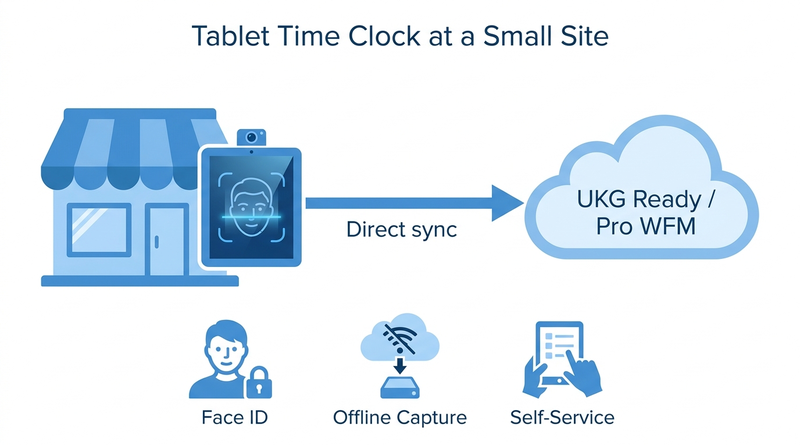
CloudApper AI TimeClock turns an iPad or Android tablet into a biometric clock and self-service kiosk that syncs directly with UKG Ready and Pro WFM. It includes facial recognition, QR and NFC punching, and offline punch buffering for remote sites. CloudApper prices it at roughly 25% of the cost of traditional UKG clocking hardware.
Most teams start with a pilot at one “evaluate” site, then score it with a weighted time clock RFP scorecard. The Intouch DX replacement guide covers what to test, and if a clock fails mid-term, see repair, exchange, or tablet options.
Frequently Asked Questions
Q: What should a UKG renewal checklist include for time clocks?
List every device by site, model, install date, and equipment plan, compare punch volume, and tag each site retain, refresh, or evaluate.
Q: Can we keep UKG and use tablets instead of UKG time clocks at some sites?
Yes. UKG Ready or Pro WFM stays the system of record. CloudApper AI TimeClock runs on iPads or Android tablets and syncs punches directly into UKG.
Q: Which sites are best suited to a tablet time clock?
Small, new, or remote locations with limited connectivity are common candidates. High-traffic sites with Intouch in place often keep it.
Q: Does changing time clock hardware affect UKG licensing?
The clock is only the capture layer, so configurations stay in UKG. Confirm contract specifics with your UKG account team.
Q: How do I budget for time clock hardware at renewal?
Budget by site over the next contract term, including devices, mounting, support, and refresh timing.
Make Hardware Part of the Renewal Review
UKG renewal on the calendar? Add a hardware line to the worksheet first. See how CloudApper AI TimeClock fits your UKG Ready or Pro WFM sites and book a walkthrough.



October 19, 2026
Nurse Mandatory Overtime Limits in UKG: Documenting Voluntary Overtime at Clock-Out
New York, Pennsylvania and Washington restrict mandatory overtime for nurses, which makes documented consent the key record. Learn how UKG Pro WFM and UKG Ready separate voluntary and mandated overtime, and how CloudApper AI TimeClock captures consent on an affordable unit tablet.

October 16, 2026
Heat Illness Recovery Breaks in UKG for Construction and Logistics Crews
State heat rules in California, Washington and beyond require cool-down breaks that payroll must be able to prove. Learn how UKG Ready and UKG Pro WFM track recovery periods, and how CloudApper AI TimeClock captures them on an affordable jobsite tablet that works offline.
October 15, 2026
PUMP Act Lactation Breaks in UKG: Tracking Them Without Breaking Meal Rules
Lactation breaks protected by the PUMP Act often show up as meal break exceptions in UKG. Learn what federal law requires, how to configure UKG Ready and UKG Pro WFM pay codes, and how CloudApper AI TimeClock records these breaks privately on an affordable tablet clock.
October 14, 2026
Enforcing Minor Work Hour Limits at the UKG Time Clock
Child labor hour limits are usually built into UKG schedules, but violations happen at the punch. Learn the federal rules for 14 to 17 year olds, how UKG Pro WFM and UKG Ready handle minor rules, and how CloudApper AI TimeClock adds age-based checks on an affordable tablet clock.