A failed or out-of-warranty UKG InTouch leaves a site without a clock. Compare UKG's Depot Exchange and Depot Repair options, what to check inside UKG first, and when a tablet running CloudApper AI TimeClock is the more affordable way to keep every site punching into UKG Ready or Pro WFM.


Table of Contents
- What UKG Offers When a Clock Fails
- Where the Decision Gets Harder
- Check These Options Inside UKG First
- When the Hardware Math Stops Working
- CloudApper AI TimeClock as the Tablet Alternative
- Frequently Asked Questions
- Ready to Price a Tablet First?
The ticket is open, the device is unplugged, and the real question isn’t technical: where do 140 hourly employees at that site punch tomorrow morning, and what will the answer cost? For many UKG customers, CloudApper AI TimeClock has become a third option in that conversation, a tablet-based clock that syncs with the same UKG Ready or Pro WFM tenant so the site keeps punching while you decide.
What UKG Offers When a Clock Fails
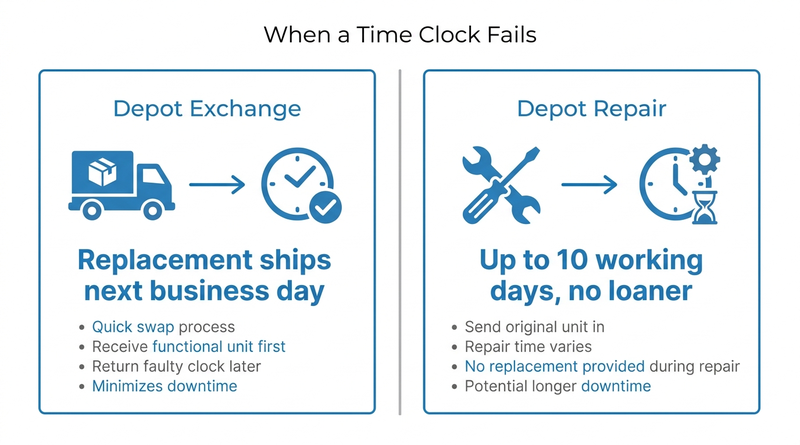
UKG’s support path is well defined. Devices are troubleshot remotely before anything ships. According to the UKG Equipment Support Services datasheet (FY25), Depot Exchange ships a replacement unit for next-business-day delivery. Depot Repair is built for organizations that keep their own spares: repaired units ship within 10 working days of receipt, with no replacement unit provided.

For a supported device on an active exchange plan, that coverage is hard to beat. Keep it.
Where the Decision Gets Harder
Older units, like those in our guides to 4000 and 4500 end of life and the Intouch 9000 sunset, may no longer qualify for the plan a site needs. A site on Depot Repair without a spare can spend up to two weeks on supervisor-entered punches, which means more manual edits and a thinner audit trail. Refurbished secondary-market units cost less but carry no UKG warranty.
Check These Options Inside UKG First
- Run remote diagnostics and a network check. A clock that looks dead can turn out to be a connectivity or configuration issue.
- Confirm the device’s support status and equipment plan with your UKG account team.
- Price Depot Exchange for high-headcount sites where next-day replacement matters most.
- Enable mobile punching and manager timecard edits temporarily to cover the gap.
When the Hardware Math Stops Working
If the device is past support, the site is small, or the repair bill approaches the price of a new terminal, buying the same class of hardware for every location may not be the best use of budget, and a time clock ROI case for your CFO usually shows it. That is where CloudApper AI TimeClock fits as an affordable alternative to intouch hardware terminals: the tablet takes the place of the terminal, and UKG stays exactly where it is.
CloudApper AI TimeClock as the Tablet Alternative
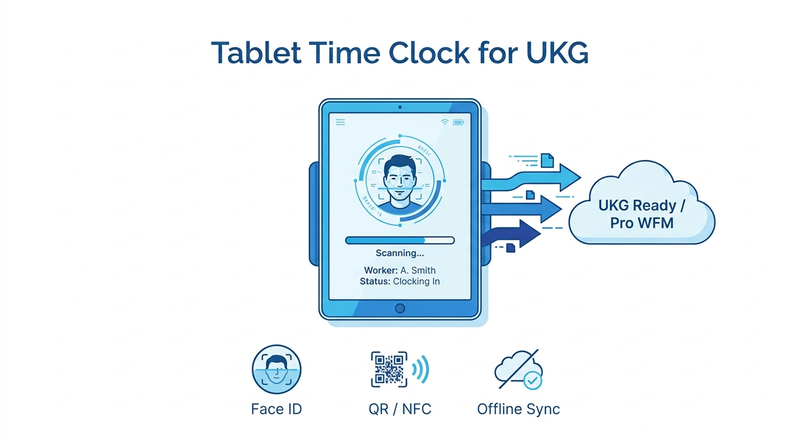
CloudApper AI TimeClock runs on an iPad or Android tablet and syncs punches directly with UKG Ready and UKG Pro WFM. Facial recognition is included at no extra cost, along with QR, barcode, and NFC punching and offline punch buffering. CloudApper prices it at roughly 25% of the cost of traditional UKG clocking hardware.
Teams use it as a stand-in during depot repair, a permanent clock for smaller sites, or a planned replacement. Our Intouch DX replacement guide covers what to test first, and retired devices should follow a biometric template purge.
Frequently Asked Questions
Q: How long does UKG Intouch repair take?
Under UKG’s Depot Repair option, repaired devices ship within 10 working days of receipt, with no replacement unit. Depot Exchange ships a replacement for next-business-day delivery.
Q: Should I repair or replace an out-of-warranty UKG Intouch?
Repair makes sense when the device is still supported and the fault is isolated. If it is past end of support or repair costs near a new device, replacement is usually better value.
Q: Are refurbished Kronos time clocks worth buying?
They lower upfront cost, but secondary-market units carry no UKG warranty. Confirm support eligibility with UKG first.
Q: Can an iPad replace a UKG Intouch time clock?
Yes. CloudApper AI TimeClock turns an iPad or Android tablet into a biometric time clock that syncs with UKG Ready and UKG Pro WFM, so your UKG system does not change.
Q: How do employees punch while a UKG clock is being repaired?
Use a spare, UKG mobile punching, manager-entered punches, or a tablet running CloudApper AI TimeClock as a temporary kiosk.
Ready to Price a Tablet First?
If a failed clock has you weighing another terminal purchase, price a tablet before you sign the quote. See how CloudApper AI TimeClock works with your UKG Ready or Pro WFM tenant and book a walkthrough.



October 19, 2026
Nurse Mandatory Overtime Limits in UKG: Documenting Voluntary Overtime at Clock-Out
New York, Pennsylvania and Washington restrict mandatory overtime for nurses, which makes documented consent the key record. Learn how UKG Pro WFM and UKG Ready separate voluntary and mandated overtime, and how CloudApper AI TimeClock captures consent on an affordable unit tablet.

October 16, 2026
Heat Illness Recovery Breaks in UKG for Construction and Logistics Crews
State heat rules in California, Washington and beyond require cool-down breaks that payroll must be able to prove. Learn how UKG Ready and UKG Pro WFM track recovery periods, and how CloudApper AI TimeClock captures them on an affordable jobsite tablet that works offline.
October 15, 2026
PUMP Act Lactation Breaks in UKG: Tracking Them Without Breaking Meal Rules
Lactation breaks protected by the PUMP Act often show up as meal break exceptions in UKG. Learn what federal law requires, how to configure UKG Ready and UKG Pro WFM pay codes, and how CloudApper AI TimeClock records these breaks privately on an affordable tablet clock.
October 14, 2026
Enforcing Minor Work Hour Limits at the UKG Time Clock
Child labor hour limits are usually built into UKG schedules, but violations happen at the punch. Learn the federal rules for 14 to 17 year olds, how UKG Pro WFM and UKG Ready handle minor rules, and how CloudApper AI TimeClock adds age-based checks on an affordable tablet clock.
