Moving from wired UKG clocks to tablets shifts a hidden dependency onto your wireless network. This guide shows UKG admins and IT how to survey each clock position, test outage behavior, and assign ownership of access point fixes before go-live.



Table of Contents
- What UKG Covers and What It Leaves to You
- Where the Network Gap Surfaces
- What to Do Inside Your Network First
- Where Fixed Terminals Run Out
Somewhere in your project charter is a line that reads “Network readiness: owner ____.” Nobody filled it in, because the old clocks were wired once and forgotten. Tablets bring that blank back. CloudApper AI TimeClock, the iPad and tablet layer that syncs with UKG Ready and Pro WFM, runs on the wireless network you already have, so the first job is deciding who owns what that network can carry.
What UKG Covers and What It Leaves to You
UKG Ready and Pro WFM accept punches from any registered endpoint, and the pay engine treats them alike. UKG does not design your wireless network. Intouch DX terminals, wired or wireless, always needed a network connection at the mounting point. A tablet simply moves that dependency from a cable drop to coverage someone else may own.
Where the Network Gap Surfaces
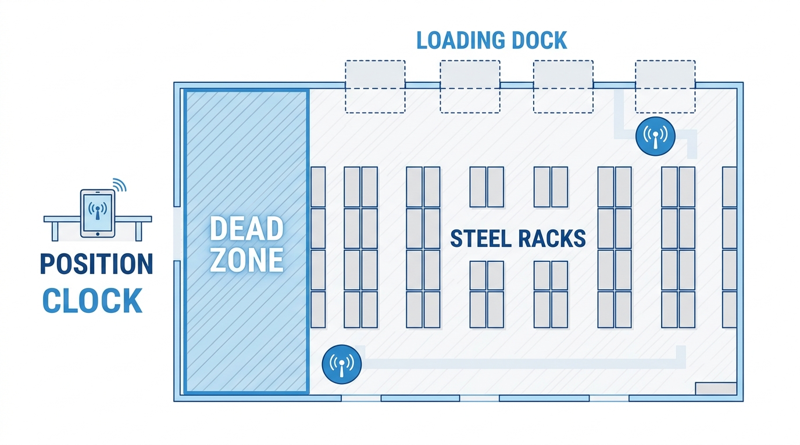
Coverage that works at a desk can fail at a dock door, behind a steel rack, or beside a cold room. Signal bars are not the test. A tablet can show full bars and still drop a punch because of shift-change congestion or a stalled roaming handoff. The harder issue is budget: access points sit in IT or facilities budgets that HR does not control. The CapEx versus OpEx breakdown helps set any remediation cost against hardware savings.
What to Do Inside Your Network First
Survey every proposed clock position, at shoulder height, during a real shift change. Record:

- Stability: signal strength, latency, and packet loss at the exact mounting spot.
- Access: certificate or portal behavior, plus network access rules, as covered in the IT security review guide.
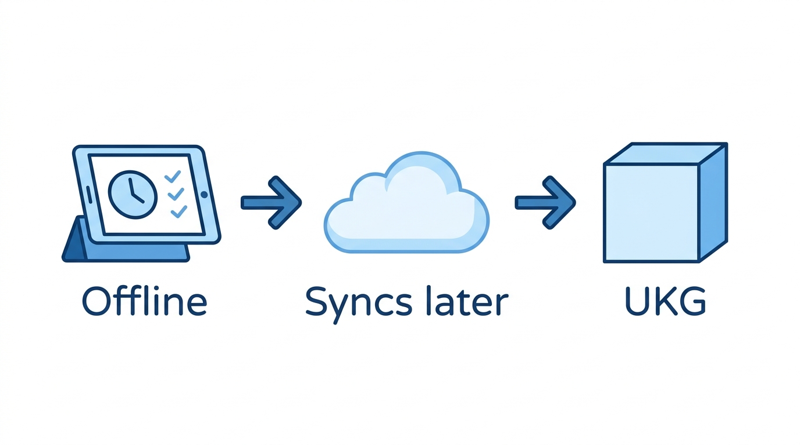
- Outage behavior: pull the uplink for ten minutes and confirm punches are held and synced later.
Then lock the devices down, since kiosk mode and MDM keep tablets on the right network. Finish by running the integration test script from each surveyed spot.
Where Fixed Terminals Run Out
A wired terminal solves coverage by being wired, a real advantage at a single gate. The limit appears with many positions or sites where cabling is expensive. CloudApper AI TimeClock lets you mount a tablet where coverage is good and buffer punches where it is not, so a weak spot does not become a missed punch.
CloudApper AI TimeClock for Weak-Signal Sites
CloudApper AI TimeClock stores punches on the tablet when the connection drops and syncs them to UKG Ready or Pro WFM with original timestamps afterward. The offline punch buffering guide explains the mechanics for IT. Per CloudApper’s pricing comparison, the tablet approach costs roughly 25% of traditional clocking hardware, which leaves room for access point additions. The Intouch DX replacement guide covers the comparison.
Frequently Asked Questions
Q: How do you test Wi-Fi before deploying tablet time clocks for UKG?
Test each clock position at shoulder height during a real shift change. Record signal strength, latency, packet loss, and authentication success, then pull the uplink briefly to confirm punches are held and synced.
Q: Does a tablet time clock need constant Wi-Fi to work with UKG?
Not with offline capture. CloudApper AI TimeClock holds punches during an outage and syncs them to UKG Ready or Pro WFM with original timestamps. Confirm this in your own outage test.
Q: Who pays for access point upgrades when replacing UKG clocks with tablets?
Name the owner in the project charter before the pilot. Compare the remediation cost with hardware savings to decide whether the project still makes sense.
Q: Is signal strength enough to approve a time clock location?
No. Strong signal can coexist with congestion, failed authentication, or roaming problems. Approve a spot only after testing stability and reconnection there.
Q: Do Intouch DX clocks also depend on the network?
Yes. Wired or wireless, they need a network connection at the mounting point to send punches to UKG. With tablets, coverage must be verified at each position.
If you are planning a tablet rollout and want a survey checklist for IT, book a demo of CloudApper AI TimeClock for UKG and walk through your sites with the team.



November 2, 2026
Changing the Time Clock in a Union Shop on UKG: What to Settle Before the First Tablet Ships
Changing the time clock in a union workplace is a labor relations task as much as an IT one. This checklist shows UKG admins and HR leaders what to settle first: agreement review, frozen pay rules, steward briefings, biometric consent alternatives, and a one-site pilot.
October 30, 2026
Running Intouch DX Terminals and Tablet Time Clocks Side by Side in One UKG Environment
Replacing UKG clocking hardware does not have to happen on one date. This guide shows UKG admins how to run Intouch DX terminals and CloudApper AI TimeClock tablets side by side, with site-by-site move or hold rules, exception owners, and rollback triggers.

October 29, 2026
How to Baseline Your Missed Punch Rate in UKG Before You Buy Any Clock Hardware
Five people in payroll will give you five missed punch rates. This guide shows UKG admins and CFOs how to build one defensible baseline from expected punches, cause tags, and a 60-day window, and where CloudApper AI TimeClock fits if the data points to hardware.

October 28, 2026
The UKG Time Clock Pilot Memo: Success Criteria Your CFO and Admin Will Both Sign
A UKG time clock pilot succeeds or fails on criteria written before day one. This guide shows UKG admins and CFOs how to set scope, baseline, pass marks, and rollback triggers, and where CloudApper AI TimeClock fits as a tablet-based challenger beside existing UKG terminals.