
IT's first objection to a tablet time clock is that someone will misuse it. Learn how to lock an iPad or Android tablet into a dedicated UKG time clock with Jamf, Intune, or Android Enterprise, a five-step day-one checklist, and what IT should manage after go-live alongside Intouch DX devices.



Table of Contents
- What the Purpose-Built Terminal Gives You
- Where Unmanaged Tablets Go Wrong
- The Platform Controls That Do the Work
- A Day-One Lockdown Checklist
- What IT Owns After Go-Live
- CloudApper AI TimeClock on a Managed Tablet
- Frequently Asked Questions
- Hand IT the Checklist
Kiosk mode in Jamf, Microsoft Intune or Android Enterprise is what turns a standard tablet into a dedicated UKG time clock that runs one app and nothing else. “It’s just an iPad. Someone will be watching videos on it by Tuesday.” IT says some version of this whenever HR proposes a tablet clock, and it is a fair objection. The controls that prevent it already exist in the MDM most IT teams run, which is why tablets running CloudApper AI TimeClock can sit alongside the Intouch DX and older Kronos-era clocks such as the 4500 and InTouch 9000.
What the Purpose-Built Terminal Gives You
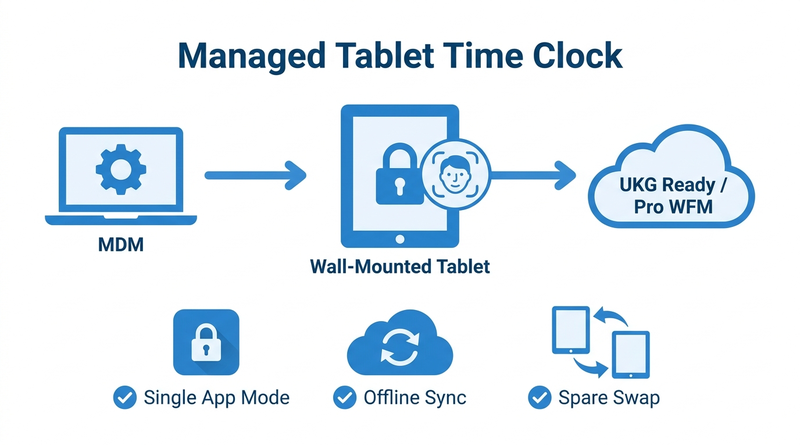
UKG Intouch devices arrive as single-purpose hardware with no app store or browser for employees to wander into. UKG Ready or Pro WFM keeps the pay rules, schedules, and accruals either way. A tablet has to be configured to behave like that terminal, and that configuration is IT’s real deliverable.

Where Unmanaged Tablets Go Wrong
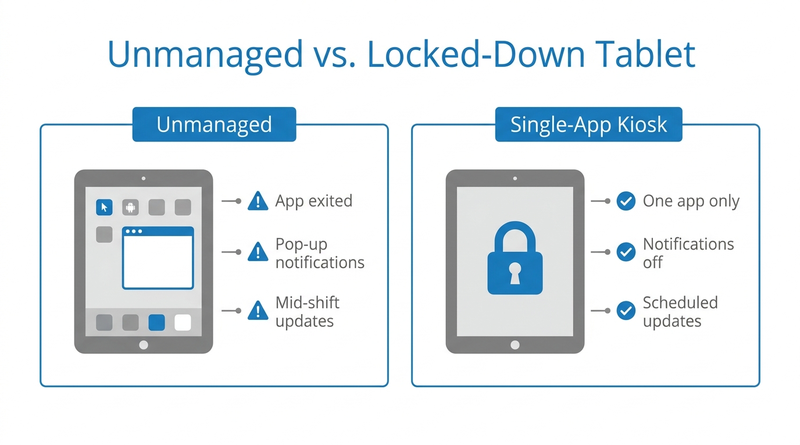
Without management, a shared tablet drifts: someone exits the app, a notification steals the screen, an OS update reboots mid-shift, or the device ends up in a desk drawer. These are configuration problems, not hardware problems, and each has a native control.
The Platform Controls That Do the Work
iPad. Enroll through Apple Business Manager so the device is supervised, then use Jamf or another MDM to apply Single App Mode. Jamf documents that Single App Mode locks a supervised iPad to one app and controls auto-lock, rotation, volume, and sleep behavior. Guided Access suits a pilot; Single App Mode survives restarts.
Android. Enroll as an Android Enterprise dedicated device. Microsoft documents that Intune can lock these devices to a single app, with users blocked from adding apps or changing restricted settings.
A Day-One Lockdown Checklist
- Enroll as managed. Use Apple Business Manager supervision or Android Enterprise dedicated-device enrollment.
- Deploy the clock app. Push it from the MDM.
- Apply single-app mode. Lock the device to the clock app and disable notifications.
- Set update windows. Schedule OS updates outside shift changes.
- Secure power and mounting. Use a locked enclosure and continuous power.
The tablet security review guide covers IT’s next questions.
What IT Owns After Go-Live
Day two is the operating model: a pre-enrolled spare per region, alerts for devices that stop checking in, and a remote exit code for troubleshooting. This is where tablets earn their place, because a pre-enrolled spare costs a fraction of a terminal, and CloudApper AI TimeClock keeps punches flowing to UKG through offline punch buffering when a site loses connectivity.
CloudApper AI TimeClock on a Managed Tablet
CloudApper AI TimeClock runs on an iPad or Android tablet and syncs directly with UKG Ready and UKG Pro WFM. It is built for single-app kiosk deployment, with facial recognition and self-service on one screen. CloudApper prices it at roughly 25% of the cost of traditional UKG clocking hardware. Planning a larger rollout? See the enterprise rollout guide and iPad setup guide. Replacing specific models? Start with the Intouch DX replacement guide or 4000 and 4500 end-of-life options.
Frequently Asked Questions
Q: Can an iPad be locked down as a UKG time clock?
Yes. A supervised iPad enrolled through Apple Business Manager can be locked to one time clock app with Single App Mode in Jamf or another MDM.
Q: How do I set up an Android tablet as a single-app time clock with Intune?
Enroll the tablet as an Android Enterprise dedicated device, deploy the clock app, and assign a single-app kiosk policy in Intune.
Q: Is Guided Access enough for a tablet time clock?
Guided Access works for a short pilot. For production, supervised Single App Mode through an MDM survives restarts and can be managed remotely.
Q: What happens if a tablet time clock fails?
Swap in a pre-enrolled spare that picks up the same kiosk policy; buffered punches still sync to UKG.
Q: Can a tablet replace an Intouch DX or Kronos 4500 time clock?
Yes. CloudApper AI TimeClock runs on a managed iPad or Android tablet and syncs punches directly with UKG Ready and Pro WFM.
Hand IT the Checklist
Send IT this checklist before the next hardware request. See CloudApper AI TimeClock running on a managed tablet and book a walkthrough.




November 3, 2026
Wi-Fi Site Survey for UKG Tablet Time Clocks: Who Owns the Network Before the First iPad Is Mounted
Moving from wired UKG clocks to tablets shifts a hidden dependency onto your wireless network. This guide shows UKG admins and IT how to survey each clock position, test outage behavior, and assign ownership of access point fixes before go-live.

November 2, 2026
Changing the Time Clock in a Union Shop on UKG: What to Settle Before the First Tablet Ships
Changing the time clock in a union workplace is a labor relations task as much as an IT one. This checklist shows UKG admins and HR leaders what to settle first: agreement review, frozen pay rules, steward briefings, biometric consent alternatives, and a one-site pilot.
October 30, 2026
Running Intouch DX Terminals and Tablet Time Clocks Side by Side in One UKG Environment
Replacing UKG clocking hardware does not have to happen on one date. This guide shows UKG admins how to run Intouch DX terminals and CloudApper AI TimeClock tablets side by side, with site-by-site move or hold rules, exception owners, and rollback triggers.

October 29, 2026
How to Baseline Your Missed Punch Rate in UKG Before You Buy Any Clock Hardware
Five people in payroll will give you five missed punch rates. This guide shows UKG admins and CFOs how to build one defensible baseline from expected punches, cause tags, and a 60-day window, and where CloudApper AI TimeClock fits if the data points to hardware.
