Municipal governments moving to UKG Ready face a challenge when retirement programs span multiple plans with conditional triggers, YTD true-ups, and quarterly student loan data. CloudApper AI Platform for UKG embeds a Retirement Contribution Calculation Engine inside the payroll close, with a per-employee review grid and an auditable data workflow.



Table of Contents
- The Formulas Behind the Benefit
- The Dual-Plan Trigger and Why It Creates Payroll Complexity
- The YTD True-Up Problem Front-Loading Creates
- The Student Loan Match: Quarterly Data, Manual Entry, No Audit Trail
Municipal Retirement Contributions in UKG Ready: Extending the Payroll Run for Multi-Plan Rules and Student Loan Match
A municipal retirement program is rarely one benefit. It is several plans running side by side, each with its own contribution rate, eligibility condition, and calculation basis. That layering reflects decades of labor negotiations, collective bargaining agreements, and policy decisions about how to reward different employee groups. What it also reflects, often, is a set of custom business rules that the payroll platform in use has carried through formulas built by someone who understood the program deeply.

When a city replaces its payroll system, those rules have to go somewhere. That transition moment is exactly where CloudApper AI Platform for UKG enters the picture for municipal governments moving to UKG Ready.
The Formulas Behind the Benefit
A Mid-Atlantic municipal government currently migrating from legacy timekeeping and ADP payroll to UKG Ready is working through this question. The city’s retirement program runs across five plans: a base 401(a) with a flat employer contribution, a supplemental 401(a) with a conditional trigger, a 401(k) with an employer match, a 457 plan, and a retirement health savings plan. Each rule is individually defensible. Together, they produce a calculation burden that sits outside standard payroll configuration.
As the city’s Payroll Lead described it: “So, right now, the way it’s set up in ADP, we have kind of a lot of formulas.”
That is not a complaint about ADP. It is an accurate description of what happens when retirement plan design outpaces what any out-of-the-box payroll configuration was built to calculate. The same challenge follows organizations into UKG Ready unless the operational requirement is planned for before the first payroll runs.
The Dual-Plan Trigger and Why It Creates Payroll Complexity
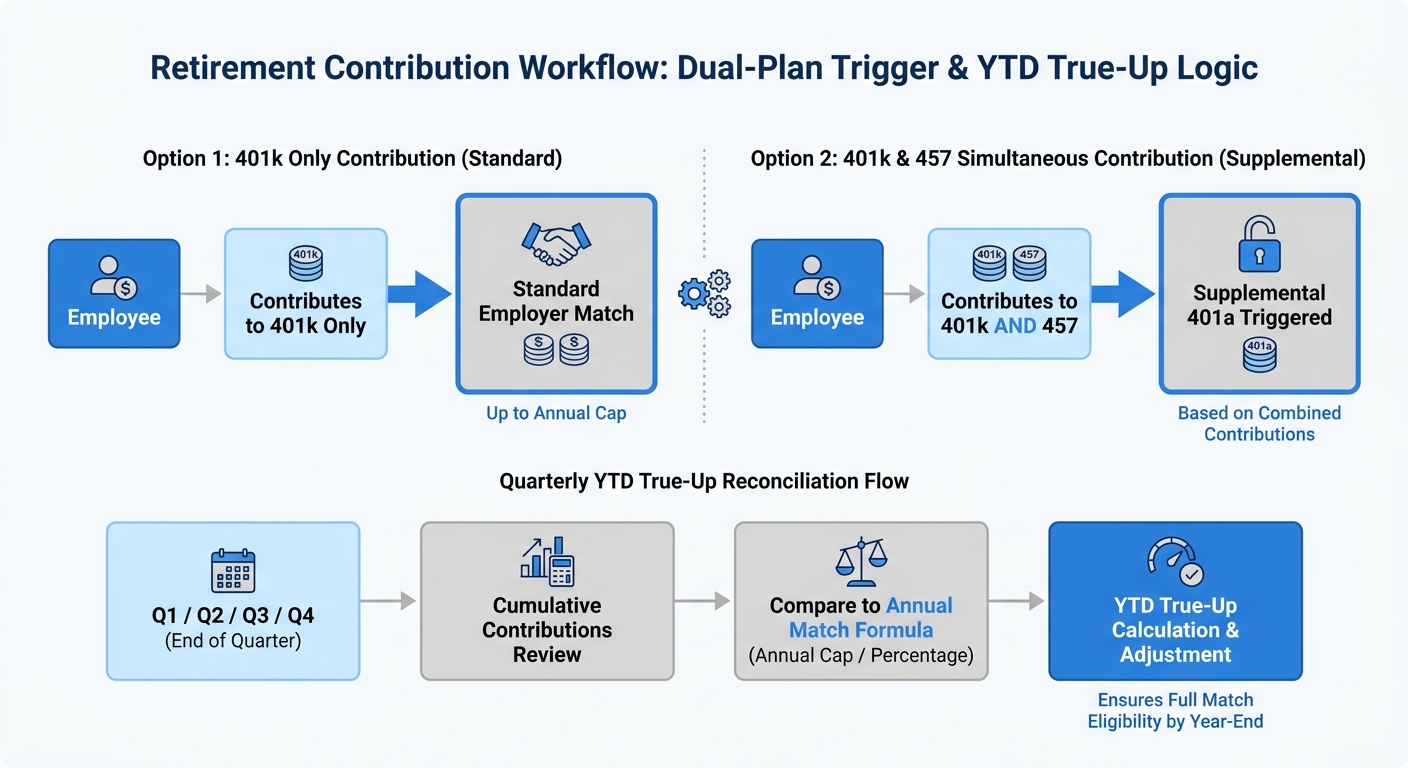
The supplemental 401(a) contribution for police and public works employees depends on an “and” condition: the employee must contribute to both the 401(k) and the 457 plan in the same pay period. Contributing to only one plan triggers nothing from the supplemental pool. The city’s Payroll Lead laid out the logic directly:
“They get the 401k employer match if they contribute only to their 401k, but if they also contribute to their 457, that’s what triggers the supplemental.”
Applied employee by employee, every pay period, across police and public works, this is a conditional logic layer that requires either a custom formula or a separate calculation engine feeding values back into payroll. It is exactly the kind of operational requirement that varies by employee group and cannot be generalized into a standard pay code setup.
The YTD True-Up Problem Front-Loading Creates
The 401(k) employer match includes a year-to-date true-up. Each pay period, payroll must compare the employee’s cumulative deferrals against cumulative eligible earnings and reconcile that against the match already credited. The intent is to protect employees who front-load contributions and hit the annual IRS limit early: the city’s employer match obligation runs through December regardless of when the employee maxes out their own deferral.
“If I do all of my contributions at the beginning of the year, I’m still only getting like the 3% from the city. That really shouldn’t stop once I max out my portion, right?”
Payroll Lead, Finance/Payroll, Mid-Atlantic municipal government
A system that calculates match only on the current period’s deferrals, without reference to YTD totals, underpays affected employees from the first pay period it misses. That is an audit exposure, not a configuration oversight. Complex payroll calculation environments in public sector and construction face similar cumulative-earnings logic that standard pay code setup does not resolve on its own.
The Student Loan Match: Quarterly Data, Manual Entry, No Audit Trail
Under SECURE 2.0, qualified student loan payments count toward an employee’s match-eligible contribution rate. The city receives this data quarterly from a third-party loan verification vendor in an Excel file. Today, payroll manually keys those payment amounts into ADP before the system combines them with the employee’s 401(k) deferral percentage in its match calculation.
“So ideally, we’re not doing reports and all these circular things to like make this happen.”
— Payroll Lead, Finance/Payroll, Mid-Atlantic municipal government
— Payroll Lead, Finance/Payroll, Mid-Atlantic municipal government
Manual entry at this stage creates three risks: keying errors, timing mismatches between quarterly loan data and biweekly payroll cycles, and no documented path connecting the vendor file to the payroll output that produced the contribution amount on the employee’s pay stub.
Keeping the Calculation Inside the Payroll Close
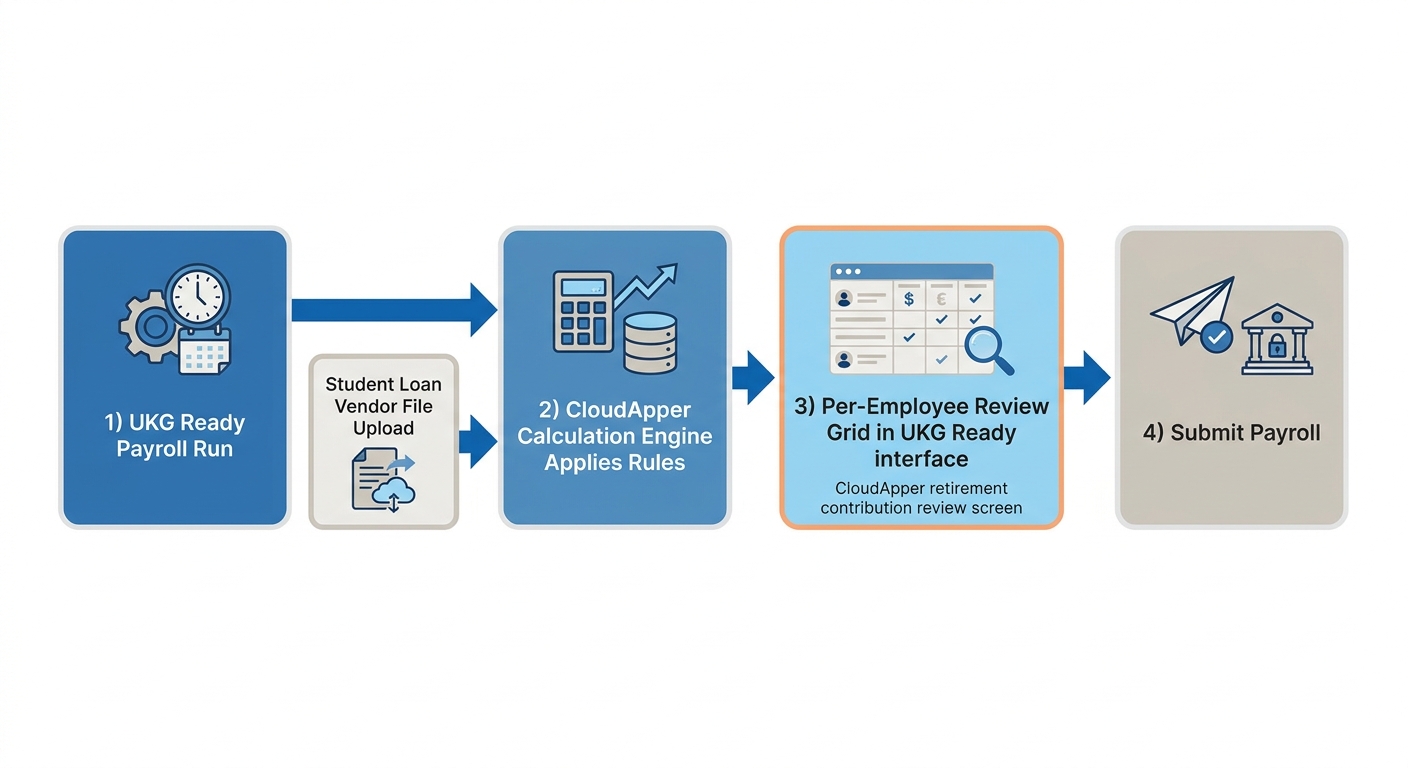
The operational requirement the city set was specific. The calculation had to run inside the normal payroll workflow, with a chance to review results before submission. A side process that required exporting data to a separate tool and reimporting the result was a non-starter:
“Ideally, the calculation would happen as we’re processing payroll, and we’d have the chance to review it and then submit payroll… if it’s something separate, that’s probably not really something we’re interested in,” the Payroll Lead said.
That requirement, common across municipal payroll environments with complex custom business rules, shapes what any extension layer needs to deliver. CloudApper AI for UKG Personalization, combined with the CloudApper AI Platform, embeds a Retirement Contribution Calculation Engine as the final step of the UKG Ready payroll close. It pulls current and YTD earnings, deferral elections, and contribution history from UKG Ready, applies the dual-plan supplemental rule and the 401(k) match with YTD true-up, and incorporates any student loan payments from the quarterly vendor upload. A per-employee review grid appears inside UKG Ready before the payroll specialist submits. When the student loan file arrives each quarter, payroll uploads it through the same interface, with validation and exception flags replacing the manual entry step entirely.
For other municipal payroll teams working through similar operational requirements, conditional pay rules across employee groups and grant-funded labor allocation with audit-ready documentation represent related problem types that CloudApper addresses on the same UKG platform. The underlying principle is consistent: the calculation belongs inside the payroll workflow, with a review step, an audit log, and results that appear on the employee’s pay stub.
If your organization is moving to UKG Ready and carries retirement contribution rules that your current system handles through custom formulas, CloudApper can scope and build the calculation engine before your first live payroll. Connect with the CloudApper team to review your specific plan design and the operational requirements it creates.



November 4, 2026
Day-Rate Overtime in UKG Ready: Why Two Minutes of Weekly Hours Can Change a Route Driver’s Rate
A guaranteed daily route rate still carries overtime obligations, and the regular rate moves with every hour worked. See how CloudApper extends UKG Ready with a route-pay engine that calculates help time, overtime and guarantees, then writes each earning component back for payroll review, line by line, every week.

November 3, 2026
Flat-Rate Technician Pay in UKG Pro WFM: Eligibility Hours, Productivity Hours and the Audit Record Between Them
A regional tire and automotive service retailer pays flat-rate technicians on billed hours from point of sale and clocked hours in UKG Pro WFM. CloudApper applies a thirteen-scenario incentive plan on top of UKG, posts results to existing pay codes, and keeps an auditable record of every pay decision.

October 30, 2026
Promotion Pay-Band Rules in UKG Pro: Letting Leaders Request Raises Without Seeing the Pay Table
At a national mortgage lender, leaders request promotions and transfers but never see compensation. Here is how CloudApper enforces pay-band caps, out-of-band attestation and FLSA flags at the moment of submission inside UKG Pro, while Senior Leadership, Team Relations and People Analytics still review every change.


October 16, 2026
Public Holiday Substitution Rules Around the World: Why UKG Pro WFM Still Needs Manual Checks
New Zealand calls it Mondayisation, the UK calls it a substitute bank holiday, Canada calls it holiday pay in lieu, and the US calls it an observed holiday. Four names, four rules, and the same manual-check problem for global UKG Pro WFM deployments.