A 310-employee county ambulance district on UKG Pro runs two union step schedules, a graded professional structure and two longevity rates. CloudApper Step Progression calculates every annual move, including promotions that keep earned longevity, and posts rates to UKG Pro, where the existing wage approval workflow and audit trail take over.




Table of Contents
EMS step progression at a taxpayer-funded ambulance district has to satisfy the board’s approval trail as well as the union contract. Every step increase and every longevity tier has to match a union contract or a grade schedule, and each one has to pass through the district’s own wage-increase approval before it reaches a paycheck. A raise that is calculated correctly but approved outside the normal channel is still a problem for the board.

A 310-employee county ambulance district in the Midwest runs HR, payroll and timekeeping on UKG Pro and UKG Pro WFM, and wants its wage grid inside that ecosystem rather than in a side spreadsheet. CloudApper Step Progression for UKG calculates step and longevity increases on top of UKG Pro while approvals stay exactly where they are, in UKG Pro.
Three Pay Structures, One January Deadline
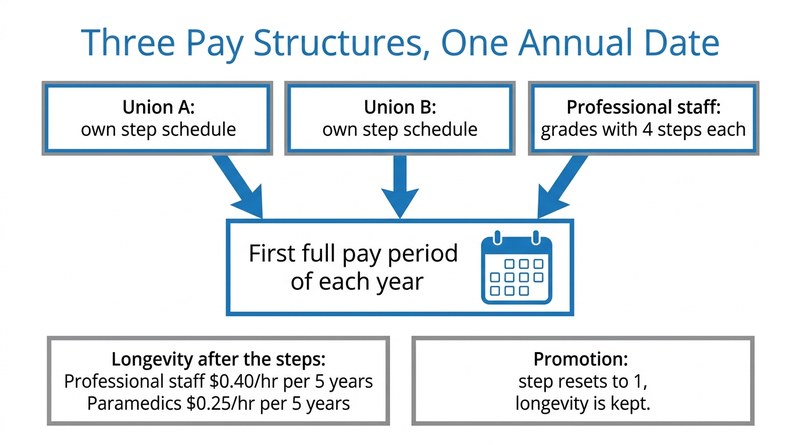
Every employee in the district sits on a wage grid, and every grid moves on the same date: the first full pay period of the calendar year. The structures underneath that date are not uniform. As the district’s HR Business Partner describes it, “We have two labor unions, so they have their own step schedule. And then we also have one for our professional staff… our professional staff really gets into the weeds because each job title falls into a specific grade.”
Each professional grade has four steps. Employees start at step one and move up one step at the first full pay period of the following year. Once they move past the steps, longevity pay takes over, and the two populations earn it at different rates: professional staff receive $0.40 an hour for every five years of service and paramedics receive $0.25, in tiers running from 5 to 39 years of service.
Promotions are where the logic gets hard. A promoted employee restarts at step one of the new grade but keeps the longevity already earned.
“We do want to keep longevity in play once they move to that new step or that new grade because they’ll start at step one again once they’ve received that promotion, but they still attain that longevity since they’ve already achieved it.”
HR Business Partner, county ambulance district
Done by hand, each January means recalculating the whole workforce, with missed step advances, wrong longevity tiers and contract disputes as the realistic failure modes, the same exposure behind keeping pay grade step progression compliant with union contracts.
Automating the Math While Approvals Stay in UKG Pro
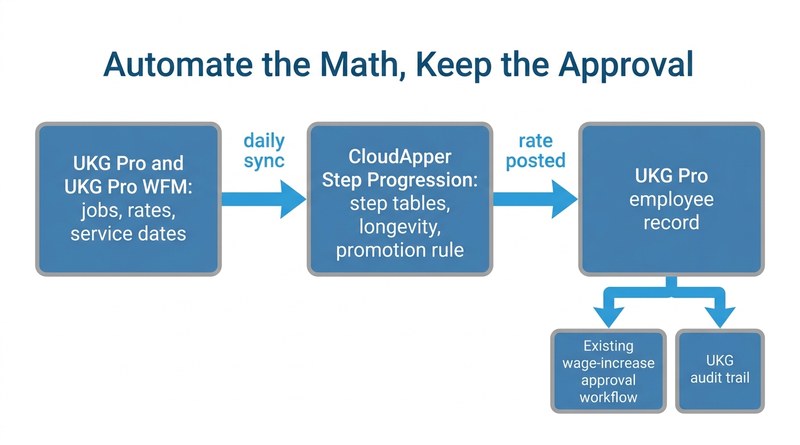
CloudApper’s approach configures CloudApper Step Progression for UKG with separate step tables for each union, graded tables for professional staff, longevity tiers at the two rates, and a promotion rule that resets the step while carrying earned longevity forward. A daily sync through CloudApper iPaaS for UKG reads jobs, rates and employment history from UKG Pro and employee details from UKG Pro WFM, so new hires never have to be set up twice.
The design decision the district cares about most is what happens at the end. On the first full pay period, CloudApper posts each calculated rate to the employee’s record in UKG Pro. That posting triggers the district’s existing wage-increase approval workflow and lands in UKG’s own audit trail. CloudApper does not approve anything. Agencies that keep an evidence file for union grievances in UKG will recognize the value of keeping that trail in one system.
“This gives us a tracking mechanism within UKG Pro to see that cookie trail. So it helps us to identify that it’s been approved through the appropriate channels.”
HR Business Partner, county ambulance district
In this model, HR opens CloudApper only when a table needs editing, for example when a new contract changes a step rate. The same pattern works for agencies running different step progression rules for every department.
What This Means for the District
With the grids held in CloudApper, the January recalculation stops being a manual project. Union employees move on their own schedules, professional staff move through their grades, longevity tiers apply at the right rate for each population, and promotions reset the step without erasing tenure. Every change still goes through the approval chain the district already trusts. For public safety employers already handling rules like a 28-day pay cycle for airport fire and police, it is another case of contract logic running beside UKG rather than inside a spreadsheet.
For the district’s technology leadership, the case for automating this work comes back to the mission.
“We’re an ambulance service… We’re saving lives, so we got to save dollars to save lives.”
Technology leadership, Administration, county ambulance district
For EMS agencies, fire districts and other public safety employers on UKG Pro, the lesson is to automate the pay math while leaving the approval and audit trail where the board already expects to find them. CloudApper builds that layer on top of UKG so the wage grid lives with the rest of the workforce data.
If your step and longevity cycle still runs from a spreadsheet every January, talk to CloudApper about bringing your wage grids into UKG Pro without changing how raises are approved.



September 30, 2026
Mid-Shift Job Transfer Pay at Union Sites: Paying Transferred Hours at the Right Step Rate in UKG Pro WFM
Mid-shift job transfer pay at union sites depends on each employee's step, not just the job. CloudApper extends UKG Pro WFM to look up the contract step rate for every transferred hour, write the correct rate back, and keep payroll matched to the agreement.

September 2, 2026
Managing Multiple Local Bargaining Unit-Based Wage Increases in UKG
Managing multiple local bargaining unit-based wage increases in UKG gets complicated fast when contracts set different rates and milestones. The CloudApper AI Platform reads each hire date, applies the correct local's rule, and syncs the new rate into UKG automatically.

July 22, 2026
Running Different Step Progression Rules in UKG for Every Department Without the Complexity
Different departments often need different step progression rules in UKG, hours-based, tenure-based, or union step tables. See how CloudApper extends UKG with an automation layer that calculates each department's correct rule and syncs the result back, without HR losing control.


March 25, 2025
Simplifying Wage Progression Tracking with UKG Pro and CloudApper
A manufacturing company automated wage progression tracking using CloudApper and UKG Pro, improving payroll accuracy, efficiency, and compliance while enhancing employee satisfaction and freeing HR resources for strategic tasks.