
UKG Pro WFM captures the data needed to catch a location transfer, but pulling it manually takes time. See how CloudApper hrPad streamlines location transfer reports in UKG Pro WFM, delivered automatically to each team's manager by email or SMS.



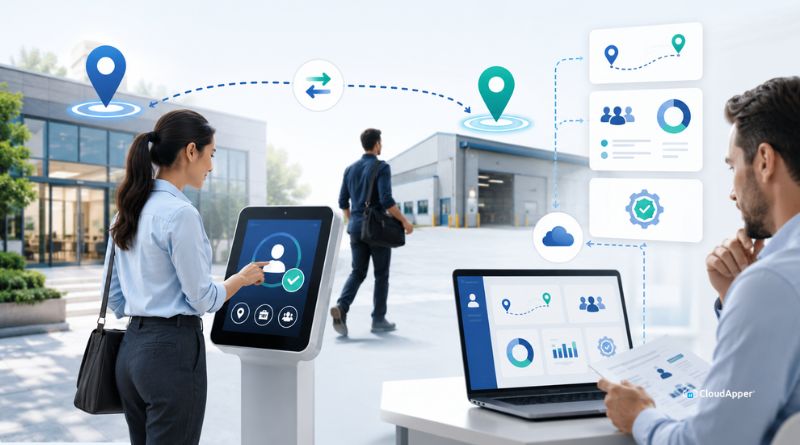
Table of Contents
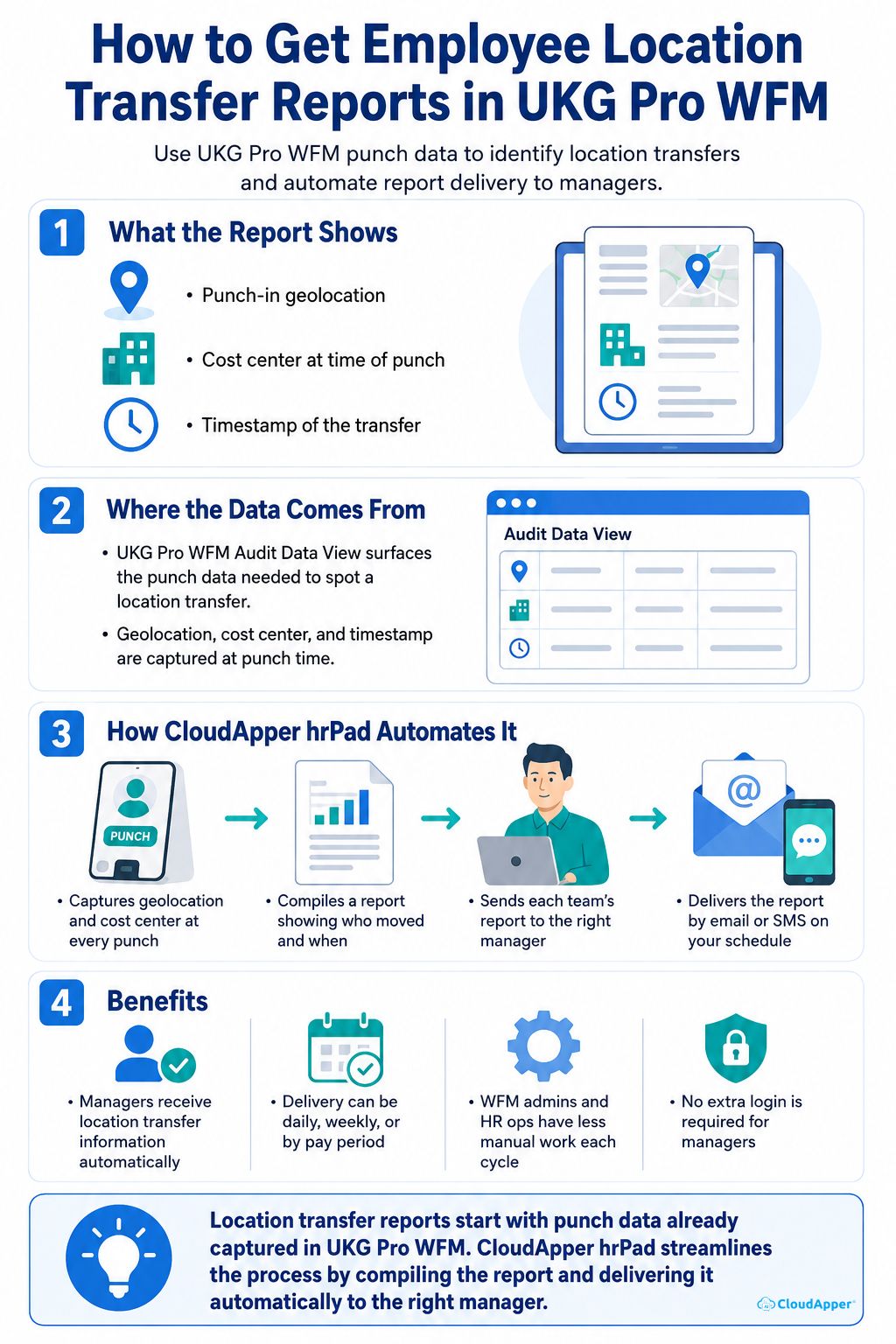
UKG Pro WFM’s Audit Data View can surface the punch data needed to spot an employee location transfer; geolocation, cost center, and timestamp are all captured at punch time. For an organization with a large workforce that moves around frequently between locations, having that report land directly with the respective manager, rather than requiring someone to pull and review it, can make the whole workforce management process noticeably more efficient. CloudApper hrPad, an employee self-service kiosk, integrated with UKG Pro WFM, can easily make that happen. It can be configured to compile and automatically deliver a location transfer report to managers by email or SMS, on whatever cycle you choose, no manual pulling required.
TL;DR
- UKG Pro WFM’s Audit Data View captures geolocation, cost center, and timestamp at every punch.
- Checking this manually works for a one-off review, but not for teams reviewing it often or at scale.
- CloudApper hrPad compiles a location transfer report automatically instead of requiring a manual pull.
- Each team can be mapped to its own manager, so reports reach the right person.
- Reports deliver by email or SMS on whatever cycle fits the business.
What an Employee Location Transfer Report Shows
Before looking at how to streamline this, it helps to be clear on what data actually makes up a location transfer report and where it comes from.
- Punch-in geolocation. Where the employee physically clocked in is what reveals a location transfer, not just a manually selected location code that might not reflect where the person actually worked.
- Cost center at time of punch. The cost center tied to that specific punch matters, since a transfer often means those labor hours belong to a different cost center than the employee’s default assignment.
- Timestamp of the transfer. Knowing exactly when the change happened matters for payroll cutoffs, cost allocation accuracy, and simply keeping a manager in the loop.
All three data points get captured at every punch in UKG Pro WFM, and they’re available through the Audit Data View for anyone who wants to review them. The more locations a workforce moves between, the more this data adds up, and the more it matters that it reaches the right manager without someone having to go looking for it.
Streamlining Location Transfer Reporting for Teams That Review This Often
UKG Pro WFM’s Audit Data View gives WFM admins and HR ops leads direct access to this information whenever they need it. Pulling the view, filtering it, and checking geolocation and cost center fields against an employee’s expected location works well for a one-off check or an occasional question about a specific employee.
For teams that need this information regularly, weekly, by pay period, or across a larger workforce, streamlining that recurring review into an automatic report is where CloudApper hrPad for UKG Pro WFM adds real value. Instead of opening the Audit Data View and reviewing it each cycle, a location transfer report compiles and arrives on its own, on whatever schedule fits how the team actually operates. Here’s how that automation works, alongside the Audit Data View you already have.
How CloudApper hrPad Delivers Employee Location Transfer Reports in UKG Pro WFM Automatically
hrPad can be configured using the CloudApper AI Platform for UKG, using the same kind of punch-level data already available, and turn it into a report that shows up on its own.
hrPad Captures Geolocation and Cost Center at Every Punch
Every punch-in through hrPad records the employee’s location and cost center as it happens, the same data points that make a location transfer identifiable in the first place, captured at the source.
The Report Compiles Automatically, Showing Exactly Who Moved and When
Rather than someone opening a view and cross-referencing records by hand, hrPad compiles the report automatically, showing exactly which employees performed a location transfer and the timestamp of the change. It streamlines what would otherwise be a manual, recurring review into something that just happens.
Each Team’s Manager Gets That Team’s Report
The recipient isn’t a single, one-size-fits-all list. You configure which manager should receive the report for each team or department, so a warehouse manager gets their team’s location transfer report and a different site’s manager gets theirs, without either one sifting through data that isn’t relevant to them. Once that mapping is set up, it keeps running on its own, on whatever cadence you picked.
The Report Gets Delivered by Email or SMS
Instead of a report someone has to remember to check, it’s delivered directly by email or SMS. A manager sees the location transfer information on a channel they’re already using, without logging into a separate system to find it.
Benefits of Automating Location Transfer Reports in UKG Pro WFM
What actually changes once this recurring review runs on its own:
- Managers receive location transfer information automatically, delivered on whatever channel they actually check.
- The report follows whatever cycle the business already runs on, daily, weekly, or by pay period.
- WFM admins and HR ops leads get one less recurring task to manage manually every cycle.
- Delivery by email or SMS means the report reaches managers wherever they already are, no extra login required.
Frequently Asked Questions
How Does hrPad Know an Employee Changed Locations?
hrPad captures geolocation and cost center data at the moment of every punch-in. When that data shows a different location or cost center than the employee’s default, it gets reflected in the location transfer report, showing exactly which employee moved and when.
Can the Location Transfer Report Go to More Than One Recipient?
Yes. Through the CloudApper AI Platform, you can configure a specific manager for each team or department, so every team’s location transfer report reaches the manager responsible for that team, rather than one recipient receiving reports for the entire organization.
How Often Can the Location Transfer Report Be Delivered?
The delivery cycle is configurable to whatever fits the business, whether that’s daily, weekly, or aligned to the pay period, so the report shows up on the same rhythm the team already uses for other recurring reviews.
Location Transfer Reports, Streamlined and Delivered Automatically
Getting location transfer reports in UKG Pro WFM starts with data that’s already there, captured at every punch and available through the Audit Data View. CloudApper hrPad for UKG Pro WFM streamlines that further, compiling the same kind of information into a report and delivering it automatically, so managers get it without a recurring manual review. For a large, mobile workforce, that’s the difference between a manager finding out about a transfer eventually and knowing about it as it happens.

If your team is still pulling and cross-referencing this information cycle after cycle, contact us today to see how CloudApper hrPad automates location transfer reports in UKG Pro WFM and let the report come to you instead.