Union grievances turn on punch-level evidence, and arbitrators weight records made at the moment of work over anything reconstructed later. What UKG's audit trail preserves, the context standard clocks never capture - who punched, where, mid-shift transfers, attestations - and the standard evidence package to build before anyone files anything.



Table of Contents
- What UKG Handles Natively
- Where the Friction Shows Up
- What to Do Inside UKG First
- Where Native Tools Run Out
A UKG punch audit trail helps in a union grievance only if it was built before the grievance was filed. The grievance names one employee, one pay period and one claim: she worked through her meal break on six occasions and was not paid for them. The union has her testimony and a coworker’s. You have the punch database. Thirty days later, an arbitrator will decide which of those is the record.

The punch database helps whoever has the more complete story, not automatically the employer. Arbitrators give more weight to records made at the moment of work than to anything reconstructed afterward, in either direction. An employee whose unpaid transfer really happened deserves the record that proves it, and an employer whose discipline was justified needs the same. The purpose of the evidence file is to shrink the set of disputed facts, and environments that capture more at the punch, including those running tablet clocks like CloudApper AI TimeClock, start with a smaller set.
What UKG Handles Natively
UKG’s audit story is strong. Original punch timestamps are preserved, timecard edits carry the editor, the timestamp, and before-and-after values, and audit reporting in both UKG Ready and UKG Pro WFM can reconstruct what a timecard looked like at any point in its history. Schedule data sits beside actuals, so schedule-versus-worked comparisons are queryable, and historical timesheet corrections leave their own trail. If the question is what the system recorded, UKG answers it well.
The harder question is what the system never received.
Where the Friction Shows Up
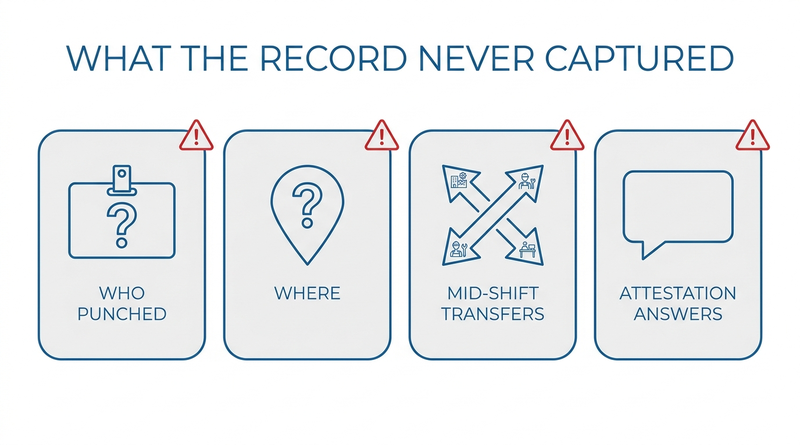
Grievances rarely turn on the data UKG stores. They turn on context the capture device never collected.
Who actually stood at the clock: a badge punch proves a badge was present, not a person, and identity is exactly what a buddy-punching or falsification dispute contests. Where the punch happened: a web punch from an unknown location cannot confirm the employee was on site for a call-back or off site for an unpaid period. What happened mid-shift: an unpaid transfer between jobs or a worked meal break generates no punch at all on a standard terminal, so the record is silent precisely where the grievance lives. And what the employee affirmed: without attestation capture, there is no contemporaneous answer to “did you take your full break today,” only recollections a year later.
Two administrative traps compound this. FLSA recordkeeping rules at 29 CFR Part 516 require payroll records kept three years and the time records behind them two — but grievance timelines under a CBA can reach further back than a team’s working reports do, and UKG Ready’s 365-day filtering window makes multi-year pulls a project rather than a report. And where employees work across related entities, the first fight is often which entity’s records even apply — the evidence problem behind multi-entity punch attribution.
What to Do Inside UKG First
Build the package the same way every time, before a specific grievance shapes it.
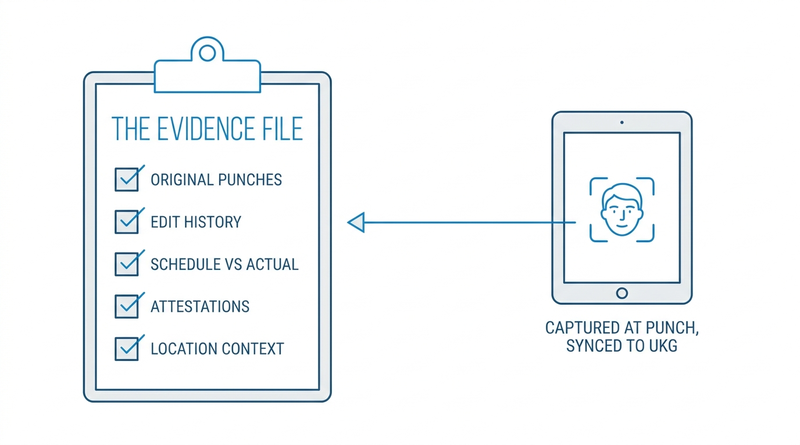
- Define a standard evidence set: original punches with capture method and device, full edit history with before-and-after values and editor identity, schedule versus actual for the period, pay rule outcomes, attestation responses where captured, and approvals.
- Export on a schedule, not on demand. A quarterly archive of punch-level data beats re-querying past the 365-day window under deadline, and it preserves what the record said before anyone had a reason to care.
- Reconcile the pay engine configuration against the CBA now — the CBA rule configuration work decides whether your records compute what the contract promises, which is half of most pay grievances.
- Document edit hygiene: reason codes on every timecard change, and a policy that supervisors annotate rather than overwrite. An edit trail full of unexplained changes reads badly no matter whose case is right.
- Treat the package as shared ground. Producing the same complete file to the union steward that you hand your own counsel is what audit-grade recordkeeping means, and it settles the settleable cases early.
Where Native Tools Run Out
Every item above assembles data that already exists. Nothing in the assembly step can add identity verification to a badge punch that happened two years ago, attach a location to a punch that never carried one, or produce the mid-shift transfer nobody recorded. Those are capture-time properties: the record either acquired them at the moment of work or it never will. This is the boundary where the evidence file stops being a reporting exercise, and it is the gap CloudApper AI TimeClock closes at the device.
What CloudApper AI TimeClock Adds to the Record
The boundary first: no time clock decides a grievance, and richer records serve whichever side the facts favor. That is their value — arbitration gets shorter when fewer facts are contestable.
CloudApper AI TimeClock runs on Android tablets and iPads and enriches each punch as it happens: facial recognition ties the punch to a person rather than a badge, geofenced punch locations tie it to a place, configurable attestation questions capture break and hours confirmations in the employee’s own answer at shift end, and custom forms record mid-shift job or cost center transfers that standard terminals never see. Every element is timestamped at capture and syncs to UKG Ready or UKG Pro WFM, so the evidence set in step one arrives already populated instead of reconstructed. For unionized environments, the same capture also enforces CBA-specific prompts — meal wave-offs, split-shift confirmations — so the contemporaneous record reflects the contract’s own questions.
Frequently Asked Questions
Q: What punch records does UKG keep for audits and grievances?
UKG preserves original punch timestamps, timecard edit history with the editor, timestamp, and before-and-after values, schedule data alongside actual worked time, and approval trails. Audit reporting in UKG Ready and UKG Pro WFM can reconstruct a timecard’s state at points in its history, which is the foundation of any grievance evidence package.
Q: How long do we have to keep time clock records under the FLSA?
Under 29 CFR Part 516, payroll records must be kept at least three years, and the supporting records they are computed from — including time cards and schedules — at least two years. Collective bargaining agreements and state law frequently require longer, so the CBA’s grievance look-back period should set your retention floor, not the federal minimum.
Q: Does UKG show who edited a timecard and when?
Yes. Timecard edits carry the editing user, the timestamp, and the values before and after the change. The quality of that trail depends on practice: edits entered with reason codes and annotations produce a record that explains itself, while unexplained overwrites invite exactly the dispute the trail exists to prevent.
Q: What should a time records package for a union grievance include?
Original punches with capture method and device, complete edit history with editors and reasons, schedule versus actual for the disputed period, the pay rule outcomes applied, attestation responses if captured, approvals, and a note recording when and how the data was exported. Assembling the same set every time keeps the package defensible and fast.
Q: Can punch records prove who actually clocked in?
Only if identity was verified at capture. A badge or PIN punch proves the credential was used, not who used it. Biometric verification such as facial recognition ties the punch to the person at the moment it happens, which is the difference between asserting identity and evidencing it in a falsification dispute.
Q: Does UKG Ready’s 365-day limit affect grievance research?
It affects how you prepare. Data older than the filtering window is harder to pull on demand, while grievance and arbitration timelines routinely reach back further. Scheduled exports of punch-level data — quarterly is common — keep the full look-back period available without a recovery project under deadline.
Every grievance that settles on the documents is one that never consumes an arbitration calendar, and the records that settle it were created long before anyone filed anything. If your punch data answers when but not who, where, or what was confirmed, see how CloudApper AI TimeClock captures identity-verified, location-aware, attestation-rich punches on tablets you already own and syncs them to UKG Ready and UKG Pro WFM at https://ukg.cloudapper.ai/affordable-ukg-kronos-time-clock/.




October 19, 2026
Nurse Mandatory Overtime Limits in UKG: Documenting Voluntary Overtime at Clock-Out
New York, Pennsylvania and Washington restrict mandatory overtime for nurses, which makes documented consent the key record. Learn how UKG Pro WFM and UKG Ready separate voluntary and mandated overtime, and how CloudApper AI TimeClock captures consent on an affordable unit tablet.

October 16, 2026
Heat Illness Recovery Breaks in UKG for Construction and Logistics Crews
State heat rules in California, Washington and beyond require cool-down breaks that payroll must be able to prove. Learn how UKG Ready and UKG Pro WFM track recovery periods, and how CloudApper AI TimeClock captures them on an affordable jobsite tablet that works offline.
October 15, 2026
PUMP Act Lactation Breaks in UKG: Tracking Them Without Breaking Meal Rules
Lactation breaks protected by the PUMP Act often show up as meal break exceptions in UKG. Learn what federal law requires, how to configure UKG Ready and UKG Pro WFM pay codes, and how CloudApper AI TimeClock records these breaks privately on an affordable tablet clock.

October 14, 2026
Enforcing Minor Work Hour Limits at the UKG Time Clock
Child labor hour limits are usually built into UKG schedules, but violations happen at the punch. Learn the federal rules for 14 to 17 year olds, how UKG Pro WFM and UKG Ready handle minor rules, and how CloudApper AI TimeClock adds age-based checks on an affordable tablet clock.