Mid-shift job transfer pay at union sites depends on each employee's step, not just the job. CloudApper extends UKG Pro WFM to look up the contract step rate for every transferred hour, write the correct rate back, and keep payroll matched to the agreement.



Table of Contents
Let’s say a Step 3 warehouse associate covers two hours as a forklift operator in the middle of a shift. Your union contract says those two hours pay the forklift operator’s Step 3 rate, not a flat forklift rate and not the associate’s usual rate. That is mid-shift job transfer pay at a union site, and it has to come out right on every shift. UKG Pro WFM already tracks who worked where, and Wage Step Progression for UKG from CloudApper extends that data so each transferred hour pays at the correct step rate without anyone checking a spreadsheet.
How Mid-Shift Job Transfers Work in UKG Pro WFM
UKG Pro WFM handles job transfers well. Employees can transfer at the clock, or a manager can add the transfer to the timecard. Either way, UKG splits the shift into blocks by job, so every hour sits under the job worked, including for multi-job employees and warehouse job transfers.

A UKG adjustment rule for job transfer then pays those hours at the rate you set for the job or location. When a job has one rate, you set it once, and everyone who works that job gets the same UKG transfer pay rate.
Why Union Wage Grids Change the Transfer Pay Math
Many union contracts do not set one rate per job. They set a rate for every job at every step, so the right pay depends on who does the work as well as what the work is. That is a union pay rate by job and step, and it is why mid-shift job transfer pay gets tricky. These grids come out of collective bargaining, and steps usually rise with hours worked or years of service, so two people on the same crew can sit on different steps. Each employee expects that progress to follow them into every job they cover. Transfers can take minutes or hours, so the lookup repeats throughout the pay period.
| Step | Associate | Forklift Operator |
|---|---|---|
| Step 1 | $18.00 | $20.50 |
| Step 2 | $19.25 | $21.75 |
| Step 3 | $20.50 | $23.00 |
Say a Step 1 employee and a Step 3 employee each work three transferred hours as forklift operators. The contract pays the first employee $61.50 and the second $69.00. The job and shift are the same, but the correct answers differ.
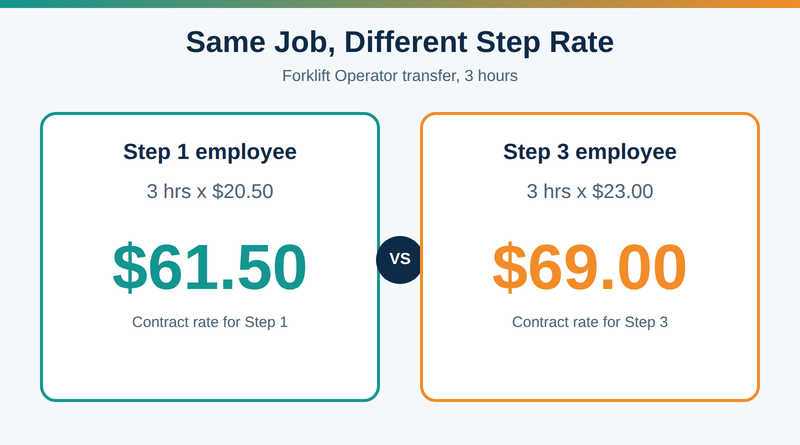
The trouble starts outside UKG. Step assignments often sit in spreadsheets, and payroll teams check transferred hours against the grid by hand every pay period. When a step change lands mid-period or a transfer slips through, employees get underpaid, grievances follow, and someone spends the next cycle calculating retro pay.
How CloudApper Extends UKG Pro WFM to Pay Transferred Hours at the Right Step Rate
CloudApper’s Wage Step Progression for UKG solution works alongside UKG Pro WFM as an additive layer, so your timekeeping setup stays as it is. It takes over the step lookups your team does by hand and makes mid-shift job transfer pay a rule that runs on schedule.
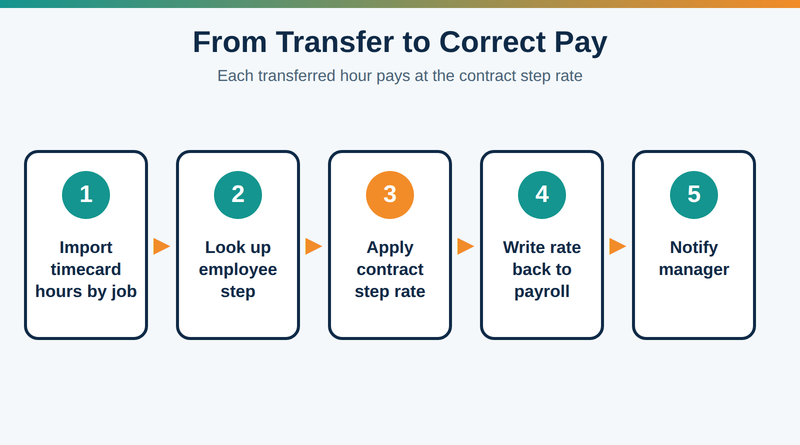
Pull employee steps and timecard data from UKG
The solution connects to UKG Pro WFM through secure REST APIs and imports employee records and timecard data automatically. That includes the hours each person worked in each job, so transferred hours arrive without exports or manual entry.
Map each job to its contract step rates
You load the contract’s wage grid once, with a rate for each job at each step. You can also set different rules by department or by bargaining unit. When a contract is ratified, you update the grid in one place.
Apply the matching step rate to each block of transferred hours
For every block, the workflow engine looks up the employee’s current step and the job they moved into, then applies the matching rate. The transferred hours step rate then writes back as the UKG Pro WFM job transfer rate, or goes to your connected payroll system, so the timecard matches the contract.
Move employees up a step and notify their managers
When someone crosses a step threshold, such as a set number of hours worked, the solution moves them to the next step and their transfer pay updates with it. Managers get a notification, and every change lands in a timestamped audit trail. If a step was missed, retroactive adjustments correct the pay.
Apply Your Contract’s Step Rates to Every Transferred Hour
Mid-shift job transfer pay should not depend on someone catching every step change in a spreadsheet. UKG Pro WFM already records where your people work, and Wage Step Progression for UKG applies your contract’s job and step rates to those hours automatically. Your payroll team gets time back, managers field fewer pay disputes, and employees see paychecks that match the agreement.
Contact us today to see how it runs with your own wage grid.



October 16, 2026
EMS Step Progression on UKG Pro: Automating Longevity Pay Without Bypassing the Wage Approval Trail
A 310-employee county ambulance district on UKG Pro runs two union step schedules, a graded professional structure and two longevity rates. CloudApper Step Progression now calculates every annual move, including promotions that keep earned longevity, and posts rates to UKG Pro where the existing wage approval workflow and audit trail take over.


September 2, 2026
Managing Multiple Local Bargaining Unit-Based Wage Increases in UKG
Managing multiple local bargaining unit-based wage increases in UKG gets complicated fast when contracts set different rates and milestones. The CloudApper AI Platform reads each hire date, applies the correct local's rule, and syncs the new rate into UKG automatically.

July 22, 2026
Running Different Step Progression Rules in UKG for Every Department Without the Complexity
Different departments often need different step progression rules in UKG, hours-based, tenure-based, or union step tables. See how CloudApper extends UKG with an automation layer that calculates each department's correct rule and syncs the result back, without HR losing control.

March 25, 2025
Simplifying Wage Progression Tracking with UKG Pro and CloudApper
A manufacturing company automated wage progression tracking using CloudApper and UKG Pro, improving payroll accuracy, efficiency, and compliance while enhancing employee satisfaction and freeing HR resources for strategic tasks.