Managing multiple local bargaining unit-based wage increases in UKG gets complicated fast when contracts set different rates and milestones. The CloudApper AI Platform reads each hire date, applies the correct local's rule, and syncs the new rate into UKG automatically.


Table of Contents
- TL;DR
- One Roster, Several Different Contracts
- Where It Actually Breaks
- How the CloudApper AI Platform Applies Each Local’s Terms Automatically
A new hire’s first raise shouldn’t depend on someone remembering which contract they’re under. But for employers managing wage increases across multiple local bargaining units within a single UKG instance, that’s exactly what it comes down to. One local’s agreement calls for a $0.75 increase after 45 days. Another calls for $1.25 after 120 days, with a seniority step layered on top. Same UKG instance, same HR team, two completely different clocks running for two completely different groups of employees and a payroll cycle that doesn’t wait for anyone to catch up. The CloudApper AI Platform for UKG closes that gap by automatically applying each bargaining unit’s terms and automating wage step progression, so HR isn’t tracking every local’s contract by hand.
TL;DR
- Multiple local bargaining units on one UKG instance usually means multiple different wage increase schedules, not one company-wide rule.
- The same job title can fall under different bargaining units by site or shift, so rules apply per employee, not per role.
- Manual spreadsheet tracking risks missed or wrong increases, which can trigger union grievances.
- The CloudApper AI Platform applies each bargaining unit’s rule automatically, based on each employee’s hire date in UKG.
- Calculated increases sync back into UKG Pro or UKG Pro WFM, with HR keeping override authority.
One Roster, Several Different Contracts
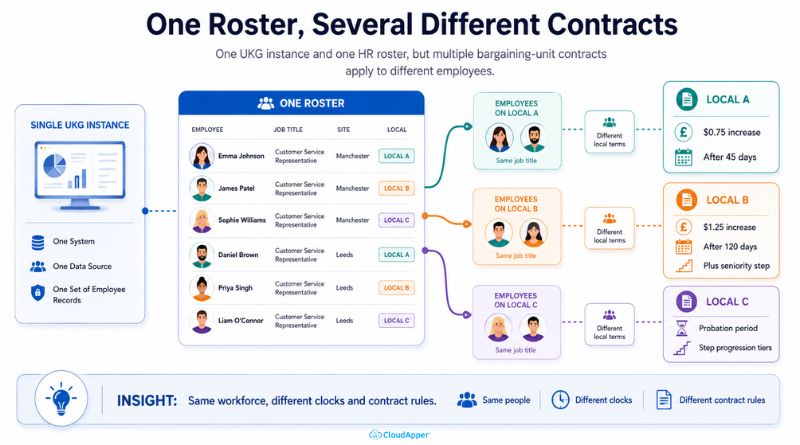
This isn’t a department-wise step progression problem. Two people in the same job title at the same site can be on entirely different wage schedules if they belong to different bargaining units: a common setup at employers who’ve absorbed multiple facilities, or where different crafts have been organized under different locals over time. Each contract sets its own trigger structure: some escalate on a flat day count, some on seniority tiers, some stack a probationary period before the clock even starts. UKG can run one progression rule cleanly. Running several concurrent, bargaining-unit-specific rule sets against overlapping groups of employees is where it starts to strain.
Where It Actually Breaks
The hard part usually isn’t the math on any single contract; it’s knowing which contract applies to which employee in the first place, especially when the same job classification falls under different agreements depending on the site or shift. In practice, that tracking tends to live entirely outside UKG: a spreadsheet listing hire dates, local assignments, and next-increase dates, maintained by whoever remembers to update it. When that tracker falls behind, or a new hire gets tagged to the wrong local, the result isn’t a quiet payroll fix. It’s a late or incorrect increase against a signed union contract, which is grievance territory, not just a correction.

How the CloudApper AI Platform Applies Each Local’s Terms Automatically
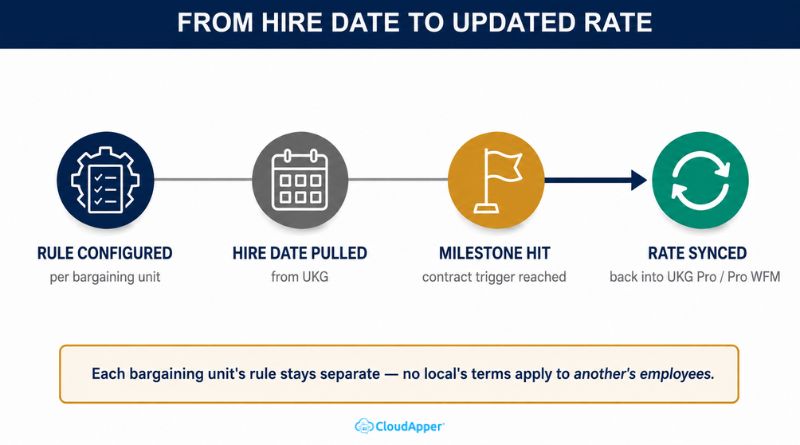
This is where the CloudApper AI Platform closes the gap. Organizations can configure each local’s wage progression rule directly in the platform: the trigger structure, the increase amount, any probationary period, or seniority tier specific to that contract. From there, the platform pulls each employee’s hire date straight from UKG, checks it against the rule for their assigned local, and calculates the new rate the moment that employee crosses their contract’s milestone. The update syncs back into UKG Pro or UKG Pro WFM automatically, so the system of record stays current without anyone re-entering a rate by hand. Every local’s terms exist as their own configured rule inside the platform, so one contract’s math never bleeds into another’s.
HR Still Owns the Contract
Automating the calculation doesn’t hand contract interpretation to software. HR and payroll can still review a calculated increase before it posts, and any override gets logged with a reason, which matters more here than in a non-union setting, since a misapplied term is a labor-relations question, not a payroll one. What has changed is that HR is no longer doing what it used to do manually: cross-checking a spreadsheet against every local’s terms and hoping nothing slips between pay cycles.
If your workforce spans more than one local bargaining unit on a single UKG instance, talk to the CloudApper team about mapping each unit’s wage increases directly against your UKG data.



October 16, 2026
EMS Step Progression on UKG Pro: Automating Longevity Pay Without Bypassing the Wage Approval Trail
A 310-employee county ambulance district on UKG Pro runs two union step schedules, a graded professional structure and two longevity rates. CloudApper Step Progression calculates every annual move, including promotions that keep earned longevity, and posts rates to UKG Pro, where the existing wage approval workflow and audit trail take over.


September 30, 2026
Mid-Shift Job Transfer Pay at Union Sites: Paying Transferred Hours at the Right Step Rate in UKG Pro WFM
Mid-shift job transfer pay at union sites depends on each employee's step, not just the job. CloudApper extends UKG Pro WFM to look up the contract step rate for every transferred hour, write the correct rate back, and keep payroll matched to the agreement.

July 22, 2026
Running Different Step Progression Rules in UKG for Every Department Without the Complexity
Different departments often need different step progression rules in UKG, hours-based, tenure-based, or union step tables. See how CloudApper extends UKG with an automation layer that calculates each department's correct rule and syncs the result back, without HR losing control.

March 25, 2025
Simplifying Wage Progression Tracking with UKG Pro and CloudApper
A manufacturing company automated wage progression tracking using CloudApper and UKG Pro, improving payroll accuracy, efficiency, and compliance while enhancing employee satisfaction and freeing HR resources for strategic tasks.