Every UKG Pro update is a risk if your customizations live inside the core. Learn how CloudApper AI Platform for UKG lets you extend UKG Pro with custom workflows, integrations, and automations that survive every update — without touching core configuration.


Table of Contents
- The Real Problem with Customizing UKG Pro
- What CloudApper AI Platform for UKG Actually Does
- Where the Gaps Show Up — and How CloudApper AI Platform for UKG Fills Them
- The Migration Anxiety Problem
- Frequently Asked Questions
- What UKG Customers Actually Say
- The Practical Takeaway
- Looking at UKG customization more broadly?
You can customize UKG Pro without breaking it on the next update by building custom logic outside UKG’s core and connecting to it, rather than modifying the platform itself. If you manage UKG Pro, you know the moment: a release note arrives, and you find out whether the custom approval workflow your HR director relies on still behaves as it should.

UKG Pro needs to fit your organization’s rules, workflows and integrations. But anything built inside the core is something you own through every patch, release and migration, and the more you build inside, the more there is to retest. CloudApper AI Platform for UKG is built around the alternative: extensions that sit alongside UKG and carry through updates.
The Real Problem with Customizing UKG Pro
When UKG customers talk about customization pain, a few patterns show up consistently.
First, getting something changed inside UKG typically means one of three things: submit a request to the community board and wait for it to collect enough votes to be prioritized, engage UKG professional services for a custom build — which takes time and money and still has to fit within the boundaries of what UKG will support — or build a workaround using spreadsheets and email chains that technically gets the job done but quietly taxes your HR team every pay cycle.
None of those options are fast. None of them are cheap. And the workaround option tends to compound over time.
Second, native customization inside UKG carries real risk. When you modify core configuration, you own that modification through every update cycle. UKG releases updates. Your custom logic may or may not survive them cleanly. The HR teams that have been through this once are usually the most reluctant to go back in.
Third — and this comes up constantly — reporting. A 2024 survey found 35% of HR professionals name enhanced reporting as their top software priority. UKG’s native reporting works, but it has limits when you need highly specific, cross-location, or role-specific data views.
These aren’t niche complaints. They’re structural realities of how enterprise HCM software is built. The question isn’t whether gaps exist — they always do. The question is how you fill them without creating new problems.
What CloudApper AI Platform for UKG Actually Does
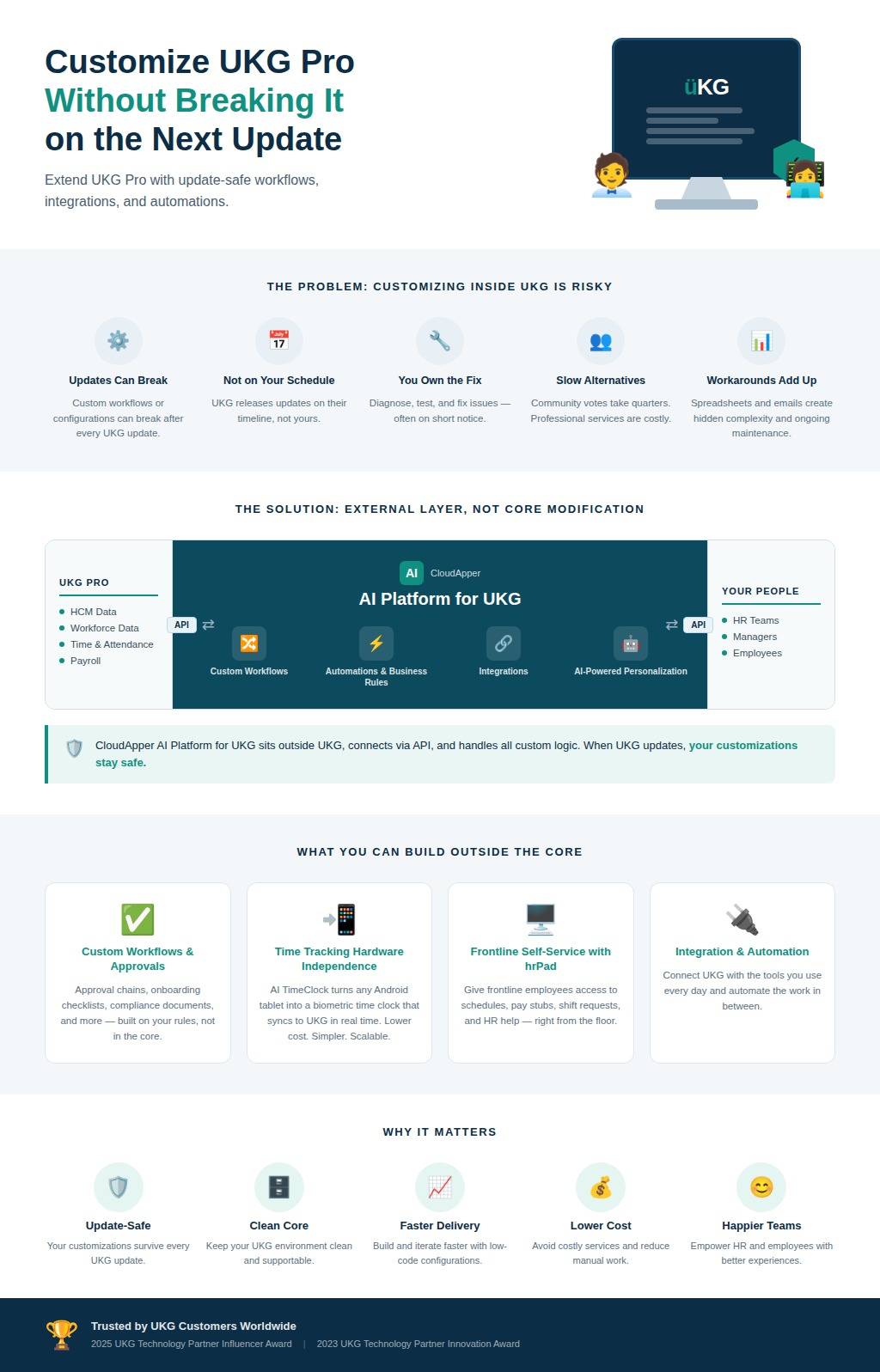
CloudApper AI Platform for UKG is an AI-native personalization layer that sits outside UKG — connecting to UKG Pro, Ready, and Pro WFM via API, and handling the workflows, automations, integrations, and custom applications that UKG doesn’t natively support.
Because CloudApper AI Platform for UKG operates outside UKG’s core, your UKG data stays clean. There’s no risk to your existing configuration. When UKG releases updates, your customizations don’t break. That architecture is worth pausing on: you’re not modifying UKG, you’re extending it. The difference matters enormously for organizations that have been burned by inside-the-core customizations before.
CloudApper AI Platform for UKG won the 2025 UKG Technology Partner Influencer Award and the 2023 UKG Technology Partner Innovation Award. That context matters less as a credential and more as an indicator that UKG customers are actively using it and finding it useful.
Where the Gaps Show Up — and How CloudApper AI Platform for UKG Fills Them
Time Tracking and Attendance
UKG handles time and attendance well at a general level. Where it gets complicated is in the exceptions — biometric requirements, multi-location punch rules, union-specific overtime logic, deskless workers who can’t access standard terminals.
CloudApper’s AI TimeClock for UKG turns any Android tablet into a biometric time clock that feeds directly into UKG. No proprietary hardware. No separate vendor relationship to manage. The data syncs back into UKG in real time. For organizations running dozens of sites, the cost difference between proprietary hardware and a managed tablet deployment is significant.
hrPad takes this further — it’s a self-service HR kiosk that gives frontline employees access to their schedules, pay stubs, shift requests, and HR queries directly from the floor. For workers who can’t sit at a desktop, that kind of access changes the employee experience materially.
Shift Management
Shift management is where UKG’s out-of-the-box configuration runs into the most organizational variation. Industries like healthcare, manufacturing, and hospitality have scheduling complexity that standard UKG workflow doesn’t always accommodate cleanly.
Shift bidding, swapping, and confirmation can all be automated through CloudApper AI Platform for UKG — reducing manual coordination by up to 90% in some deployments. Managers stop fielding swap requests by text. Employees get a structured, rule-governed process. UKG records stay accurate.
Shift optimization adds AI-driven scheduling logic on top of that — factoring in skills, seniority, compliance requirements, and availability to produce schedules that would take a manager hours to build manually.
Reporting and Analytics
This is where a lot of UKG customers feel the frustration most acutely. The data is in UKG. Getting it out in a format that’s actually useful to a specific manager, for a specific location, in a specific format — that’s where things break down.
Custom dashboards and reports built on CloudApper AI Platform for UKG let you configure role-specific data views without touching UKG’s core data model. A district manager for a retail chain sees regional headcount, labor costs, and schedule adherence across their locations. A shift supervisor sees their team’s attendance and open shifts. The data is the same. The view is different. That’s what personalization actually means at the reporting layer.
Recruiting
UKG Pro Recruiting is capable, but the recruiting workflow still requires significant manual effort — sourcing, screening, scheduling, follow-up. Many UKG customers are losing candidates to slower processes while competitors move faster.
AI Recruiter for UKG adds conversational AI to the recruiting funnel — QR code and SMS-based applications, AI-driven resume screening, automated interview scheduling, and candidate engagement workflows. The result is a materially shorter time-to-hire without replacing UKG Pro Recruiting. It works with it.
HCM Automation and Employee Self-Service
HCM automation through CloudApper AI Platform for UKG covers the operational layer that UKG doesn’t automate natively — custom approval workflows, compliance documentation, onboarding checklists, and the kind of repetitive HR administrative work that currently lives in inboxes and spreadsheets.
SMS-based employee self-service gives workers a way to interact with UKG via text message — checking balances, requesting time off, confirming shifts — without needing to log into a portal. For hourly and frontline populations, this reduces “how do I do this?” queries to HR significantly.
Third-Party Integration
Most organizations using UKG also use other systems — ERPs, payroll providers, scheduling tools, third-party benefits platforms. Getting data to move cleanly between those systems without manual exports is where a lot of hidden labor hides.
UKG integration via iPaaS handles this — connecting UKG to external systems through a managed integration layer that doesn’t require custom API development on your end. If you’ve ever managed a one-off integration between UKG and a benefits provider using CSV files and a shared mailbox, you know what this replaces.
The Migration Anxiety Problem
One issue that comes up repeatedly in the UKG ecosystem: organizations on UKG Ready that know they eventually need to move to UKG Pro WFM, but keep delaying because the prospect of rebuilding every customization they’ve accumulated is daunting enough to make the status quo look acceptable.
CloudApper AI Platform for UKG solves this cleanly. Because the personalization layer lives outside UKG rather than inside it, it migrates with you. The custom workflows, forms, and integrations you’ve built don’t need to be rebuilt when you upgrade. You carry them forward.
That’s a real answer to a real concern — not a theoretical one. Organizations that have spent years building out their UKG configuration have a legitimate reason to be cautious about anything that might disrupt it. CloudApper AI Platform for UKG doesn’t touch that configuration. It extends it.
Frequently Asked Questions
What is CloudApper AI Platform for UKG for UKG?
CloudApper AI Platform for UKG is an AI-native personalization platform that extends UKG Pro, Ready, and Pro WFM with custom workflows, automations, applications, and integrations — without modifying UKG’s core configuration.
Can I customize UKG without breaking my existing setup?
Yes, when customization is handled through CloudApper AI Platform for UKG. Because CloudApper AI Platform for UKG operates outside UKG via API, your core UKG configuration is never touched. UKG updates don’t affect your CloudApper AI Platform for UKG customizations.
What UKG products does CloudApper support?
CloudApper integrates with UKG Pro, UKG Ready, UKG Pro WFM (Dimensions), and UKG HRSD (WF Central).
How long does it take to deploy a CloudApper AI Platform for UKG customization?
Most CloudApper AI Platform for UKG solutions are deployed significantly faster than native UKG professional services engagements. CloudApper’s team handles build, delivery, and integration — organizations are typically live in weeks, not months.
Does CloudApper AI Platform for UKG replace UKG?
No. CloudApper AI Platform for UKG extends UKG. It adds capability without replacing the platform you’ve already invested in and configured.
What’s the difference between CloudApper AI Platform for UKG and UKG’s native customization tools?
UKG’s native customization requires working within UKG’s supported boundaries and typically involves UKG professional services or community board requests. CloudApper AI Platform for UKG operates as an external layer, which means faster delivery, more flexibility, and no risk to your UKG core when updates are released.
Can CloudApper AI Platform for UKG help with UKG Pro to UKG Ready migration (or vice versa)?
Yes. Because CloudApper AI Platform for UKG customizations live outside UKG, they transfer between UKG products without requiring a rebuild. This is one of the main reasons organizations use CloudApper AI Platform for UKG ahead of planned migrations.
What industries use CloudApper AI Platform for UKG for UKG personalization?
CloudApper AI Platform for UKG is used across healthcare, manufacturing, retail, education (including K-12 substitute management), hospitality, and finance — any industry where UKG is the HCM backbone but operational complexity exceeds what UKG natively handles.
What UKG Customers Actually Say
The feedback from UKG Aspire 2025 was consistent: customers kept saying “We didn’t know we could do all of this inside UKG — and so fast.”
That reaction — surprise at what’s possible combined with surprise at the speed — is what CloudApper AI Platform for UKG tends to produce. The expectation coming in is usually that any meaningful UKG customization requires a long engagement, a large budget, or both. CloudApper AI Platform for UKG changes that math.
The Practical Takeaway
UKG is doing its job. The gaps you’re dealing with aren’t failures of the platform — they’re just the space between a general-purpose HCM system and your organization’s specific operational reality.
Filling that space doesn’t require replacing UKG. It requires a personalization layer that can move fast, stay stable through updates, and handle the workflows that your HR team currently manages through workarounds.
That’s what CloudApper AI Platform for UKG is for.
Learn more about CloudApper AI Platform for UKG or explore all CloudApper solutions for UKG across time tracking, shift management, recruiting, and integration.
Looking at UKG customization more broadly?
This guide is specific to UKG Pro and update-safety. For the cross-edition view — extending UKG Pro, Ready, and Pro WFM without rebuilding core configuration — see UKG customization: how to extend UKG without rebuilding everything, or explore the UKG customization platform.



October 6, 2026
Union Vacation Accrual in UKG Pro: How Manager Self-Service Keeps Time-Off Approvals Contract-Compliant
Union contracts decide how vacation accrues and what managers may approve, yet approvals usually rely on the balance on screen. A unionized envelope and packaging manufacturer worked with CloudApper to apply CBA accrual rules inside UKG Pro manager self-service, ending manual workarounds and cutting union time-off payroll errors.

October 1, 2026
12-Month Pay for 10-Month Employees in UKG Ready: How a School-Based Nonprofit Automated Pay Spreading
A school-based services nonprofit pays ten-month staff over twelve months. Its pay spread lived in a fragile spreadsheet until CloudApper added a pay spread engine to UKG Ready that splits school-year earnings evenly across every pay period, recalculates mid-year changes automatically, and keeps summer paychecks predictable for staff.

September 25, 2026
Substitute Teacher Management in UKG Ready
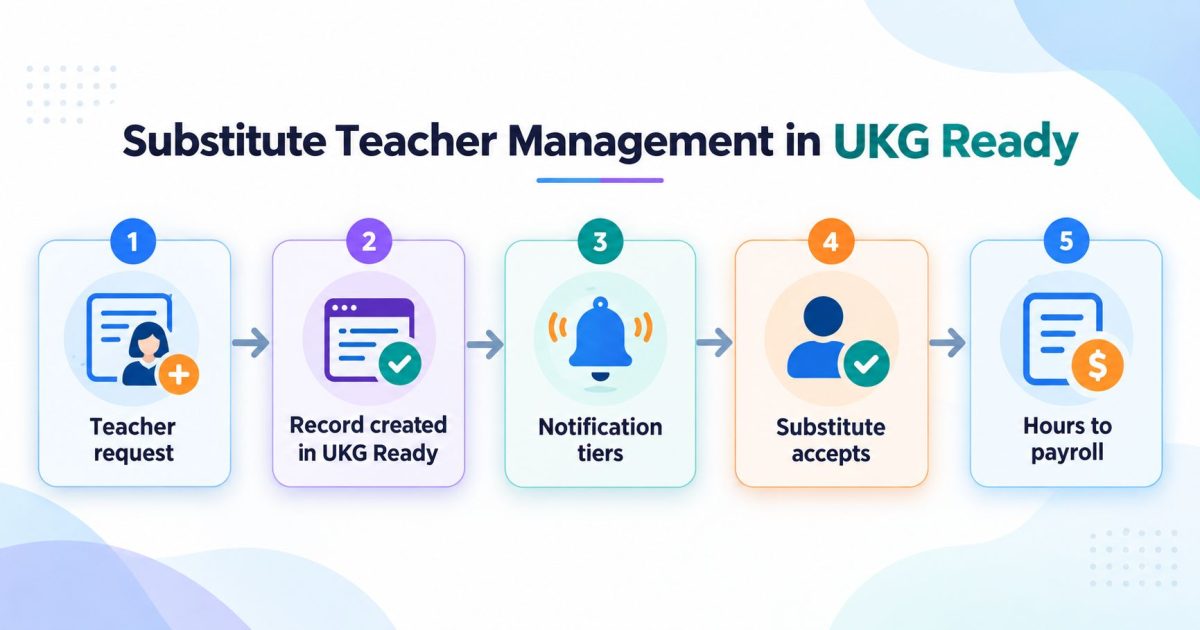
Substitute teacher management is the process of turning a staff absence into a covered classroom. In UKG Ready, the absence record and the approval rules already exist. What sits on top is the dispatch process: who gets asked, in what order, and how the hours reach payroll with the right code.

August 25, 2026
Manager Self-Service in UKG Pro Built for SOX: Why the Delegation Matrix Comes Before the Forms
Enterprises have automated parts of the workforce change process, but the parts are scattered across email, chat, the HCM and a ticket queue, so the control exists while its evidence does not. A national mortgage lender built SOX-audited manager self-service in UKG Pro by settling the delegation matrix before anyone designed a form.