Changing the time clock in a union workplace is a labor relations task as much as an IT one. This checklist shows UKG admins and HR leaders what to settle first: agreement review, frozen pay rules, steward briefings, biometric consent alternatives, and a one-site pilot.



Table of Contents
- What UKG Already Does for Union Rules
- Where a Clock Change Gets Contested
- What to Settle Before the First Tablet Ships
- Where Fixed Terminals Run Out for Union Sites
The first question from the union side of the table will not be about cost. It will be: “What else changes?” If your answer to that is vague, a hardware swap turns into a bargaining dispute. A rollout of CloudApper AI TimeClock, the iPad and tablet layer that syncs with UKG Ready and Pro WFM, goes smoothly in a union shop only when that answer is precise before the first tablet is mounted.
What UKG Already Does for Union Rules
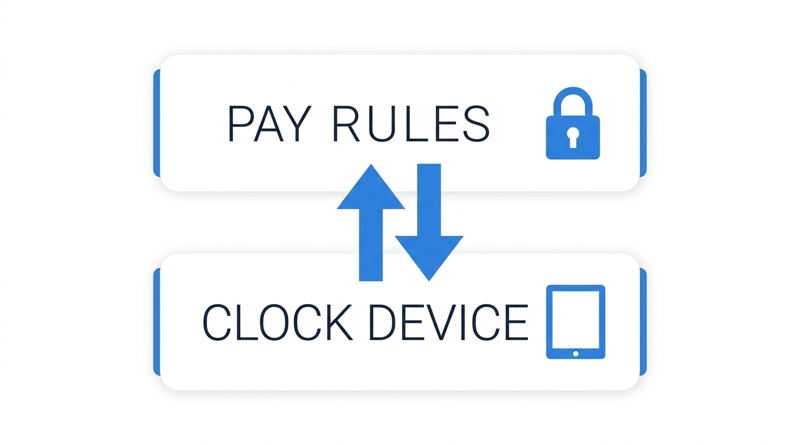
UKG Ready and Pro WFM hold your pay rules, accruals, and CBA configuration, and they apply them to every punch regardless of where it came from. The clock is a capture endpoint. As the CBA rule configuration guide explains, the pay engine does the heavy lifting, so a device change should leave those rules untouched.
Where a Clock Change Gets Contested
The device itself is rarely the dispute. Four other things are. Whether CBA language or past practice on timekeeping systems requires notice or bargaining. Informal practices attached to the old clocks, such as unwritten grace minutes or habitual missed punch forgiveness. Biometric consent and privacy, which vary by state and province, as the Illinois BIPA guide shows. And whether punch data will be used for discipline. This article is a practitioner checklist, not legal advice, so confirm obligations with labor counsel.
What to Settle Before the First Tablet Ships
- Agreement review: read the timekeeping clauses and past practice with labor counsel, then decide whether to notify or bargain.
- Rule freeze: keep rounding, grace periods, and pay rules identical, so the change is a device change and nothing more.
- Informal practices: list them. If a practice will end because capture becomes more accurate, say so and negotiate an explicit replacement.
- Steward briefing: demo the kiosk to stewards before any pilot, and share how punch data will and will not be used.
- Consent and alternatives: document biometric consent and offer a non-biometric path.
- Evidence: confirm the audit trail meets the standard in the union grievance evidence file guide.
Then run one site as a pilot with agreed pass marks, and have your UKG admin follow the integration validation steps first.
Where Fixed Terminals Run Out for Union Sites
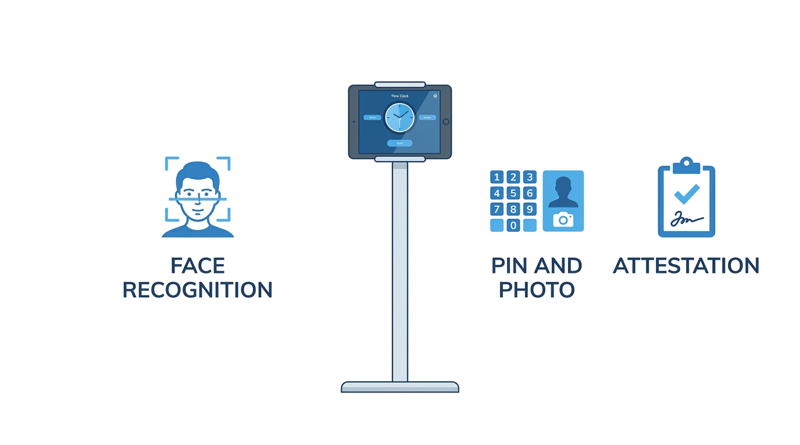
Union sites often need an alternate credential for members who decline biometrics, custom attestation prompts, or a visible record at the point of punch. Adding those to fixed terminals usually takes extra configuration and cost. That is where CloudApper AI TimeClock, an affordable iPad and tablet alternative to Intouch DX and other legacy Kronos clocks, becomes worth testing.
CloudApper AI TimeClock for Union Sites
CloudApper AI TimeClock runs on standard tablets at roughly 25% of the cost of traditional UKG clocking hardware, per CloudApper’s pricing comparison. It supports facial recognition, with PIN and photo verification as the alternative where biometrics are restricted or declined. It adds custom attestation prompts, offline capture with automatic sync, and employee self-service, and it posts punches into UKG Ready or Pro WFM under your existing rules.
Frequently Asked Questions
Q: Do you have to bargain before replacing a time clock in a union workplace?

Not automatically. Review the CBA and past practice with labor counsel, because the answer depends on the agreement and applicable law.
Q: Does changing the time clock change UKG union pay rules?
No. Pay rules and CBA configuration live in UKG Ready or Pro WFM, so keep them frozen during a device change.
Q: What if union members refuse biometric time clocks?
Offer a documented alternative such as PIN and photo verification. CloudApper AI TimeClock supports this alongside facial recognition.
Q: Should stewards see the tablet clock before the pilot?
Yes. A demo and a clear statement of how punch data is used remove most surprises before they become grievances.
Q: How should a union site pilot a new time clock?
Start with one site, freeze pay rules, and compare results against an agreed baseline for at least two pay cycles.
If you want to see how CloudApper AI TimeClock fits a union site on UKG, you can explore CloudApper AI TimeClock for UKG and book a demo.



October 30, 2026
Running Intouch DX Terminals and Tablet Time Clocks Side by Side in One UKG Environment
Replacing UKG clocking hardware does not have to happen on one date. This guide shows UKG admins how to run Intouch DX terminals and CloudApper AI TimeClock tablets side by side, with site-by-site move or hold rules, exception owners, and rollback triggers.

October 29, 2026
How to Baseline Your Missed Punch Rate in UKG Before You Buy Any Clock Hardware
Five people in payroll will give you five missed punch rates. This guide shows UKG admins and CFOs how to build one defensible baseline from expected punches, cause tags, and a 60-day window, and where CloudApper AI TimeClock fits if the data points to hardware.

October 28, 2026
The UKG Time Clock Pilot Memo: Success Criteria Your CFO and Admin Will Both Sign
A UKG time clock pilot succeeds or fails on criteria written before day one. This guide shows UKG admins and CFOs how to set scope, baseline, pass marks, and rollback triggers, and where CloudApper AI TimeClock fits as a tablet-based challenger beside existing UKG terminals.
October 27, 2026
Multilingual Time Clocks for UKG: Making Sure Workers Understand What They Attest To
An attestation is only as defensible as the employee's understanding of the question. Learn how UKG Pro WFM and UKG Ready handle languages, where custom prompts fall short, and how CloudApper AI TimeClock delivers multilingual attestation on affordable tablets.