Five people in payroll will give you five missed punch rates. This guide shows UKG admins and CFOs how to build one defensible baseline from expected punches, cause tags, and a 60-day window, and where CloudApper AI TimeClock fits if the data points to hardware.



Table of Contents
- What UKG Already Reports
- Where the Number Goes Wrong
- Build the Baseline Inside UKG
- Where the Baseline Points Beyond Your Current Terminals
Ask five people in your payroll meeting for the missed punch rate and you will hear five numbers. The timekeeper counts corrections, the CFO counts employees, and the UKG admin counts whatever the report returned last Tuesday. Until one number is agreed, no one can say whether a hardware change would help, including a move to CloudApper AI TimeClock, the tablet layer that syncs punches into UKG Ready and Pro WFM.
What UKG Already Reports
UKG Ready documentation describes a Missing Punches report that returns the employee, the date, and the missing start or end time for any period you select. Timesheet change requests and timecard audit trails show who fixed what afterward. The missed punch report walkthrough covers the mechanics, so this article covers the part that comes after: turning the output into a rate.
Where the Number Goes Wrong
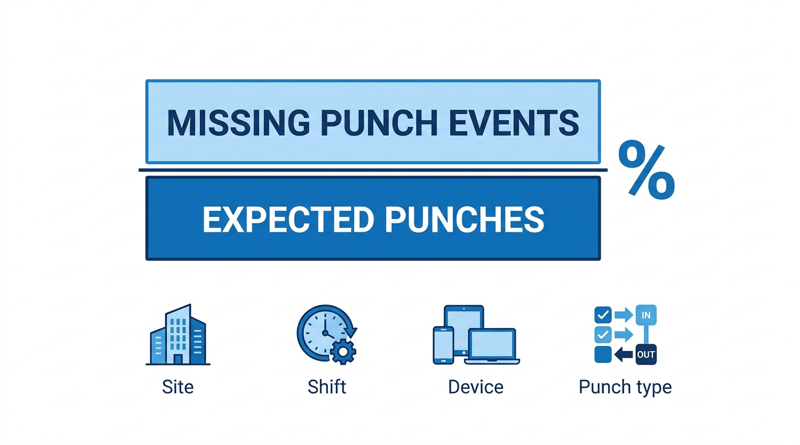
Three errors show up most often. The denominator is employees or shifts instead of expected punches. Corrected punches drop out of the count, so good HR cleanup hides the workload you are trying to measure. And the result blends every cause into one figure: a device that was offline, a credential that failed to read, a supervisor override, and a worker who simply forgot. A missed punch policy can fix the last cause. It cannot fix the first two.
Build the Baseline Inside UKG
- Window: 60 days, enough to span several pay cycles and at least one schedule change.
- Denominator: expected punches. Two hundred employees on five shifts a week with two punches each, over 8.5 weeks, is about 17,000.
- Numerator: every missing punch event, whether or not it was corrected later.
- Segments: site, shift, clock or punch method, and punch type (start, end, meal, transfer).
- Cause tag: device or network down, credential read failure, supervisor override, employee behavior.
- Cost: misses multiplied by minutes spent correcting each one gives adjustment hours a CFO can paste into a model.
Cross-check a sample against timecards using the UKG time audit steps before the number goes anywhere.
Where the Baseline Points Beyond Your Current Terminals
If misses cluster by supervisor or shift, fix the process in UKG first. If they cluster at specific clocks, remote sites, or offline windows, hardware is part of the answer. That is the point where an iPad or tablet option such as CloudApper AI TimeClock, an affordable alternative to Intouch DX and other legacy Kronos clocks, earns a test.
What CloudApper AI TimeClock Changes in the Baseline
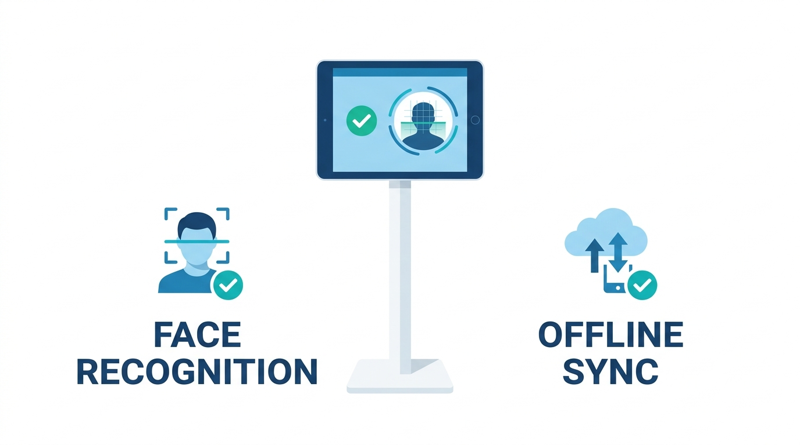
CloudApper AI TimeClock targets the causes UKG process settings cannot reach. Facial recognition addresses credential read failures. Offline punch buffering with automatic sync addresses network gaps. It runs on tablets you buy off the shelf, at roughly 25% of the cost of traditional UKG clocking hardware, per CloudApper’s pricing comparison. Run the same baseline during a single-site pilot, then take both numbers into the CFO ROI case.
Frequently Asked Questions
Q: How do you calculate a missed punch rate in UKG?

Divide missing punch events by expected punch events for a fixed period, then multiply by 100. Segment the result by site, shift, device, and punch type.
Q: What is a good baseline period for missed punches?
Sixty days works for most employers because it spans several pay cycles. There is no universal acceptable rate, so your own baseline is the benchmark.
Q: Should corrected punches count as missed punches?
Yes. A corrected punch was still missed at the time clock, and removing it hides the correction workload.
Q: Where is the missed punch report in UKG Ready?
Run the Missing Punches report for your chosen date range. It lists each employee, date, and missing start or end time.
Q: How do you tell hardware misses from process misses?
Tag each miss with its cause and compare clusters. Misses tied to specific devices, sites, or outages point to hardware, and misses tied to supervisors or shifts point to process.
If you want to see how CloudApper AI TimeClock performs against your own baseline, you can explore CloudApper AI TimeClock for UKG and book a demo.




October 30, 2026
Running Intouch DX Terminals and Tablet Time Clocks Side by Side in One UKG Environment
Replacing UKG clocking hardware does not have to happen on one date. This guide shows UKG admins how to run Intouch DX terminals and CloudApper AI TimeClock tablets side by side, with site-by-site move or hold rules, exception owners, and rollback triggers.

October 28, 2026
The UKG Time Clock Pilot Memo: Success Criteria Your CFO and Admin Will Both Sign
A UKG time clock pilot succeeds or fails on criteria written before day one. This guide shows UKG admins and CFOs how to set scope, baseline, pass marks, and rollback triggers, and where CloudApper AI TimeClock fits as a tablet-based challenger beside existing UKG terminals.
October 27, 2026
Multilingual Time Clocks for UKG: Making Sure Workers Understand What They Attest To
An attestation is only as defensible as the employee's understanding of the question. Learn how UKG Pro WFM and UKG Ready handle languages, where custom prompts fall short, and how CloudApper AI TimeClock delivers multilingual attestation on affordable tablets.
October 26, 2026
California Seventh Consecutive Day Overtime in UKG: Flagging It at Clock-In
California pays premium rates on the seventh consecutive workday in a workweek, even when total hours stay at 40. Learn how UKG Pro WFM and UKG Ready calculate it, why the cost decision happens before the punch, and how CloudApper AI TimeClock flags it at clock-in.
