California pays premium rates on the seventh consecutive workday in a workweek, even when total hours stay at 40. Learn how UKG Pro WFM and UKG Ready calculate it, why the cost decision happens before the punch, and how CloudApper AI TimeClock flags it at clock-in.


Table of Contents
- How California’s Seventh-Day Rule Works
- What UKG Handles Natively
- Where the Friction Shows Up
- What to Fix Inside UKG First
- Where the Punch Becomes the Last Checkpoint
- CloudApper AI TimeClock for Seventh-Day Control
- Frequently Asked Questions
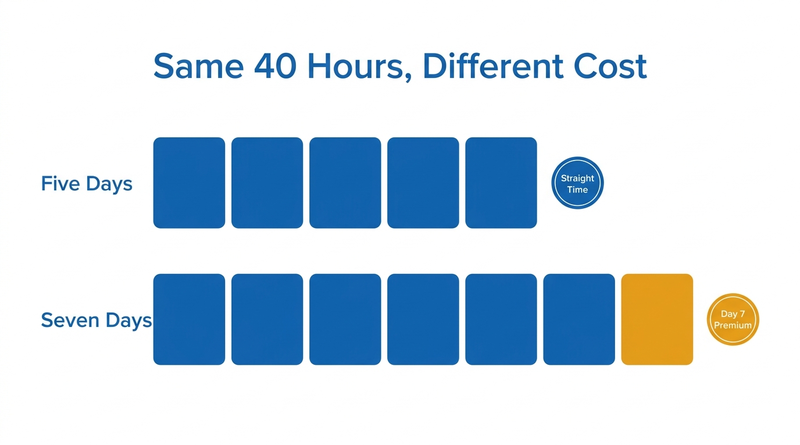
Two cashiers at the same California store each worked 40 hours this week. One worked five eight-hour days at straight time. The other spread those hours across seven days and earned premium pay. California seventh day overtime pays time-and-a-half for the first eight hours on the seventh consecutive workday, and UKG calculates it after the fact. The cheaper moment to catch it is clock-in, on a CloudApper AI TimeClock tablet.
How California’s Seventh-Day Rule Works
California Labor Code Section 510 requires time-and-a-half for the first eight hours worked on the seventh consecutive day in a single workweek, and double time for hours beyond eight that day. This sits alongside daily overtime after eight hours and double time after twelve. In Mendoza v. Nordstrom (2017), the California Supreme Court held that the day of rest is measured by workweek, not any rolling seven days, and that an employer may not cause an employee to forgo it, though a fully informed employee may choose to work.

What UKG Handles Natively
UKG Pro WFM and UKG Ready support California pay rules well, including daily overtime, double time and consecutive-day overtime tied to the workweek. Once configured, the premium calculates automatically, as this guide to configuring overtime rules in UKG explains.
Where the Friction Shows Up
The cost decision happens before the calculation. A seventh day usually appears through a pickup or a last-minute shift swap, not the published schedule. By the time UKG calculates the premium, the shift has already been worked. Managers also need a record that a seventh day was the employee’s informed choice, which Mendoza makes relevant.
What to Fix Inside UKG First
Confirm each California location uses a fixed workweek that matches its scheduling and pay rules. Set scheduling rules to flag a seventh consecutive day before the schedule posts, and route swaps that create one through manager approval. Add an attestation question confirming that working a seventh day was voluntary.
Where the Punch Becomes the Last Checkpoint
Unplanned seventh days still reach the clock, where a warning gives managers one more chance to approve or redirect the shift. Adding InTouch DX terminals across every California store is the direct native route, and for multi-store retailers the cost of more dedicated terminals is often what limits coverage. CloudApper AI TimeClock fits here as a tablet option at roughly 25% of the cost of traditional UKG clocking hardware.
CloudApper AI TimeClock for Seventh-Day Control
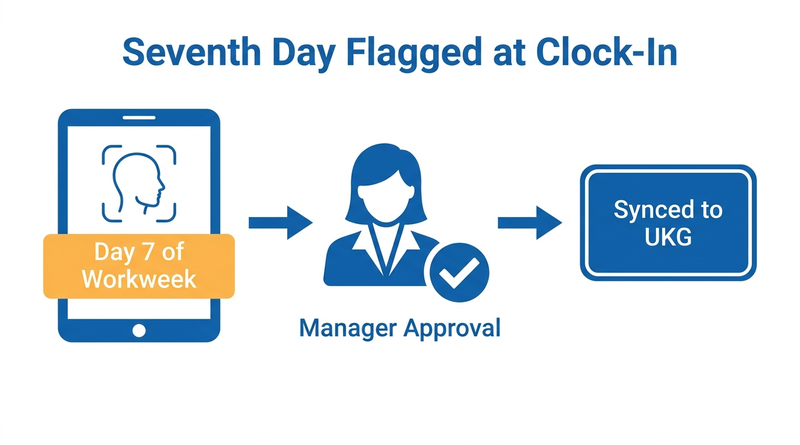
CloudApper AI TimeClock turns any Android tablet or iPad into a biometric time clock that syncs directly with UKG Ready and UKG Pro WFM. At clock-in, it can tell an employee and manager that the punch starts a seventh consecutive day, require approval, and capture a voluntary-choice attestation. It can also restrict punches by schedule and support broader efforts to reduce unplanned overtime. Multi-state employers can compare the rolling-window approach in the Illinois One Day Rest in Seven Act.
Frequently Asked Questions
Q: How is seventh-day overtime calculated in California?
Under Labor Code Section 510, the first eight hours on the seventh consecutive workday in a workweek are paid at time-and-a-half, and hours beyond eight that day are paid at double time.
Q: Does the seventh day have to be in the same workweek?
Yes. In Mendoza v. Nordstrom (2017), the California Supreme Court held that the seventh consecutive day is measured within the employer’s defined workweek.
Q: Can an employee choose to work seven days in a row in California?
Yes. An employer may not cause an employee to forgo a day of rest, but a fully informed employee may choose to work the seventh day.
Q: Does UKG calculate California seventh-day overtime?
Yes. UKG Pro WFM and UKG Ready can be configured with consecutive-day overtime rules tied to the workweek, so the premium calculates automatically.
Q: How can a time clock prevent unplanned seventh-day overtime?
CloudApper AI TimeClock can warn employees and managers at clock-in when a punch starts a seventh consecutive day and require approval before the shift begins.
If seventh-day premiums show up only after payroll runs, see how CloudApper AI TimeClock flags them at clock-in on a UKG-connected tablet at the CloudApper AI TimeClock for UKG page.



October 23, 2026
New York Spread of Hours Pay in UKG: Catching the 10-Hour Span Before Payroll Does
New York owes an extra hour of pay when a workday spans more than 10 hours or includes a split shift. Learn how UKG Pro WFM and UKG Ready calculate the premium, why missed split-shift punches hide it, and how CloudApper AI TimeClock keeps punches accurate on affordable tablets.
October 22, 2026
Illinois One Day Rest in Seven Act: Configuring UKG for Meal and Seventh-Day Rest Rules
Since 2023, Illinois requires 24 hours of rest in every rolling seven-day period and earlier, more frequent meal periods. Learn how UKG Pro WFM and UKG Ready can enforce ODRISA rules, and how CloudApper AI TimeClock adds seventh-day and meal checks on an affordable tablet.
October 19, 2026
Nurse Mandatory Overtime Limits in UKG: Documenting Voluntary Overtime at Clock-Out
New York, Pennsylvania and Washington restrict mandatory overtime for nurses, which makes documented consent the key record. Learn how UKG Pro WFM and UKG Ready separate voluntary and mandated overtime, and how CloudApper AI TimeClock captures consent on an affordable unit tablet.

October 16, 2026
Heat Illness Recovery Breaks in UKG for Construction and Logistics Crews
State heat rules in California, Washington and beyond require cool-down breaks that payroll must be able to prove. Learn how UKG Ready and UKG Pro WFM track recovery periods, and how CloudApper AI TimeClock captures them on an affordable jobsite tablet that works offline.