Seasonal ramps break biometric enrollment two ways at once: one station cannot capture hundreds of new hires, and the rush is exactly when consent forms get skipped. What UKG handles natively, the sequencing that protects the audit file, and why enrollment stops being a queue when it stops being a station.



Table of Contents
- What UKG Handles Natively
- Where the Friction Shows Up
- What to Do Inside UKG First
- Where Native Tools Run Out
Biometric time clock enrollment is the step most seasonal hiring plans leave out, and it is where a busy orientation day usually stalls. Orientation starts at eight. By nine, forty new hires have signed handbooks, collected vests and met their supervisors. Then the group lines up at the time clock, one at a time, for template capture, and the schedule falls apart, because enrollment is a per-person transaction at the device and there is exactly one device.

The queue is the visible problem, and the cheaper one. The expensive problem is what gets skipped to keep the line moving. Organizations enrolling on tablet kiosks with CloudApper AI TimeClock structure the week differently, but the two constraints below apply to every UKG environment regardless of hardware.
What UKG Handles Natively
UKG’s enrollment tooling is solid and worth using fully. Employees are enrolled at the terminal or managed through People Editor in UKG Ready and UKG Pro WFM, badge and PIN alternatives exist for anyone not using biometrics, and the consent prompt at the device lets an employee decline — which deletes the template rather than capturing it. The web clock and mobile entry provide punch paths that work before any enrollment has happened at all, and the standard enrollment procedure is well documented.
None of that is the gap. The gap is that all of it was designed around steady-state hiring — a few people a week — and a ramp is not steady state.
Where the Friction Shows Up
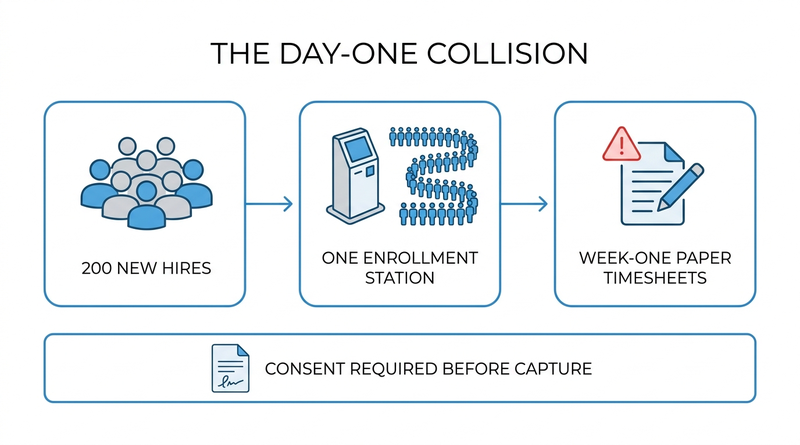
Two constraints collide in the same week.
The first is throughput. Enrollment is serial: one person, one station, one capture at a time. A site with two hundred seasonal starts and one terminal spends its first payroll cycle on temporary badges, paper sign-in sheets, and supervisor attestations, and payroll inherits the reconciliation. Shared temporary badges also mean the season opens with exactly the buddy-punching exposure biometrics were bought to close.
The second is the one that follows the organization home after the season. Illinois BIPA requires informed written consent before a biometric identifier is collected — not after, not batched at week’s end. A consent form that got skipped to keep the orientation line moving is not a paperwork gap; it is a per-person statutory violation, and the same time pressure that skips consent also skips the retention planning. Seasonal workers leave in January, and their templates need a deletion schedule that actually executes — the same discipline that applies when retiring clocks and purging templates at hardware end of life. The BIPA consent requirements and the broader state biometric privacy landscape do not have a busy-season exception.
What to Do Inside UKG First
- Pre-provision before day one. Employee records, badge numbers, and profiles created the week prior, so enrollment day is capture only, not data entry.
- Put the biometric consent packet inside the onboarding paperwork, signed before anyone stands in front of a clock. Consent is a hiring document, not a time clock step.
- Stagger capture across orientation cohorts instead of processing everyone on start day. Twenty per session absorbs cleanly; two hundred does not.
- Enable the web clock or mobile punch as the bridge for unenrolled starters, so week one produces real punch data instead of paper.
- Write the season-end deletion schedule now — who deletes templates, when, and where the confirmation is recorded — while Legal is already reviewing the consent language. It is the same review, and January-you will not do it under pressure any better than October-you.
Staffing-heavy environments already run a version of this: the staffing agency time and attendance pattern treats enrollment and separation as a continuous cycle rather than an annual event.
Where Native Tools Run Out
Everything above still leaves the serial-capture constraint standing. Proprietary terminals make enrollment parallelism a capital question: more simultaneous capture points means more devices at proprietary hardware prices, purchased for a peak that lasts six weeks. That math rarely survives the CFO, so most sites run the ramp through one station and eat the queue — and this is precisely the constraint CloudApper AI TimeClock removes, because capture points stop being capital.
How CloudApper AI TimeClock Changes Ramp Math
Two boundaries first. Consent remains an employer process — no device collects a lawful biometric template from someone who has not signed, and the written policy, the release, and the deletion schedule stay yours. And UKG remains the system of record; enrollment feeds it, nothing replaces it.
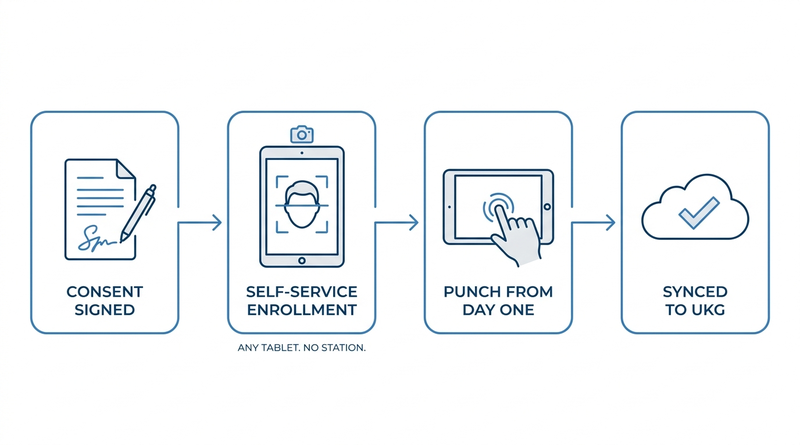
What changes is the shape of enrollment. CloudApper AI TimeClock runs on any Android tablet or iPad, and face enrollment is a self-service, selfie-style capture at the device — no proprietary enrollment station, no admin standing at a terminal per person. Because the clock is software on tablets the organization already owns or can buy at commodity prices, a site can stand up as many capture points as the orientation schedule needs — the same tablet-based clock-in setup used for daily punching — and fold them back into normal duty after the ramp. Custom forms at the device can present and record the consent acknowledgment as part of first punch, giving the audit file a timestamped record alongside the template. Enrollment stops being a line because it stops being a station, and every punch from day one syncs to UKG Ready or UKG Pro WFM.
Frequently Asked Questions
Q: How do you enroll employees on a UKG biometric time clock?
In a standard UKG environment, enrollment happens at the terminal — the employee’s finger or face template is captured at the device — with the employee record managed through People Editor in UKG Ready or UKG Pro WFM. It is a per-person, at-the-device process, which is why high-volume hiring needs a capture plan rather than a walk-up line.
Q: Can employees enroll themselves on a biometric time clock?
On tablet-based clocks such as CloudApper AI TimeClock, yes: face enrollment is a self-service, selfie-style capture at the kiosk, completed in seconds without an administrator at the device. Proprietary terminals generally require staffed enrollment, which is what creates the day-one queue during seasonal ramps.
Q: Do seasonal employees need to sign a biometric consent form?
In states with biometric privacy statutes, yes, and timing matters: Illinois BIPA requires informed written consent before the identifier is collected. Seasonal status changes nothing. The cleanest approach is putting the consent packet inside onboarding paperwork so it is signed before the employee ever reaches a clock.
Q: What happens to biometric data when the season ends?
Templates of separated seasonal workers fall under your written retention and destruction policy — under BIPA, destruction when the purpose is satisfied or within three years of last interaction, whichever is first. Set the deletion schedule during the ramp, assign an owner, and record confirmations, because January is when this obligation is most commonly forgotten.
Q: How many enrollment stations do we need for a seasonal ramp?
Enough that capture keeps pace with orientation cohorts rather than start dates. On proprietary hardware that is a capital purchase for a six-week peak; on tablet-based clocks it is a scheduling decision, since any tablet running the clock can capture enrollments and return to duty as a regular punch station afterward.
Q: Can new hires clock in before biometric enrollment is done?
Yes. UKG’s web clock and mobile entry capture real punches without biometric enrollment, and badge or PIN paths work at terminals. Use those as the sanctioned bridge for unenrolled starters — paper sign-in sheets and shared temporary badges recreate the time theft and reconciliation problems the biometric clock was meant to end.
A ramp plan that covers requisitions, orientation rooms, and vest sizes but not template capture and consent sequencing is a plan with a queue in it. If your enrollment math still assumes one station per site, see how self-service face enrollment on CloudApper AI TimeClock scales capture points with the hiring curve and syncs every punch to UKG Ready and UKG Pro WFM at https://ukg.cloudapper.ai/affordable-ukg-kronos-time-clock/.




October 16, 2026
Heat Illness Recovery Breaks in UKG for Construction and Logistics Crews
State heat rules in California, Washington and beyond require cool-down breaks that payroll must be able to prove. Learn how UKG Ready and UKG Pro WFM track recovery periods, and how CloudApper AI TimeClock captures them on an affordable jobsite tablet that works offline.
October 15, 2026
PUMP Act Lactation Breaks in UKG: Tracking Them Without Breaking Meal Rules
Lactation breaks protected by the PUMP Act often show up as meal break exceptions in UKG. Learn what federal law requires, how to configure UKG Ready and UKG Pro WFM pay codes, and how CloudApper AI TimeClock records these breaks privately on an affordable tablet clock.
October 14, 2026
Enforcing Minor Work Hour Limits at the UKG Time Clock
Child labor hour limits are usually built into UKG schedules, but violations happen at the punch. Learn the federal rules for 14 to 17 year olds, how UKG Pro WFM and UKG Ready handle minor rules, and how CloudApper AI TimeClock adds age-based checks on an affordable tablet clock.
October 13, 2026
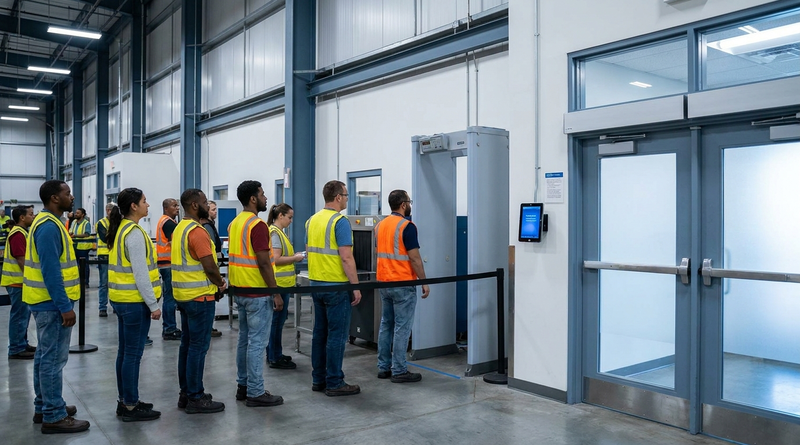
Security Screening and Bag Check Time in UKG: Where Post-Shift Minutes Become Payable
Exit bag checks and security screening can be paid time under California and Pennsylvania law. Learn how UKG Ready and UKG Pro WFM handle screening time, what to configure first, and how CloudApper AI TimeClock places an affordable tablet clock past every checkpoint.