A large food producer on UKG Pro handles about 75 internal transfers a week. CloudApper automates the position defaults behind each move, including comp codes, cost centers, standard hours and union codes, through the UKG Pro API, and HR now owns and updates the rules without a database request.



Table of Contents
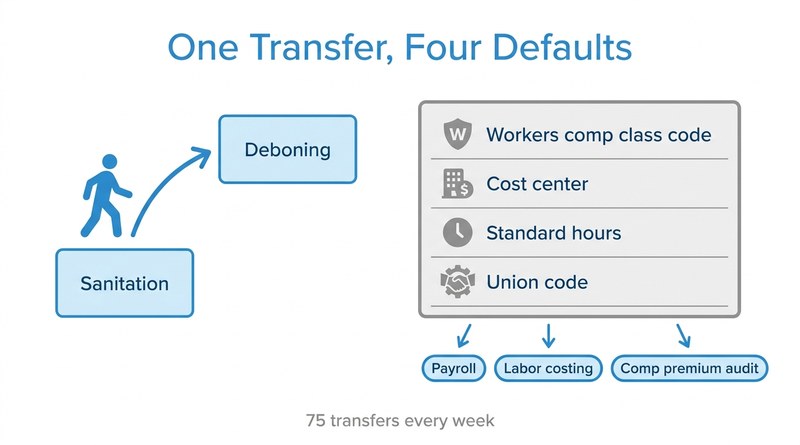
In a food processing plant, a job change is never just a title change. When a line worker moves from sanitation to deboning, or a lead steps up to supervisor, the job record behind that move decides which workers’ comp class code the hours fall under, which cost center absorbs the labor, what the standard hours are and which union contract governs the pay. Get one of those defaults wrong and the error does not stay in HR. It shows up in payroll, in labor costing and in the next premium audit.

A large food production company moving to UKG Pro processes about 75 of these internal transfers every week across many union and job combinations. CloudApper now extends its UKG Pro position management by applying the defaults for each hire and transfer automatically, and the more important change is who controls them: HR sets and updates the rules, without a database request for each one.
Why Position Defaults Matter More in Food Production
The company’s previous HCM filled in job record defaults the moment someone was hired into a position. UKG Pro handles the same defaults through platform business rules configured job by job, which works well for stable structures. This producer’s structure is anything but stable. Union codes, cost center charges and comp classifications shift as lines are added, contracts are renegotiated and crews move between departments, and each change touches dozens of position combinations.
With 75 transfers a week, every one handled by hand meant an HR specialist looking up the right comp code, cost center, standard hours and union code and keying them in. Every rule change meant a request to update the underlying business rules and a wait for it to land. According to the HR Systems Manager at the food production company, “Our HR group went back and they said we have at least 75 transfers a week and that’s just… internally.”
These are HR record transfers, not the punch-level moves covered in pieces like paying mid-shift job transfers at the right step rate. But the downstream effect is the same: if the job record is wrong, every hour worked under it inherits the error.
Rules Owned by HR, Applied Through the UKG Pro API
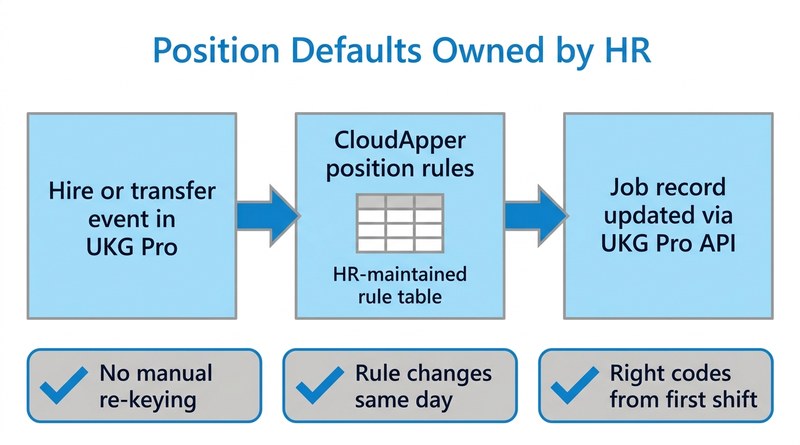
CloudApper built position-default automation as an extension of UKG Pro using the CloudApper AI for UKG Personalization layer. When a hire or transfer event occurs, CloudApper reads the target position, looks up the default set for that position, and writes workers’ comp code, cost center, standard hours and union code to the employee’s job record through the UKG Pro API. Data that needs to flow back to other systems moves through CloudApper iPaaS for UKG, the same pattern many teams use when keeping connected systems live through a move to UKG Pro.
“If there was a job that was triggered to run after somebody either was hired or transferred into a new job, another job would kick off to update all those key fields based on the job that the employee’s working.”
HRIS Lead, food production company
The defaults live in a rule table HR maintains. That does not make the process hands-off. HR still reviews the table when contracts, lines or comp classifications change, and every record update is visible in UKG Pro. What changed is that rule ownership sits with the people who understand the union and job structure, the same principle behind keeping union time-off approvals contract-compliant.
“We have to pivot quickly… We just don’t have that kind of time, especially when… there was a time where it was, I swear, every other month we bought a new company. So we need to be able to have the ability to do whatever we need to without opening projects.”
HR Systems Manager, food production company
What Payroll and Finance Noticed First
The 75 weekly manual transfer steps are gone, and HR no longer waits on database updates to change a default. The bigger effect showed up downstream. Payroll earnings now follow the correct union code from the first shift in the new job. Labor costs land in the right cost center without month-end reclassification. Workers’ comp hours are reported under the class code that matches the work, which keeps premium audit conversations short. It is the same reasoning that applies when UKG data feeds an ERP approval hierarchy: the system of record is only as good as the defaults applied at the moment of change.
The Takeaway for Manufacturers on UKG Pro
For organizations with union contracts, many cost centers and frequent internal moves, UKG Pro position management works best when the defaults behind each position are treated as rules HR owns, not settings someone re-enters on every transfer. CloudApper builds that layer on top of UKG Pro so the job record is right at the moment of the move and stays right as contracts and structures change.
If internal transfers in your UKG Pro environment still depend on someone keying the same defaults every week, talk to CloudApper about automating position defaults your HR team can own.



October 16, 2026
Public Holiday Substitution Rules Around the World: Why UKG Pro WFM Still Needs Manual Checks
New Zealand calls it Mondayisation, the UK calls it a substitute bank holiday, Canada calls it holiday pay in lieu, and the US calls it an observed holiday. Four names, four rules, and the same manual-check problem for global UKG Pro WFM deployments.

October 15, 2026
Health and Welfare Pay for Military Base Stores: How a Retailer Made Every H&W Hour Traceable in UKG
A national specialty retailer with stores on US military installations moved health and welfare pay out of spreadsheets. CloudApper now applies the 40-hour weekly cap, multi-store proration and employer cost recovery against UKG time data, posting H&W pay codes to each timecard with a trail back to the hours.

September 30, 2026
When Your Best Candidates Already Worked for You: How a 50,000-Employee Home Care Organization Automated Rehire Campaigns and Geographic Filtering in UKG Pro
A 50,000-employee home health care organization extended UKG Pro Recruiting with CloudApper AI Recruiter to add geographic zip-code filtering, automated rehire outreach campaigns for former employees, and blind-ranking — reducing recruiter workload and improving hiring quality at scale.

September 29, 2026
If Your HR Events Aren’t in Slack, They Don’t Exist: How a 260-Person HR Tech Company Connected UKG Ready to Where Work Actually Happens
A 260-person HR tech company with a Slack-first culture connected UKG Ready lifecycle events to Slack using CloudApper iPaaS — so new hires, promotions, and PTO approvals appear where the organization already pays attention.