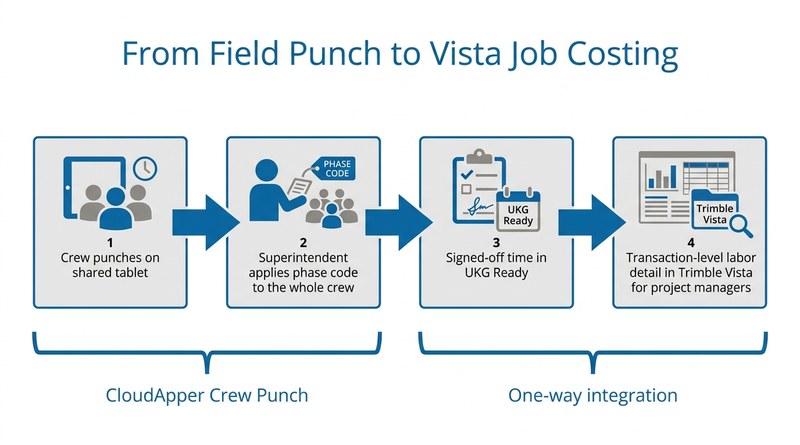
Concrete contractors need more than a payroll summary in Trimble Vista. CloudApper Crew Punch and hrPad capture crew punches and phase codes on shared tablets in the field, so the transaction-level labor detail that reaches Vista from UKG Ready starts clean and project managers can job cost by trade, crew and phase.



Table of Contents
For a large concrete contractor, getting transaction-level crew labor data from UKG Ready into Trimble Vista is what makes job costing by trade, crew and phase code possible. Its field crews work across active job sites with no fixed time clock terminals and unreliable connectivity, and phase codes change as a project moves from one stage to the next. A summary entry per pay period, totals rather than records by phase code, trade or crew member, tells project managers almost nothing. They live in Vista, and they need to see which trade spent how many hours on which phase, and whether a pour is running over budget. CloudApper’s part of that picture is field time capture on top of UKG Ready, so every crew member’s hours carry the right job and phase code from the moment of the punch.
Addressing the Punch Problem First
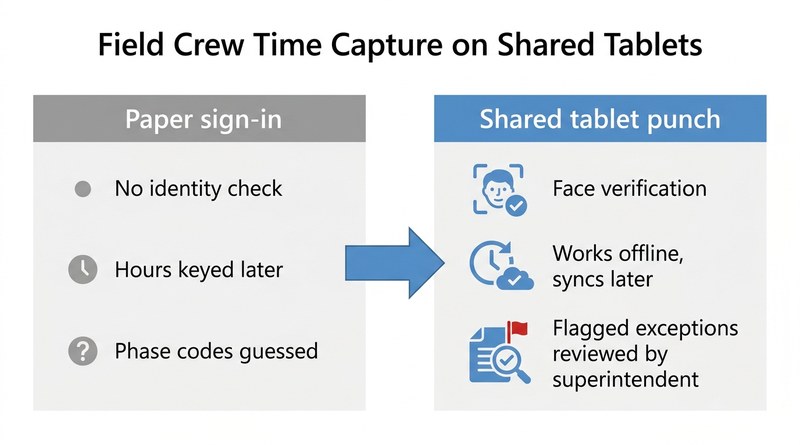
CloudApper hrPad turns shared tablets at each field location into time clocks, so crews clock in and out with facial recognition and no dedicated hardware or fixed kiosk mounting. The tablets move with the job as site layouts change and keep capturing punches offline when connectivity drops, syncing back to UKG Ready when the signal returns, the same approach that handles field time capture for crews working in locations with no reliable network access. With 30 or more people in a clock-in line, the punch completes even when face verification fails; the exception is flagged for the superintendent to review against the captured photo at day’s end, so the line keeps moving without giving up accountability.

The HR team is just as specific about the Vista side and whoever builds it. As one HR team member put it: “If there was someone who already on your team has worked with Vista before and the integrations with UKG and Vista… then we could already feel comfortable that that side of it is going to be in good shape.” Proven Vista integration experience, alongside UKG expertise, is the criterion the team weighs most heavily for that connection.
What Project Managers Actually Need in Their ERP
Accurate punch records in UKG Ready handle the payroll side. Getting that data to Vista in a usable form is the harder requirement.
A summary-level connection between UKG and Vista passes aggregated payroll totals, period summaries rather than the transaction-level detail a project manager needs to review labor actuals by phase code or trade. For a firm running several concurrent concrete jobs, that means daily production calls start without current labor figures in the hands of the people managing to budget. The situation mirrors how operations move operational field data into UKG timecards with full transaction fidelity. The direction reverses here, but the detail requirement is identical.
“I don’t want a summary entry. I want the detail… all the way flowing through into the job so that my project managers aren’t going into UKG to run reports. They’re going into Vista and they can still see all that detail in their reports.”
VP of Finance, large concrete construction firm
Finance has set clear guardrails for that connection: transaction-level records, including each employee’s hours, pay rate, pay and phase code, landing in Vista’s job cost, payroll and GL objects; employee data flowing one way from UKG Ready; nightly job and phase syncs with an on-demand push when a new phase is needed mid-week; and no back-writes from Vista. CloudApper iPaaS for UKG can build a connector to that specification, and some contractors use an integration partner with deep Vista experience instead. Either way, the connector can only deliver what the field captured.
That is where CloudApper does its most important work for job costing. With CloudApper Crew Punch for UKG, a superintendent selects everyone who clocked in on a tablet and applies the phase code to the whole crew in one action, then bulk-transfers part of the crew when it moves to a new phase after lunch. Superintendents sign off the day’s time before it moves, and only signed-off time flows into UKG Ready, so the record that eventually reaches Vista starts clean.
What the Controller and Project Managers Need Back
The practical goal for finance is Vista labor data that no longer has to be cross-referenced against UKG to validate. Project managers should be able to run phase code variance reports inside the system they use every day, with data that reflects actual crew hours against actual phase codes rather than rolled-up figures from a prior payroll batch. Finance also wants a hard stop on late time edits once payroll is processed, so the numbers in Vista match what was paid.
“We’re sitting in this conversation and I get constant answers of, oh, well, I can’t do that. That’s what I’m trying to avoid. I don’t want to assume something that can’t happen.”
VP of Finance, large concrete construction firm
For UKG Ready customers in construction running Trimble Vista, the distance between payroll detail and ERP visibility tends to widen as the number of concurrent jobs grows. Each new job adds cost codes and trades, and a summary entry becomes less useful to the project managers who manage to it every day. CloudApper’s crew punch capabilities address the field side of that problem, so the detail reaching Vista begins as clean, phase-coded punch data in UKG Ready. For operations managing crews without fixed terminals, the CloudApper approach to field time capture at remote sites applies here as well.
To explore how CloudApper captures crew time and phase codes in the field for UKG Ready customers running Trimble Vista, contact the CloudApper team.



October 16, 2026
Public Holiday Substitution Rules Around the World: Why UKG Pro WFM Still Needs Manual Checks
New Zealand calls it Mondayisation, the UK calls it a substitute bank holiday, Canada calls it holiday pay in lieu, and the US calls it an observed holiday. Four names, four rules, and the same manual-check problem for global UKG Pro WFM deployments.


October 16, 2026
UKG Pro Position Management at a Food Producer: Who Sets the Defaults When 75 Employees Change Jobs Every Week
A large food producer moving to UKG Pro handles about 75 internal transfers a week. CloudApper automates the position defaults behind each move, including comp codes, cost centers, standard hours and union codes, through the UKG Pro API, with HR owning and updating the rules without opening a project.

October 15, 2026
Health and Welfare Pay for Military Base Stores: Making Every H&W Hour Traceable in UKG
A national specialty retailer with stores on US military installations needs health and welfare pay it can defend. CloudApper applies the 40-hour weekly cap, multi-store proration and employer cost recovery against UKG time data, posting H&W pay codes to each timecard with a trail back to the hours.

September 30, 2026
Your Best Candidates Already Worked for You: Rehire Campaigns and Geographic Filtering in UKG Pro for Home Care
Large home care organizations hire at high volume across many territories, and former employees often re-enter the same pipeline as strangers. CloudApper AI Recruiter extends UKG Pro Recruiting with zip-code filtering, rehire outreach campaigns and blind ranking, so coordinators see the strongest local candidates first.
