A clock-in grace period allows employees a small buffer around scheduled shift times without being marked late. Learn how UKG teams configure grace periods correctly using CloudApper hrPad to reduce payroll errors and attendance disputes.



Table of Contents
- Grace periods vs rounding: the difference most teams miss
- Why grace period configuration matters
- Common grace period examples (what teams actually use)
- Configuring grace periods with hrPad for UKG
- Best practices: how to set grace periods that employees accept
- FAQ
- The takeaway: grace periods are small, but they shape trust
Accurate time tracking is the backbone of workforce management—especially in hourly environments where a few minutes can create payroll disputes, attendance exceptions, or frustrated employees. That’s why many organizations use a grace period: a small buffer around shift start or end time that allows normal real-world variation without treating employees as late or creating unnecessary exceptions.

With CloudApper hrPad, UKG/Kronos customers can apply grace-period rules in practice for frontline teams—using an employee self-service kiosk that runs on tablets and syncs with UKG timekeeping for consistent policy enforcement.
What is a grace period for clocking in and out?
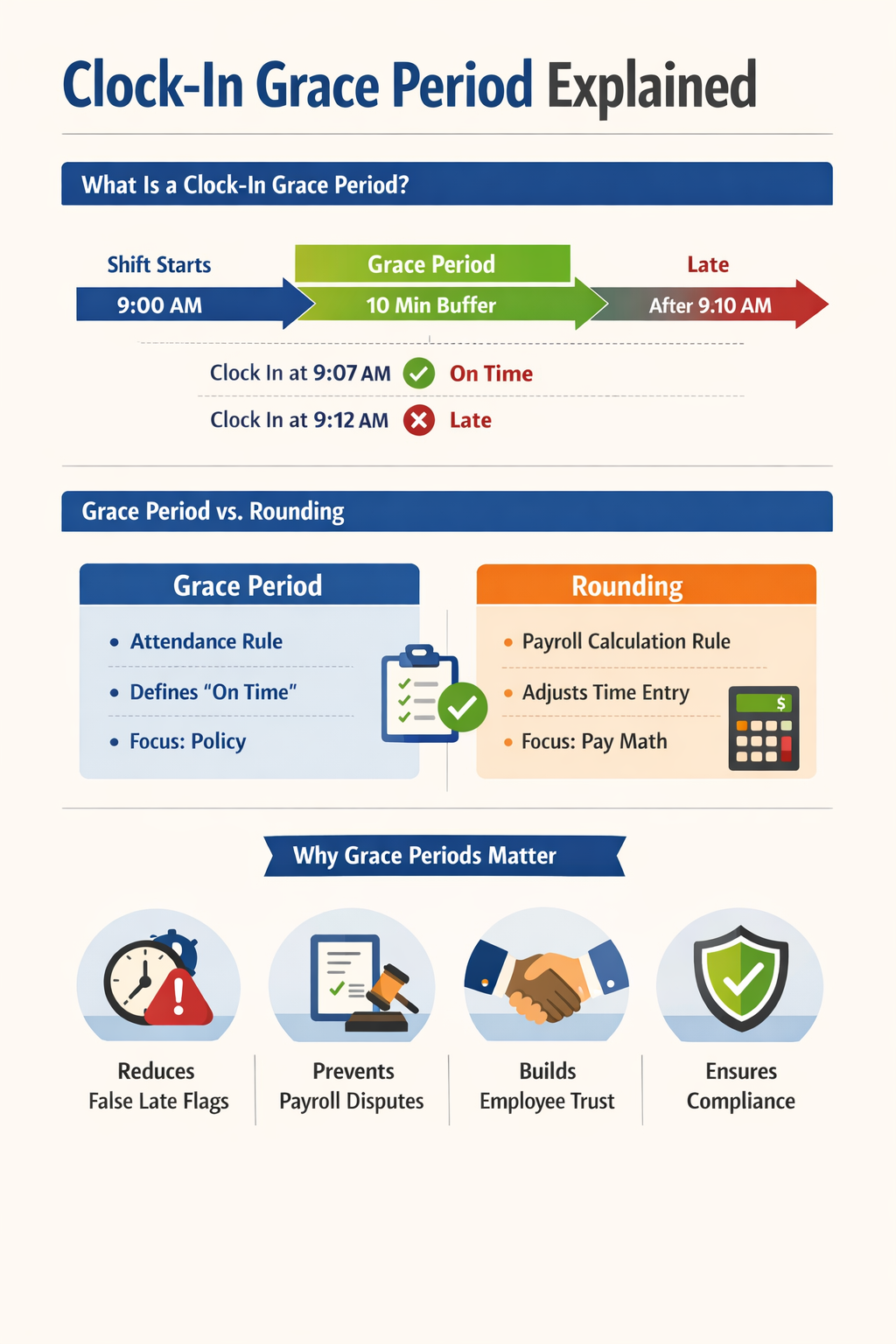
A grace period is a defined window of time before or after a scheduled start/end time where an employee’s punch is still considered “on time” for policy purposes. For example, if a shift starts at 9:00 AM and the grace period is 10 minutes, an employee who clocks in at 9:07 AM may still be treated as on time—depending on how the policy is configured.
Grace periods exist because timekeeping is rarely perfect in the real world. People hit traffic, security lines back up, devices take time to authenticate, and shift handoffs don’t always happen on the minute. The goal is to balance accountability with fairness, while keeping payroll clean.
Grace periods vs rounding: the difference most teams miss
Grace periods are often discussed alongside rounding, but they’re not always the same thing.
In UKG environments, “grace” is commonly tied to how punches are treated around the shift boundary and when times round forward or backward. UKG documentation describes “graces” in the context of rounding behavior around shift start/end times. UKG Ready feature documentation also lists “grace and rounding” as part of timekeeping capabilities.
In plain terms:
-
A grace period policy is about whether someone is treated as late/early for attendance purposes.
-
A rounding rule is about how punch times are converted for calculations (for example, rounding to 5- or 15-minute increments).
Why this matters: employees may accept a grace period for “late status,” but they’ll challenge policies that feel like time is being rounded unfairly. And legally/ethically, consistency matters—grace/rounding can’t be designed to only benefit the employer.
Why grace period configuration matters
Grace periods are not just a “nice to have.” They’re one of the simplest ways to reduce operational noise in timekeeping—especially in frontline settings where managers already have too much to chase.
Timekeeping mistakes are common across organizations. EY’s payroll error research found missing/incorrect time punches occur frequently—roughly four times for every ten employees in the measured period. And a related EY analysis reported organizations often make multiple payroll corrections per pay period, creating direct cost and time loss.
When your system flags too many “late” exceptions for minor variances, managers start ignoring exceptions altogether—then the real problems slip through. A well-designed grace period reduces false alarms so the true issues stand out.
Common grace period examples (what teams actually use)
Most organizations set grace periods based on operational realities, not theory. Here are common examples you’ll see in the field:
A healthcare unit may allow a short grace window at shift change because patient handoffs don’t happen like clockwork. A retail store might use a slightly larger buffer because employees arrive in waves and form a line at the clock. A manufacturing site may keep grace tighter but pair it with better identity verification to stop buddy punching and keep time data trustworthy.
The “right” number isn’t universal. The important part is that the rule is clear, consistent, and explainable to employees.
Configuring grace periods with hrPad for UKG
CloudApper hrPad extends UKG by turning any tablet into an employee self-service kiosk that supports timekeeping and HR service delivery workflows—so policies like grace periods don’t stay theoretical. They become easy to apply at the device employees actually use.
Role- or location-based grace periods
Different jobs have different realities. A one-size grace rule across all departments creates resentment. With hrPad, organizations can align grace periods with how the operation works—by location, department, or job role—so the rule feels fair instead of arbitrary.
Attendance enforcement without manual policing
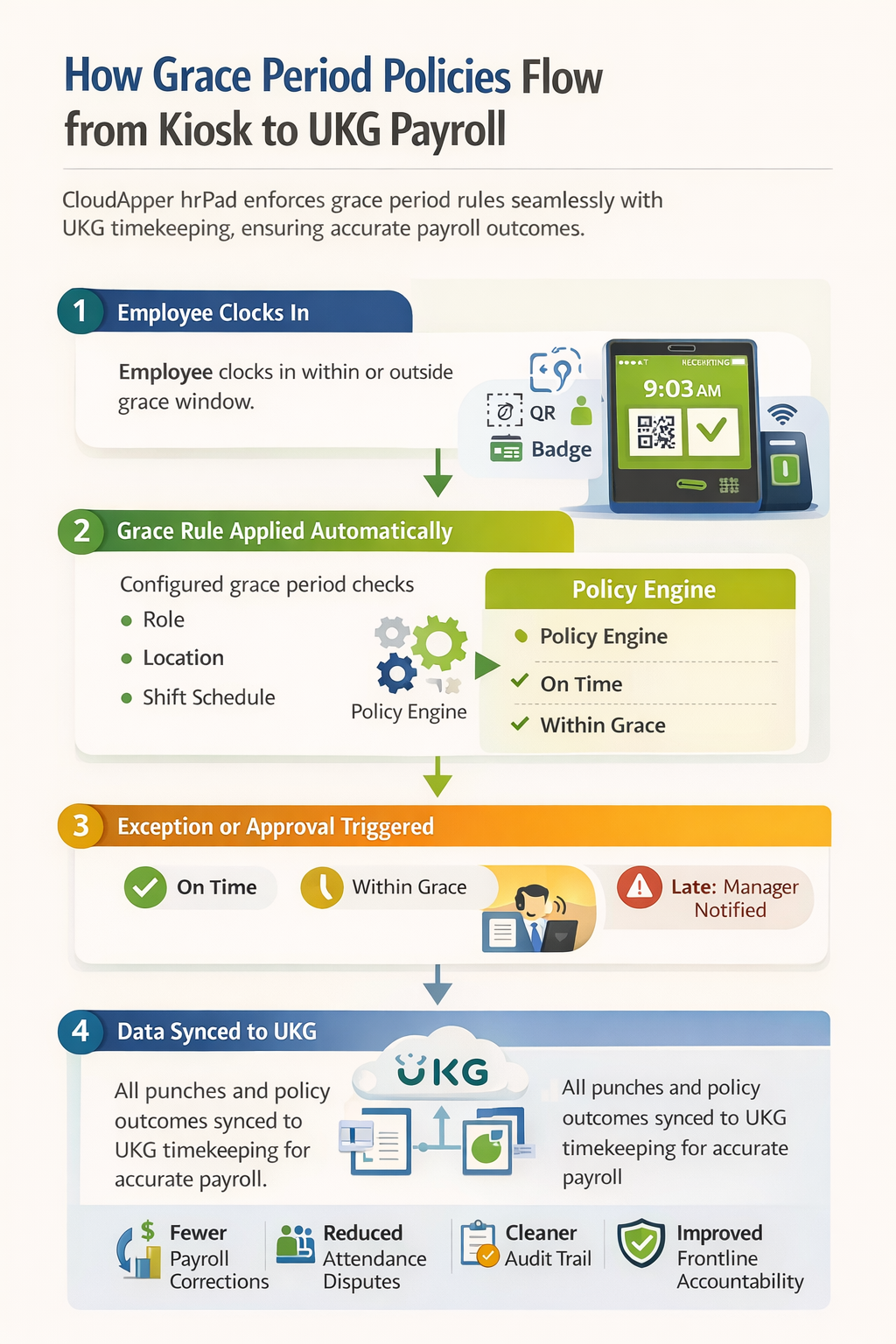
Grace periods only help if they’re enforced consistently. When rules are applied ad hoc, you get disputes. hrPad supports automated handling so that when someone exceeds the grace window, you can trigger the action your policy requires—whether that’s an exception, a follow-up step, or a manager review.
Fewer payroll disputes and cleaner audits
The more ambiguous your punch policy is, the more “he said / she said” you’ll deal with at payroll cutoffs. Clear grace windows reduce disputes because employees know what counts as on time, and managers aren’t improvising decisions.
Real-time manager visibility
A practical grace setup doesn’t just mark someone late after the fact. It helps supervisors react while coverage still matters. When a punch doesn’t happen inside the grace window, manager visibility becomes a staffing tool—not just a timekeeping record.
Synced to UKG timekeeping so there’s one source of truth
A major cause of payroll friction is “multiple systems, multiple truths.” hrPad is designed to work as an extension layer, pushing clocking activity and related policy outcomes back into UKG timekeeping so payroll calculations remain consistent and centralized.
Best practices: how to set grace periods that employees accept
A grace period works best when it’s easy to explain. If you can’t summarize it in one sentence, employees will assume it’s unfair.
Start by writing the policy in plain language: “You are considered on time if you clock in within X minutes of your scheduled shift start.” Then decide whether you’re applying the policy for attendance only, calculations only, or both—and make sure it’s consistent across teams.
Also, keep an eye on the operational cause of late punches. If the real issue is a line at the clock, better access points help. If the real issue is buddy punching, identity verification matters. If the real issue is shift swaps, you need better self-service scheduling.
FAQ
What does “grace period” mean at work?
A grace period at work is a small allowed buffer around a scheduled time where clocking in or out is still treated as on time, depending on company policy.
Does a grace period mean employees get paid for extra minutes?
Not automatically. Some policies treat grace as an attendance buffer while still paying based on actual punch time; others combine grace with rounding rules. How this works depends on your configuration and policy.
Are grace periods the same as rounding?
Not necessarily. Grace periods generally affect on-time/late treatment, while rounding changes how time is calculated. In UKG contexts, “grace” often interacts with rounding behavior, so it’s important to define both clearly.
Can grace periods be set differently by location or role?
Yes—and many organizations do this to keep policies fair across different operational realities.
Should grace policies be applied only one way?
Policies should be consistent and not designed to only benefit the employer. Consistency and clarity reduce disputes and risk.
The takeaway: grace periods are small, but they shape trust
Grace periods aren’t just a timekeeping setting. They’re a daily signal to employees about whether the organization is strict, fair, or inconsistent. When configured well, grace periods reduce noise, prevent payroll corrections, and improve accountability without creating unnecessary friction.
CloudApper hrPad helps UKG/Kronos customers operationalize those policies at the point of clock-in—through a self-service kiosk experience designed for frontline reality—while keeping UKG as the system of record.


October 13, 2026
Paperless HR for Rural Hospitals on UKG: Extending One Kiosk to Documents, E-Signatures and Benefits Data
A rural hospital using CloudApper hrPad as its UKG time clock still handled much of HR on paper. Its next step is extending the same kiosk to documents, e-signatures and transfers, with CloudApper iPaaS moving benefits data to providers, all within network rules that block external AI services.


October 7, 2026
Shared Tablet SSO in UKG: One Time Clock for Every Login Type
Hourly staff on basic UKG logins and managers on SSO can share one tablet time clock without login mix-ups. This guide explains each login type in plain English, compares three shared-tablet setups and shows how hrPad by CloudApper AI makes it work.

October 5, 2026
Why Is My Paycheck Wrong? Tracing UKG Payroll Errors to Six Upstream Causes
Most UKG payroll questions start upstream of payroll: in employee details, attendance, deductions, approvals, compliance or reconciliation. hrPad by CloudApper AI catches each one at the time clock.


October 2, 2026
Offline Self-Service in UKG Ready: How Requests Queue and Sync
Frontline sites with little or no internet leave employees unable to reach HCM self-service. With offline self-service, CloudApper AI's hrPad lets workers submit requests from any iPad or Android tablet, keeps the time each request was made, and syncs it to UKG Ready for HR approval once connected.