A delivery trucking company with more than 400 drivers captures every run once on a phone. After manager approval, the same log feeds UKG Ready pay counters and weekly customer invoices, so pay and billing start from one record. Here is how the workflow runs and what is still in progress.




Table of Contents
At a multi-region US delivery trucking company, one truck run decides two things at once: what the driver is paid and what a store customer is billed. The company has more than 400 drivers and helpers hauling building materials and retail goods, with UKG Ready as its system of record for time and pay. The CloudApper AI Platform for UKG carries the field record that both outcomes are drawn from.
A Run Is a Pay Event and a Billing Event
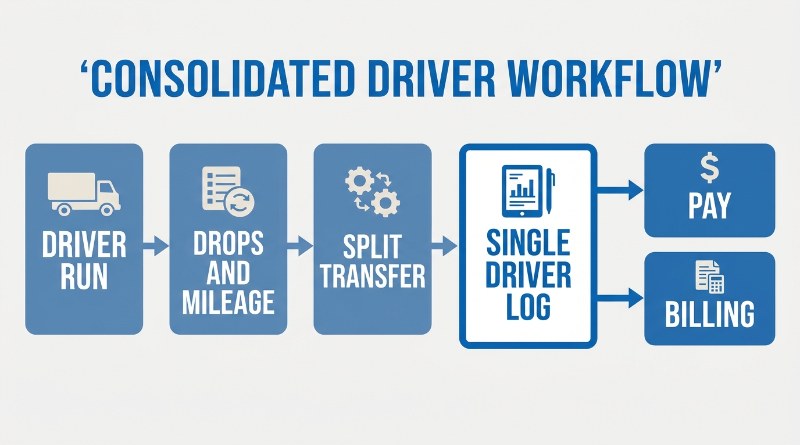
Every run has a truck type, a set of drops or pickups, mileage, yard downtime and sometimes a transfer between locations. Billing follows the contract: flat rate, zone rate by truck type, fixed charges or extras. Pay follows the same facts: revenue earned, incentive, trainer pay, drive time and a daily safety bonus that differs by job.
Before the app, billing staff recalculated charges by hand when one landed in the wrong column, and logs tied to one manager dropped out of view when that manager left. The Operations Leader put it plainly: “A lot of times there are specific charge and we want to be able to clarify to the customer exactly what that is. So that’s a trailer fork setup fee, right? But it’s different for every contract.”
Approval Is the Control Point
A driver picks the truck type and logs each drop with mileage and times. When a run includes a split transfer, the app replicates the original log at half rate for the receiving store. The market manager reviews logs, adds any missed drop, marks absences and approves. Flat rate logs sit under market-level entities, so a market keeps generating logs even when its manager role is vacant.

“I knew it made the log, but I want to make sure, because that’s something we could easily overlook. It’s just a line item on the invoice.”
Operations Leader, multi-region delivery trucking company
That approval is where the record locks. The same logic applies to hours that arrive from a vehicle, as in this look at landing telematics driver hours in UKG Ready timecards.
Two Outputs From One Approval
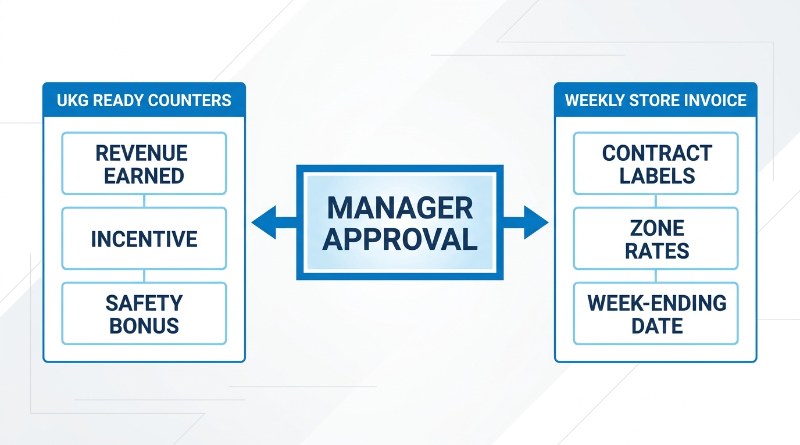
An approved log goes to two places. CloudApper iPaaS for UKG sends revenue earned, incentive, daily safety bonus, drive time and trainer pay into UKG Ready counters by job code, and maps absence statuses to time-off counters. Billable charges roll into a weekly invoice for each store, with contract-specific labels, zone rate filters for box trucks, editable week-ending dates for late miscellaneous charges and a resend option for corrections.
Route pay raises its own questions, such as how a daily rate interacts with overtime, covered in this account of day-rate overtime for route drivers in UKG Ready.
What Is Live and What Comes Next
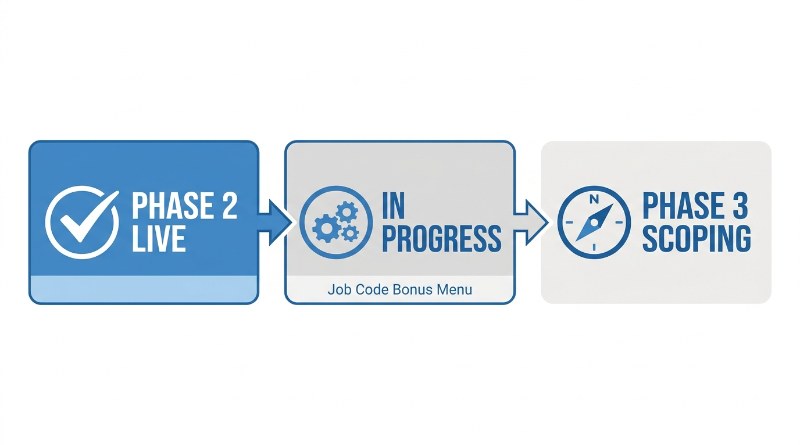
More than 400 drivers log runs on their phones today, and the second phase of the build was substantially complete by mid 2026. Field pay values reach UKG Ready counters without hand keying, and invoices come from the same approved logs. A third phase is being scoped. Two items are still in progress: a configurable menu that ties each expanded UKG Ready driver job code to its safety bonus, built with CloudApper AI for UKG Personalization, and alignment of the invoice percentage calculation with the billing team’s spreadsheet. No time or dollar savings have been measured.
“We probably addressed almost everything plus some additional things that we had on the second scope of this whole round of buildout.”
Operations Leader, multi-region delivery trucking company, mid-project review
For a Controller, the question for a UKG administrator is where the approval step sits. A fleet that approves once has one record to defend. Fleets on UKG Ready also keep federal records, as in this guide to driver hours of service reports in UKG Ready.
If your drivers or field crews generate both pay and customer charges, talk with the CloudApper team about how the CloudApper AI Platform for UKG can carry one approved record into both.



October 28, 2026
UKG Pro AxisCare Integration for Home Care: Designing the Sync Around Orientation Day, Shared Names and Blended Overtime
Connecting AxisCare and UKG Pro is harder than moving data back and forth. A multi-state home care provider's rules on orientation day, matching by unique ID and blended overtime show what the integration has to respect, and how CloudApper iPaaS for UKG syncs both systems in two directions.
October 14, 2026
UKG Costpoint Integration for Defense Contractors: Who Owns the 65 Fields Between Payroll and the Audit
A defense services contractor needs its HRIS to update more than 65 Costpoint fields through an API. CloudApper iPaaS handles the UKG Costpoint integration, and the real lesson is governance: HRIS, finance and IT each own their part of the mapping rules, so labor cost data stays audit-ready as contracts change.

October 12, 2026
ATS to UKG Ready Integration: Making Every Light Industrial Staffing Placement Payroll-Ready on Day One
A light industrial staffing firm placing 20 to 40 new workers a week re-enters every hire from its ATS into payroll by hand. CloudApper's sync creates UKG Ready records at assignment and carries updates and terminations across, so every placement can be payroll-ready on day one.

October 9, 2026
UKG Pro and Mexico Payroll Integration: Keeping Cross-Border Employee Data in Sync
US employers with Mexico operations often run UKG Pro as the system of record and a local platform for Mexican payroll. CloudApper connects the two with an automated sync that sends hires, terminations and pay changes to the Mexico platform and brings payroll results back into UKG Pro.