Connecting AxisCare and UKG Pro is harder than moving data back and forth. A multi-state home care provider's rules on orientation day, matching by unique ID and blended overtime show what the integration has to respect, and how CloudApper iPaaS for UKG syncs both systems in two directions.



Table of Contents
A UKG Pro AxisCare integration for a home care agency succeeds or fails on three rules that most integration diagrams leave out: when a new caregiver gets created in each system, how records are matched, and how overtime is priced when one caregiver works at several rates in the same week. AxisCare runs caregiver scheduling, electronic visit verification and point-of-care, while UKG Pro holds HR and payroll. CloudApper connects the two with an integration layer designed around those rules.
A fast-growing, multi-state home care provider with a high-volume caregiver workforce and weekly payroll shows how much rides on that design. Its IT team already writes code to move data between the systems, and manual work remains. As the organization’s technology and IT executive put it, “We still live… in spreadsheets in a variety of different ways, just trying to get out of that.”
“I don’t want something that’s prettier, I want it to be usable … if we purchase something with a system, we need to use the system. Now, we’re not getting away from [AxisCare].”
Payroll lead, multi-state home care provider
Orientation Day Is an Integration Requirement
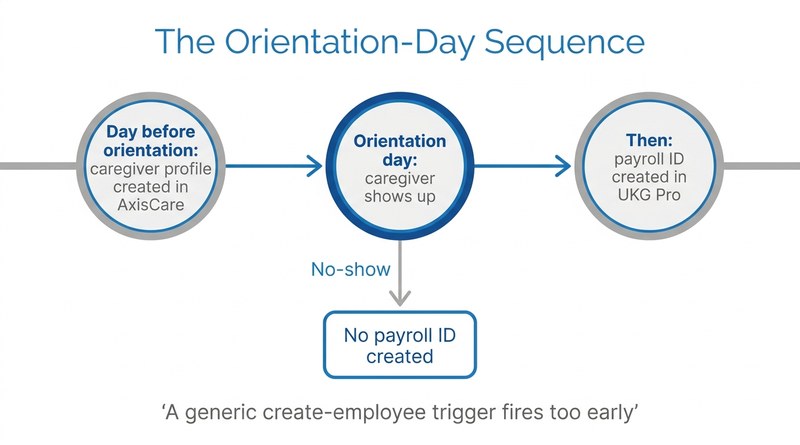
A new caregiver has to exist in AxisCare before they can be scheduled, so the agency builds that profile the day before orientation. Payroll works on a different clock. Someone who never shows up should never get a payroll ID.

“We actually have to create an [AxisCare] profile the day before, it has to be in there the day they’re supposed to arrive … Yes, but we don’t want payroll IDs if they don’t show up for orientation.”
Payroll lead, multi-state home care provider
A generic create-employee trigger breaks that sequence, because it fires the moment HR enters a hire. The integration has to follow the agency’s onboarding order instead, which is why CloudApper treats orientation as a workflow rule inside the sync. Staffing employers face the same timing question when making every new placement payroll-ready from the ATS.
Matching on IDs and Pricing Mixed-Rate Overtime
Matching is the second rule. A large caregiver workforce includes many people who share a name, so records have to match on a unique identifier: the UKG Pro employee number mapped to AxisCare’s external ID, with UKG location codes mapped to AxisCare branches.
“That won’t work because you’re going off of a name and it has to go off of a social security number because we have 50 [people with the same name].”
Payroll lead, multi-state home care provider
The third rule is overtime. Caregivers often work at more than one pay rate in a week, depending on the client or program. Under the FLSA’s regular-rate rule (29 CFR 778.115), overtime for an employee paid at two or more rates is generally based on a weighted average of all straight-time earnings, so exporting raw hours and applying a single rate gets the premium wrong. Agencies already rehiring and placing caregivers by geography in UKG Pro know how quickly volume multiplies small payroll errors.
How CloudApper Approaches the Sync
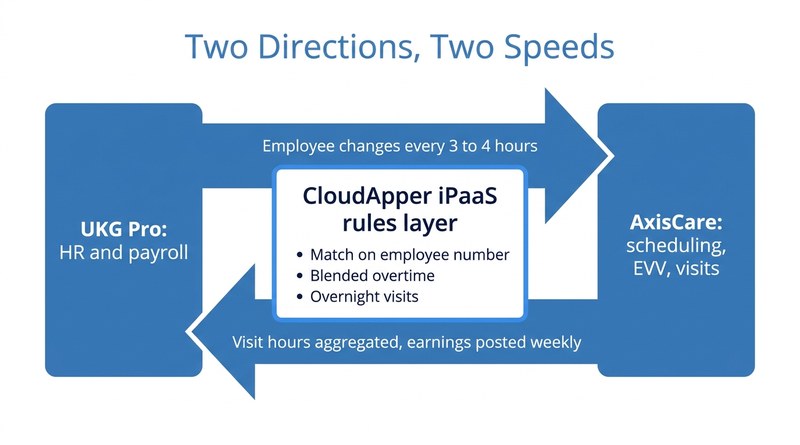
CloudApper iPaaS for UKG runs as no-code middleware with two directions and two speeds. Every three to four hours, it reads UKG Pro’s employee-changes feed and pushes new hires, rehires, status, supervisor and branch changes to AxisCare. In the other direction, it listens for AxisCare visit-completion events, aggregates caregiver hours and bulk-posts regular, overtime and other earnings to the UKG Pro payroll earnings import at the end of each weekly pay period. A rules layer calculates blended overtime, normalizes timestamps and handles visits that cross midnight, so payroll reviews exceptions instead of rebuilding the week. It follows the same principle as sending payroll only the fields that changed: shape the data to what the receiving system expects.
Because the AxisCare sandbox contains PHI and access requires an NDA, BAA and DPA, CloudApper’s approach starts testing with simulated payloads built on dummy data, so payroll and IT see how records land on both sides before touching real caregiver information.
The Takeaway for Home Care Payroll and IT Leaders
For home care agencies, the hard part of connecting AxisCare and UKG Pro is encoding the agency’s own rules: who exists in which system and when, which identifier wins, and how a week of mixed-rate visits becomes a correct paycheck. CloudApper builds that layer on top of UKG Pro, so AxisCare keeps running care delivery and UKG Pro stays the system of record for people and pay.
If your caregiver hours still reach payroll through exports and spreadsheets, talk to CloudApper about an AxisCare integration built around your onboarding, matching and overtime rules.


October 14, 2026
UKG Costpoint Integration for Defense Contractors: Who Owns the 65 Fields Between Payroll and the Audit
A defense services contractor needs its HRIS to update more than 65 Costpoint fields through an API. CloudApper iPaaS handles the UKG Costpoint integration, and the real lesson is governance: HRIS, finance and IT each own their part of the mapping rules, so labor cost data stays audit-ready as contracts change.
October 12, 2026
ATS to UKG Ready Integration: Making Every Light Industrial Staffing Placement Payroll-Ready on Day One
A light industrial staffing firm placing 20 to 40 new workers a week re-enters every hire from its ATS into payroll by hand. CloudApper's sync creates UKG Ready records at assignment and carries updates and terminations across, so every placement can be payroll-ready on day one.

October 9, 2026
UKG Pro and Mexico Payroll Integration: Keeping Cross-Border Employee Data in Sync
US employers with Mexico operations often run UKG Pro as the system of record and a local platform for Mexican payroll. CloudApper connects the two with an automated sync that sends hires, terminations and pay changes to the Mexico platform and brings payroll results back into UKG Pro.

October 7, 2026
Client-Site Employees and UKG Pro WFM: Keeping Embedded Automotive Engineers Paid Right
Engineers working inside a client’s facility log time in the client’s system, so their paycheck is the employer touchpoint that matters most. For an automotive engineering services firm, CloudApper moves those hours into UKG Pro WFM automatically, removing the manual re-entry where pay errors start.