Frontline employees without portal access often route shift swap requests through HR. CloudApper AI TimeClock for UKG puts that same request and approval process right at the shared tablet, syncing approved changes to UKG Ready automatically, no manual correction needed.




Table of Contents
- Why Shift Coverage Still Runs Through HR
- The Cost of Leaving Frontline Workers Without Access
- Requesting a Shift Swap With CloudApper AI TimeClock for UKG
- Bringing Shift Swaps Back to the Clock
HR tech enthusiast digging into workforce management, time tracking, and compliance tools. Sharing what I learn at cloudapper.ai. Operations managers running multi-site UKG environments lose real hours every week to this firefighting, and HR absorbs requests employees could handle themselves with the right access.

UKG already lets employees request a shift change through self-service, but that sits behind a personal login, not much help to a frontline employee at a shared tablet mid-shift. The fix: put that same request-and-approve step right at the time clock. CloudApper AI’s employee time clock for UKG does exactly that, letting employees submit and get approval on the same device they already use to punch in.
Why Shift Coverage Still Runs Through HR
Most UKG deployments give office-based employees self-service access for time-off and schedule requests. Frontline employees on a plant floor, in a distribution center, or on a home-health route often don’t have that same access: no company email, no laptop, sometimes no personal smartphone during a shift. When a schedule conflict comes up, the request goes to whoever is reachable: a shift lead, a site HR contact, or a manager’s personal phone. A self-service kiosk puts that same request process on the device employees already use.
Gallup’s 2025 American Job Quality Study found that 41% of U.S. employees have little or no control over their work schedules, a gap most pronounced among part-time workers (34%) and workers without a college degree (31%).
The Cost of Leaving Frontline Workers Without Access
Shift swapping is one of the most common requests a frontline team generates, and one of the easiest to resolve if the employee can reach someone with authority to approve it. Without that access at the clock, managers get pulled off the floor, shift leads approve coverage without checking eligibility, and HR fields requests that have nothing to do with policy or pay, small interruptions that add up across every site.

It matters for payroll too: a shift change that updates the schedule but not the timecard is exactly the kind of payroll reconciliation problem that surfaces near the end of a pay cycle, and the stakes grow with complexity, as CloudApper’s work extending UKG for a large public transit authority’s seniority-based shift bidding under a collective bargaining agreement shows.
Requesting a Shift Swap With CloudApper AI TimeClock for UKG
CloudApper AI’s employee time clock for UKG can run on an iPad or Android tablet and is compatible with UKG as well. Employees identify themselves with Face ID, a QR code, or a barcode, geofencing validates punch location, and the clock works offline, syncing once reconnected. From the same screen, employees can view schedules, request PTO, check accrual balances, handle job transfers and pay-code selection, and get answers to routine HR questions through a built-in AI assistant.
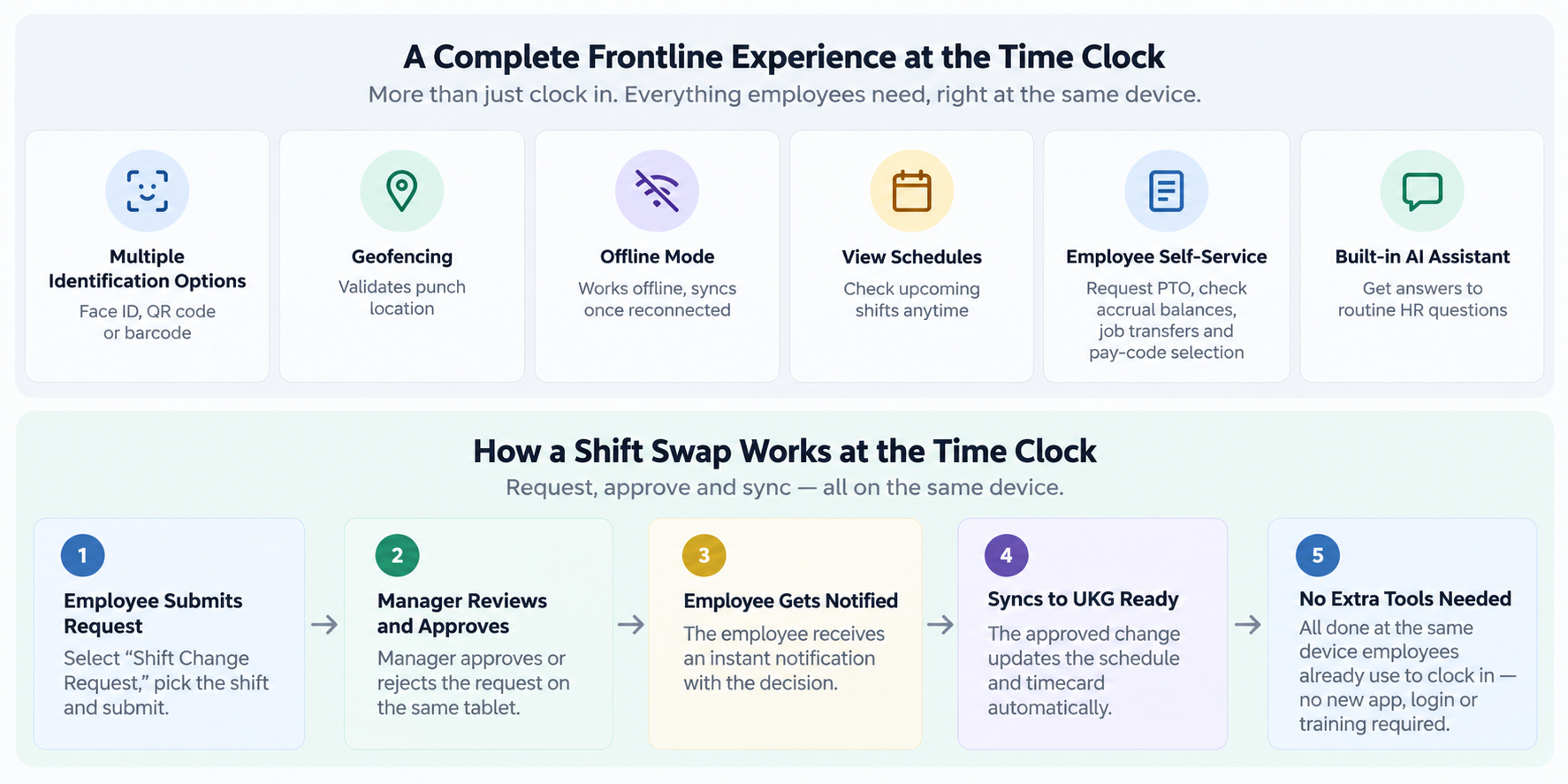
In this scenario, that same self-service menu is what lets an employee request a shift swap right at the clock: they select “Shift Change Request,” pick the shift, and submit it. The manager approves or rejects it on the same tablet, the employee is notified right away, and the change syncs to UKG Ready automatically, updating the schedule and timecard without a manual correction. Because it’s the same interface employees already use to clock in, there’s no new app, login, or training required, which is what actually makes self-service work for frontline employees who don’t have their own portal access.
Bringing Shift Swaps Back to the Clock
Shift coverage doesn’t have to run through HR by default. When the request, the manager’s approval, and the UKG Ready sync all happen at the same device employees already use to clock in, coverage gaps get resolved faster and HR gets its time back for work that actually needs a person. If you want to learn more, consider contacting us so we can discuss more about shift swapping, and how it fits for you.
FAQ
How does an employee submit a shift swap request at the time clock?
The employee clocks in, opens the self-service menu, selects “Shift Change Request” or “Shift Swap,” picks the shift, adds an optional note, and submits. The request routes instantly to the manager for review.
Does a manager have to approve the request before it takes effect?
Yes. The manager approves or rejects the request on the shared tablet, and the employee is notified as soon as a decision is made.
Does an approved shift swap update UKG automatically?
Yes. Approved requests update the schedule and timecard in UKG Ready through real-time API sync, which is designed to keep payroll accurate without a manual correction.
Can employees submit or check on a shift swap request from their phone?
Yes. In addition to the shared tablet at the time clock, employees can submit and track requests from the CloudApper mobile app on iOS or Android.
What identification methods does the time clock support?
Employees can identify themselves using Face ID, a QR code, or a barcode.
Does CloudApper AI TimeClock for UKG cost less than a traditional hardware time clock?
Yes. It runs on iPads or Android tablets rather than proprietary terminals, which lowers both the upfront hardware cost and ongoing maintenance compared to a traditional time clock.


October 19, 2026
Nurse Mandatory Overtime Limits in UKG: Documenting Voluntary Overtime at Clock-Out
New York, Pennsylvania and Washington restrict mandatory overtime for nurses, which makes documented consent the key record. Learn how UKG Pro WFM and UKG Ready separate voluntary and mandated overtime, and how CloudApper AI TimeClock captures consent on an affordable unit tablet.

October 16, 2026
Heat Illness Recovery Breaks in UKG for Construction and Logistics Crews
State heat rules in California, Washington and beyond require cool-down breaks that payroll must be able to prove. Learn how UKG Ready and UKG Pro WFM track recovery periods, and how CloudApper AI TimeClock captures them on an affordable jobsite tablet that works offline.
October 15, 2026
PUMP Act Lactation Breaks in UKG: Tracking Them Without Breaking Meal Rules
Lactation breaks protected by the PUMP Act often show up as meal break exceptions in UKG. Learn what federal law requires, how to configure UKG Ready and UKG Pro WFM pay codes, and how CloudApper AI TimeClock records these breaks privately on an affordable tablet clock.
October 14, 2026
Enforcing Minor Work Hour Limits at the UKG Time Clock
Child labor hour limits are usually built into UKG schedules, but violations happen at the punch. Learn the federal rules for 14 to 17 year olds, how UKG Pro WFM and UKG Ready handle minor rules, and how CloudApper AI TimeClock adds age-based checks on an affordable tablet clock.