UKG Ready and Pro WFM support blended workforces — but proprietary hardware and provisioning lag create cost center errors that compound every payroll cycle. Here is how to build clean FTE and contingent worker time capture separation, and where CloudApper AI TimeClock for UKG fills the gaps native hardware cannot.



Table of Contents
- What UKG Does Natively for Blended Workforces
- Where the Blended Workforce Problem Actually Lives
- What to Fix Within UKG First
- Where Native UKG Hardware Runs Out for Contingent Workforces
- How CloudApper AI TimeClock for UKG Handles the Contingent Workforce Layer
- Building a Clean Contingent Workforce Time Capture Framework in UKG
- Frequently Asked Questions
Tracking contingent and temp worker hours separately from FTEs in UKG starts at the time clock, where each punch has to route to the right labor bucket. After a first major temp surge, many UKG admins at manufacturers, logistics firms and retailers see the same pattern: a staffing agency worker clocks in on the same tablet as the full-time employee beside them, the punch lands in the wrong cost center, and the discrepancy doesn’t surface until payroll close. By then the correction is manual, the audit trail is muddy and the cost is invisible unless someone goes looking.
Contingent labor is a large share of hourly work in manufacturing, retail, logistics and healthcare support, yet few organizations have automated how temp and FTE time is captured, routed and reported in UKG Ready or UKG Pro WFM. That separation is a capture and configuration question, and CloudApper AI TimeClock for UKG handles it at the device, before the punch reaches UKG.
What UKG Does Natively for Blended Workforces
UKG Ready and Pro WFM both support multiple employee types within the same environment. Admins can create separate employee groups, assign distinct pay rules and work rules by employee type, and configure cost center associations at the employee profile level. For organizations with relatively stable contingent workforces — the same agency workers returning week over week under established profiles — this native configuration is workable.
UKG also supports labor distribution, which allows punch data to be split across cost centers and pay codes. For FTE employees moving between departments during a shift, this is well-documented functionality. The job transfer capability within UKG Ready and Pro WFM allows workers to select their department or cost center at clock-in, which routes the punch to the correct labor bucket.
These tools work. The problem is not that UKG lacks the configuration levers — it is that the levers require each contingent worker to have a clean, maintained UKG profile, and that the device capturing the punch must enforce the correct routing for each worker type. Neither condition holds reliably in high-volume, high-turnover temp environments.
Where the Blended Workforce Problem Actually Lives
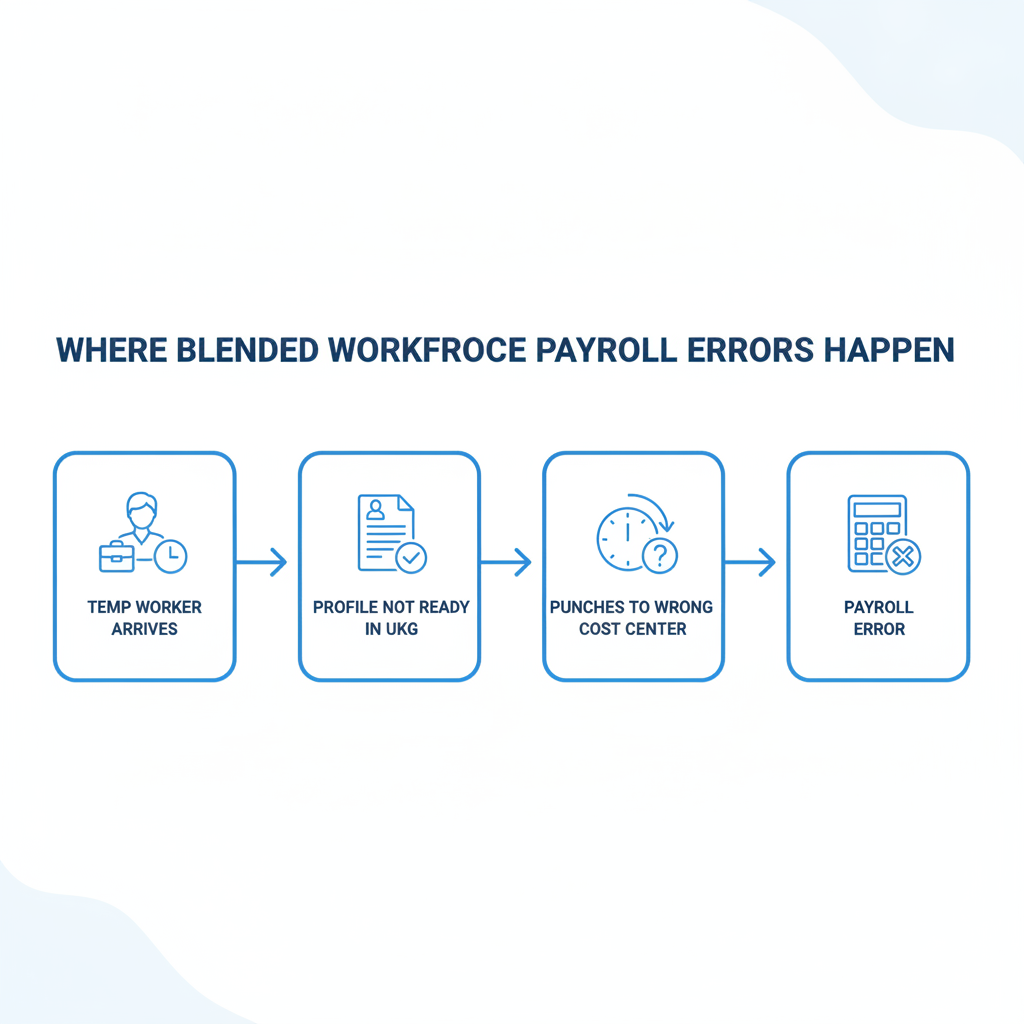
The failure mode is almost always at the device, not in UKG’s pay rule engine.
When a staffing agency sends 40 workers to a distribution center on a Monday, those workers need UKG profiles before they can punch in. In practice, profile creation lags behind day-one start dates — workers are clocking in before IT has fully provisioned them, or they are being entered under placeholder profiles that carry the wrong cost center, the wrong pay group, or no pay differentiation from FTEs at all.

The second failure: most proprietary UKG time clock hardware — Intouch DX, 9000, 9100 — treats every employee as equivalent at the device level. The clock does not know whether the person scanning in is an FTE, a temp from Agency A, or a temp from Agency B with a different bill rate and a different cost center assignment. It captures the punch and passes it to UKG. If the UKG profile is wrong, the punch routes wrong.
The third failure: temp workers convert. They extend. They transfer between cost centers mid-assignment. Every one of those events requires a manual update to the UKG profile to keep the downstream payroll routing accurate. In environments with hundreds of contingent workers cycling through over a quarter, the administrative overhead compounds fast. For payroll teams already managing common UKG timekeeping errors by industry, contingent workforce routing is one of the highest-frequency error sources — and one of the least visible, because it does not produce a missed punch alert. The punch goes through. It just goes through to the wrong bucket.
What to Fix Within UKG First
Before looking outside UKG, there are several native configuration steps worth completing for any organization running a blended workforce.
Separate employee groups by worker type. UKG Ready and Pro WFM both support employee group configuration that can isolate contingent workers from FTEs for reporting, pay rule application, and overtime calculation purposes. If your contingent workers are currently in the same default employee group as your FTEs, that is the first thing to fix. Work rules — overtime thresholds, break rules, shift differentials — should apply differently to temp workers in most blended environments, and group separation is the mechanism UKG uses to enforce that.
Build agency-specific cost centers. Rather than assigning temp workers to the same cost centers as FTEs, create distinct cost center codes for each agency relationship. This makes labor distribution reporting clean — you can pull agency labor cost separately from internal labor cost without a manual split — and it prevents temp punches from appearing inside FTE labor budgets during variance analysis.
Configure punch restrictions by employee type. UKG Ready allows admins to restrict which clock-in methods are available to different employee groups. The cost center punch association settings in UKG Ready allow you to lock specific time clocks to specific cost centers, which prevents temp workers physically located in one department from punching into a device assigned to a different labor bucket.
Use labor distribution for workers who move across cost centers. Temp workers frequently cover multiple departments in a single shift. The automated job transfer process in UKG can be configured to prompt the employee at clock-in, routing the punch to the correct labor bucket without manual intervention afterward.
These steps close most structural configuration gaps. What they do not solve is the device problem — the moment a temp worker stands in front of a proprietary UKG terminal without a fully provisioned profile, or needs to select a cost center that requires customized prompting the native hardware cannot deliver.
Where Native UKG Hardware Runs Out for Contingent Workforces
Proprietary UKG time clocks — Intouch DX, 9000, 9100 series — are built for stable, defined employee populations. They are not designed for high-velocity onboarding, dynamic cost center selection, or the custom data capture that contingent workforce management requires.
There is no mechanism on a proprietary UKG terminal to present a temp worker with a custom prompt at enrollment — asking them to confirm their agency assignment, their cost center, or their work rule group before their first punch. That configuration step happens in UKG’s admin interface, by an administrator, before the device interaction. When the admin step lags — and in high-volume temp environments, it always lags — the device accepts the punch anyway, routes it to whatever default profile exists, and the error propagates into payroll.
The second hardware gap: proprietary UKG terminals cost upward of $1,200 per device. Organizations that need to expand into a new facility or add temporary capacity for a seasonal surge cannot deploy additional hardware quickly or cheaply. For organizations where contingent worker time capture is causing manual correction overhead that compounds each payroll cycle, the device layer is where the fix needs to happen.
How CloudApper AI TimeClock for UKG Handles the Contingent Workforce Layer
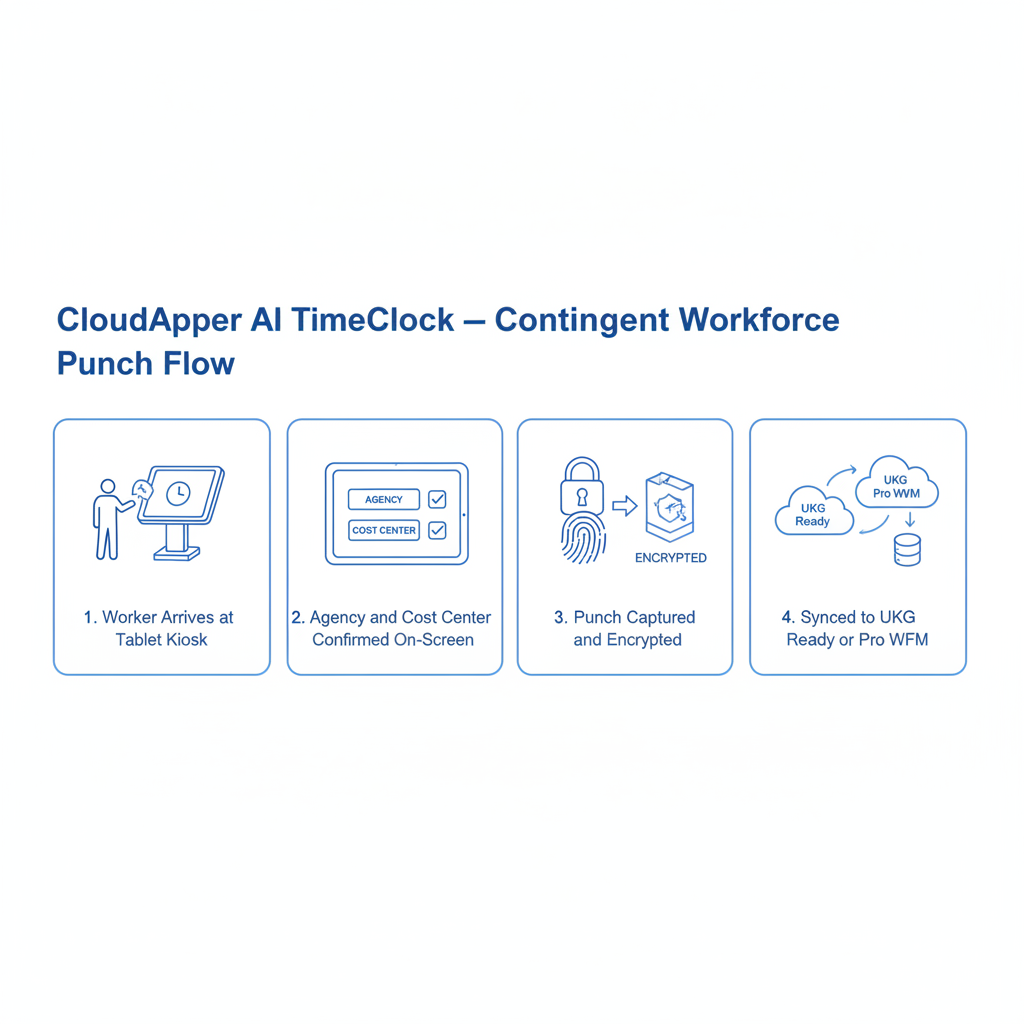
CloudApper AI TimeClock for UKG runs on any standard Android tablet or iPad, syncs directly with UKG Ready and Pro WFM, and costs 25% of what proprietary UKG hardware runs per device. It replaces the terminal without replacing UKG — punches still flow directly into UKG timekeeping, pay rules still apply inside UKG, and HR still manages everything through UKG’s interface.
For blended workforces specifically, several CloudApper AI TimeClock capabilities address the failures that proprietary hardware cannot:
Custom enrollment prompts by employee type. CloudApper AI TimeClock can present different prompts during enrollment and clock-in based on employee type. A temp worker enrolling for the first time can be walked through a custom screen confirming their agency assignment, cost center, and work rule group — before their first punch is recorded. That data feeds directly into their UKG profile, eliminating the provisioning lag that creates downstream payroll errors.
Cost center selection at every punch. For contingent workers who move between departments, CloudApper AI TimeClock prompts cost center selection at each clock-in event. The worker selects their current department from a configurable list, and the punch routes to the correct UKG cost center automatically. The cost center overtime exclusion configuration in UKG Pro WFM works correctly because the cost center is captured accurately at the device level — not defaulted from a stale profile.
Separate device pools for FTEs and temp workers. Because CloudApper AI TimeClock runs on standard tablets, organizations can deploy dedicated kiosks for contingent workers without a capital hardware investment. A distribution center can put one tablet at the temp worker entrance configured to enforce agency-specific prompts, without touching the FTE time clock workflow at all.
Offline capture for surge deployments. When a large temp workforce onboards at a new facility or remote site, connectivity is often inconsistent. CloudApper AI TimeClock captures punches offline and syncs to UKG when connectivity restores — critical for seasonal ramp-ups where a Wi-Fi dead zone on day one of a 300-person temp deployment is not acceptable.
Custom data capture forms. Staffing agencies often require their own time capture documentation alongside the UKG punch record. CloudApper AI TimeClock supports custom data collection at the kiosk, capturing that data alongside the UKG punch without requiring a separate system. Organizations that need to track billable versus non-billable hours in UKG Ready can configure CloudApper AI TimeClock to capture that distinction at the punch level for agency-billed contingent workers.
For operations managers dealing with labor cost variance caused by misrouted temp punches, the improvement in labor cost management in UKG Pro timekeeping is direct: when every punch routes to the correct cost center on the first pass, the reconciliation work at payroll close disappears. For manufacturers specifically — where temp labor can represent 40%+ of headcount during production ramp — the payroll accuracy improvements CloudApper AI TimeClock delivers in manufacturing environments translate directly into reduced agency dispute volume and cleaner cost center reporting.
Building a Clean Contingent Workforce Time Capture Framework in UKG
Audit your current employee group structure. Pull a report of all active employee groups in UKG and confirm that every contingent worker profile is assigned to an agency-specific group — not a generic bucket shared with FTEs. Pay rule and work rule assignments flow from group membership; if temp workers are in the wrong group, their overtime calculation is wrong from day one.
Map every cost center to a specific time clock or device pool. Using UKG’s punch restriction configuration, associate each physical device location with the cost center it serves. For mixed-use areas, configure CloudApper AI TimeClock to prompt cost center selection at clock-in rather than relying on device location alone.
Build a same-day provisioning SLA with your staffing agency. The most common root cause of contingent worker payroll errors is profile lag — temp workers arrive before their UKG profiles are complete. Establish a process with your staffing agency to submit worker data 24 hours before start, and use that window to build and validate UKG profiles including employee group, cost center, and pay rule assignment.
Configure auto-inactivation for temps at assignment end. When a temp assignment ends, automate the profile inactivation tied to the end date rather than relying on manual offboarding. This prevents ghost punches — terminated temp workers whose badges or QR codes still work at the clock — which distort labor cost reports and create payroll adjustment cycles. The same discipline that applies to time audits in UKG should run against contingent worker profiles quarterly.
Report temp labor separately in every payroll cycle. Build a standard UKG labor distribution report that isolates agency labor cost by cost center, separate from FTE labor. This report surfaces misrouted punches before payroll closes. For organizations managing labor control in UKG, clean contingent workforce separation is the prerequisite for any meaningful labor budget variance analysis.
Frequently Asked Questions
Q: Can UKG Ready distinguish between FTE and temp worker punches natively, without a third-party time clock?
Yes, if every temp worker has a correctly configured UKG profile with the right employee group, cost center, and pay rule assignments before their first punch. The challenge is provisioning lag — workers arriving before their profiles are complete — and the lack of custom prompts at proprietary UKG hardware. Native UKG handles the classification correctly when the upstream data is right; the device layer is where most blended workforce configurations break down.
Q: What happens to overtime calculation when temp workers are in the wrong employee group in UKG?
Overtime rules in UKG are applied based on employee group and work rule assignments. A temp worker miscategorized in an FTE group will have FTE overtime thresholds applied — which may be higher or lower than the agency contract specifies. The error typically surfaces as a payroll dispute with the staffing agency when billed overtime hours do not match UKG’s calculated hours.
Q: How do you handle temp workers who move between cost centers during a single shift?
UKG’s job transfer functionality allows workers to select a new cost center at any clock event during their shift. CloudApper AI TimeClock can be configured to prompt cost center selection automatically at each clock-in event, removing the navigation step and ensuring the selection is captured consistently — particularly important for temp workers unfamiliar with the native UKG device interface.
Q: Can CloudApper AI TimeClock support separate enrollment workflows for FTEs and temp workers on the same site?
Yes. CloudApper AI TimeClock supports device-level configuration that displays different enrollment screens, prompts, and data capture fields based on employee type. A tablet designated for temp worker enrollment can require agency confirmation and cost center selection before enrollment completes, while the FTE device uses a standard enrollment flow. Both sync to UKG transparently.
Q: What’s the risk of co-employment if temp workers punch in on the same time clock as FTEs?
Co-employment risk is primarily determined by management behavior and employment documentation, not by which device a worker uses to punch in. Using the same time clock does not by itself create a co-employment relationship. Maintaining separate devices for agency workers — which CloudApper AI TimeClock makes inexpensive on standard tablets — provides a clean operational signal that the workforce populations are managed separately.
Q: How does offline punch capture work for temp workers at remote or new sites?
CloudApper AI TimeClock stores punch records locally on the tablet when network connectivity is unavailable. When connectivity restores, punches sync to UKG in sequence with timestamps intact. For seasonal temp deployments at new facilities where network infrastructure may not be fully established on day one, offline capture ensures no punches are lost and no manual entry is required when connectivity comes back up.
Q: How quickly can CloudApper AI TimeClock be deployed for a seasonal temp surge?
A standard CloudApper AI TimeClock deployment on a tablet device takes hours, not weeks. The application is installed and configured remotely; no proprietary hardware needs to be ordered or shipped. For a 300-person seasonal temp surge at a distribution center, deploying three to five additional tablet kiosks configured specifically for contingent worker punch capture can be completed before the first day of the assignment period.
Getting contingent workforce time capture right in UKG is a device and configuration problem — and both are solvable. CloudApper AI TimeClock for UKG runs on any standard Android tablet or iPad, deploys in hours, and syncs directly with UKG Ready and Pro WFM at 25% of the cost of proprietary hardware. Custom enrollment prompts, cost center selection at every punch, and offline capture for new sites give blended workforce environments the clean separation that proprietary UKG terminals cannot deliver. Learn more at https://ukg.cloudapper.ai/affordable-ukg-kronos-time-clock/.




November 3, 2026
Wi-Fi Site Survey for UKG Tablet Time Clocks: Who Owns the Network Before the First iPad Is Mounted
Moving from wired UKG clocks to tablets shifts a hidden dependency onto your wireless network. This guide shows UKG admins and IT how to survey each clock position, test outage behavior, and assign ownership of access point fixes before go-live.

November 2, 2026
Changing the Time Clock in a Union Shop on UKG: What to Settle Before the First Tablet Ships
Changing the time clock in a union workplace is a labor relations task as much as an IT one. This checklist shows UKG admins and HR leaders what to settle first: agreement review, frozen pay rules, steward briefings, biometric consent alternatives, and a one-site pilot.
October 30, 2026
Running Intouch DX Terminals and Tablet Time Clocks Side by Side in One UKG Environment
Replacing UKG clocking hardware does not have to happen on one date. This guide shows UKG admins how to run Intouch DX terminals and CloudApper AI TimeClock tablets side by side, with site-by-site move or hold rules, exception owners, and rollback triggers.

October 29, 2026
How to Baseline Your Missed Punch Rate in UKG Before You Buy Any Clock Hardware
Five people in payroll will give you five missed punch rates. This guide shows UKG admins and CFOs how to build one defensible baseline from expected punches, cause tags, and a 60-day window, and where CloudApper AI TimeClock fits if the data points to hardware.