A large concrete construction firm extended UKG Pro WFM with CloudApper hrPad and iPaaS to deliver full crew punch detail into Trimble Vista — giving project managers cost-code-level labor data in the ERP they already use.



Table of Contents
Field crews at a large concrete construction firm work across active job sites where time clock terminals don’t exist and Wi-Fi is unreliable. Every payroll run, the punch data those crews generate flows from UKG Pro WFM into Trimble Vista, the ERP where their project managers track job costs. What was arriving in Vista was summary data: totals by pay period, not transaction-level records by cost code, trade, or crew member. Project managers weren’t logging into UKG to run labor reports; they lived in Vista. And the aggregated entries landing in their job costing module told them almost nothing about which trade spent how many hours on which phase, or whether a concrete pour was running over budget. The data existed — it was just sitting in the wrong system, in a form that couldn’t support a cost variance review.
Addressing the Punch Problem First
CloudApper hrPad was deployed on tablets at each field location, enabling crews to clock in and out using facial recognition. No dedicated hardware installations. No fixed kiosk mounting. The tablets move with the job as site layouts change and continue capturing punches offline when connectivity drops, syncing back to UKG Pro WFM when the signal returns — the same approach that addresses field time capture for crews working in locations with no reliable network access. Biometric verification at clock-in eliminates the accountability problem: there is no mechanism for one crew member to clock in for another.

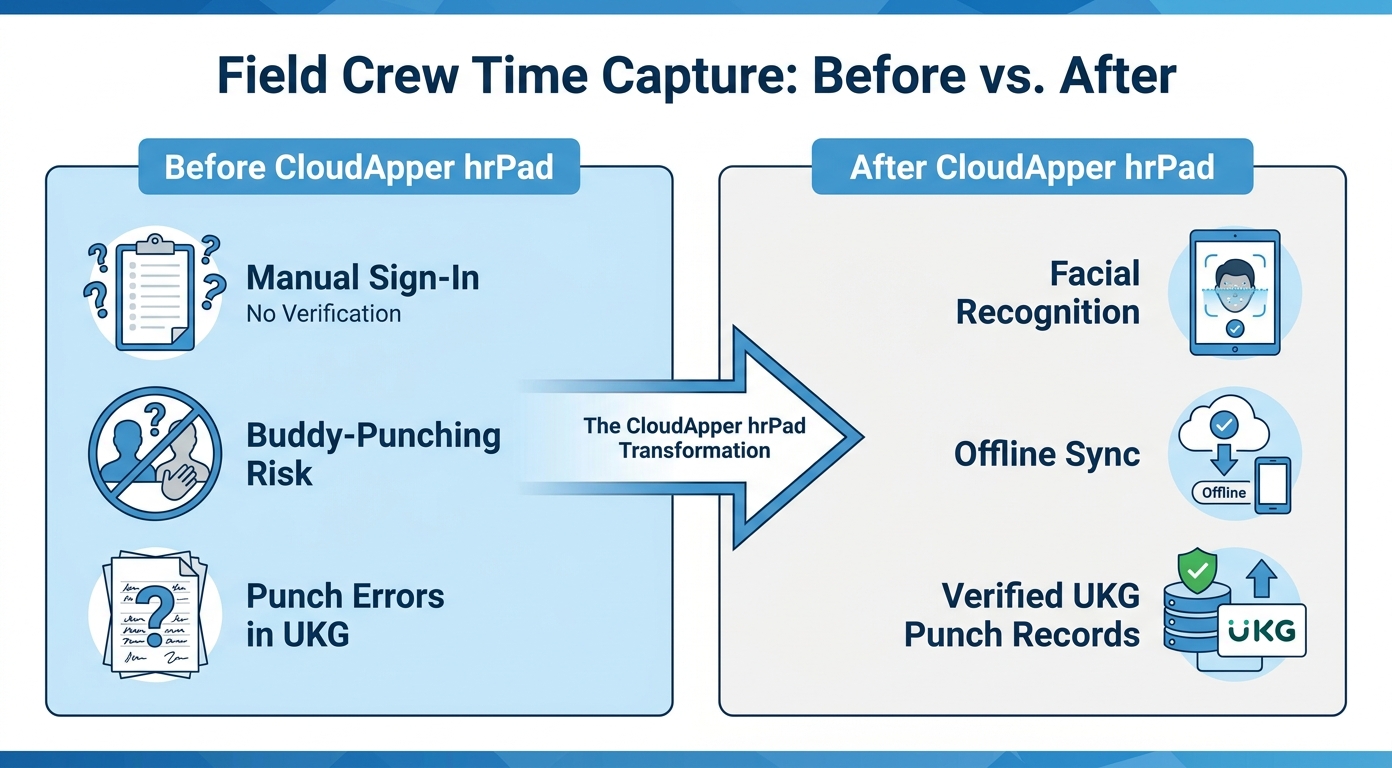
The HR Manager’s concern before deployment was straightforward. As they put it: “It would be helpful to us if there was someone on your team who has already worked with Vista before. Then we could already feel comfortable that side of it is going to be in good shape.” Integration competency with Vista specifically — not just UKG expertise — was the criterion that moved the firm from evaluation to deployment.
What Project Managers Actually Need in Their ERP
Accurate punch records in UKG Pro WFM solved the payroll side. Getting that data to Vista in a usable form was the harder requirement.
The existing connection between UKG and Vista had been passing aggregated payroll totals — period summaries — not the transaction-level detail a project manager needs to review labor actuals by cost code or trade. For a firm running several concurrent concrete jobs, that meant daily production calls started without current labor figures in the hands of the people managing to budget. The situation is structurally similar to how operations have to move operational field data into UKG timecards with full transaction fidelity — the direction reverses here, but the detail requirement is identical.
“I don’t want a summary entry — I want the detail. My project managers aren’t going into UKG to run reports. They’re going into Vista, and they can still see all that detail in their reports.”
— VP of Finance, large concrete construction firm
CloudApper iPaaS for UKG was configured as a bidirectional connector between UKG Pro WFM and Trimble Vista, delivering transaction-level records — individual punches, cost code assignments, trade hours — directly into Vista as payroll processes. That specificity, detail rather than totals, drove the integration architecture from the first conversation.
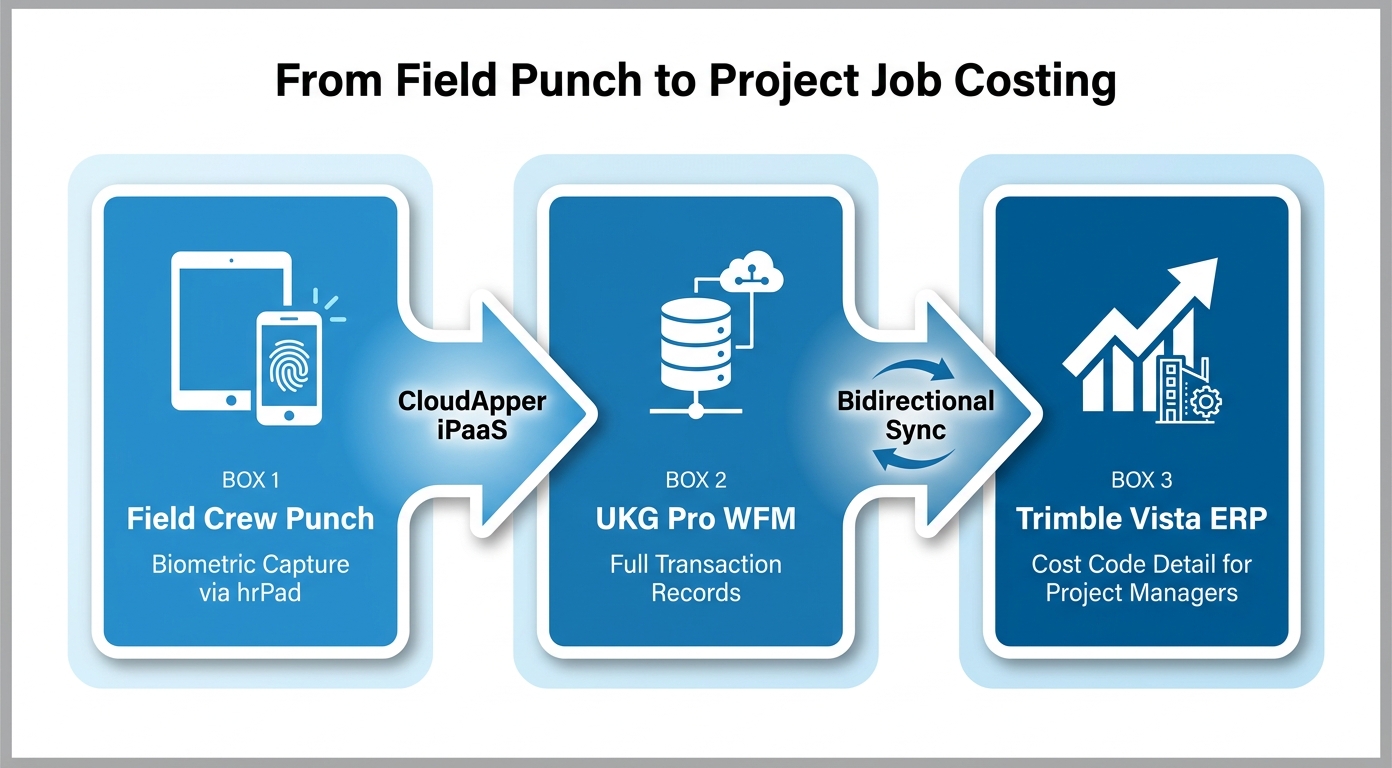
What the Controller and Project Managers Got Back
The practical change for the finance function was that Vista labor data no longer required cross-referencing against UKG to validate. Project managers now run their cost code variance reports inside the system they use every day, with data that reflects actual crew hours against actual cost codes — not rolled-up figures from a prior payroll batch.
“I just don’t want to be sitting in a future conversation and get constant answers of ‘I can’t do that.’ I don’t want to assume something that can’t happen — that’s what I’m trying to avoid.”
— VP of Finance, large concrete construction firm
For UKG Pro WFM customers in construction running Trimble Vista alongside UKG, the distance between payroll detail and ERP visibility tends to widen as the number of concurrent jobs grows. More jobs, more cost codes, more trades — and a summary entry becomes progressively less useful for the project managers who need to manage to it in real time. The combination of CloudApper crew punch capabilities with direct ERP data delivery addresses both sides of that challenge: clean field punch data in UKG, and the same detail available to project managers in Vista without anyone running a manual export. For operations managing crews without fixed terminals, the CloudApper approach to field time capture at remote sites applies here as well.
To explore how CloudApper can connect UKG Pro WFM with Trimble Vista or other construction ERP platforms, contact the CloudApper team.



September 30, 2026
When Your Best Candidates Already Worked for You: How a 50,000-Employee Home Care Organization Automated Rehire Campaigns and Geographic Filtering in UKG Pro
A 50,000-employee home health care organization extended UKG Pro Recruiting with CloudApper AI Recruiter to add geographic zip-code filtering, automated rehire outreach campaigns for former employees, and blind-ranking — reducing recruiter workload and improving hiring quality at scale.

September 29, 2026
If Your HR Events Aren’t in Slack, They Don’t Exist: How a 260-Person HR Tech Company Connected UKG Ready to Where Work Actually Happens
A 260-person HR tech company with a Slack-first culture connected UKG Ready lifecycle events to Slack using CloudApper iPaaS — so new hires, promotions, and PTO approvals appear where the organization already pays attention.

September 28, 2026
4 Integrations, One Migration Window: How a Healthcare Products Distributor Kept Every Critical System Live When They Moved to UKG Pro
A healthcare products distributor migrating from ADP to UKG Pro built four critical enterprise integrations at go-live using CloudApper iPaaS — not after cutover. Here is how treating integrations as a parallel workstream changed what migration day actually meant.
September 18, 2026
When Every Open Shift Carries Grievance Risk: How a Large Public Transit Authority Extended UKG Pro WFM for CBA-Compliant Shift Substitution Bidding
A large public transit authority automated CBA-compliant seniority-based shift substitution bidding in UKG Pro WFM with CloudApper, eliminating manual supervisor interpretation, reducing union grievance exposure, and creating a timestamped audit trail for every assignment decision.
