When employee classifications change in UKG, pay rules and accrual policies do not update automatically. This gap creates severe compliance risks and retroactive payroll errors. Discover how HR teams manage effective dates and utilize CloudApper to automate complex downstream adjustments.



Table of Contents
- What Actually Changes When an Employee’s Type Changes in UKG
- The Effective Date Problem
- What UKG Pro, Ready, and Dimensions Handle Natively
- The Real Compliance Exposure
- How CloudApper Retro Adjustment App for UKG Closes the Gap
- Related Challenges the Same Workflow Addresses
- Other CloudApper Solutions for UKG Payroll Accuracy
- A Practical Checklist for HR Admins and Payroll Managers
- Frequently Asked Questions
- Final Thought
When an employee switches type in UKG, for example from full-time to part-time or into a new job category, the pay rule, overtime threshold, accrual policy and benefit eligibility all have to change on the same effective date, or pay and compliance errors follow. In UKG Pro, UKG Ready and UKG Pro WFM, a change dated incorrectly can ripple through retro pay, accrual balances and overtime for the rest of the period.
Most guidance explains what retro pay is. This article covers what breaks when an employee’s type changes mid-period, which downstream effects need a manual check, and how teams with large or complex workforces keep those changes accurate.
What Actually Changes When an Employee’s Type Changes in UKG
On the surface, a Full-Time to Part-Time status change looks like a single field update. In UKG, it’s not.
Pay rule assignment: UKG links pay rules to employee types. A full-time hourly employee sits under a different pay rule set than a part-time one — different overtime thresholds, different shift differential eligibility, different premium pay triggers. When the type changes, the pay rule needs to change too, on the correct date. UKG will not prompt you to do this. It keeps calculating under whichever rules are currently attached.

Accrual profile reassignment: Accrual benefits in UKG are typically segmented by employee category. Full-time employees accrue PTO at one rate; part-time employees accrue at a prorated rate based on Full-Time Equivalency (FTE). The FTE calculation itself — expressed as either a percentage or a ratio of employee hours to full-time hours — feeds directly into how much time accumulates each period. Change the employee type without updating the accrual profile, and the system accrues at the wrong rate until someone catches it.
Work rule profile: Overtime logic, meal break rules, and scheduling constraints are often tied to employment type. These need updating too.
Benefits eligibility: Depending on how your UKG instance is configured, certain benefit packages are gated by employment status. A reclassification can open or close eligibility windows without anyone noticing until open enrollment or a benefits audit.
None of this is automatic. The system won’t warn you that the pay rule is now out of sync with the new employee type.
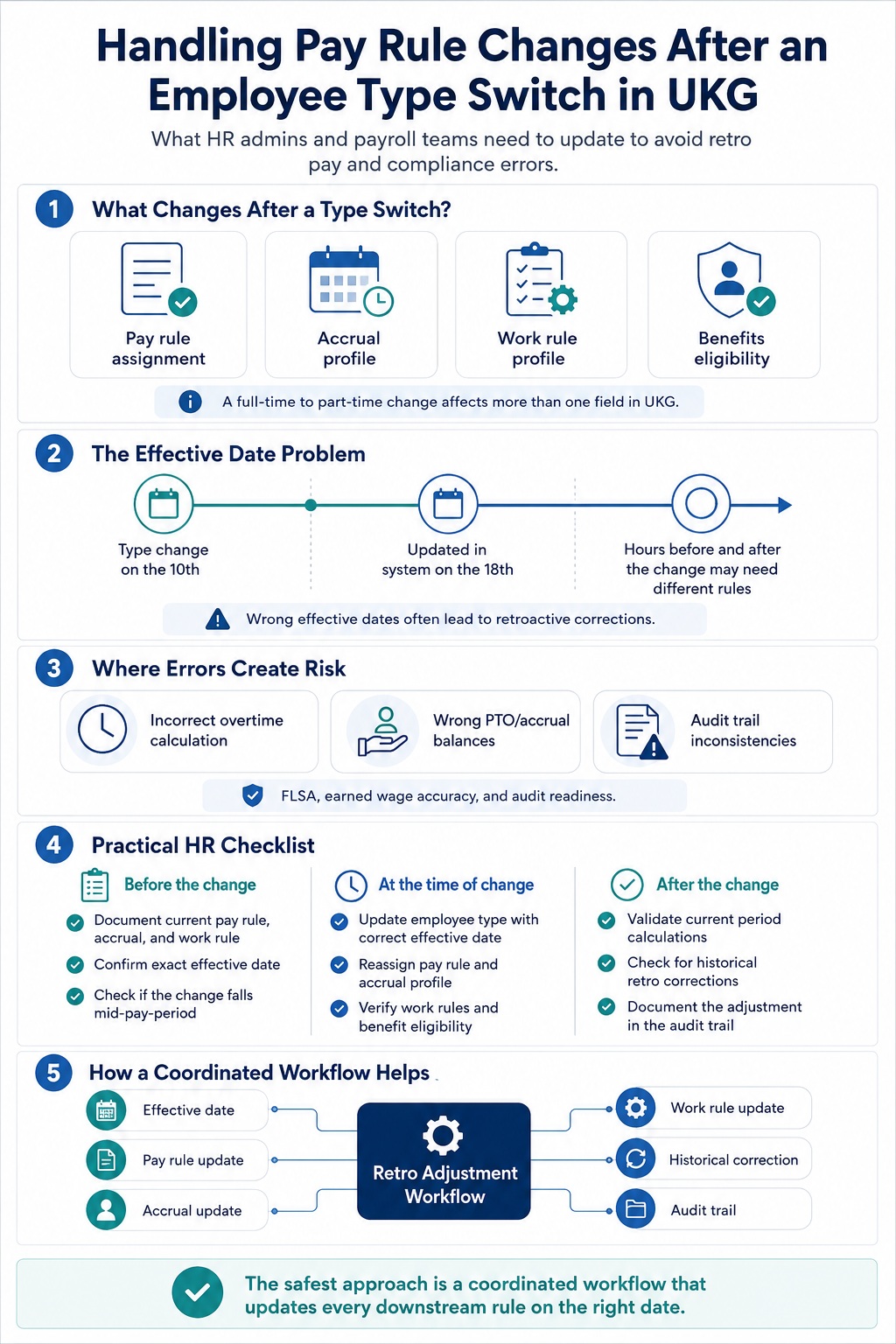
A practical payroll checklist for managing employee type changes, covering pay rule updates, accrual profiles, effective dates, compliance risks, and retro adjustment workflows.
The Effective Date Problem
Most payroll errors in this scenario don’t come from ignoring the reclassification. They come from getting the effective date wrong.
Say an employee formally transitions from full-time to part-time on the 10th of the month, but the change isn’t processed in UKG until the 18th. If the pay period runs from the 1st to the 31st, you have a split-period problem. Hours worked before the 10th should be calculated under full-time rules. Hours from the 10th onward fall under part-time rules. And if the employee was already paid for some of those hours in a prior cycle, you’re looking at a retroactive correction.
UKG does support effective dating for employee profile changes and accrual profile assignments. You can enter an effective date to indicate when a change takes effect. What that date does not do is trigger a downstream recalculation of pay and accrual records that already exist for that period. Correcting those requires additional steps, manual intervention, or a workflow built around the problem.
For payroll teams managing hundreds of employees across multiple pay rule groups, executing this correctly every time is genuinely hard. Common accrual errors in UKG Ready frequently trace back to exactly this scenario: an employee type changed, the accrual profile wasn’t updated at the right time, and the discrepancy didn’t surface until weeks later when an employee noticed their PTO balance was wrong.
What UKG Pro, Ready, and Dimensions Handle Natively
It’s worth being specific about where the native UKG tools are strong, and where the gaps appear.
UKG Ready Accruals 2.0: introduced automatic accrual balance adjustments when employee updates occur — promotions, transfers, and reclassifications. It added effective dating so the right accrual rules apply to the correct time periods. For organizations on UKG Ready, this is a meaningful step forward, particularly for clean reclassifications that don’t involve mid-period splits.
UKG Workforce Dimensions: supports adjustment rules that are effective dated, giving admins control over when new pay policy implementations take effect relative to a pay period boundary. For environments with multiple labor categories or cost centers, triggers can be configured by business structure, which helps when reclassified employees also move across departments.
UKG Pro’s continuous calculation engine: handles retroactive pay, corrections, and adjustments in many standard scenarios without requiring manual recalculation. A correction typically produces a retroactive pay line item on the next available paycheck.
Where all three platforms require additional configuration or manual oversight:
- Reclassifications that happen mid-pay-period and need split-period pay rule logic
- Cases where the accrual profile, pay rule, and work rule all need to change simultaneously on the same effective date
- Volume reclassifications — workforce restructuring events that change dozens of employees at once
- Situations where historical timecards need to be recalculated against the new pay rule, not just the current open period
Scale is where this gets difficult. Understanding how pay codes and pay types are configured in UKG helps clarify which rules are in play after a reclassification — but knowing which rules exist and actually updating all of them on the right date are two different things.
The Real Compliance Exposure
Misconfigured pay rules after a status change carry legal risk, not just administrative inconvenience.
Under FLSA, overtime calculations for non-exempt employees depend directly on their classification. If a full-time employee is reclassified to part-time but the overtime pay rule isn’t updated, you’re calculating overtime incorrectly for the period straddling the change. FLSA violations don’t require intent; they require incorrect pay.
Accrual miscalculations have their own exposure. In most U.S. states, accrued PTO is treated as earned wages. If an employee accrues at the wrong rate — either too high or too low — correcting it retroactively means documenting both the dollar difference and the paper trail showing the correction was made. Courts and state labor boards don’t respond well to “we fixed it when we noticed.”
There’s also the audit angle. When UKG records show a pay rule assignment that doesn’t match the employee type on a given date, that inconsistency will surface in an audit. The burden falls on HR to reconstruct the timeline and explain the gap.
HR admins who deal with this regularly tend to make the same point: the safest approach is a pre-change checklist that captures every UKG configuration tied to the current employee type before the switch happens. Once the change is processed, verifying that each downstream configuration was updated is far easier than discovering three months later that one of them wasn’t.
How CloudApper Retro Adjustment App for UKG Closes the Gap
The CloudApper Retro Adjustment App for UKG was built for this specific workflow: recalculating and adjusting pay rules and accrual policies when an employee’s type or job changes, anchored to a defined effective date.
Instead of relying on an HR admin to manually identify and update every downstream configuration, the app coordinates those updates. When a reclassification is triggered with an effective date, it identifies the associated pay rule set, accrual profile, and work rule assignments tied to the new employee type and processes the retro adjustment — ensuring records reflect the actual classification at every point in time.
For organizations running high volumes of status changes — seasonal workforce cycles, layoff-and-rehire events, FLSA-driven reclassifications — this matters practically. The alternative is a manual tracking process that depends on whoever is in the seat that week knowing all the configuration dependencies. That works until it doesn’t.
The app runs across UKG Pro, UKG Ready, UKG Workforce Central, and UKG Pro WFM (Dimensions), so it fits into existing UKG environments without a platform migration.
Related Challenges the Same Workflow Addresses
Pay rule changes after a status switch rarely arrive alone.
Historical timesheet corrections: If the effective date of the reclassification falls inside a closed pay period, the historical timecards need to be recalculated against the new pay rule. Correcting historical timesheets in UKG is a separate process from updating the current employee profile — typically requiring manager access to past pay periods. Automating that access and the workflow around it reduces both the time to correction and the error rate.
Retroactive pay adjustment errors: When retro pay covers multiple periods, error rates increase. Fixing retroactive pay adjustment errors in UKG Pro requires structured workflows. Without an auditable process, the same miscalculation can repeat across future periods before anyone catches it.
Bulk reclassifications: Workforce restructuring events reclassify groups of employees at once. Processing those individually through UKG’s native interface is time-consuming and inconsistent. The Bulk Punch and Task Transfer solution for UKG Pro WFM handles the volume problem — HR teams can process batch updates with the same effective-date logic applied consistently across each record.
Other CloudApper Solutions for UKG Payroll Accuracy
If pay rule complexity after employee type changes is a recurring problem, a few other CloudApper tools address connected parts of the same workflow:
CloudApper hrPad extends UKG’s time capture and self-service capabilities via tablets — relevant when reclassified employees are frontline workers who need to verify updated pay information or submit corrections without going through a desktop interface. It also handles pay schedule compliance across state labor laws, which matters when a status change shifts which state-level rules apply to an employee.
CloudApper AI TimeClock integrates with UKG so that time data collected at the point of capture already reflects the correct pay rule for the employee’s current classification — catching mismatches before they reach the payroll engine rather than after.
CloudApper HCM Automation handles the broader workflow around employee lifecycle events in UKG, including status changes. When a reclassification triggers not just pay rule updates but also workflow routing changes, manager reassignments, and benefit adjustments, having a coordinated automation layer reduces the manual coordination that falls on HR.
A Practical Checklist for HR Admins and Payroll Managers
When processing an employee type change in UKG Pro, Ready, Workforce Central, or Dimensions:
Before the change:
- Document the current pay rule assignment, accrual profile, and work rule profile
- Confirm the exact effective date and whether it falls within an open or closed pay period
- If mid-period, determine whether a split-period calculation is needed
- Notify payroll of the incoming retroactive adjustment
At the time of change:
- Update the employee type field with the correct effective date
- Reassign the pay rule profile to match the new type
- Update the accrual profile and recalculate FTE if moving between full-time and part-time
- Update work rule assignments for overtime and break calculations
- Verify benefit eligibility settings
After the change:
- Run a validation report confirming the new rules are applied to the current period
- Check for historical periods that need retroactive correction
- Document the adjustment in the audit trail
- Confirm the employee received accurate confirmation of their updated pay structure
At volume, a manual checklist gets you most of the way there. It doesn’t get you all the way — the configuration dependencies are too numerous and too interconnected for a checklist alone to catch every edge case under pressure.
Frequently Asked Questions
Does UKG automatically update pay rules when an employee type changes?
No. UKG links pay rules to employee profiles, but updating the employee type field does not trigger a pay rule reassignment. That update is made separately, and it requires the correct effective date.
What happens if a pay rule isn’t updated after a reclassification?
The system continues calculating pay under the rules attached to the old employee type until the assignment is manually corrected. The result can be incorrect overtime calculations, wrong accrual rates, or inaccurate shift differential pay — all requiring retroactive correction.
Can UKG Ready recalculate accruals retroactively after an employee type change?
UKG Ready Accruals 2.0 supports retroactive policy adjustments and lets HR admins manually recalculate balances for specific periods. The recalculation is not automatic — it requires admin action after the reclassification event.
What effective date should be used when reassigning a pay rule in UKG?
The effective date should match when the employee’s classification actually changed, not when the update is being processed in the system. Using the processing date instead of the classification date is one of the most common sources of retroactive pay errors in UKG.
How does CloudApper handle retro adjustments across different UKG platforms?
The CloudApper Retro Adjustment App works across UKG Pro, UKG Ready, UKG Workforce Central, and UKG Pro WFM (Dimensions). It reads the employee’s new type and effective date, identifies downstream configuration dependencies, and processes the adjustment in a coordinated workflow — rather than requiring separate manual updates to each configuration.
Final Thought
Employee reclassifications are routine. What’s not routine is the number of downstream configurations in UKG that don’t update themselves when one happens.
The organizations that handle this cleanly have built a process: a pre-change documentation step, tooling that coordinates the pay rule, accrual, and work rule updates together, and an audit trail that shows what changed and when. The organizations that don’t have that process tend to find out they need it at the worst possible time.
If your team is still working through reclassifications manually, that’s manageable at low volume. At scale, the errors compound faster than a weekly payroll review can catch them.
CloudApper is a UKG Technology Innovation Partner and winner of the 2023 UKG Technology Innovator Award. To learn how the Retro Adjustment App and other CloudApper solutions fit into your UKG environment, contact the CloudApper team.