
Preventing unplanned overtime in UKG starts with real-time visibility and better control at the moment punches happen. This guide shows how CloudApper AI TimeClock helps you reduce surprise hours, improve accuracy, and keep payroll clean with simple, reliable tools.



Table of Contents
If you work in a UKG environment, you know how quickly unplanned overtime can get out of hand. I have seen managers approve schedules that look perfect on paper, only to end up dealing with unexpected overtime at the end of the week. Most of the time, the issue is not the schedule. It is the lack of real-time visibility. That is why so many UKG users now rely on CloudApper AI TimeClock for UKG. It helps prevent overtime before it happens by giving you accurate time tracking, automated alerts, and real-time control.

TL;DR
-
Unplanned overtime happens in UKG when early punches, late punches, and missing alerts go unnoticed.
-
CloudApper AI TimeClock prevents this by validating punches in real time and blocking inaccurate clock-ins.
-
Automated overtime alerts help managers and employees act before extra hours accumulate.
-
Self-service tools reduce schedule conflicts, which lowers last-minute overtime.
-
Geofencing and approval workflows give you tighter control over hours without disrupting your existing UKG process.
Why Unplanned Overtime Becomes a Problem in UKG Environments
Overtime itself is not the issue. The problem is unplanned overtime that sneaks up on you. It eats up your budget, adds stress to managers, and sometimes creates compliance risks. Here are the patterns I notice most often across UKG accounts:
-
Employees clock in early to “get a head start”
-
Clock-out times drift later throughout the week
-
Supervisors do not see overtime coming until it is too late
-
Mobile employees and field teams punch from uncontrolled locations
-
HR ends up spending hours cleaning up entries during payroll
-
Managers get surprised during labor reporting and scramble to explain costs
None of this is because UKG is missing something. It is because the business needs more control at the moment punches happen. When you fix that, overtime becomes predictable and manageable.
Common UKG Overtime Mistakes That Raise Labor Costs
These mistakes showed up repeatedly across many organizations I help:
1. Not setting up daily or weekly overtime rules correctly
Many teams think their overtime rules are set up correctly, only to find out later that a small configuration detail in UKG is adding extra hours. I often see daily overtime set to trigger too late or weekly overtime set to follow an outdated policy. When the rule does not match your real schedule, overtime accumulates quietly in the background, and you only notice during payroll review.
2. Allowing early or late punches
This is one of the biggest hidden causes. Employees often start a few minutes early or stay a few minutes late because they want to finish a task. It feels harmless to them, but across a large team, those small minutes turn into hours of unplanned overtime by the end of the pay period. Without automatic controls, these extra minutes stack up faster than most managers realize.
3. No geofencing for mobile workers
Field workers and mobile crews create overtime issues when they punch from uncontrolled locations. I have seen cases of employees clocking in from the highway on their way to a job site or clocking out long after leaving. When punches are not tied to a specific site, you lose control of both accuracy and compliance. A few minutes here and there end up inflating total work hours and pushing staff into overtime.
4. Missing real-time alerts
Most managers only discover overtime after it has already happened. That is because they see hours during approval, not during the shift. Without alerts at 70 or 80 percent of the overtime threshold, there is no chance to intervene early. By the time overtime is visible, it is too late to fix. This creates a weekly cycle of surprises and corrections.
5. No audit trail during payroll review
When punches are not validated at the moment they happen, HR ends up sorting through unclear edits and missing information at the end of the pay cycle. Without a clean audit trail, HR must guess why certain hours appear where they do. This slows down payroll, increases corrections, and allows overtime errors to pass through unnoticed.
Fixing these issues prevents most overtime problems before they reach payroll.
You don’t have to keep fixing overtime problems after they happen. You can stop them right at the punch.
How CloudApper AI TimeClock Helps You Prevent Unplanned Overtime in UKG
Here is where things get easier. When you connect CloudApper AI TimeClock to UKG, you get real-time tools that catch overtime before it becomes an issue.
Real-Time Visibility Into Hours and Overtime
One thing I see often is that overtime does not “appear” suddenly. It builds quietly throughout the week. The challenge is that most teams notice it only during payroll or manager approval, which is far too late to fix. With CloudApper AI TimeClock feeding real-time hours into UKG, you see overtime forming as it happens. You can track who is getting close to their limits, who has already gone over, and which shifts are pushing the totals higher.
This level of clarity lets you act in the moment instead of reacting days later. You can reassign workload, balance hours between team members, or bring in someone who still has room under their weekly limits. I have watched supervisors reduce unplanned overtime by up to 20 percent in a single pay period simply because they finally had visibility at the right time. When you see the problem early, fixing it becomes much easier.
Automated Alerts for Employees and Managers
Even when managers want to prevent overtime, they often miss the warning signs because they are busy running operations. Automated overtime alerts solve this by letting the system do the watching for you. When an employee approaches daily or weekly overtime limits, both the employee and the manager receive a notification. It is a small nudge, but it makes a big difference.
Employees can slow down or finish their shift on time. Managers can shuffle tasks, assign support, or approve additional hours when needed. These small adjustments prevent overtime from building up unintentionally. Many organizations I work with tell me that alerts alone reduced overtime because people became more aware of their hours. Visibility creates responsibility, and responsibility reduces unnecessary overtime.
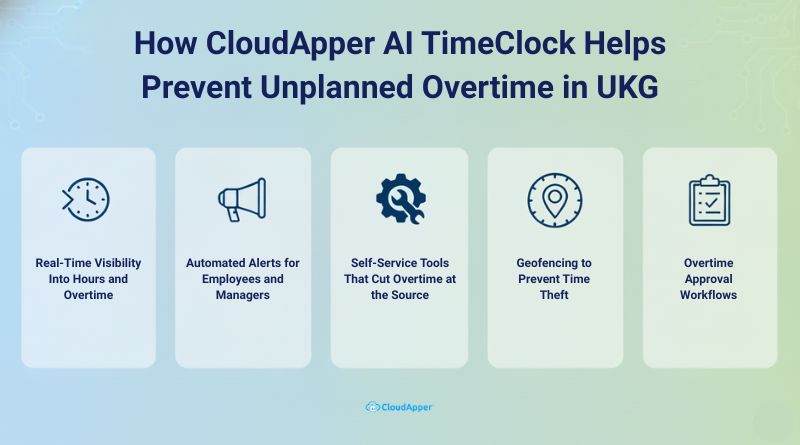
Self-Service Tools That Cut Overtime at the Source
A surprising amount of overtime happens because employees lack control over simple scheduling issues. Someone cannot find a shift swap. Someone needs a last-minute PTO request approved. Someone stays late because the person covering them did not show up. These problems add up fast.
Self-service tools inside CloudApper AI TimeClock allow employees to fix these issues on their own. They can swap shifts, request time off, manage break times, and see their total weekly hours in advance. When people can make these adjustments without involving HR or managers, schedules stay balanced and employees avoid pushing themselves into overtime without meaning to.
Most companies notice fewer schedule conflicts and fewer last-minute changes once employees have tools to handle these decisions directly. Less chaos means less overtime.
Geofencing to Prevent Time Theft
Location-based rules matter more than people realize. In many operations, especially logistics and field service, overtime increases because employees clock in or out from places that do not truly reflect their working hours. Someone clocks in from the parking lot. Someone clocks out from home. Someone working remotely stretches their shift unintentionally.
Geofencing prevents all of that by restricting clock-ins and clock-outs to approved locations only. You define the site, and the system validates the punch instantly. If the employee is not within the approved zone, the punch is blocked. This protects your time data and prevents small inconsistencies from piling up into large overtime totals.
Overtime Approval Workflows
This feature gives managers more control without slowing operations down. When an employee requests overtime, the request moves through a simple workflow. Managers see why the overtime is needed, how many hours the employee has already worked, and whether the request fits the week’s budget.
This lets you approve overtime when it is necessary and deny it when another solution makes more sense. It also helps maintain consistency in how overtime is granted, which avoids the common issue of certain employees receiving more overtime than others, leading to frustration or favoritism concerns.
Approval workflows create predictability. Predictability reduces surprise costs. And when overtime does occur, it is intentional and aligned with your staffing needs.
From My Experience Helping UKG Users
When overtime spikes, it is rarely because the schedule failed. It usually happens because no one saw the overtime coming. Once CloudApper AI TimeClock begins sending overtime warnings automatically inside UKG, those spikes start to disappear. Most teams notice improvement within the first week.
Overtime management becomes predictable, payroll becomes easier, and managers feel more in control.
Final Thoughts
Preventing overtime in UKG is not about tightening rules. It is about giving yourself real-time control. When you pair UKG with CloudApper AI TimeClock, you see the full picture before overtime happens. This leads to fewer surprises, cleaner payroll, and a smoother workforce management process.
If you want to test this with one location or one department, you can see results quickly. It is easy to try and even easier to maintain.
If you want overtime to become predictable instead of stressful, the right time clock makes the difference.
Frequently Asked Questions
-
How do I set up overtime rules in UKG?
Daily and weekly overtime rules are configured in UKG Pro WFM or UKG Ready. CloudApper ensures punches follow these rules by validating them in real time.
-
What causes incorrect overtime calculations in UKG?
Early punches, late punches, missing edits, and mobile punches from uncontrolled locations are the most common causes.
-
Does CloudApper AI TimeClock help prevent overtime automatically?
Yes. Overtime alerts, punch validation, geofencing, and approval workflows help prevent overtime before it reaches payroll.
-
Can employees manage their own hours?
Yes. They can swap shifts, request PTO, and manage availability through self-service.
-
Does it work for mobile or field teams?
Yes. Geofencing ensures accurate punches from approved sites only.