Intermittent FMLA arrives at the time clock unlabeled: a late clock-in, an early out, nothing marking it protected. So attendance points accrue, PTO burns, and HR designates from a week-old memory. How to capture the employee's claim at the punch and keep protected absences from entering UKG disguised as attendance problems.


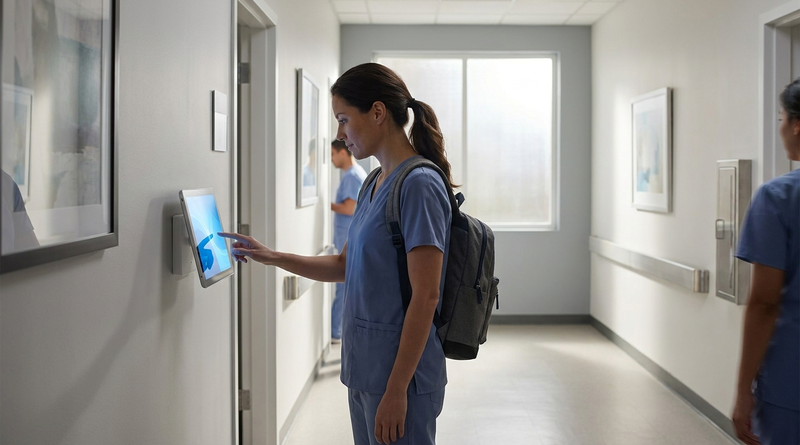
Table of Contents
- What UKG Handles Natively
- Where the Friction Shows Up
- What to Do Inside UKG First
- Where Native Tools Run Out
Tracking intermittent FMLA at the time clock comes down to one move: capture the employee’s leave claim at the moment of the punch, before the absence gets coded as anything else. UKG manages the entitlement; the clock’s job is making sure a protected two-hour absence never enters the system looking like a late arrival.

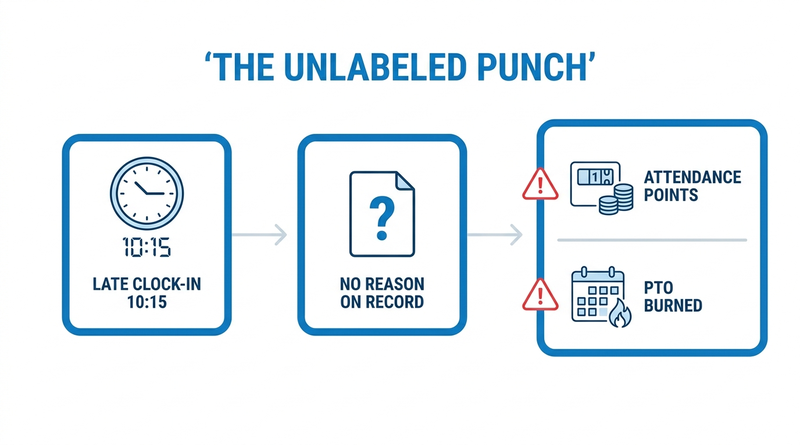
That moment is where intermittent leave usually goes wrong. A migraine flare-up arrives as a 10:15 clock-in. A dialysis appointment arrives as a 2:00 clock-out. Nothing in the punch says FMLA, so attendance points accrue, PTO gets burned, and HR designates the absence days later from a supervisor’s recollection. Organizations that add at-punch reason capture with CloudApper AI TimeClock are often surprised by how much reconstruction they used to do.
What UKG Handles Natively
UKG covers the entitlement side well. Absence plans track the 12-week allotment, pay codes distinguish leave types, and under 29 CFR 825.205 intermittent leave must be accounted for in the shortest increment used for other leave, capped at one hour — increments UKG’s configuration handles. Once an absence is designated FMLA, leave management in UKG does the math correctly.
Where the Friction Shows Up
Designation depends on knowing the absence happened for an FMLA reason, and the punch record arrives silent. The late-in looks identical to traffic. So attendance points accrue against protected absences — the classic interference fact pattern — and payroll unwinds retroactive corrections that a missed punch policy never anticipated. A record corrected three days later is a reconstruction, not evidence.
What to Do Inside UKG First
- Configure FMLA-specific pay codes at the increment your other leave uses, so partial-shift absences post cleanly.
- Suspend attendance-point accrual for any absence pending FMLA review rather than reversing points after designation.
- Give employees a same-day path to flag an absence — the same logic as capturing PTO reasons at the clock.
- Route flagged punches to the leave administrator daily, not at pay-period close.
Where Native Tools Run Out
Every step depends on the reason reaching the record, and a proprietary terminal cannot ask. A badge swipe carries no claim, no context, no prompt — which is the specific gap CloudApper AI TimeClock closes at the device.
How CloudApper AI TimeClock Captures the Claim
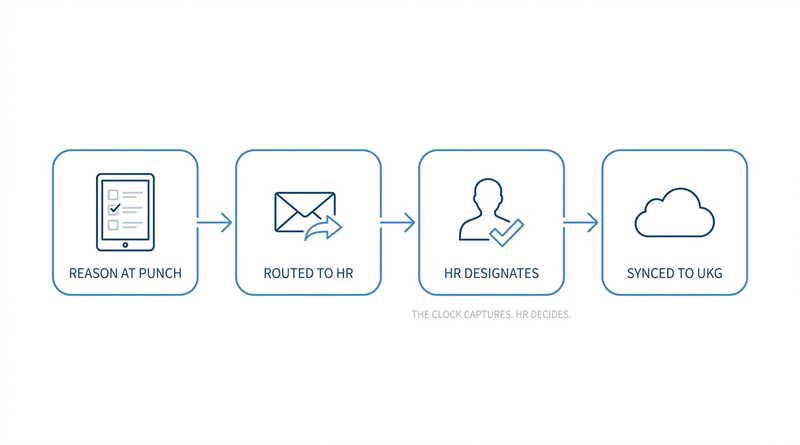
One boundary first: no time clock designates FMLA. Designation is HR’s decision. The clock’s contribution is a timestamped, employee-submitted claim made at the moment of work.
CloudApper AI TimeClock runs on any Android tablet or iPad and prompts at the punch: a late-in or early-out can carry a reason selection, including an FMLA option, the same way it captures comments on missed punches. Custom forms route the flagged punch to HR for review, and the punch syncs to UKG Ready or UKG Pro WFM already carrying its context — so designation starts from a contemporaneous record instead of a week-old memory.
Frequently Asked Questions
Q: How do you track intermittent FMLA at the time clock in UKG?
Capture the employee’s leave reason at the moment of punch, then route it to HR for designation. UKG’s absence plans and pay codes handle the entitlement math; the capture layer’s job is ensuring a protected partial-shift absence enters the system flagged, not disguised as a late arrival.
Q: What increment must intermittent FMLA be tracked in?
Under 29 CFR 825.205, an employer must account for intermittent FMLA in the shortest increment it uses for other forms of leave, and never more than one hour. If you track other leave in 15-minute units, FMLA gets 15-minute units too.
Q: Can attendance points be given for FMLA-protected absences?
No — counting protected absences against a no-fault attendance policy is a recognized FMLA interference pattern. The safest configuration suspends point accrual for any absence pending FMLA review instead of assessing points and reversing them later.
Q: Does a time clock designate an absence as FMLA?
No. Designation is always HR’s decision under the FMLA process. What a clock can do is capture the employee’s contemporaneous claim — a reason code submitted at the punch — so HR designates from a timestamped record rather than a later reconstruction.
Q: Can employees flag an FMLA absence when clocking in on CloudApper AI TimeClock?
Yes. At punch, the kiosk can prompt for a reason on a late-in or early-out, including an FMLA option, and route the flagged punch to the leave administrator. The punch syncs to UKG Ready or UKG Pro WFM with that context attached.
If intermittent FMLA reaches your team as a stack of retroactive corrections every pay period, the fix is capturing the claim at the punch. See how CloudApper AI TimeClock adds reason capture to tablets you already own, syncing directly with UKG Ready and UKG Pro WFM, at https://ukg.cloudapper.ai/affordable-ukg-kronos-time-clock/.




November 5, 2026
Tablet Time Clocks in Cold, Wet and Dusty Sites: Who Answers the Work Order When the Screen Fogs Over
Putting a tablet time clock in cold storage, a washdown line or a dusty dock works when ownership is settled first. This guide gives UKG admins placement rules, fallback punch options, a test plan and a named support owner for each site.

November 4, 2026
Weekend Cutover from Intouch DX to Tablet Time Clocks: The Rollback Rule to Agree Before Friday
A weekend swap from Intouch DX to tablet time clocks works only when the rollback rule is agreed first. This runbook gives UKG admins a Friday to Monday sequence, plant manager acceptance criteria, and a payroll-based trigger for reverting a site.

November 3, 2026
Wi-Fi Site Survey for UKG Tablet Time Clocks: Who Owns the Network Before the First iPad Is Mounted
Moving from wired UKG clocks to tablets shifts a hidden dependency onto your wireless network. This guide shows UKG admins and IT how to survey each clock position, test outage behavior, and assign ownership of access point fixes before go-live.

November 2, 2026
Changing the Time Clock in a Union Shop on UKG: What to Settle Before the First Tablet Ships
Changing the time clock in a union workplace is a labor relations task as much as an IT one. This checklist shows UKG admins and HR leaders what to settle first: agreement review, frozen pay rules, steward briefings, biometric consent alternatives, and a one-site pilot.