Fair workweek and predictive scheduling laws cover retail, food service, and hospitality across 10+ US jurisdictions. UKG handles the pay rules and scheduling layer well. The compliance gap is at the terminal — rest period consent, schedule change acknowledgment, and contemporaneous documentation that a pay calculation alone cannot provide.


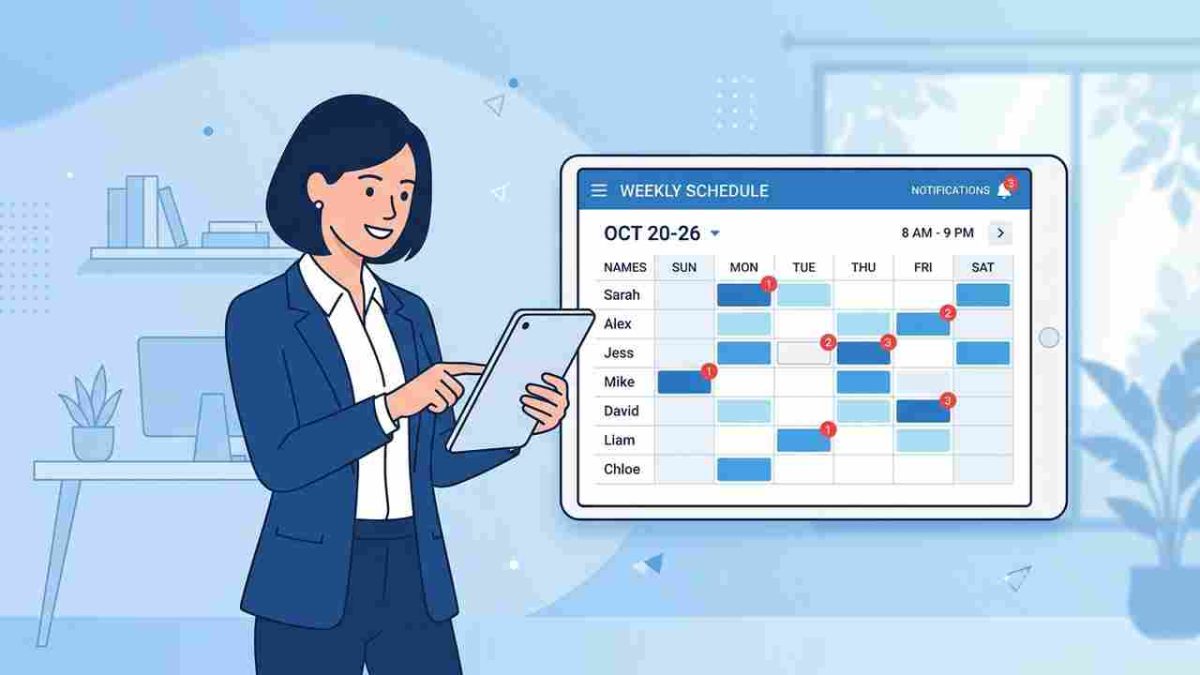
Table of Contents
- What Fair Workweek Laws Actually Require
- What UKG Does Well for Scheduling Compliance
- Where the Compliance Documentation Gap Shows Up
- What to Configure in UKG Before a Fair Workweek Audit
- How CloudApper AI TimeClock Closes the Terminal-Level Documentation Gap
- Frequently Asked Questions
- Closing
Fair Workweek compliance in UKG depends on records the pay rules can’t create on their own: proof that employees were notified of schedule changes and agreed to shorter rest between shifts. Consider a retail HR manager in Chicago whose store director calls because three employees want to know why they didn’t receive predictability pay after their shifts changed with less than 14 days’ notice. In UKG Ready the schedule change is there and the punches are there. What’s missing is any record of when the employees were told, or whether they agreed to a short rest period before the next morning’s shift.
Chicago’s Fair Workweek Ordinance requires 14 days’ advance notice of schedules, predictability pay for changes inside that window, and time-and-a-quarter pay for shifts that start less than 10 hours after the previous one ended, which employees may decline. With pay rules configured correctly, UKG can calculate the premiums. The notice and consent records have to come from somewhere else, and many organizations discover they don’t exist during a wage claim.
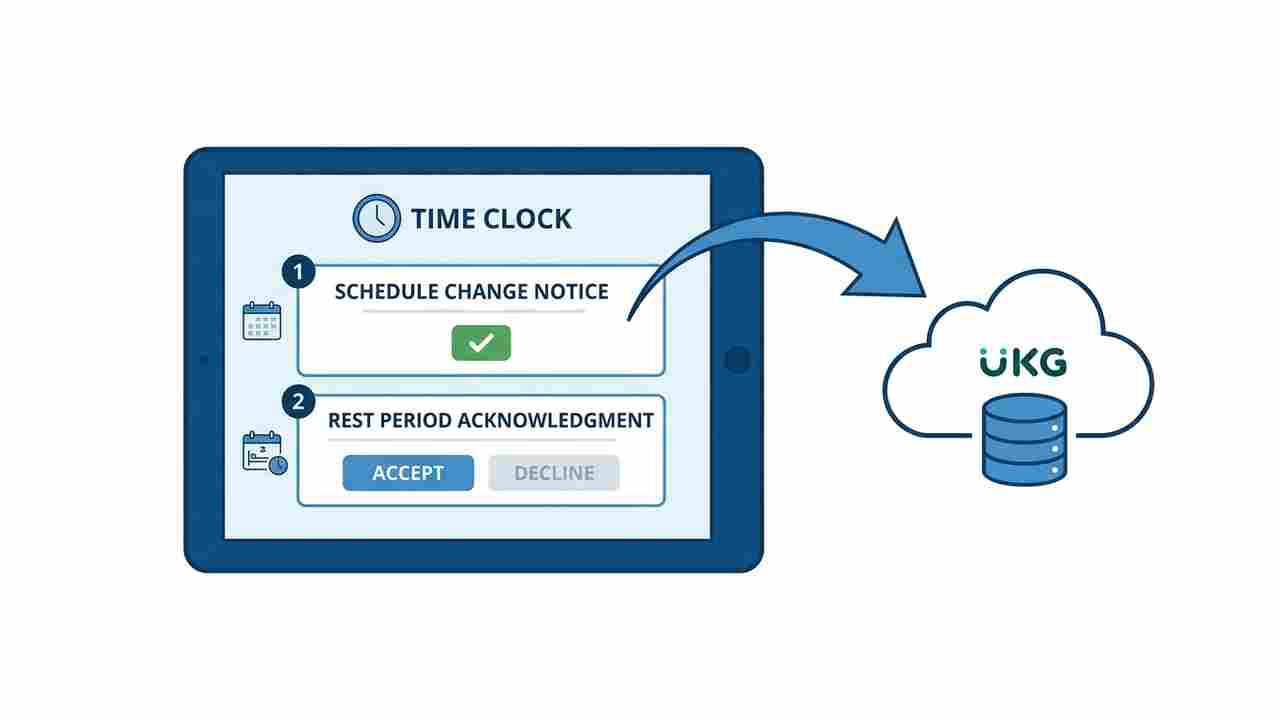
CloudApper AI TimeClock for UKG adds schedule acknowledgment and rest period consent prompts at clock-in, on Android tablets or iPads synced with UKG Ready and Pro WFM, so the compliance record starts at the punch.
What Fair Workweek Laws Actually Require
Fair workweek and predictive scheduling laws have expanded significantly and now cover employers across more than a dozen US jurisdictions. The common structure across all of them follows a recognizable pattern, though the specifics vary enough that a compliance approach built for Seattle does not automatically cover Chicago or Philadelphia.
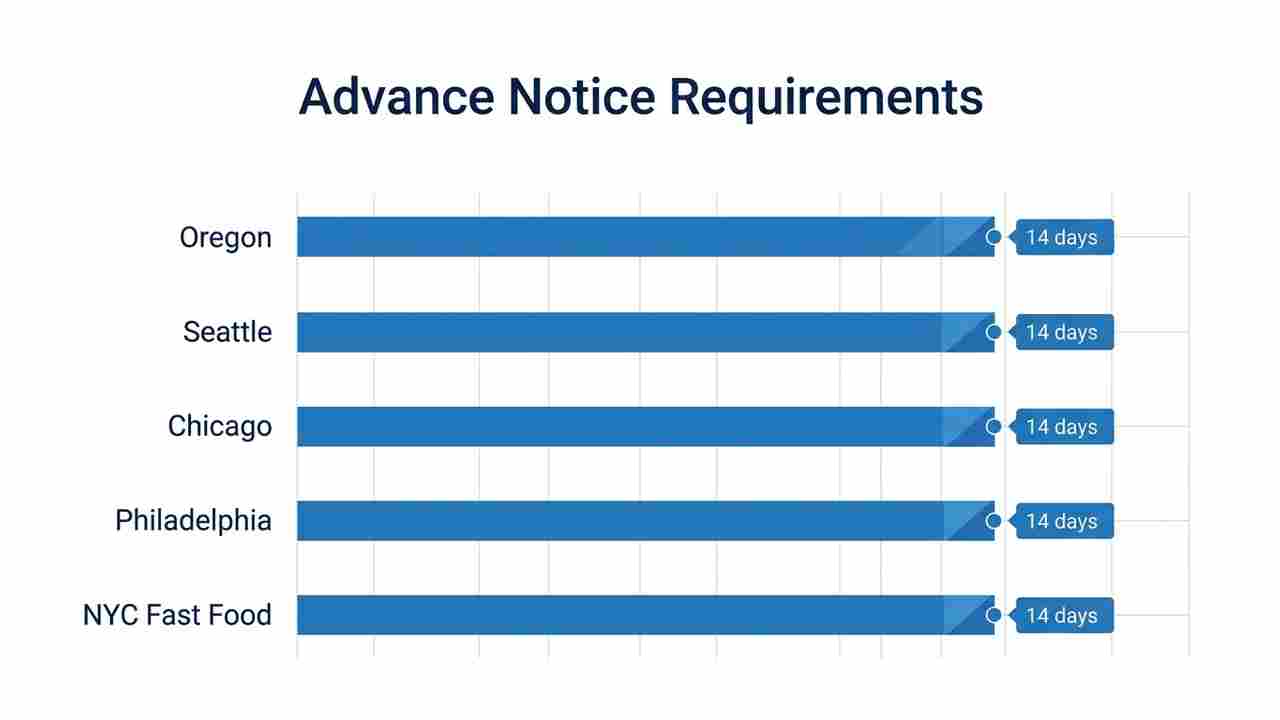
Advance schedule posting. Most jurisdictions require employers to post schedules at least 14 calendar days before the first shift covered by the schedule. Oregon, Seattle, San Francisco, Chicago, Philadelphia, Emeryville, Berkeley, Los Angeles City, LA County (unincorporated), Evanston, and New York City (fast food) all use a 14-day notice window. New York City retail requires 72 hours. Violation of the posting requirement itself is often the threshold trigger for predictability pay obligations.

Predictability pay for schedule changes. When a schedule change occurs after the advance notice window closes, most jurisdictions require additional pay. The calculation varies: Oregon, Seattle, and Philadelphia use a fractional approach — half the regular rate for each scheduled hour the employee is not worked. Berkeley, Emeryville, and Evanston use a capped-block approach — up to four hours at the regular rate for reductions or cancellations made with less than 24 hours’ notice. Chicago sets one hour at the regular rate for most changes within 14 days, with different triggers for additions versus cancellations. New York City fast food uses a fixed-dollar premium that escalates based on how close to the shift the change is made.
Right to rest and clopening rules. Every major fair workweek jurisdiction includes a minimum rest period between the end of one shift and the start of the next. The minimums range from 9 hours (Philadelphia) to 11 hours (Berkeley, Emeryville, Evanston, New York City fast food). Oregon, Seattle, Chicago, and Los Angeles require 10 hours. When an employee accepts a shift that violates the rest period — the classic “clopening” where an employee closes and opens back-to-back — most jurisdictions require either a pay premium (typically 1.25x to 1.5x) or a flat dollar premium, and the employee’s written consent. Chicago requires the clopening premium to be itemized separately on the pay stub.
Recordkeeping. Most fair workweek laws impose two to three year recordkeeping requirements for schedule notices, employee acknowledgments, consent forms, and predictability pay calculations. The documentation trail needs to be retrievable for that window because wage claims, DOL inquiries, and class action suits are the enforcement mechanism.
What UKG Does Well for Scheduling Compliance
UKG Ready and UKG Pro WFM have genuine capabilities that support fair workweek compliance at the scheduling and payroll layer, and it’s worth being precise about what those are.
UKG’s scheduling module supports advance schedule posting. Schedules can be published to employees through UKG’s employee-facing interfaces, and the platform maintains a record of when a schedule was published. For organizations operating in fair workweek jurisdictions, UKG’s scheduling tools provide the infrastructure for the 14-day advance posting requirement if the publishing workflow is configured and followed.
UKG’s pay rules engine can be configured to calculate predictability pay automatically when schedule change events meet the jurisdictional trigger. Last-minute schedule changes in UKG that affect payroll accuracy require pay rule configuration that maps change event types to the correct premium calculation — something UKG’s engine can handle when configured for the specific jurisdiction.
UKG’s reporting capabilities support the recordkeeping obligations. Schedule history, change logs, and pay period summaries are available through UKG’s reporting tools and provide the raw data for a fair workweek audit response. The limit is at the terminal layer: what happens when the employee arrives at the time clock and clocks in for a shift that was changed, that violates a rest period, or that was added inside the notice window without their documented consent.
Where the Compliance Documentation Gap Shows Up
Rest period acknowledgment at clock-in. When an employee arrives for a shift that follows another shift with less than the required rest period, the jurisdiction’s premium pay applies — but so does the employee’s right to refuse and the employer’s obligation to have documented consent if the employee accepts. A standard UKG terminal processes the punch without surfacing the rest period calculation or prompting for consent. The employer knows the clopening occurred because the punch records show it. What’s missing is the consent record that makes the premium legally sufficient rather than just a calculation the payroll system produced.
Schedule change acknowledgment. When a schedule was modified inside the notice window and the employee shows up for the changed shift, most jurisdictions treat the employee’s appearance as implicit acceptance — but a documented acknowledgment at the time of notification or at clock-in is a significantly stronger compliance position. A manager who texted a schedule change and received no reply has weaker documentation than a terminal that prompted the employee to acknowledge the change at clock-in and recorded the response with a timestamp. DOL audit readiness for UKG users covers the general principle: the records need to be contemporaneous, not reconstructed.
Multi-jurisdiction compliance for multi-location operations. A retail organization with locations in Seattle, Chicago, and Philadelphia faces three different notice windows, three different premium calculation formulas, and three different rest period requirements — on the same workforce management platform. Multi-state hour tracking in UKG Pro WFM addresses the pay rule complexity. The terminal-level compliance documentation — which prompts fire for which employees at which locations — is a separate configuration layer.
What to Configure in UKG Before a Fair Workweek Audit
Map your locations to applicable jurisdictions before configuring pay rules. A UKG deployment serving locations in multiple states may have locations in covered jurisdictions mixed with locations where no fair workweek law applies. Build your jurisdiction map before building pay rules — and do not apply a single national pay policy to a multi-city retail operation. Oregon, Seattle, San Francisco, LA City, LA County (unincorporated), Berkeley, Emeryville, Chicago, Evanston, Philadelphia, and New York City fast food and retail all have different trigger thresholds and premium structures.
Audit your schedule publishing workflow. Pull the schedule history from UKG for the last full pay period at a covered location and confirm that schedules were published at least 14 days before the period start. If your workflow involves managers publishing schedules with less than 14 days’ lead time — even occasionally — document the circumstances and confirm whether your pay rule configuration automatically triggers predictability pay for those instances.
Configure pay rules for clopening premium calculation. A clopening that meets the jurisdiction’s threshold needs to generate the correct premium calculation automatically in UKG. Test this configuration before the next pay period closes. Common UKG timekeeping errors by industry include premium pay miscalculation from pay rules that were not configured for the specific jurisdiction’s formula — the error is invisible until a wage claim surfaces it.
Establish a documentation approach for schedule change consent. Decide how your organization will document employee acknowledgment of schedule changes made inside the notice window. UKG’s notification system records when a notification was sent; it does not record employee acknowledgment unless the employee responds through UKG’s self-service interface. If your frontline workforce does not consistently use UKG’s self-service interface to respond to schedule changes, identify where that acknowledgment gap lives.
How CloudApper AI TimeClock Closes the Terminal-Level Documentation Gap
CloudApper AI TimeClock for UKG runs on standard Android tablets or iPads and syncs directly with UKG Ready and Pro WFM. For organizations operating in fair workweek jurisdictions, the terminal-level capabilities address the documentation gaps that UKG’s pay rules and scheduling module cannot close on their own.
Rest period acknowledgment at clock-in. When an employee clocks in for a shift that follows another shift with less than the required rest period for their jurisdiction, a configurable attestation prompt fires at the terminal. The employee sees the rest period information and confirms or declines. The response is recorded with a timestamp and the employee’s verified biometric identity, and it syncs to UKG as part of the time record. Role-specific attestation in UKG is the configuration pattern — fair workweek acknowledgment is a specific attestation use case for covered jurisdictions.
Schedule change acknowledgment at the terminal. Employees who did not receive or respond to a schedule change notification through UKG’s messaging can be prompted at clock-in to acknowledge the schedule change before punching in. The acknowledgment is documented at the terminal — same timestamp, same identity verification, same UKG sync — creating a contemporaneous record that the employee was informed and consented to work the changed shift.
Self-service shift viewing and schedule transparency. CloudApper AI TimeClock’s employee self-service module gives frontline workers direct access to their schedule from the terminal. For organizations operating in jurisdictions where employees have the right to view their schedule and accept or decline added shifts, the terminal becomes the self-service access point.
24/7 AI assistant for policy and premium pay queries. Frontline retail and food service employees frequently have questions about their rights under fair workweek laws — what premium pay they’re entitled to, whether a schedule change was within the notice window, what a clopening premium means on their pay stub. CloudApper AI TimeClock’s 24/7 AI assistant answers these queries in plain language, drawing on the HR policy content the organization has configured. Reducing the volume of employee calls to HR over schedule premium questions is a documented outcome for organizations deploying CloudApper AI TimeClock at scale.
Multi-location configuration per jurisdiction. Fair workweek attestation prompts are configured at the location level in CloudApper AI TimeClock. A Seattle location surfaces the 10-hour rest period prompt; a Chicago location surfaces the 10-hour prompt with the 1.25x acknowledgment; a Philadelphia location uses the 9-hour threshold with the $40 flat premium disclosure. The configuration follows the jurisdiction, not a single national template, while the UKG pay rules handle the premium calculation. How compliance-oriented UKG customers configure their time clock environment covers the general configuration discipline; fair workweek is a specific instance of location-level compliance customization.
For retail, food service, and hospitality organizations running UKG in fair workweek jurisdictions, CloudApper AI TimeClock for UKG closes the terminal documentation gap that premium pay calculations cannot fill on their own — at 25% of the cost of proprietary UKG Intouch hardware.
Frequently Asked Questions
Q: Which industries and employer sizes does fair workweek law cover?
Most US fair workweek laws target retail, food service, and hospitality. Chicago and Evanston extend coverage to healthcare, manufacturing, building services, and warehouse operations. Employer size thresholds vary: Oregon and Seattle set a 500+ employee worldwide threshold; Chicago requires 100+ globally (250+ with 30+ locations for restaurants); Philadelphia sets 250+ employees with 30+ locations; New York City retail applies to employers with 20+ NYC employees; Berkeley and Emeryville cover employers with 56+ employees globally. Organizations should verify whether their specific locations meet the applicable thresholds before assuming coverage does or does not apply.
Q: Does UKG automatically calculate predictability pay when a schedule changes?
UKG’s pay rules engine can be configured to calculate predictability pay automatically, but the configuration must be built for each applicable jurisdiction separately. The premium formula differs between jurisdictions — fractional approaches versus capped-block approaches, fixed-dollar premiums versus rate multipliers. A UKG deployment that was not configured with fair workweek pay rules will not generate premium pay automatically. Review your pay rule configuration for each location in a covered jurisdiction before assuming the calculation is happening correctly.
Q: What documentation does a fair workweek audit typically request?
Audits under fair workweek ordinances typically request: schedule history showing when schedules were posted and when changes were made; employee notification records showing when employees were informed of changes; consent records for rest period waivers or clopening acceptance; predictability pay calculations for the audit period; and pay stubs showing how the premium was characterized. Organizations that cannot produce contemporaneous documentation — employee acknowledgments at the time of the change, not reconstructed from payroll records — are in a weaker position if a penalty dispute escalates.
Q: What is a clopening, and what does UKG need to do to handle it correctly?
A clopening is a shift sequence where an employee closes one day and opens the next, with insufficient rest time between shifts. Most fair workweek laws define the threshold (9 to 11 hours depending on jurisdiction) and require that the employer pay a rest period premium if the employee accepts and consents. UKG needs two things configured correctly: first, the pay rules engine must calculate the premium automatically when the rest period threshold is violated; second, the organization needs a documented consent record from the employee. The pay calculation alone does not satisfy the consent documentation requirement.
Q: Can employees waive their right to advance schedule notice?
Several fair workweek laws allow employees to voluntarily accept additional shifts or schedule changes within the notice window, but most require this consent to be documented in writing. Oregon, Seattle, and Philadelphia explicitly require written or electronic consent for employees who voluntarily request a schedule change that would otherwise trigger predictability pay. Verbal consent from a supervisor conversation is not sufficient documentation in most covered jurisdictions. Organizations should establish a documented consent workflow — whether through UKG’s employee self-service interface or a terminal-level acknowledgment prompt — before relying on voluntary waiver provisions.
Q: Are there states considering statewide fair workweek laws?
Yes. Several states have introduced statewide predictive scheduling legislation in recent legislative sessions. California, Washington, and Illinois — all of which have city-level laws — have seen proposals to extend coverage statewide. Multi-location employers should monitor state-level developments in their operating jurisdictions, as a statewide law would eliminate the city-by-city compliance mapping that currently governs most multi-location fair workweek compliance programs.
Q: Does fair workweek law apply to remote or work-from-home employees?
Most fair workweek laws were written for industries where workers report to a physical location — retail stores, restaurants, warehouses, hotels — and apply to scheduled hourly workers. Remote and work-from-home employees are generally outside the scope of current fair workweek legislation. UKG administrators should confirm the applicable law’s definition of covered employees for their specific jurisdiction, particularly for hybrid workers who occasionally work on-site.
Closing
Fair workweek laws are enforcement-driven: the compliance gap does not appear until a wage claim or audit puts documentation requirements in focus. Organizations running UKG Ready or Pro WFM in covered jurisdictions have the scheduling and pay rules infrastructure to handle most of what the laws require. The documentation that fair workweek enforcement actually scrutinizes — rest period consent, schedule change acknowledgment, contemporaneous records of employee notification — lives at the terminal, where the employee actually appears for work.
If your UKG terminals at covered retail, food service, or hospitality locations are not surfacing rest period acknowledgments and schedule change consent prompts, explore how CloudApper AI TimeClock handles fair workweek documentation at https://ukg.cloudapper.ai/affordable-ukg-kronos-time-clock/




November 5, 2026
Tablet Time Clocks in Cold, Wet and Dusty Sites: Who Answers the Work Order When the Screen Fogs Over
Putting a tablet time clock in cold storage, a washdown line or a dusty dock works when ownership is settled first. This guide gives UKG admins placement rules, fallback punch options, a test plan and a named support owner for each site.

November 4, 2026
Weekend Cutover from Intouch DX to Tablet Time Clocks: The Rollback Rule to Agree Before Friday
A weekend swap from Intouch DX to tablet time clocks works only when the rollback rule is agreed first. This runbook gives UKG admins a Friday to Monday sequence, plant manager acceptance criteria, and a payroll-based trigger for reverting a site.

November 3, 2026
Wi-Fi Site Survey for UKG Tablet Time Clocks: Who Owns the Network Before the First iPad Is Mounted
Moving from wired UKG clocks to tablets shifts a hidden dependency onto your wireless network. This guide shows UKG admins and IT how to survey each clock position, test outage behavior, and assign ownership of access point fixes before go-live.

November 2, 2026
Changing the Time Clock in a Union Shop on UKG: What to Settle Before the First Tablet Ships
Changing the time clock in a union workplace is a labor relations task as much as an IT one. This checklist shows UKG admins and HR leaders what to settle first: agreement review, frozen pay rules, steward briefings, biometric consent alternatives, and a one-site pilot.
