Two employees who look alike enough to confuse a UKG time clock shouldn't mean a slower shift for everyone else. hrPad by CloudApper AI gives HR admins two simple, employee-friendly ways to resolve it, so every frontline worker keeps punching in without a hitch.



Table of Contents
A home care agency ran into this last year. They’d hired identical twins as direct care staff, and the second twin couldn’t enroll on the tablet time clock. The screen just told her the profile already existed. Two people, two separate employee files, and the camera genuinely couldn’t tell them apart. The instinct on a help desk ticket like that is to treat it as a data error: delete the second profile, re-enroll, try again. None of that fixes anything, because the read was correct the first time.

It’s not a glitch. A facial recognition system compares geometry, and when two faces sit close enough together, a second enrollment attempt reads as a repeat of the first one. That’s exactly the behavior you want when someone tries to punch in as a coworker. The same logic sits behind hrPad’s anti-spoofing checks on new iPads. It just also catches identical twins, and sometimes close relatives on the same shift, who haven’t done anything wrong.
Two fixes, not one
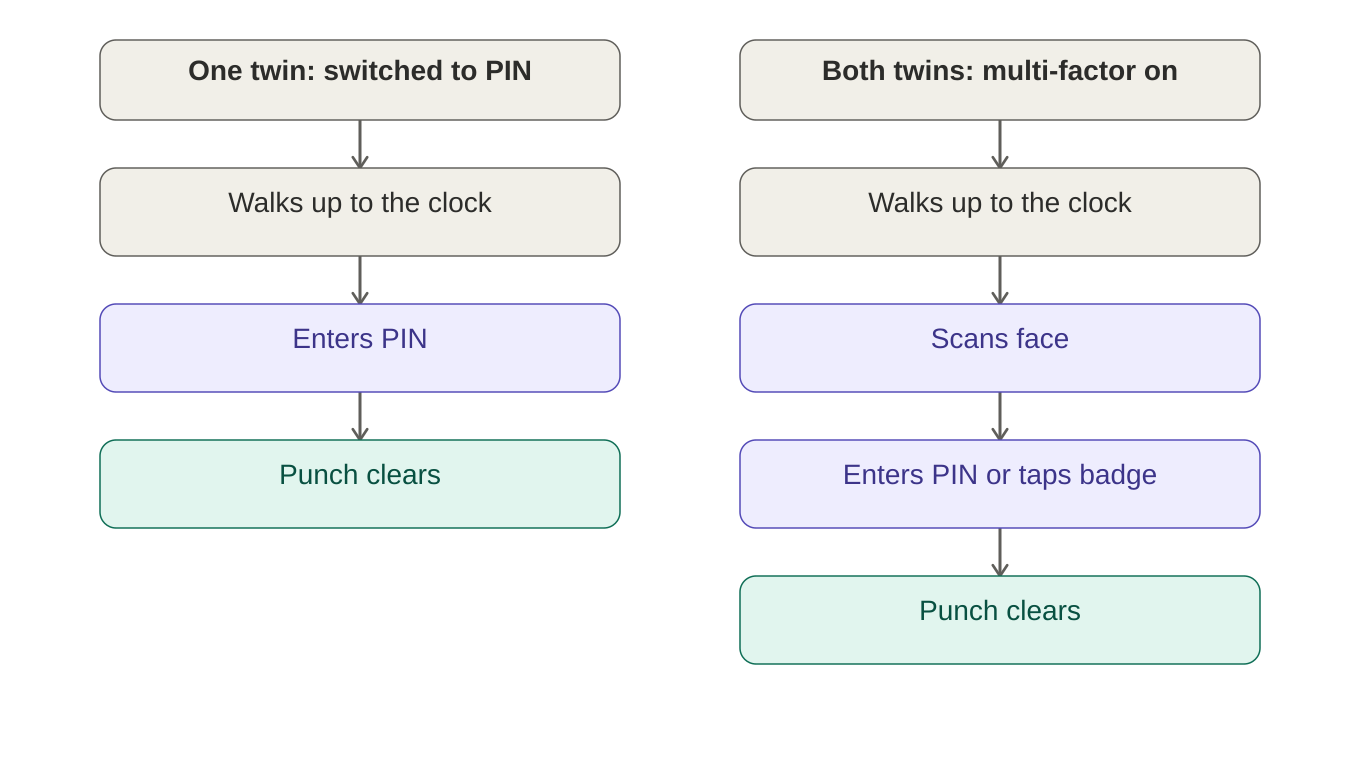
hrPad by CloudApper AI handles this two ways, and each solves a slightly different version of the problem. The simpler option is what the home care agency actually did: give one twin a different single method entirely, PIN instead of face, and leave the other on face recognition. It takes minutes to set up, and it’s the right call for a one-off pair.
The sturdier option is multi-factor authentication, where face recognition stops making the call on its own. An employee scans their face, then enters a PIN or taps a badge, and the punch clears only when both match. For two people whose faces read as nearly identical to the camera, that second factor does the job the camera can’t. Neither twin loses biometric punching; the system just stops trusting the face by itself. Both paths live in the same place: a setting applied to one employee or an entire site, and neither one changes how the punch eventually lands in UKG.
For an HR admin weighing the two, it helps to see what each option actually looks like from the employee’s side at the clock:
How to decide between the two
The two options aren’t interchangeable, and picking between them comes down to scale. A single-method swap changes the experience for exactly one person. It’s quick, it adds no friction for anyone else on the clock, and it’s the obvious choice for a two-person edge case like a pair of twins on the same roster.
Multi-factor changes the experience for everyone it’s turned on for, since it adds a second step to every punch, not just the ambiguous ones. That trade-off is worth making once the lookalike problem stops being a two-person exception: a site with several siblings or cousins on the same shift, a role where a misattributed punch would be expensive to untangle in payroll or compliance, or anywhere an admin would rather not manually track which employee is on which method. The rule of thumb that holds up in practice: swap the method for an edge case, add the factor for a pattern.
Why this isn’t a UKG problem
Either fix lives entirely in hrPad’s configuration, upstream of UKG entirely. UKG Ready and UKG Pro WFM process the punch the same way no matter which method produced it: face alone, PIN alone, or face plus a second factor all arrive as a standard punch record. The duplicate-match check sits in the time clock’s biometric layer, well before the data reaches UKG. A “profile already exists” message on the clock calls for a setting change on the clock, not a ticket against your HCM platform, and it’s worth saying plainly so admins don’t waste time escalating the wrong system.
Admins who want an extra layer of assurance beyond the authentication method itself can also turn on photo logging at each punch. It won’t resolve a lookalike conflict on its own, since the photo looks the same either way, but it gives a record to check against if a punch is ever questioned.
Beyond twins
Twins are the dramatic case, but assigning authentication per employee solves smaller versions of the same problem: a new hire whose enrollment hasn’t finished processing during a hiring rush, a camera that struggles in low light at one site, or someone who’s opted out of biometrics on principle, a stance that Illinois’s BIPA gives real legal weight to. Treating PIN, QR, and multi-factor as real options for one person, not fallbacks for the whole building, is the fix, and it scales from a single twin pair up to a multi-site workforce without anyone having to rebuild the clock’s configuration from scratch.


November 17, 2026
Open enrollment for hourly workers on UKG: a last-two-weeks plan
Hourly workers miss open enrollment because they share devices, have no company email, or work shifts that never overlap with HR. Here is a two-week plan that reaches them at the time clock.


November 9, 2026
Emergency Accountability at Scale: Why Large Manufacturers Build Live Muster Rosters on UKG Punch Data
Large manufacturers face a complex emergency accountability problem across multiple workforce populations. CloudApper AI Platform extends UKG punch and schedule data into a live muster roster, giving safety teams real-time visibility at every assembly point with offline support for distant outdoor locations.
November 5, 2026
Per-Employee or Per-Location Time Clock Pricing: Which Fits Your Retail Stores?
Choosing between per-employee and per-location time clock pricing comes down to three numbers: store count, employees per store and holiday peak. See how to run the comparison, with a worked example and vendor questions.
October 28, 2026
2027 Minimum Wage Increase: A UKG Payroll Cutover Checklist for January 1
Minimum wage rises on January 1, 2027 in Washington, California, Connecticut, Colorado, Michigan and Seattle. This dated UKG runbook shows what to map, load, test and verify, from November through the first payroll of the new year.