Some plants keep attendance on the clocks at the door and capture job labor at the workstation. This piece looks at that two-clock model on UKG Ready: scan-only capture for gloved operators, work orders validated against the ERP, and how CloudApper adds that layer using the PCs and scanners already on the line.


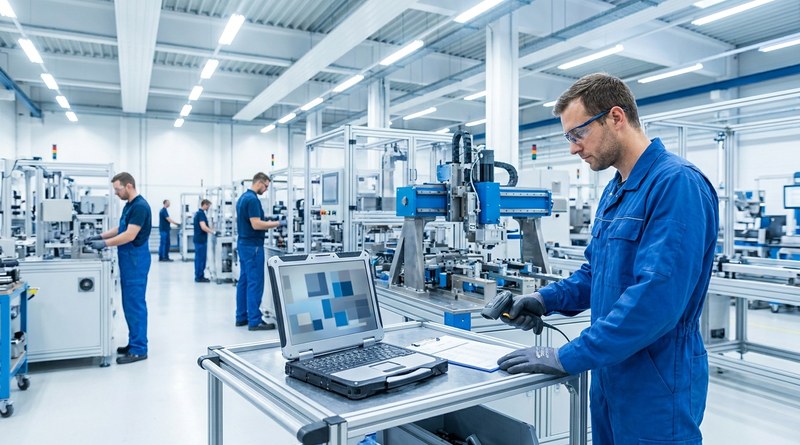
Table of Contents
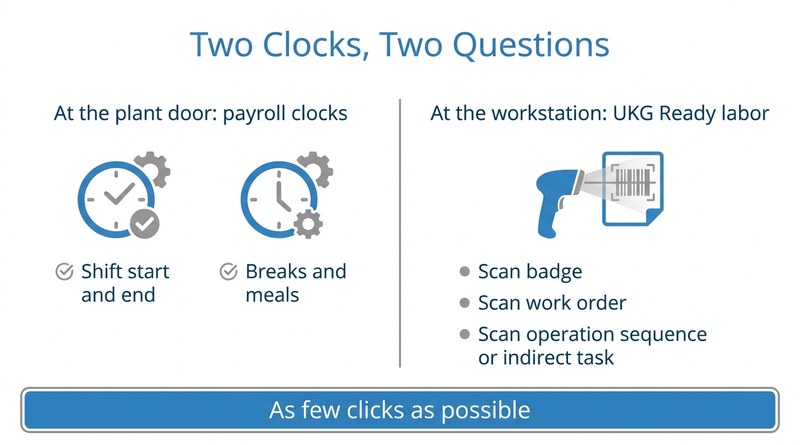
On an engineered-to-order production line, two different questions get asked about every operator’s day. Payroll asks when the person arrived, took a break and left. Finance and manufacturing engineering ask which work order and which operation sequence each hour belonged to. Many plants answer both with one clock. Some deliberately split them: attendance stays on the clocks at the plant door, and job labor is captured at the workstation. Barcode labor tracking on UKG Ready fits the second model well, and it is where CloudApper adds a station-level capture layer on top of UKG.

The example here is the industrial automation division of a Quebec manufacturing group, with roughly 90 production stations, each already equipped with a PC or laptop and a USB barcode scanner. The group chose UKG Ready WFM for labor by work order, timesheet approval and production cost reporting. Its payroll system and entrance clocks already handle attendance, and the division’s digital team set that boundary in writing: “Pas de clock pour le début du quart de travail ni pour la fin du quart de travail. Même chose pour les pauses et les repas. Ces options ne seront disponibles que sur les horodateurs […] qui seront à l’entrée des usines” (no clock-in at the stations for the start or end of the shift, breaks or meals; those stay on the time clocks at the plant entrances).
Why Two Clocks Is a Design Choice, Not a Compromise
Splitting attendance from job labor keeps payroll punches exactly where they already are and lets the workforce management layer focus on one thing: which job every hour went to. The trade-off is that the station capture has to be fast enough that operators actually use it. Operators on this kind of floor wear gloves, move between stations and already scan a badge and a job barcode in their production system. Typing badge numbers or clicking through screens will not happen.
“L’Interface doit avoir le moins de clique possible”
Digital Product Owner, Quebec industrial automation manufacturer (translation: the interface must have as few clicks as possible)
Dedicated clocks at 90 stations would meet the need on paper but are hard to justify on cost, a familiar calculation for anyone weighing time capture without buying terminals.
The Hierarchy Has to Come From the ERP
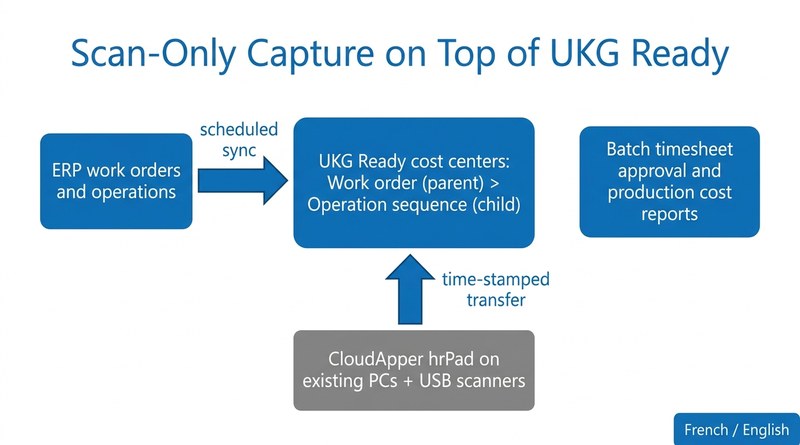
The second requirement is about data integrity. Every unit of work is tracked against an ERP work order and its operation sequence, and labor should only ever be charged to combinations that exist. The team asked for a parent-child structure for exactly that reason.
“Valider si nous pouvons utiliser les listes afin de nous permettre de représenter une hiérarchie dont le work order est un parent et l’opsq (séquence d’opération du wo) son enfant. Ceci est pour éviter de saisir de la donnée qui n’existe pas dans notre ERP”
Digital Product Owner (translation: represent a hierarchy with the work order as parent and the operation sequence as its child, to avoid entering data that does not exist in our ERP)
That means work orders and operations must exist in UKG Ready as cost centers before anyone scans them. For the controller, it also means the labor record that feeds production cost reports can be reconciled against ERP actuals line by line. Plants that already push production events from an MES into UKG will recognize the same principle: the system that owns the work defines what labor can be charged to.
How CloudApper Approaches Scan-Only Capture on UKG Ready
CloudApper’s approach runs CloudApper hrPad for UKG as station software on the PCs and laptops already on the line. An operator scans a badge and sees the task in progress with its start time, then scans a work order and operation sequence, or an indirect task code such as cleanup, which needs no sequence. Each scan becomes a time-stamped transfer posted to UKG Ready through its API against a parent-child cost center that is validated before it is accepted. There are no shift, break or meal punches at the station.
CloudApper iPaaS for UKG syncs ERP work orders and operations into UKG Ready on a schedule, so the cost centers exist before the floor needs them. Supervisors approve timesheets in UKG Ready individually or in batches, finance runs production cost reports by work order, and the interface works in French and English. It is the same idea as job costing and cost center capture with hrPad, narrowed to the fewest possible actions.
“Être en mesure de voir un exemple concret du flux de transactions qui sera effectué par nos équipiers de plancher à partir des écrans des différentes stations”
Digital Product Owner, Quebec industrial automation manufacturer (translation: to see a concrete example of the transaction flow our floor team members will perform from the screens at the different stations)
The Takeaway for Manufacturers on UKG Ready
For plants that keep attendance at the door, the station capture layer has one job: put every hour on a real work order with almost no effort from the operator. CloudApper builds that layer on top of UKG Ready, using hardware already on the line and a hierarchy that comes from the ERP, so production cost reporting starts from labor data the controller can trust.
If your production labor still reaches cost reports through manual entry or end-of-shift paperwork, talk to CloudApper about scan-only work-order tracking on UKG Ready.


October 13, 2026
Paperless HR for Rural Hospitals on UKG: Extending One Kiosk to Documents, E-Signatures and Benefits Data
A rural hospital using CloudApper hrPad as its UKG time clock still handled much of HR on paper. Its next step is extending the same kiosk to documents, e-signatures and transfers, with CloudApper iPaaS moving benefits data to providers, all within network rules that block external AI services.

October 7, 2026
Shared Tablet SSO in UKG: One Time Clock for Every Login Type
Hourly staff on basic UKG logins and managers on SSO can share one tablet time clock without login mix-ups. This guide explains each login type in plain English, compares three shared-tablet setups and shows how hrPad by CloudApper AI makes it work.
October 5, 2026
Why Is My Paycheck Wrong? Tracing UKG Payroll Errors to Six Upstream Causes
Most UKG payroll questions start upstream of payroll: in employee details, attendance, deductions, approvals, compliance or reconciliation. hrPad by CloudApper AI catches each one at the time clock.


October 2, 2026
Offline Self-Service in UKG Ready: How Requests Queue and Sync
Frontline sites with little or no internet leave employees unable to reach HCM self-service. With offline self-service, CloudApper AI's hrPad lets workers submit requests from any iPad or Android tablet, keeps the time each request was made, and syncs it to UKG Ready for HR approval once connected.