Toast calculates the tips. UKG pays them. Neither one works out who is owed what, so somebody rebuilds the math in a spreadsheet every morning. Here is how the daily run works end to end, which pay codes land in the UKG timecard, and what to settle internally before any of it writes to payroll.



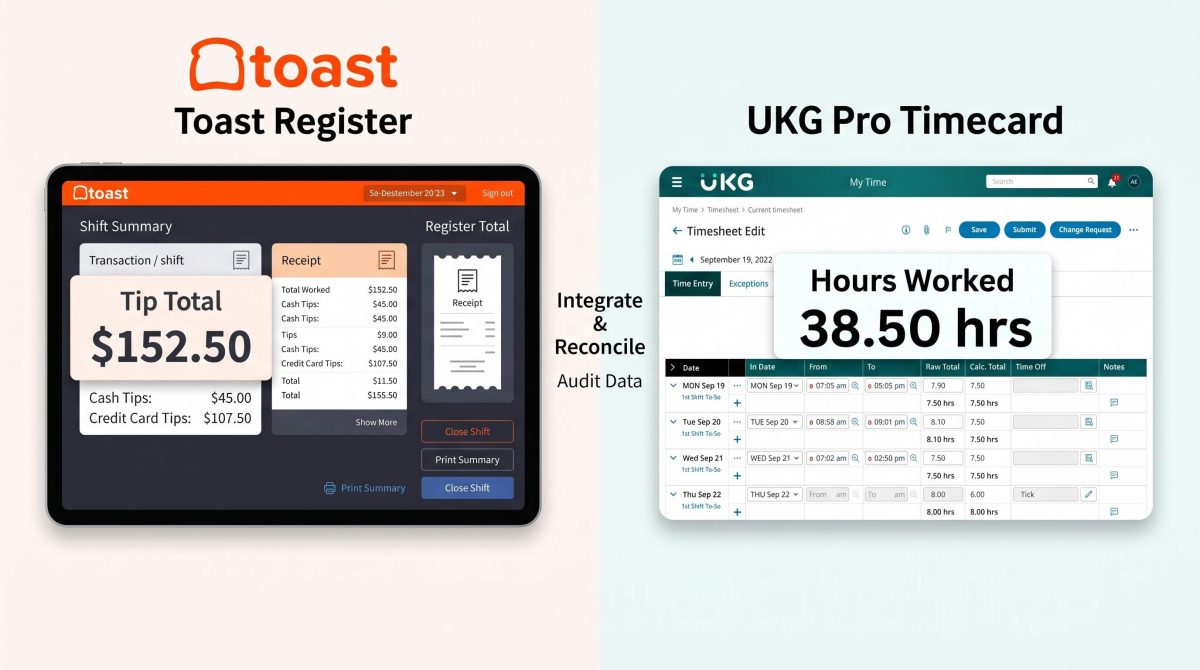
Table of Contents
- Why Toast tip distribution to UKG breaks down today
- How Toast tip distribution to UKG actually works
- What each system contributes
- How CloudApper calculates the tip share
- Make-up pay and the guaranteed hourly floor
- Which pay codes land in UKG
- What you need before you automate Toast tip distribution to UKG
- How exceptions and re-syncs are handled
- An eleven-location group, before and after
- Frequently asked questions
- Where to start with Toast tip distribution to UKG
Toast tip distribution to UKG is rarely about integration for its own sake. It is about getting tips out of the point of sale and into payroll without a spreadsheet in the middle.

Most restaurant groups run both systems well. Toast holds the sales and the tips. UKG holds the hours, the job codes and the pay. However, neither one calculates who is owed what, so a manager does it by hand every single day.
Toast tip distribution to UKG, from point of sale to payroll
Two systems, two halves of the answer.
Why Toast tip distribution to UKG breaks down today
The two systems hold different halves of the answer and neither can see the other.
First, Toast knows the tip total for a shift. It does not know that a server worked four hours on the floor and two in catering. UKG knows the hours and the job segments. But it has no idea what the tip pool was worth.
So until the process is automated, someone exports both and matches them in a spreadsheet. Then they work out proportional shares and key the result back into UKG. For an eleven-location group that is a daily job. Also, every manual step is a step an auditor will ask about later.
How Toast tip distribution to UKG actually works
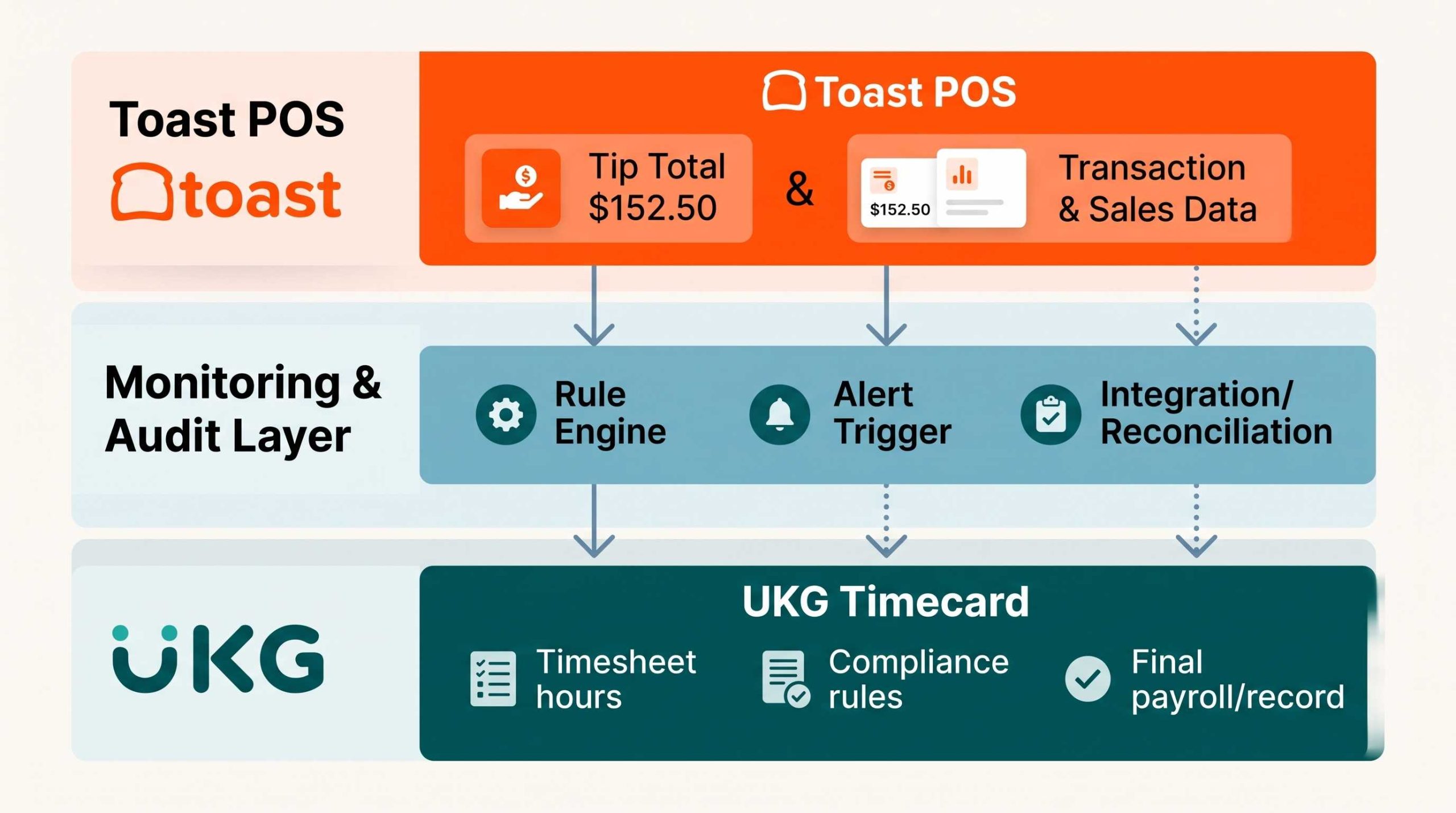
A process layer sits between the two systems and does the arithmetic neither will do. CloudApper runs as that layer.
Data flow from Toast through CloudApper into UKG pay codes
The record stays in UKG. Only the calculation moves.
The flow runs in both directions. CloudApper reads from Toast and UKG, calculates outside both, then writes pay codes back into the UKG timecard. As a result, UKG stays the system of record and payroll runs from the place it always ran from.
What each system contributes
| Source | What it provides |
|---|---|
| Toast | Daily tip entries and Cash In totals, split by pool such as front of house against catering, or lunch against dinner |
| UKG APIs | Hours worked, job roles, labor categories and location for each employee |
| Your configuration | Eligible and excluded roles, guaranteed rates, trainer premiums |
Because the pools are read separately, a server who works a lunch shift and a catering event is credited against the correct pool for each. For more on how tip data moves between a point of sale and UKG generally, see getting accurate tip reporting from your POS.
How CloudApper calculates the tip share
In short, tip share is proportional to eligible hours worked, per job segment and per location.
But that sounds simple until you add the exclusions. Managers do not participate. Bartenders running an individual drawer usually do not either. Trainers may carry a premium on their base rate. Therefore each of those becomes a rule, and each rule is a reason the spreadsheet version goes wrong.
The calculation runs automatically each morning for the previous business date. That timing matters more than it sounds. Managers often enter tips late at night, so a run scheduled for the following morning catches entries that an end-of-shift job would miss.
Make-up pay and the guaranteed hourly floor
This is the part most integrations skip, and it is the part that creates real exposure.
For example, many groups guarantee a minimum hourly compensation. The employee earns a base rate plus tips, and if the combined figure lands below the guaranteed floor, the employer owes the difference. Working that out needs base pay, tip allocation and hours in one place. Neither Toast nor UKG has all three on its own.
CloudApper compares total earnings against the guaranteed hourly compensation for the period. Then, where there is a shortfall, it generates a differential code for the amount owed, which CloudApper calls Level Up Pay. Nobody has to notice the shortfall first.
Which pay codes land in UKG
There are two kinds, for two different audiences.
Daily tracker codes give administrators running visibility during the period. An LU Tracker code shows accumulating make-up pay exposure. A TNP Tracker code shows tips allocated so far.
Period-end codes are the ones that pay. Tips NP carries the net tip amount and Level Up Pay carries the differential, both written directly to the UKG timecard.
Splitting them this way means payroll sees a clean final figure while operations can still watch the number move during the period.
What you need before you automate Toast tip distribution to UKG
| What you need | Why it holds projects up |
|---|---|
| A written tip policy | Which roles share, which are excluded, how pools divide. Usually this lives in someone’s head |
| Your guaranteed rate | Per role or per location, if you operate one |
| API access to both systems | UKG credentials that can read timecards and write pay codes |
| Pay codes created in UKG | The tracker and period-end codes must exist before anything can write to them |
| A named owner for exceptions | Someone has to act when a tip entry goes missing |
On the third row, the UKG Ready API documentation guide covers what the UKG side needs.
How exceptions and re-syncs are handled
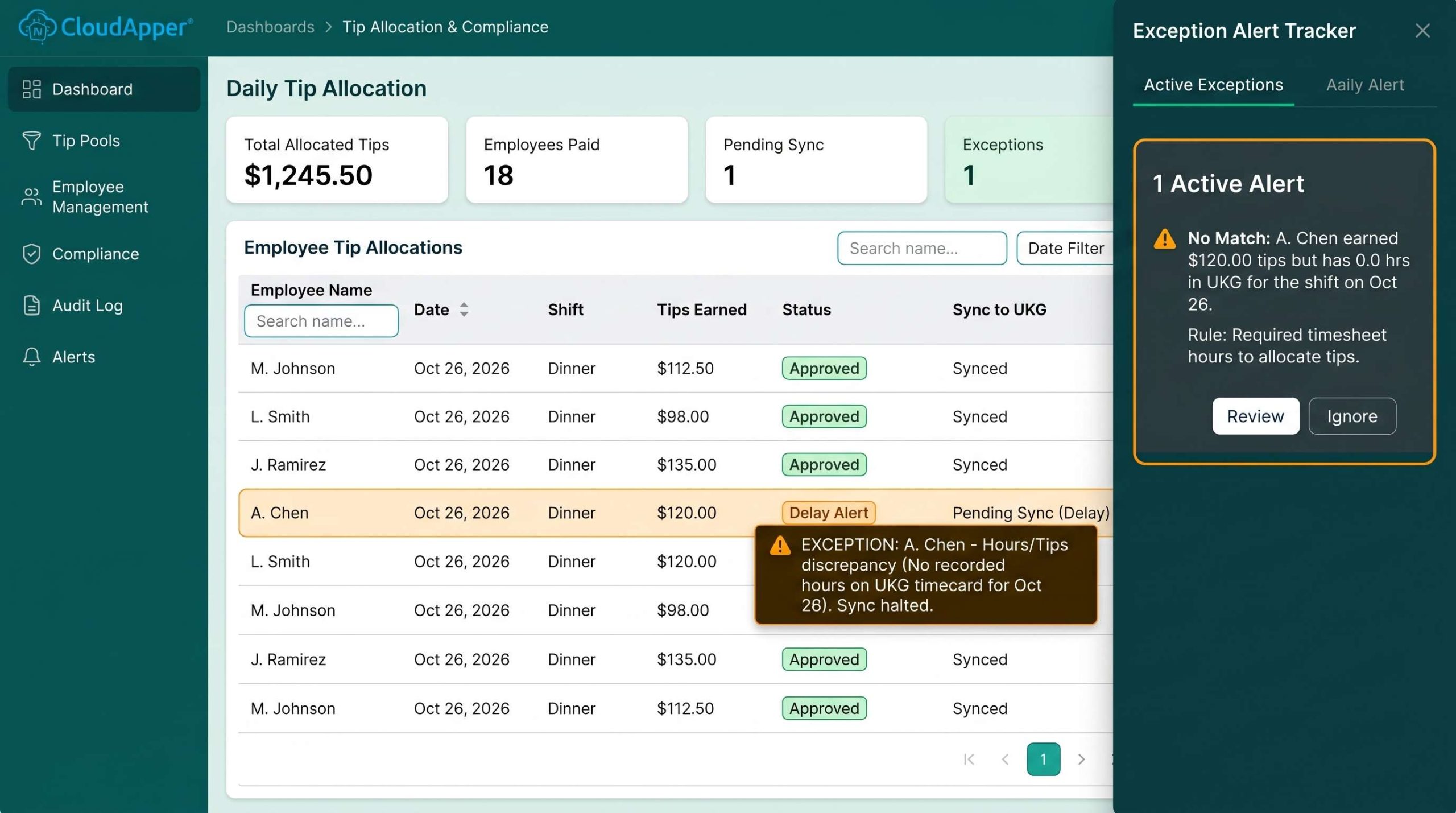
Automation on payroll has to fail loudly, not quietly. Therefore the exception path matters as much as the calculation itself.
CloudApper dashboard showing tip allocations and exception alerts
Fix it at the source, then re-sync. Never edit the result.
The CloudApper dashboard shows allocations for each run and raises alerts when something is off, most often a missing daily tip entry for one location. Corrections then happen where they belong. Fix the entry in Toast or the punch in UKG, then trigger a re-sync and the affected date recalculates.
So the rule for Toast tip distribution to UKG stays simple. The source systems hold the truth, and CloudApper recalculates from them rather than storing its own version.
An eleven-location group, before and after
One CloudApper customer automated Toast tip distribution to UKG across eleven restaurant locations with roughly 550 employees.
Before, a manager at each site pulled Toast tip totals and UKG hours every morning. Then they matched them by hand and split front of house and catering shares. Trainers carried a premium that had to be applied manually. Staff who picked up shifts at a second location created overtime that nobody caught until payroll.
Now the run happens automatically each morning for the previous day. Front of house and catering pools calculate separately. The trainer premium applies as a rule, multi-location overtime is caught in the calculation, and make-up pay arrives as a pay code each period. The managers check a dashboard instead of building a spreadsheet.
Frequently asked questions
Does Toast tip distribution to UKG replace either system?
No. Toast stays the point of sale and UKG stays the system of record for time and pay. CloudApper reads from both, calculates, and writes pay codes back into UKG.
How often does Toast tip distribution to UKG run?
Daily, for the previous business date. Running in the morning rather than at end of shift catches tip entries that managers key in late at night.
Can Toast handle more than one tip pool per day?
Yes. CloudApper reads each pool separately, so front of house and catering, or lunch and dinner, credit independently even when one employee works both.
What happens when someone fixes a Toast or UKG punch after the run?
Correct it in UKG or Toast, then trigger a re-sync for that date. The calculation runs again from the corrected source data rather than anyone editing the result by hand.
Who is excluded from a restaurant tip pool?
Whoever your policy excludes, commonly managers and bartenders running an individual drawer. You configure exclusions as rules, so they apply the same way every day.
Where to start with Toast tip distribution to UKG
First, write down your tip policy before you look at any software. Which roles share, which do not, how pools divide, and what you guarantee. In fact, most of the difficulty in these projects is policy that was never written down, not integration.
Once that exists, the mechanics of Toast tip distribution to UKG are straightforward. Pull a week of Toast tip data and a week of UKG timecards, run them side by side against your current spreadsheet, and check whether the numbers agree before anything writes to payroll.
If you want to see the calculation layer on its own, CloudApper tip management for UKG covers it, and there is a broader view of restaurant tip pooling automation for groups running UKG Ready. If you run more than one HR system, the same calculation layer is covered in tip management for HCM. For the federal rules on tipped employees, the Department of Labor’s Wage and Hour Division is the reference point and the FLSA overview covers minimum wage and overtime standards. State rules often differ, so check yours.



September 17, 2026
No Tax on Tips: What It Means for Your UKG Payroll
Starting in 2026, employers using UKG must report tips correctly on the W-2 to support the new No Tax on Tips deduction, and tip tracking commonly breaks down before that data reaches payroll. CloudApper Tips Management for UKG keeps tip data accurate from the point it's earned.

August 19, 2026
Multi-Department Tip Pool Allocation in UKG: What a Tribal Gaming Resort Needs and How CloudApper Handles It
A casino resort's tip records say how much a department collected but assign nothing to anyone, leaving allocation to a weekly spreadsheet. Here is why department-specific tip pool rules at a tribal gaming resort need to be written down, and how CloudApper turns them into a per-employee record in UKG.


December 9, 2024
Automate Tip Pools Calculation in Restaurants Using UKG/Kronos TimeClock
Simplify tip management with CloudApper hrPad for UKG/Kronos users. Automate tip tracking, reduce errors, and ensure IRS compliance effortlessly. Save time, boost employee trust, and focus on growing your restaurant business with streamlined, accurate tip management.
August 31, 2023
Success Story: Restaurant Chain Automates Workforce Management
Capano Management's partnership with CloudApper AI TimeClock for UKG Dimensions exemplifies the impact of integrating AI technology into workforce management. Their commitment to accuracy, efficiency, and compliance in clock-ins, tip recordkeeping, and job transfers underscores the value of innovation.