Seamlessly integrate UKG solutions as well as third-party systems for enhanced automation, efficiency, and decision-making. Simplify your integration journey with CloudApper AI's AI-powered platform.



Table of Contents
- Ready vs Pro vs Pro WFM: Which UKG API Do You Need?
- Seamless UKG Ready Integration With Thousands of Third-Party Systems
- UKG Ready API Documentation Resources
- Authenticating to the UKG Ready REST API: What the Flow Looks Like
- Common UKG Ready API Integration Errors (and What They Actually Mean)
- Tips for Getting Started
- CloudApper AI: Simplifying UKG Integration
- FAQ: UKG Ready API Documentation
- Conclusion
Understanding documentation resources is essential for organizations wishing to integrate APIs into their UKG Ready platform. This article guides developers through the UKG Ready API documentation, covering REST and GraphQL APIs and developer resources.
Ready vs Pro vs Pro WFM: Which UKG API Do You Need?
UKG’s product editions have separate APIs and separate documentation, and using the wrong one is the most common reason integration work stalls on day one. This guide covers UKG Ready. If your organization runs UKG Pro, see our guide to UKG Pro API documentation instead. If you are on UKG Pro Workforce Management (Dimensions), start with the UKG Pro WFM Dimensions API quick-start guide. Not sure which edition you have? Your login URL is the tell: Ready instances typically run on a saashr.com domain.
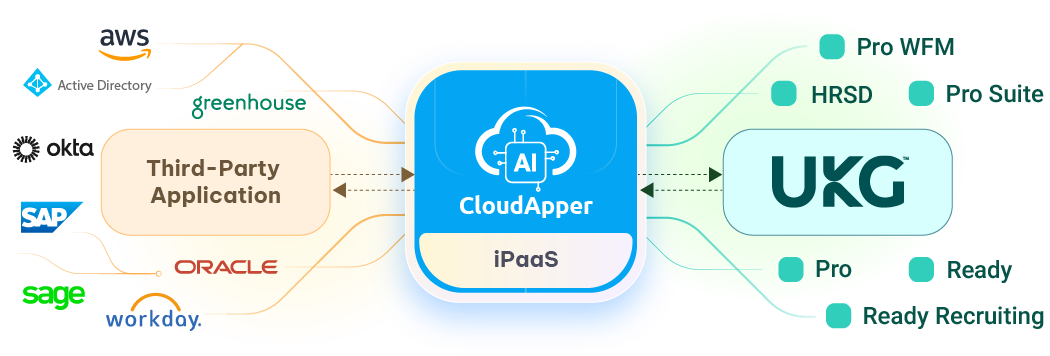
Seamless UKG Ready Integration With Thousands of Third-Party Systems
From ERP and HRM to everything in between, CloudApper AI platform offers a vast array of integrations to make your workflows more efficient and effective.
UKG Ready API Documentation Resources
1. UKG Ready REST API (v2)
Main Documentation: UKG Ready REST API Documentation
This extensive material addresses multiple areas, such as:
- Points of entry and primary URLs
- Approaches to authentication
- How to handle error codes
- Organizing pages in massive datasets
- Standards for date formatting
- A record of revisions
Additionally, it explores particular API requests including retrieving personnel details, leave balances, timesheets, and more.
2. UKG Ready GraphQL API
Documentation: UKG Ready GraphQL API
There is a present lack of public access to the GraphQL API documentation. Only authorized partners and users with valid UKG memberships are able to access this. The UKG official website has documentation that users with the right credentials can use to explore the GraphQL functionalities.
3. Other Resources
UKG Developer Hub: UKG Developer Hub
The UKG Developer Hub has all the information you need regarding the UKG API. Crucial components include:
- Guidelines and documentation
- Example code
- Platforms where developers can talk about their work
- A method for locating specific APIs
Product packaging should be used to organize data. In the “HR Service Delivery” section, you’ll find UKG Ready.
Authenticating to the UKG Ready REST API: What the Flow Looks Like
Every UKG Ready REST integration starts the same way: obtain an API key, authenticate with a service account to receive a token, then call endpoints with that token. Three things must already exist in your Ready instance before any code works: an API key generated in UKG Ready, a service account configured with the right permissions, and your company short name, which identifies your tenant in every request.
A typical login call follows this pattern (paths can vary by instance and API version — always confirm against the official REST documentation linked above):

curl -X POST "https://secure.saashr.com/ta/rest/v2/companies/|CID|/login" \
  -H "Content-Type: application/json" \
  -H "Api-Key: YOUR_API_KEY" \
  -d '{"credentials": {"username": "SERVICE_ACCOUNT", "password": "PASSWORD", "company": "COMPANY_SHORT_NAME"}}'
The response returns a token, which subsequent calls send in the authentication header. For example, retrieving employee records follows this pattern:
curl -X GET "https://secure.saashr.com/ta/rest/v2/companies/|CID|/employees" \
  -H "Accept: application/json" \
  -H "Authentication: Bearer YOUR_TOKEN"
From there, the endpoints you will use most cover employee demographics, timesheets, accrual balances, pay information, and schedules — each documented with request and response examples in the official REST docs. For a worked example, see our guide to downloading employee lists via the UKG API and the UKG job transfer API guide.
Common UKG Ready API Integration Errors (and What They Actually Mean)
Most failed Ready integrations trip over the same handful of issues. Checking these five before opening a support ticket saves days.
401 Unauthorized on login: usually not the password — it’s the company short name. It must match your tenant exactly. Here’s how to look yours up.
API key rejected: keys are environment-specific and permission-scoped. Confirm the key was generated in the same instance you’re calling and that the service account behind it has the required permission profile.
403 on specific endpoints: the token is valid but the service account lacks access to that data area (for example, pay data). Adjust the account’s security profile rather than regenerating keys.
Empty or truncated result sets: the REST API paginates large datasets. Follow the pagination parameters in the docs instead of assuming one call returns everything.
Date and time mismatches: Ready expects specific date formats and returns times relative to company timezone settings. Normalize on your side before comparing against other systems.
Tips for Getting Started
Evaluate Your Requirements: Be as explicit as possible when describing the API calls and features you need.
Make an Informed Documentation Decision: Consider your requirements carefully and choose between the REST and GraphQL API docs.
Check out the Authentication Techniques: Read the instructions carefully to familiarize yourself with the authentication methods and make sure you have the right credentials.
Utilize Sample Code: To better understand the API’s structure and the forms of requests and responses, make use of the given example scripts and other resources.
Reach out to UKG Support: If you need more help or run into any problems, you might want to contact UKG support.
CloudApper AI: Simplifying UKG Integration
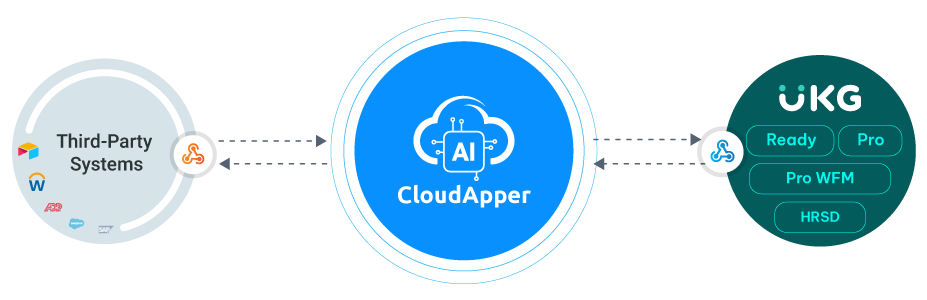
The integration path with the UKG API can be streamlined with the help of CloudApper AI, a UKG partner, thanks to their years of experience and specialized skills. The AI-driven platform of CloudApper AI guarantees a smooth integration of third-party systems with UKG products (Dimensions, Ready, Pro, or HRSD).
Benefits of CloudApper’s AI Integration Connectors:
Automation and Efficiency: Streamline operations, locate pertinent data, and get more in-depth understanding through the use of automation.
Personalized Solutions: The CloudApper platform makes it easy to build personalized applications.
Strength in Decision-Making: Convert raw facts into useful insights for better decision-making.
Integration Made Easy: Connectors for integration make working with thousands of external systems a breeze.
FAQ: UKG Ready API Documentation
Is UKG Ready API documentation publicly available?
The UKG Ready REST API documentation is publicly accessible online. The GraphQL API documentation is not public: it is available to authorized UKG partners and customers with valid credentials, typically through the UKG Developer Hub.
Does UKG Ready have a REST API?
Yes. UKG Ready provides a REST API (v2) covering employees, timesheets, accrual balances, pay information, schedules, and more, with documented authentication, error handling, and pagination.
How do I get an API key for UKG Ready?
API keys are generated inside your UKG Ready instance by an administrator, and API calls authenticate with a service account. You also need your company short name, which identifies your tenant in every request.
What is the difference between the UKG Ready API and the UKG Pro API?
They are separate APIs for separate products with different endpoints, authentication, and documentation. UKG Ready’s REST API runs on the saashr.com platform, while UKG Pro and UKG Pro WFM (Dimensions) each have their own APIs and developer documentation.
Can I integrate UKG Ready with other systems without writing API code?
Yes. Integration platforms like CloudApper build and maintain the API connections for you, syncing employee data between UKG Ready and third-party systems such as ERP, payroll, and CRM platforms without in-house API development.
Conclusion
For developers looking to optimize and integrate their workforce management, the UKG Ready API documentation provides a variety of information. But if you want a quicker turnaround from experience UKG Ready integration professionals, CloudApper AI’s experience with UKG APIs can make it faster and easier. That way you can concentrate on expanding your business operations and we can integrate your UKG solutions efficiently with the help of CloudApper AI.



October 14, 2026
UKG Costpoint Integration for Defense Contractors: Who Owns the 65 Fields Between Payroll and the Audit
A defense services contractor needs its HRIS to update more than 65 Costpoint fields through an API. CloudApper iPaaS handles the UKG Costpoint integration, and the real lesson is governance: HRIS, finance and IT each own their part of the mapping rules, so labor cost data stays audit-ready as contracts change.

October 12, 2026
ATS to UKG Ready Integration: Making Every Light Industrial Staffing Placement Payroll-Ready on Day One
A light industrial staffing firm placing 20 to 40 new workers a week re-enters every hire from its ATS into payroll by hand. CloudApper's sync creates UKG Ready records at assignment and carries updates and terminations across, so every placement can be payroll-ready on day one.

October 9, 2026
UKG Pro and Mexico Payroll Integration: Keeping Cross-Border Employee Data in Sync
US employers with Mexico operations often run UKG Pro as the system of record and a local platform for Mexican payroll. CloudApper connects the two with an automated sync that sends hires, terminations and pay changes to the Mexico platform and brings payroll results back into UKG Pro.

October 7, 2026
Client-Site Employees and UKG Pro WFM: Keeping Embedded Automotive Engineers Paid Right
Engineers working inside a client’s facility log time in the client’s system, so their paycheck is the employer touchpoint that matters most. For an automotive engineering services firm, CloudApper moves those hours into UKG Pro WFM automatically, removing the manual re-entry where pay errors start.
