Employee hours worked across multiple locations require accurate time-capture context. This article explains how UKG Pro supports multi-location payroll and how extending it with CloudApper AI TimeClock helps organizations allocate hours and wages correctly without changing their core payroll system.



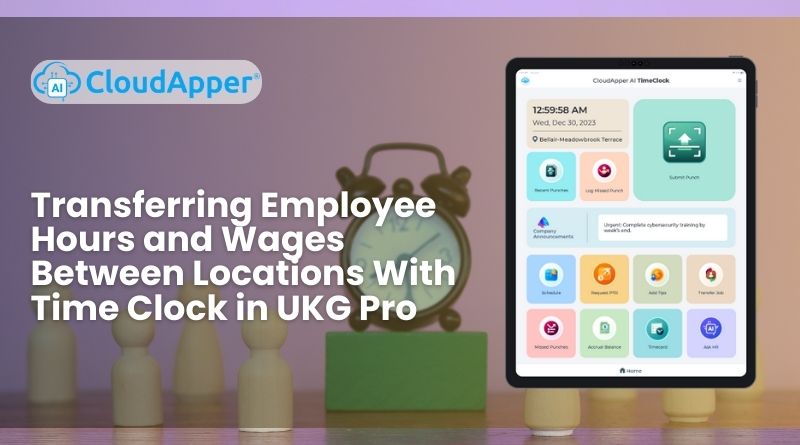
Table of Contents
- TL;DR
- Why Multi-Location Work Requires Additional Time-Capture Context
- How UKG Pro Supports Multi-Location Payroll Management
- Capturing Location Context at the Moment of the Punch
- How CloudApper AI TimeClock Extends UKG Pro for Tracking Employee Hours Across Locations
- Beyond Time Capture: Streamlined Workforce Workflows
- Reporting, Compliance, and Labor Visibility
- Enabling Flexibility While Preserving Payroll Accuracy
- Conclusion: Supporting Multi-Location Work With Accurate Employee Hours
Payroll accuracy depends on capturing the right work context—not just applying correct pay rules. As organizations adopt flexible schedules, remote work, and multi-location assignments, tracking and allocating employee hours across locations becomes a common operational challenge.

Organizations using UKG Pro rely on it as their system of record for workforce management and payroll. When employees work across multiple locations or cost centers, accurate payroll depends on capturing location and assignment details at the moment time is recorded. This article explains how multi-location work impacts time tracking and how extending UKG Pro with CloudApper AI TimeClock helps organizations allocate employee hours and wages correctly—without changing their core system.
TL;DR
-
Employee hours worked across multiple locations require accurate context at the moment time is recorded.
-
UKG Pro remains the system of record for payroll, labor costing, and compliance.
-
Location and assignment data directly impact payroll accuracy, reporting, and audits.
-
CloudApper AI TimeClock extends UKG Pro by capturing location-aware employee hours at clock-in and clock-out.
-
Accurate time capture reduces manual payroll adjustments and improves labor visibility across locations.
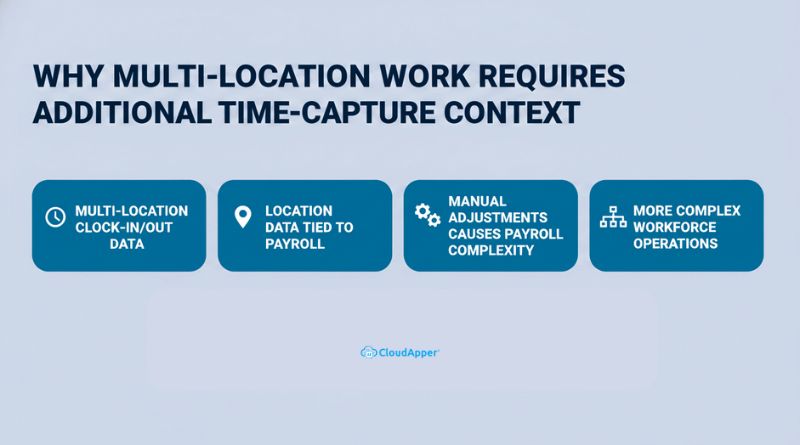
Why Multi-Location Work Requires Additional Time-Capture Context
Today’s workforce is no longer confined to a single location. Employees may rotate between job sites, support multiple departments, split shifts across locations, or work remotely while remaining tied to specific labor allocations.
Employee Hours Are No Longer Tied to a Single Location
In traditional work models, employee hours were naturally associated with one primary location. In modern environments, that assumption no longer holds. An employee may work part of a shift at one site and complete the remainder at another, or move between locations across a single pay period.
Without capturing location context at the time of each punch, employee hours can be attributed incorrectly, affecting payroll allocation, labor costing, and reporting.
Location Context Directly Impacts Payroll and Costing
Where employee hours are worked matters just as much as how many hours are worked. Location and assignment data influence:
-
labor cost distribution
-
Departmental or site-based reporting
-
Overtime calculations
-
Compliance and audit readiness
When location context is missing, payroll teams often need to manually redistribute employee hours after the fact, increasing the risk of errors and delays.
Manual Adjustments Create Downstream Payroll Complexity
When employee hours are recorded without sufficient context, payroll teams must rely on manual adjustments, manager approvals, or spreadsheet-based reconciliations to correct allocations. These workarounds add time to payroll cycles and introduce inconsistencies across pay periods.
Over time, this manual effort becomes unsustainable—especially for organizations with large, mobile, or distributed workforces.
Workforce Complexity Has Outpaced Traditional Time Capture
This challenge is not the result of system shortcomings. It reflects how workforce models have evolved faster than traditional time-capture methods. As work becomes more flexible and location-independent, capturing richer context at the moment employee hours are recorded becomes essential for maintaining payroll accuracy.
How UKG Pro Supports Multi-Location Payroll Management
UKG Pro provides a strong and reliable foundation for payroll processing, labor allocation, and compliance. It serves as the authoritative system for pay rules, earnings calculations, and reporting tied to employee hours.
For organizations managing employee hours across multiple locations, success depends on ensuring that:
-
Time punches include accurate location or assignment context
-
Employee hours flow cleanly into payroll without rework
-
Approvals and validations follow consistent, auditable workflows
When employee hours are captured with the right context upstream, UKG Pro processes payroll accurately and efficiently, maintaining consistency across payroll runs and financial reporting.
Capturing Location Context at the Moment of the Punch
The most effective way to manage employee hours across locations is to capture context when time is recorded, not after payroll processing begins.
This context typically includes:
-
Work location or site
-
Assignment, department, or cost center
-
Role-specific or site-specific rules
-
Manager or site-level approvals
When employee hours are recorded with this information in real time, payroll processing becomes more predictable, downstream adjustments are reduced, and reporting accurately reflects how work was performed across the organization.
Capturing this information early also improves audit readiness and labor transparency.
How CloudApper AI TimeClock Extends UKG Pro for Tracking Employee Hours Across Locations
CloudApper AI TimeClock is designed to extend UKG Pro for frontline, mobile, and multi-location work environments. It does not replace UKG Pro; instead, it enriches employee hour data before it reaches payroll.
By capturing location and assignment context at clock-in and clock-out, CloudApper ensures employee hours are properly attributed before payroll processing begins.
Automatic Location and Assignment Capture
Employees clock in and out through CloudApper AI TimeClock using mobile devices, kiosks, or tablets. The system automatically records location and assignment context based on configuration and punch activity, reducing reliance on manual input.
This ensures employee hours are consistently attributed to the correct location and cost center.
Seamless Data Flow Into UKG Pro
Captured employee hour data flows directly into UKG Pro, preserving UKG as the system of record. Payroll teams continue to run payroll, apply pay rules, and generate reports entirely within UKG Pro—now with enriched, location-aware time data.
This seamless flow reduces payroll corrections and improves reporting accuracy.
Support for Flexible Work Arrangements
CloudApper AI TimeClock supports a wide range of work patterns, including:
-
Rotating job sites
-
Floating employees
-
Remote or hybrid work
-
Multi-department assignments
Employee hours remain accurate and traceable regardless of where work is performed.
Approval and Workflow Alignment
Organizations can configure approval workflows for transferred employee hours, ensuring managers review and validate time data before payroll is finalized. This improves accountability while maintaining compliance and visibility.
Beyond Time Capture: Streamlined Workforce Workflows
Extending time tracking with CloudApper AI TimeClock also improves broader workforce operations related to employee hours:
-
Enhanced data security to protect time and location records
-
Customizable workflows aligned with organizational policies
-
Improved employee experience through intuitive clock-in methods across devices and locations
These capabilities reduce friction for employees while giving payroll and HR teams greater confidence in employee hour data.
Reporting, Compliance, and Labor Visibility
Accurately allocated employee hours improve more than payroll—they enhance labor visibility across the organization. With consistent location-aware time data, organizations can:
-
Analyze labor costs by site or department
-
Identify scheduling inefficiencies
-
Support compliance audits
-
Improve workforce planning decisions
Because UKG Pro remains the system of record, all reporting and compliance activities stay centralized and consistent.
Enabling Flexibility While Preserving Payroll Accuracy
Tracking and allocating employee hours across locations does not require replacing your payroll system. By capturing the right context at the source and allowing UKG Pro to process enriched data, organizations can support modern work arrangements without compromising accuracy or compliance.
Together, UKG Pro and CloudApper AI TimeClock enable organizations to:
-
Maintain a single system of record
-
Reduce manual payroll adjustments
-
Support distributed and mobile employees
-
Improve confidence in employee hours reporting
Conclusion: Supporting Multi-Location Work With Accurate Employee Hours
Managing employee hours across multiple locations is a natural outcome of today’s flexible and distributed workforce. When time is recorded with the right location and assignment context, payroll processing becomes accurate, consistent, and predictable.
UKG Pro continues to serve as the system of record for payroll, labor rules, and compliance. By extending UKG Pro with CloudApper AI TimeClock, organizations can capture enriched employee hour data at the moment of the punch—ensuring hours and wages are allocated correctly across locations without manual intervention.
Modern workforces move across locations—your time tracking should move with them, without adding payroll complexity.
Frequently Asked Questions
-
How does UKG Pro handle employee hours across multiple locations?
UKG Pro processes employee hours accurately when time data includes the correct location or assignment context at the point of capture. -
Why is location context important when tracking employee hours?
Location context ensures employee hours are allocated correctly for payroll, labor costing, compliance reporting, and departmental visibility. -
Can employee hours be transferred automatically between locations in UKG Pro?
Employee hours can be allocated across locations when time is captured with proper context and flows into UKG Pro for payroll processing. -
How does CloudApper AI TimeClock support multi-location employee hours?
CloudApper AI TimeClock captures location and assignment details at clock-in and clock-out, enriching employee hour data before it reaches UKG Pro. -
Does extending UKG Pro affect existing payroll rules or compliance?
No. UKG Pro remains the system of record for payroll rules and compliance, while CloudApper AI TimeClock enhances time data accuracy.



September 17, 2026
UKG Time Clock for 3PL and Distribution Centers: The Job Transfer and Dock Assignment Gap Driving Payroll Errors
Distribution centers and 3PL operators running UKG Ready or Pro WFM face a recurring payroll problem: dock workers who move between client cost centers mid-shift without a transfer punch. This article examines the hardware placement gap that causes billing errors, the limits of native Intouch terminals in high-movement environments, and how CloudApper AI TimeClock for UKG closes the dock-level transfer punch gap.
September 16, 2026
UKG Time Clock for Multi-Location Retail: The Shared-Kiosk Problem Hiding in Your Payroll Costs
Retail chains running UKG across 20+ locations face a punch compliance architecture problem — not a scheduling one. Shared kiosks, high turnover enrollment gaps, and multi-state attestation rules create hidden payroll leakage and audit exposure. Here's where it originates and how to close it.

September 15, 2026
Before IT Signs Off on Your UKG Time Clock Replacement: The Security Questions That Stall Every Deployment
When HR sends the tablet time clock proposal to IT, four security questions surface that no vendor presentation answers directly: where biometric data lives, what FIPS 140-2 actually certifies, whether MDM enrollment is supported, and how the UKG integration authenticates. Here is the complete IT review framework.
September 14, 2026
UKG Time Clock for School Districts: Tracking Paraprofessionals, Custodial, and Support Staff Across Every Building
K-12 school districts running UKG manage hundreds of hourly paraprofessionals, custodians, and support staff across dozens of buildings — but only have Intouch hardware at a handful of locations. Here's how a tablet-based biometric time clock closes that multi-building coverage gap within district budgets.