At a project-driven contractor, next week's schedule is negotiated: project managers lend and borrow technicians so every crew gets 40 hours and every site has leadership. This piece looks at that weekly negotiation across sixty project managers, and how CloudApper adds project-based scheduling on top of UKG.



Table of Contents
At a project-driven contractor, next week’s schedule is not built from a shift template. It is negotiated. Every project manager is trying to give each technician 40 hours and each job site its foreman and superintendent, and the only way to do that is to lend people to colleagues who have more work than crew, and borrow from those who have crew but not enough work. Construction manpower scheduling at that scale is a coordination problem across the whole division, and it is the part of the week CloudApper is built to support on top of UKG.

The contractor behind this piece is a multi-region specialty firm with more than sixty project managers. Its own scheduling scenarios, written from a project manager’s point of view, describe the starting position plainly: “I am working to fill out my team’s schedule across five active projects. I have a team of 20 technicians, three foremen, and one superintendent.”
Why the Schedule Is a Negotiation
Technicians are not tied to one site. They move between project managers week to week, some crews start at off hours such as 2 PM, and a single manager may need to place 5 to 50 people on a project for several weeks at once. The plan also breaks on short notice.
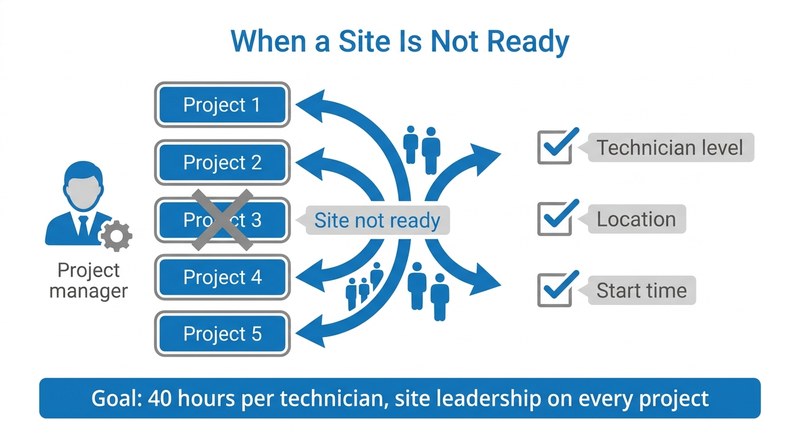
“…one of the five projects notified me that the site is not ready for my team. I need to reallocate the team assigned to that project across the remaining four projects.”
Project manager scenario, multi-region specialty contractor
Reallocating that crew without overloading the other four jobs means knowing who is free, at what technician level, in which location and from what start time. When one manager is short, the request goes out to peers in the same area, sometimes for any qualified technician and sometimes for a named one, and someone has to approve or decline it. Contractors already balancing prevailing wage and certified payroll obligations know that every one of these moves also shows up later in time records and job costs.
The Weekly Manpower Meeting
Once a week, operations managers bring the division together to close the remaining holes. The scenario for that meeting sets the scale.
“I am meeting with over sixty project managers to coordinate a manpower scheduling meeting. PM’s are spread across multiple geographies.”
Operations manager scenario, multi-region specialty contractor
That meeting only works if everyone sees the same picture: every crew, every assignment and every technician who is not yet fully scheduled. It also depends on permissions. Each project manager stays accountable for their own projects and people, but the operations manager needs to move labor across managers in the room without waiting for each owner to make the change.
How CloudApper Approaches Project-Based Scheduling on UKG
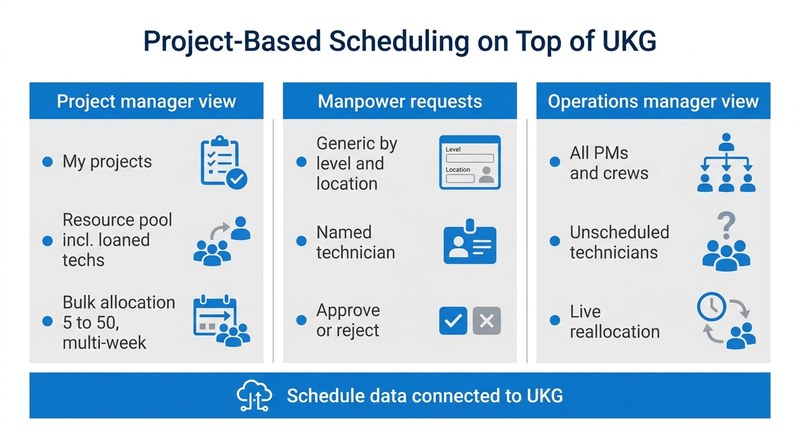
CloudApper’s approach adds a project-based scheduling layer on the CloudApper AI Platform for UKG, shaped around how contractors actually staff work. A project manager starts from a view of their projects and next week’s open slots, with a resource pool of direct reports and loaned technicians. Single and bulk allocation, including multi-week assignments and off-hour start notation, happen in one place. Manpower requests, generic or named, route to peers in the same location for approval. When a site is not ready, the crew can be redistributed and technicians and field leadership notified of the change.
For operations managers, a division view shows every project manager, crew and unscheduled technician, so reallocation can happen live. Schedule data connects to UKG through CloudApper AI for UKG Personalization, which keeps UKG as the workforce system of record. Teams that use crew-level schedules in UKG or need crew labor data flowing into job costing will recognize why the allocation and the time record need to agree.
“I as Ops Manager am able to use a scheduling tool in a live setting to allocate manpower to other projects without running into permissions barriers. The end result is that all projects have adequate manpower and all technicians have a full schedule for the week.”
Operations manager scenario, multi-region specialty contractor
The Takeaway for Contractors on UKG
For contractors, the scheduling question is less about shifts and more about who can lend, who can borrow and who has the authority to move people in the room. CloudApper builds that project-based layer on top of UKG so the weekly negotiation runs from one shared view, and the resulting schedule stays connected to the time and pay data UKG already manages.
If your project managers still trade technicians through calls and side spreadsheets every week, talk to CloudApper about project-based scheduling on top of UKG.


August 7, 2026
Building a Fair, SMS-Based Shift Fill Process on Top of UKG Pro WFM for Public Safety Agencies
An Australian government public safety authority needs SMS-based shift fill for fire and emergency services with four-layer eligibility filtering and overtime priority ordering. Here is why that is hard and how CloudApper AI Platform for UKG builds it on top of UKG Pro WFM.


December 6, 2024
Simplify Holiday Employee Scheduling Using CloudApper’s UKG/Kronos TimeClock
Streamline holiday scheduling with CloudApper AI. Simplify shift management, automate approvals, and reduce last-minute stress. Empower employees with schedule control, ensure attendance, and integrate seamlessly with UKG. Handle the holiday rush confidently while boosting efficiency and employee satisfaction.

May 2, 2024
How UKG Users Can Ensure Optimal Shift Coverage With CloudApper AI
Unfilled shifts disrupt operations and cost businesses. UKG users can ensure optimal coverage with CloudApper AI's Shift Optimization solution for shift trading, bidding, and confirmations.

February 19, 2024
How UKG Users Can Minimize The Effects of No-Call No-Show Events
Worried about employee no-call no-show events? Use CloudApper AI's Shift Optimization for UKG and reduce the effects now!