Empower your workforce with CloudApper hrPad – a dynamic alternative to UKG's self-service features. Elevate user experiences with cross-device accessibility, AI-powered assistance, and seamless integration. Revolutionize HR with CloudApper hrPad – Where Innovation Meets Empowerment.


Table of Contents
- What Employees Can Do with UKG Self-Service
- Where Employees Access Self-Service
- Understanding Employee Self Service (ESS)
- UKG’s Self Service Features
- Key Features of UKG’s Self Service Functionality
- Elevating UKG Employee Self-Service with CloudApper hrPad
- Conclusion
- FAQ: UKG Employee Self-Service
UKG Employee Self-Service (ESS) lets employees handle their own HR basics — viewing schedules and timesheets, checking pay stubs, requesting time off, updating personal information, and submitting availability changes — through the UKG portal, the mobile app, or a shared kiosk, without going through HR for every question. This guide covers what ESS includes, what employees can actually do with it, where they access it, and how organizations extend it for frontline teams.
What Employees Can Do with UKG Self-Service
The fastest way to understand ESS is by task. Employees can view their schedule, check their timesheet, view current and past pay stubs, request time off, check PTO and accrual balances, submit availability changes, and request to fill open shifts. Each link above is a step-by-step guide. For a usage-focused overview, see the top 5 usages of UKG self-service.
Where Employees Access Self-Service
ESS lives in three places: the UKG web portal (desktop, full feature set), the UKG mobile app (schedules, timesheets, requests on the go), and increasingly on shared kiosks or tablets at the worksite — the option that matters most for frontline teams who don’t sit at desks and may not install work apps on personal phones.
Understanding Employee Self Service (ESS)
UKG Employee Self Service system allows workers to take charge of their own human resources and administrative responsibilities. Accessible through the UKG portal, self-service technology at UKG empowers users to manage their own experience and information access, whether it’s checking in or out for shifts, requesting time off, or monitoring payroll.
UKG’s Self Service Features
Using the tools provided by UKG’s Employee Self Service technology, staff members may take care of a variety of responsibilities with little to no intervention from upper management. You may edit your direct deposit details, view your pay stubs, alter your security questions, and change your username. You can also access your pay stubs and amend your personal information.
Key Features of UKG’s Self Service Functionality
UKG Pro Portal: The centralized hub for employees to access essential information and manage various tasks.

UKG Pay Stub: A feature allowing employees to view and track their pay statements effortlessly.
My UKG Support: An interactive support system that caters to employees’ queries and concerns promptly.
UKG Account Help: Resources to facilitate employees in managing their account information securely.
UKG Desktop Navigation: User-friendly desktop navigation for seamless interaction with self-service features.
Elevating UKG Employee Self-Service with CloudApper hrPad
While UKG’s self-service features offer substantial benefits, CloudApper hrPad emerges as a powerful alternative for UKG users. With a focus on providing a user-centric experience, CloudApper hrPad goes beyond traditional self-service solutions.
Reasons to Choose CloudApper hrPad:
Cross-Device Accessibility
Ensure a consistent user experience across Android and iOS devices, including tablets, iPads, and smartphones.
AI-Powered HR Assistant
Leverage an innovative AI assistant that responds to HR queries in real-time, reducing the workload on HR professionals and enhancing overall efficiency.
Seamless Integration
Integrate seamlessly with leading HR and payroll solutions, including but not limited to UKG, Rippling, Zenefits, ADP, Paycom, and many more.
Customizable Application
Tailor the application to fit unique engagement goals and activities, providing HR departments with a flexible and personalized solution.
Employee Time Tracking
Streamline time tracking for employees, facilitating accurate recording and reporting of work hours.
Time Clock Solution
Implement a user-friendly time clock solution to simplify attendance tracking and eliminate manual processes.
Self-Service Features
Empower employees with self-service capabilities, allowing them to manage PTO, shift bidding, swap requests, and more on their own.
Employee Benefits Management
Centralize and simplify the management of employee benefits, ensuring transparency and accessibility.
Real-Time Tracking and Transparency
Enhance visibility into HR operations with real-time tracking, promoting transparency and accountability.
Automation for Efficiency
Maximize time and resources by automating mundane HR activities, freeing up HR teams to focus on strategic initiatives.
Employee Query Response
Enable the AI assistant to respond to a wide range of employee queries, from HR policies to employee perks, ensuring quick and accurate information.
Internal Knowledge Base
Provide employees with quick access to an internal knowledge base, reducing dependency on HR for routine information.
Employee Personalization
Offer a personalized and customized experience for employees, ensuring that the application aligns with their unique needs and preferences.
Task Automation
Automate repetitive tasks, such as email and phone communication, by routing requests to the appropriate HR staff, streamlining workflow.
Employee Referral Management
Facilitate the employee referral process with a comprehensive system that guides users through the initiation and provides real-time tracking and status updates for referrers.
Expense Management
Simplify expense management by allowing employees to submit expense reports online, streamlining processes related to approvals and reimbursements.
Analytics and Reporting
Provide robust analytics and reporting capabilities, allowing HR teams to track and analyze data to measure Key Performance Indicators (KPIs) for continuous improvement.
Employee Communication Hub
Centralize team, department, and company-wide communication to streamline processes like holiday requests, PTO approvals, and attendance records.
Employee Engagement Features
Enhance overall employee engagement by providing tools and features that contribute to a positive and interactive work environment.
Real-Time Insights
Offer real-time insights into employee-related data, empowering HR professionals and decision-makers with up-to-date information.
Conclusion
In the ever-evolving landscape of workforce management, empowering employees with efficient self-service solutions is paramount. While UKG’s self-service features offer a robust foundation, CloudApper hrPad stands out as a forward-thinking alternative, ensuring a seamless transition, enhanced functionality, and a user-centric approach. Explore the possibilities of CloudApper hrPad and revolutionize your HR strategy today.
Discover the future of Employee Self Service with CloudApper hrPad – Where Innovation Meets Empowerment.
FAQ: UKG Employee Self-Service
What is UKG Employee Self-Service (ESS)?
ESS is the set of UKG features that let employees manage their own HR tasks – viewing schedules, timesheets, and pay stubs, requesting time off, updating personal information, and submitting availability or shift requests – through the UKG portal, mobile app, or a worksite kiosk.
What can employees see and do in UKG self-service?
Depending on configuration: view schedules and timesheets, check current and historical pay statements, see PTO and accrual balances, request time off, submit availability changes, request open shifts, and update personal details.
How do employees access UKG self-service?
Through the UKG web portal on desktop, the UKG mobile app, or a shared self-service kiosk at the worksite. Feature availability varies by UKG edition and your organization’s setup.
What is a UKG self-service kiosk?
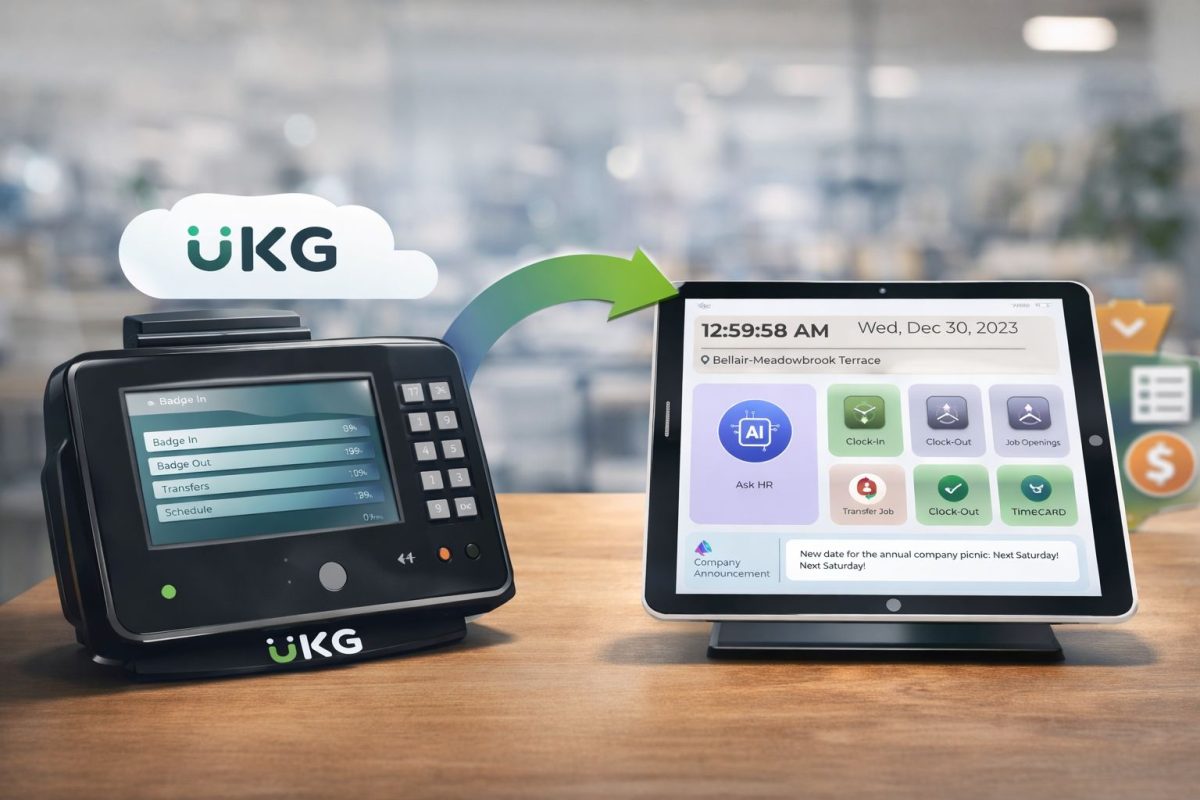
A shared tablet or device at the worksite where employees punch in and out and handle self-service tasks without a personal login environment – for example, CloudApper hrPad turns any iPad or Android tablet into a UKG-connected ESS kiosk with an AI assistant for HR questions.
January 29, 2026
Replacing End of Support Time Clocks in a UKG: A Practical Transition Plan
With UKG InTouch 9000 and 9100 devices approaching end of support, many organizations are rethinking more than just hardware. This practical guide walks HR leaders through a low-risk, UKG-aligned transition strategy—covering device inventory, pilot planning, payroll parallel runs, and how modern self-service kiosks like hrPad can reduce HR friction while improving the frontline experience.

January 27, 2026
How AI-Powered Self-Service Maximizes ROI in UKG Workforce Management Solutions
AI-powered self-service in UKG Workforce Management Solutions enhances ROI by automating HR tasks, reducing hidden costs, and improving employee satisfaction and operational efficiency.
January 27, 2026
Why CloudApper Stands Out Among UKG Integration Partners for Custom HR Workflows
CloudApper stands out among UKG Integration Partners by offering a no-code, AI-driven platform for custom HR workflows, enhancing flexibility and efficiency.
January 27, 2026
Revolutionizing UKG Dimensions Employee Login: Empowering Deskless Workers with Modern Solutions
Over 80% of the global workforce is deskless, yet many HR systems like UKG Dimensions are desktop-focused, causing inefficiencies for frontline workers. Solutions like CloudApper hrPad enhance accessibility, boosting productivity and employee satisfaction.