A restaurant group posts tips the day after service while its POS and UKG Ready describe each shift differently. Here is how staged review, reruns and a kept record of every calculation make each tip allocation defensible before it reaches payroll.


Table of Contents
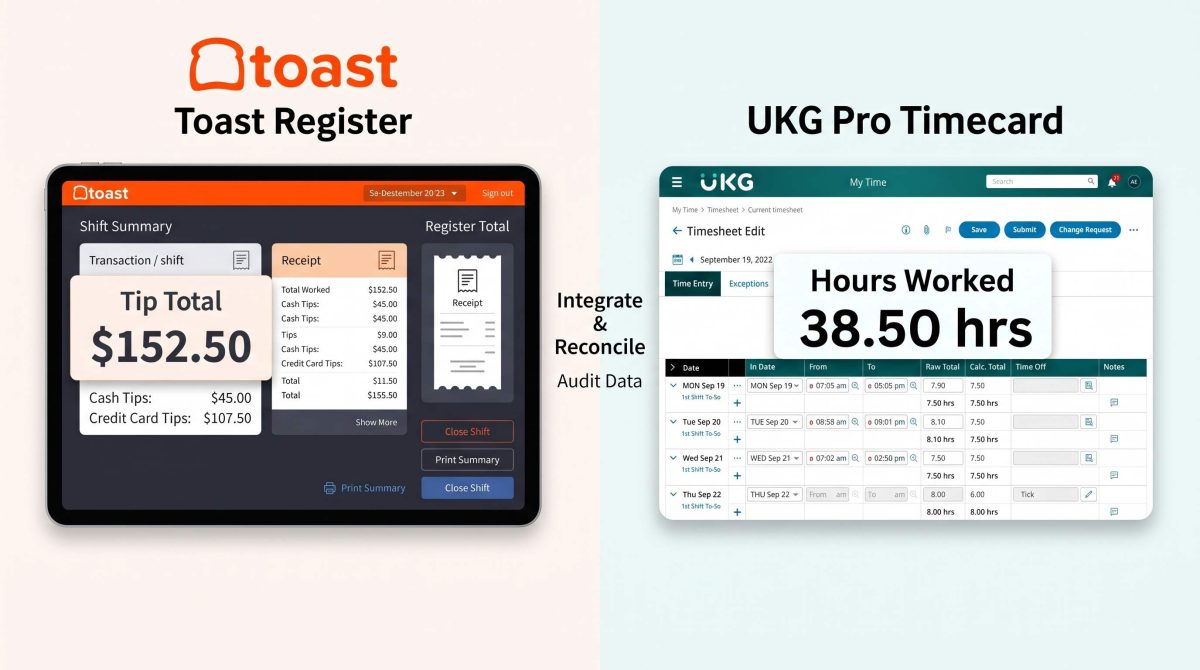
A tip allocation can be arithmetically correct and still be hard to defend. The point-of-sale system records one shift with a start, an end and a break. UKG Ready records a start, a break out, a break in and an end. Neither holds the fact that dinner service starts at 5:00 p.m. A 450-employee full-service restaurant group with eight locations reconciles all of it every morning, because its central office posts tips the day after service. UKG Ready stays the system of record for punches and payroll, and CloudApper Tip Management for UKG carries the calculation and the evidence behind it.
The Date on the Check Is Not Always the Date of Service
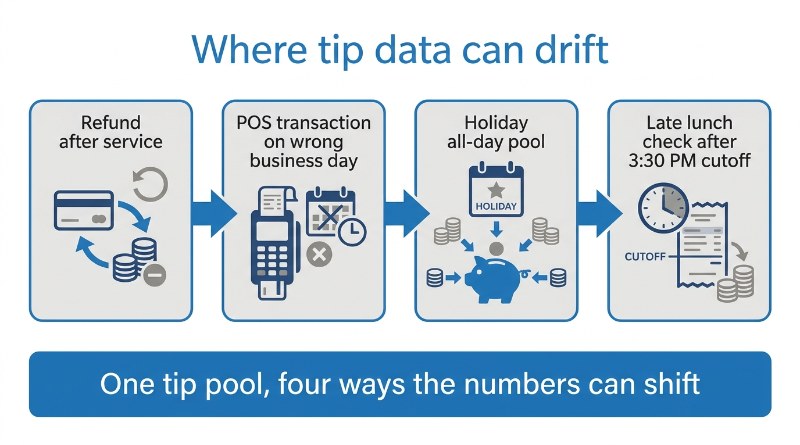
The edge cases are what make a tip pool hard to audit. Refunds arrive after the fact. A transaction can land on the wrong business day. On holidays, lunch and dinner collapse into one all-day pool. The Payroll Lead said the requirement was that “it just needs to be dynamic based on the day, the shift, and the position.”

Qualifying windows by role were the first problem the group solved, covered in this account of a minutes-worked tip pool. The next question was whether anyone could prove the numbers.
Stage, Review, Then Import
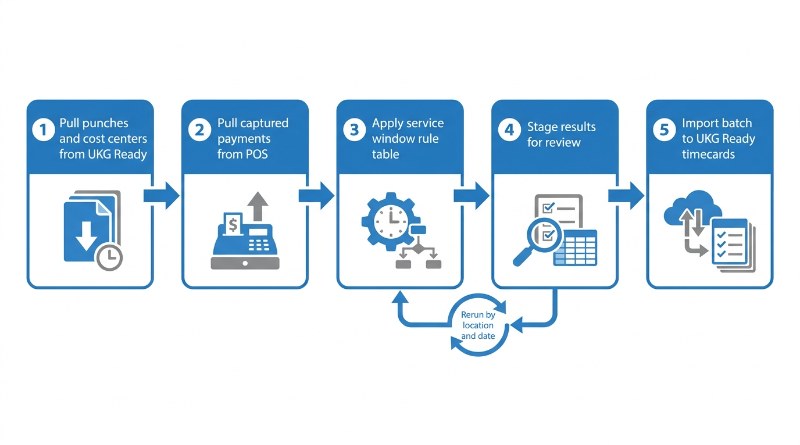
Each early morning, after managers review the previous night’s punches, CloudApper pulls punches and cost centers from UKG Ready and captured payments from the point of sale through CloudApper iPaaS for UKG. A rule table by location, day, role and service period decides which minutes qualify. Only captured payments count, and canceled, voided, denied and error statuses are excluded.
Nothing posts straight to payroll. Results are staged for review, the control the Payroll Lead asked for from the start:
“Going forward… we want more layers of review. Just make sure that all those proportions are working out right, that everybody’s time is being recorded correctly.”
Payroll Lead, central administration office, eight-location restaurant group
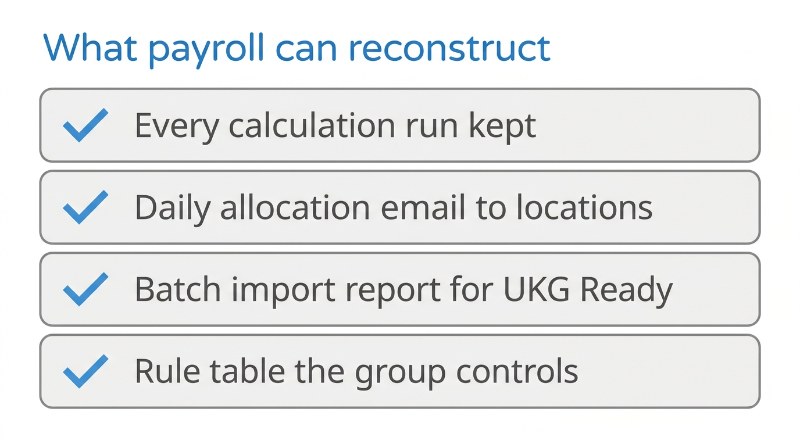
When a refund or misdated transaction shifts a pool, the Payroll Lead can rerun one location and date with a click or enter a manual adjustment. A business-date reallocation, being finalized after go-live, will move a transaction to the day it belongs. If tips arrive as zero, the calculation reruns the next morning on its own. Every run is kept, so a correction is a recorded step, not a silent edit. The same staging discipline applies to automating POS tip distribution into UKG.
What Payroll Gets After Go-Live
The group went live on October 1, 2026, aligned to the start of a pay period, across all eight restaurants. Approved results import into UKG Ready as a batch and reach each timecard as earnings ahead of every semi-monthly payroll. Locations receive a daily allocation email, and the central office gets a batch import report. The rules sit in a table the group controls, built on the CloudApper AI Platform for UKG, so a new holiday or location is a configuration change.
“Since we’re live now, we have to find a way to make it work every day.”
Payroll Lead, central administration office, eight-location restaurant group
Hours saved have not been measured yet. What the group has is a reviewable record of every run.
The Takeaway for Payroll and Finance Leaders
Tip reporting keeps drawing attention, as this guide to what no tax on tips means for UKG payroll explains, and finance leaders want to see how each number was built. The same need appears in multi-department tip pool allocation at a gaming resort. A pool that can be reconstructed by location, date and rule is easier to hand to an auditor than one that lives in a spreadsheet, and CloudApper keeps UKG Ready at the center of that record.
If your tip pools run through UKG Ready and you want every allocation reviewable before it reaches payroll, talk with the CloudApper team about how CloudApper Tip Management for UKG fits your locations.


October 27, 2026
How to Automate Toast Tip Distribution to UKG
Toast calculates the tips. UKG pays them. Neither one works out who is owed what, so somebody rebuilds the math in a spreadsheet every morning. Here is how the daily run works end to end, which pay codes land in the UKG timecard, and what to settle internally before any of it writes to payroll.


September 17, 2026
No Tax on Tips: What It Means for Your UKG Payroll
Starting in 2026, employers using UKG must report tips correctly on the W-2 to support the new No Tax on Tips deduction, and tip tracking commonly breaks down before that data reaches payroll. CloudApper Tips Management for UKG keeps tip data accurate from the point it's earned.

August 19, 2026
Multi-Department Tip Pool Allocation in UKG: What a Tribal Gaming Resort Needs and How CloudApper Handles It
A casino resort's tip records say how much a department collected but assign nothing to anyone, leaving allocation to a weekly spreadsheet. Here is why department-specific tip pool rules at a tribal gaming resort need to be written down, and how CloudApper turns them into a per-employee record in UKG.


December 9, 2024
Automate Tip Pools Calculation in Restaurants Using UKG/Kronos TimeClock
Simplify tip management with CloudApper hrPad for UKG/Kronos users. Automate tip tracking, reduce errors, and ensure IRS compliance effortlessly. Save time, boost employee trust, and focus on growing your restaurant business with streamlined, accurate tip management.