Tracking Billable & Non-Billable Time in UKG Ready becomes simpler with automated job codes, project-based tracking, and real-time reporting that improve billing accuracy, workforce visibility, and payroll confidence without manual corrections or administrative overhead across teams and departments company wide.



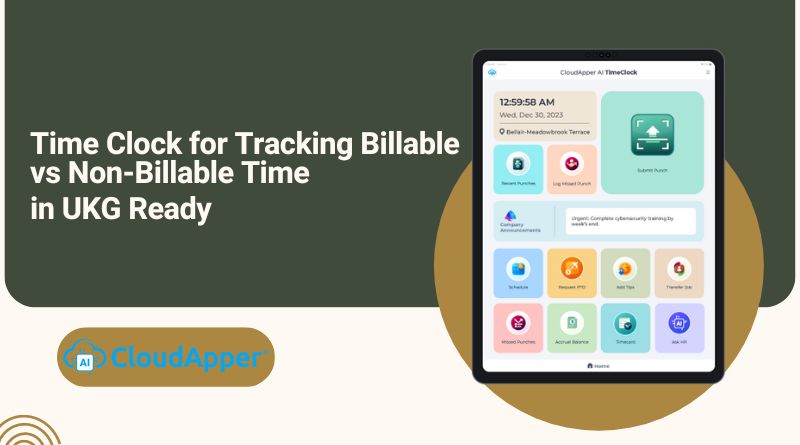
Table of Contents
- TL;DR
- Why is Tracking Billable & Non-Billable Time So Important?
- Billable vs. Non-Billable Time: How to Differentiate Them Correctly
- The Solution: CloudApper AI TimeClock for Tracking Billable & Non-Billable Time
Achieving accuracy, transparency, and team empowerment in managing billable and non-billable time is an ongoing challenge. Manual tracking often results in tedious tasks, errors, and diminished motivation. CloudApper AI TimeClock for UKG emerges as a standout time-tracking solution, providing additional tools alongside its standard features. This makes it the preferred choice for seamlessly handling billable and non-billable hours within the UKG Ready environment.
TL;DR
-
Tracking billable and non-billable time is essential for accurate billing, payroll, and financial transparency in UKG Ready.
-
Manual time tracking often leads to errors, rework, and limited visibility into labor utilization.
-
CloudApper AI TimeClock classifies time correctly at clock-in using job codes, cost centers, and project-based tracking.
-
Real-time reporting provides clear insight into labor distribution, profitability, and workforce utilization.
-
Organizations gain better control and accuracy without increasing administrative workload or manual corrections.
Why is Tracking Billable & Non-Billable Time So Important?
Accurately separating billable and non-billable time is foundational to both financial performance and operational clarity. When tracked correctly, it delivers measurable benefits across the organization:

-
Ensures accurate and defensible client billing
Clearly distinguishing billable hours prevents underbilling or overbilling, reduces client disputes, and supports transparent, auditable invoices. -
Improves financial visibility and profitability analysis
Understanding how much time is spent on revenue-generating versus internal activities helps leaders identify profitable projects, cost overruns, and margin erosion early. -
Optimizes resource allocation and workforce utilization
By seeing where non-billable time accumulates, organizations can rebalance workloads, reduce inefficiencies, and allocate staff more effectively. -
Supports fair and accurate payroll and compensation
Proper classification ensures employees are paid correctly based on the type of work performed, reducing payroll errors and compliance risks. -
Strengthens operational planning and forecasting
Historical billable and non-billable data enable more accurate budgeting, project forecasting, and staffing decisions.
Billable vs. Non-Billable Time: How to Differentiate Them Correctly
| Dimension | Billable Time | Non-Billable Time |
|---|---|---|
| Purpose | Directly contributes to revenue or client billing | Supports internal operations and workforce enablement |
| Typical Activities | Client projects, contract work, chargeable services, customer deliverables | Internal meetings, training, administration, compliance tasks, downtime |
| Cost Center / Job Code Setup | Assigned to billable cost centers or job codes that calculate wages and billing | Assigned to non-billable cost centers for visibility without client billing |
| Project & Task Association | Linked to specific projects, tasks, or clients for invoicing and profitability analysis | Linked to internal projects or tasks for operational insight |
| Payroll & Billing Impact | Included in billable wage calculations and client invoices | Tracked for payroll and reporting, but excluded from client billing |
The Solution: CloudApper AI TimeClock for Tracking Billable & Non-Billable Time
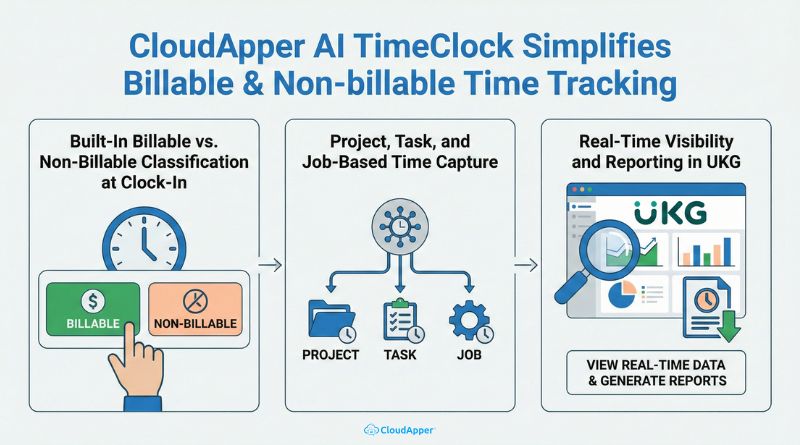
CloudApper AI TimeClock simplifies billable & non-billable time tracking in UKG Ready by removing ambiguity at the point of clock-in and automating classification behind the scenes. Instead of relying on manual corrections or after-the-fact adjustments, time is categorized accurately as it’s captured.
Built-In Billable vs. Non-Billable Classification at Clock-In
CloudApper AI TimeClock removes ambiguity at the very first step of time capture by embedding billable and non-billable classification directly into the clock-in experience. Organizations configure cost centers, job codes, or labor transfers in UKG as billable or non-billable based on internal policies and client billing rules.
When an employee clocks in—using touchless facial recognition, kiosk, or mobile device—the AI TimeClock automatically records the punch against the predefined job code or cost center for that shift. For environments where employees move between different types of work, the system can also prompt them with approved job code options at clock-in or during labor transfers.
The key advantage is simplicity for employees and consistency for the business. Employees don’t need to understand billing logic, wage calculations, or accounting rules. They simply select the correct job, project, or shift, and the system applies the correct classification automatically. This prevents misclassified hours, reduces payroll corrections, and ensures billable time is captured accurately from the start.
Project, Task, and Job-Based Time Capture
For organizations that bill clients based on projects, tasks, or specific jobs, CloudApper AI TimeClock provides granular time capture that aligns directly with UKG’s project and job structures. Each time entry can be associated with a specific project, task, or job code, creating a clear link between labor hours and the work performed.
This approach supports multiple real-world scenarios, including:
-
Client-facing (billable) projects where hours must roll up into invoices and profitability reports
-
Internal (non-billable) initiatives such as training, onboarding, or administrative work
-
Hybrid roles where employees switch between billable and non-billable work throughout the day
Because time is captured at this level of detail, organizations gain precise visibility into where labor hours are going. Billable hours are protected and fully accounted for, while non-billable time remains transparent for cost control, productivity analysis, and resource planning. This level of granularity also supports accurate forecasting and helps leaders understand true project margins.
Real-Time Visibility and Reporting in UKG
All time data captured through CloudApper AI TimeClock syncs directly and continuously into UKG, giving managers real-time access to accurate labor information without manual reconciliation. Instead of waiting for payroll cycles or exporting data from multiple tools, stakeholders can see up-to-date insights as work happens.
With this real-time visibility, teams can monitor:
-
Billable vs. non-billable labor distribution to understand how time is allocated
-
Project profitability trends based on actual labor costs
-
Overtime driven by non-billable activities, helping identify inefficiencies
-
Workforce utilization across departments, roles, and locations
This immediate access to clean, categorized data allows finance, HR, and operations leaders to make faster, more confident decisions. Whether adjusting staffing, reallocating resources, or correcting issues before payroll closes, teams can act proactively—without pulling reports from multiple systems or questioning data accuracy.
Why Choose CloudApper AI TimeClock?
- AI-powered Assistance: Utilize the power of artificial intelligence to allow employees to ask any HR-related questions or concerns.
- Seamless UKG Integration: Simplify your workflow and eliminate data silos with the seamless integration of CloudApper AI TimeClock with UKG.
- Customization Galore: Tailor the platform to your specific needs and workflows, ensuring it aligns perfectly with your organization’s unique requirements.
- User-Friendly Interface: Make time tracking a breeze for your entire team with CloudApper AI TimeClock’s intuitive and user-friendly interface.
Turning Time Data Into Financial Clarity and Control
Accurately tracking billable and non-billable time is essential for organizations using UKG Ready to ensure correct billing, fair payroll, and clear visibility into how labor hours are spent. When time is captured manually or categorized inconsistently, businesses face billing errors, reduced profitability, and unnecessary administrative work.
CloudApper AI TimeClock eliminates that complexity by classifying time correctly at clock-in and syncing it seamlessly with UKG Ready. With automated job codes, project-based tracking, and real-time reporting, teams gain accurate insights without extra effort. See how CloudApper AI TimeClock can simplify your billable and non-billable tracking—request a demo today.
Frequently Asked Questions
-
What is the difference between billable and non-billable time?
Billable time directly contributes to client billing or revenue, while non-billable time includes internal activities such as training, meetings, and administrative work. -
Why is tracking billable and non-billable time important in UKG Ready?
Accurate tracking ensures correct client billing, transparent payroll, better cost control, and improved visibility into how employee time is utilized. -
How does CloudApper AI TimeClock help track billable vs. non-billable hours?
:contentReference[oaicite:0]{index=0} classifies time at clock-in using job codes, cost centers, and project-based tracking that sync directly with :contentReference[oaicite:1]{index=1}. -
Can employees switch between billable and non-billable work during a shift?
Yes. Employees can use job transfers or predefined shifts to accurately record time spent on different types of work without manual corrections. -
Does billable and non-billable time affect payroll and reporting?
Yes. Billable time is included in client billing and profitability reports, while non-billable time supports payroll accuracy, compliance, and workforce analysis.



September 28, 2026
UKG Intouch Down or Out of Warranty? Choosing Between Repair, Exchange, and a Tablet Time Clock
A failed or out-of-warranty UKG Intouch leaves a site without a clock. Compare UKG's Depot Exchange and Depot Repair options, what to check inside UKG first, and when a tablet running CloudApper AI TimeClock is the more affordable way to keep every site punching into UKG Ready or Pro WFM.


September 25, 2026
Custom Data Capture at Clock-In: What You Can Record in UKG Without Native Hardware or IT Development
UKG's time clocks keep timecards accurate, but many frontline teams also need equipment IDs, mileage readings and project codes at the punch. Here's how custom data capture at clock-in records those details with each punch, on iPads and Android tablets, without native hardware or IT development.

September 24, 2026
Department-Specific Punch Flows in UKG: Configuring Different Clock-In Prompts by Location, Role, or Work Group
Warehouse staff, field crews and plant workers need different questions at clock-in, and those questions change with every new site, client or crew. Learn how to configure and update department-specific punch flows in UKG by location, role and work group, with every answer synced back to UKG.

September 23, 2026
UKG Offline Time Clock: How Offline Punch Buffering Works (What IT Needs to Know)
When a remote site loses its connection, punches, job transfers and attestations can go missing from UKG. See how CloudApper AI's employee time clock for UKG stores records on standard tablets during 8- or 48-hour outages, keeps original timestamps and syncs everything to UKG Pro WFM or UKG Ready automatically.