UKG (Kronos) time clocks are trusted by thousands of organizations for their accuracy, reliability, and ability to keep work hours compliant with labor laws. Many of you, however, want to take that experience even further and customize the UKG/Kronos time clock to fit your organizational needs. That is where CloudApper AI TimeClock works hand in hand with UKG. It allows you to customize your Kronos time clock experience using any iPad or Android tablet without replacing existing systems. From digital attestations and geofencing to self-service tools and offline punch capture, CloudApper helps extend and personalize what UKG already does best.
TL;DR
-
CloudApper AI TimeClock helps you customize your UKG/Kronos TimeClock using iPads or Android tablets without changing your existing system.
-
You can add features such as digital attestations, geofencing, offline punch capture, and employee self-service to improve flexibility.
-
It integrates seamlessly with UKG Ready and UKG Pro WFM, syncing punches and workflows in real time or after offline use.
-
Time theft is prevented through facial recognition and geofencing, ensuring only verified employees can clock in or out.
-
Setup is quick and easy: discuss your needs, CloudApper builds the workflow, you test it, and go live once everything runs smoothly.
A Fresh Way to Use Kronos Time Clock
Many of you ask how to use the Kronos time clock more effectively. CloudApper answers that by keeping things simple. Employees can clock in or out with facial recognition. All punches go straight into the UKG system in real time. Managers don’t have to chase down missing entries or fix punch errors manually anymore.
With this setup, the traditional Kronos clocking system becomes smarter. You can track attendance, manage shifts, and verify identities right from an iPad. Plus, since CloudApper works offline too, punches get saved even in areas without internet and sync later automatically. That alone saves hours of manual correction each week.
How CloudApper Augments the UKG/Kronos Time Clock Experience
CloudApper AI TimeClock offers a wide range of ways to customize your UKG/Kronos TimeClock experience. The examples below highlight some of the most popular customization options used by UKG customers today. However, the AI TimeClock is not limited to these features; its flexibility allows organizations to design workflows and data capture processes that perfectly match their unique needs.
Custom Data Capture Forms
You can build forms to capture exactly what your organization needs: job transfers, pay code details, or employee tips. If your team needs to log project information or input shift details, CloudApper makes it easy to create and manage those fields. Everything is synced directly with your UKG (Kronos) system for accurate reporting.
Digital Attestations
Want employees to acknowledge meal breaks or confirm safety checklists before clocking out? You can add digital attestations in minutes. It’s a simple way to stay compliant with labor laws and company policies while reducing paperwork and manual follow-ups.
Geofencing for Accurate Punches
With CloudApper AI TimeClock, you can define virtual boundaries so punches are only accepted within approved worksites. Geofencing helps ensure employees clock in and out from the right locations, reducing time fraud and improving accountability.
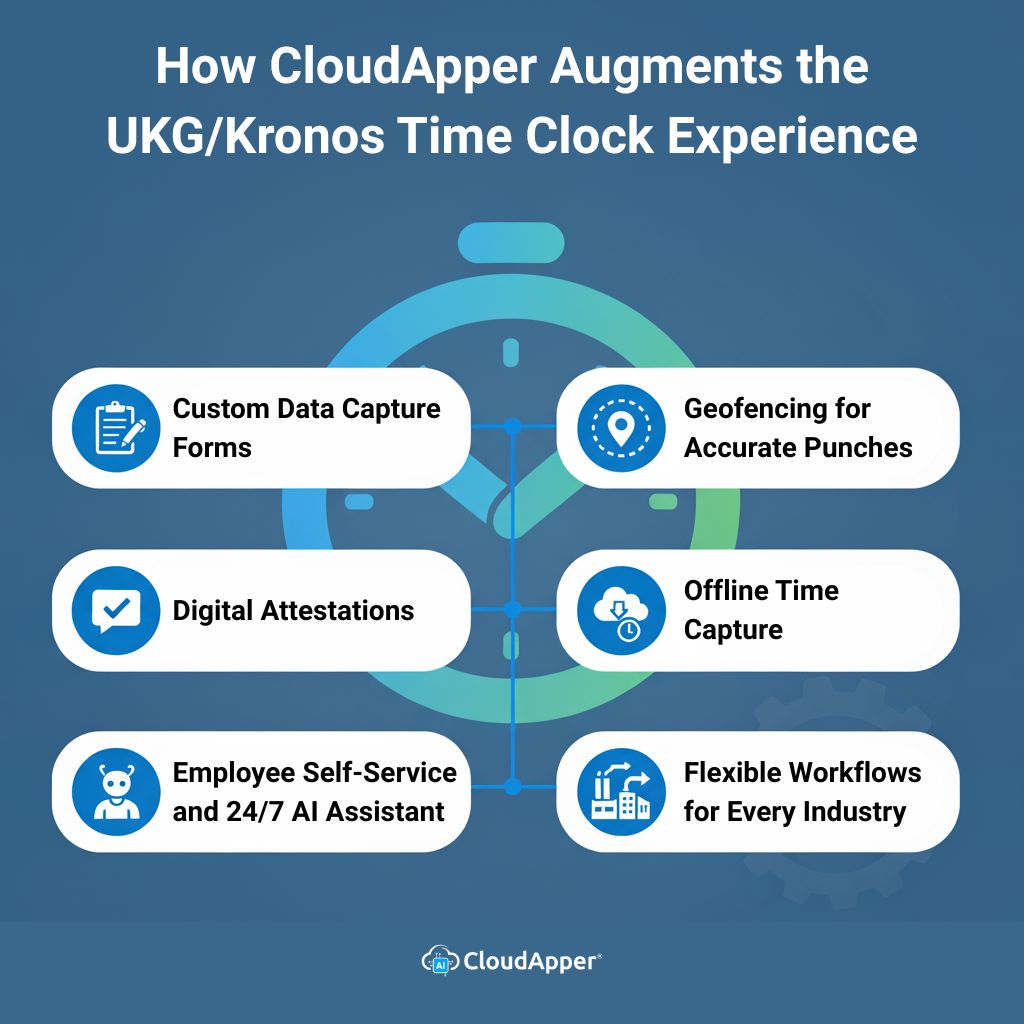
Employee Self-Service and 24/7 AI Assistant
CloudApper includes self-service features and an AI assistant that works around the clock. Employees can check schedules, submit PTO requests, view accrual balances, or get answers to HR questions instantly. This saves HR teams time and gives employees more control over their information.
Offline Time Capture
No Wi-Fi? No problem. CloudApper can record punches offline and sync the data automatically once the connection is restored. This makes it perfect for construction sites, healthcare facilities, or any environment where internet access can be spotty.
Flexible Workflows for Every Industry
Every organization runs differently, and CloudApper reflects that. Whether you need shift-swap requests, project-based tracking, or custom compliance checks, you can configure your — exactly the way you want. CloudApper adapts to your needs without disrupting your existing UKG setup.
Four Simple Steps to Customize Kronos Time Clock
Getting started with CloudApper is straightforward. You won’t need a big IT project, just a quick chat with the team. Here’s how it works:
-
Talk to Our Solution Experts About Your Requirements
Share your goals and challenges. Maybe you want to add attestations, set up geofencing, or automate tip tracking. Our experts will listen and plan accordingly.
-
The Solution Experts Create the Workflow
Based on your requirements, they’ll build the right workflow for your UKG setup. Every detail from data capture to employee self-service is tailored to your organization.
-
Deploy a Test Run to See If There Are Any Issues
Once it’s ready, you can test the setup. The test run ensures all punches sync correctly with UKG and everything functions smoothly on your chosen devices.
-
If Everything Goes Right, Go Live
After a successful test, you’re ready to roll. Employees can start using your customized Kronos time clock instantly on iPads or tablets. It’s that easy.
This guided approach means you don’t have to worry about technical complexities. CloudApper handles everything from workflow design to integration testing.
Before and After: The CloudApper Difference
Here’s a quick look at how organizations upgrade their timekeeping when they customize their Kronos time clock with CloudApper AI TimeClock:
| Category |
Before CloudApper |
After CloudApper |
| Customization |
Limited and IT-dependent |
Easily tailored by CloudApper experts to match workflows |
| Time Theft & Security |
Prone to buddy punching; limited biometric options |
Touchless facial recognition and geofencing for verified punches |
| Offline Use |
Dependent on network availability |
Records punches offline and syncs automatically when reconnected |
| Compliance & Attestations |
Manual paperwork and delayed confirmations |
Digital attestations for policies, shifts, or meal breaks |
| Employee Self-Service |
Basic or unavailable |
View schedules, check accruals, and submit PTO requests at the clock |
This side-by-side comparison shows how CloudApper takes the same reliable Kronos foundation and makes it modern, mobile, and flexible without breaking your UKG system.
Final Thoughts
At the end of the day, your time clock shouldn’t hold you back. With CloudApper, you can customize your Kronos time clock to suit your workflows, reduce time theft, and give employees a better experience. From setup to launch, everything is handled by experts who understand UKG systems deeply.
Frequently Asked Questions
-
Can I customize UKG/Kronos TimeClock without replacing hardware?
Yes. CloudApper AI TimeClock runs on iPads or Android tablets, so you can add custom workflows and data capture without changing your existing UKG setup.
-
What customization options are available?
You can add digital attestations, geofencing, custom data capture forms (job transfers, pay codes, tips), project tracking, and employee self-service for schedules, PTO, and accruals.
-
Does it integrate with UKG Ready and UKG Pro WFM?
Yes. CloudApper integrates with UKG Ready and UKG Pro WFM so punches, forms, and workflows sync to your UKG environment in real time or after offline sync.
-
How does it help prevent time theft?
CloudApper supports facial recognition and geofencing so only verified employees can clock in or out at approved locations.
-
What is the setup process?
Share your requirements with solution experts, they build the workflow, you run a test, and then go live once everything looks good.