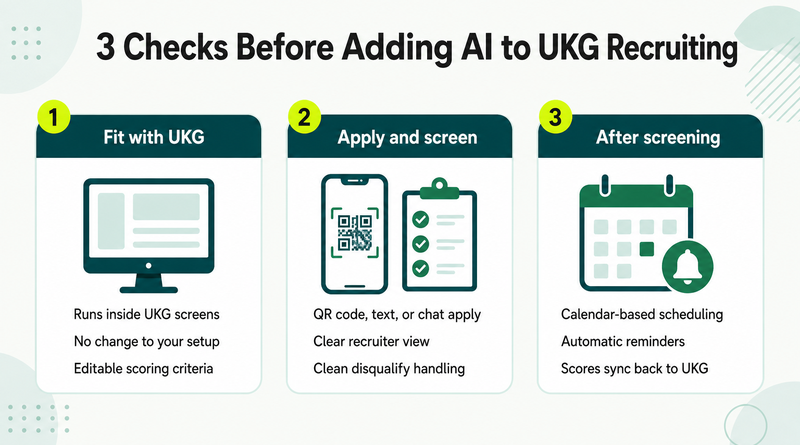
Adding AI to UKG recruiting goes best when you test the tool on three fronts: UKG fit, candidate application and screening, and what follows. Ten demo-call questions make each check specific, and an answer key shows how AI Recruiter responds.




Table of Contents
- TL;DR
- Fit with your existing UKG setup
- How candidates apply and get screened
- What happens once screening ends
UKG Pro and Ready Recruiting are trusted systems that give your team one dependable place for requisitions, applicants, and hiring decisions. However, every organization runs hiring in its own way, so many teams look to tailor that foundation with a separate AI Recruiter for UKG. Before adding AI to UKG recruiting, ask three things: does the tool fit your existing UKG setup, how do candidates apply and get screened, and what happens once screening ends. The ten questions below turn those three checks into specifics you can raise on a demo call.
TL;DR
- Check that the tool runs inside the UKG screens your recruiters already use
- Confirm it leaves your UKG configuration and workflows unchanged
- Ask who sets the scoring criteria and whether recruiters can edit them per role
- Look at what a recruiter actually sees on each screened candidate
- Test scheduling, reminders, and data sync with your own requisitions
Fit with your existing UKG setup
1. Does it work inside UKG or as a separate tool?
Recruiters move faster when they stay in the screens they already know. Ask whether scores and summaries appear inside UKG or behind a second login. A separate tool means more tabs, more training, and more chances for a recruiter to skip a step.
2. Does it change your UKG configuration or workflows?
Your UKG setup reflects years of decisions about approvals, statuses, and permissions. Adding AI to UKG recruiting should not force your admins to rebuild any of it. Ask what, if anything, must be reconfigured, and whether recruiters keep their current workflow on day one.
How candidates apply and get screened
3. How do candidates apply, and what happens when they don’t finish?
Long forms lose candidates before screening even starts. Ask whether candidates can apply by QR code, text, or a short chat, and whether those applications land in your UKG pipeline. Also ask whether the tool follows up by text or email when someone stops partway.
4. Who defines the scoring criteria, and can you change them per role?
Scoring is only fair when the criteria match the job. Ask how the criteria are created and whether recruiters can edit them for each requisition. For example, can you remove a degree requirement for a role where experience matters more? Strong AI candidate scoring in UKG starts with criteria your team controls.
5. What does the recruiter see on each candidate?
A score alone does not help a recruiter decide. Ask to see the full view: the score, a short summary, gaps against the role, suggested interview questions, and the candidate’s screening answers. An exportable overview also helps when a hiring manager wants to review a shortlist, and it lets you rank candidates with less guesswork.
6. What happens when a candidate gives a disqualifying answer?
Some answers end a candidacy, such as a missing required license. Ask whether the tool stops the screening, records the reason for the recruiter, and tells the candidate politely. This works best alongside the knockout questions you already use in UKG.
7. Can you ask for video answers, and is it optional?
Some roles benefit from hearing a candidate answer in their own words. Others do not need it. Ask whether you can switch on one-way video interviews per role and how candidates receive the request. If video is optional, candidates who skip it should still move forward.
What happens once screening ends
8. How does scheduling use calendar availability?
Scheduling is where qualified candidates often wait, and waiting costs you hires. Ask whether the tool checks your recruiters’ real calendars, sends candidates a link, and creates the calendar invite once they pick a time. Good interview scheduling in UKG Pro Recruiting should remove the back and forth.
9. How are candidates reminded about upcoming interviews?
A booked interview still fails if the candidate forgets it. Ask whether reminders go out by email and text without a recruiter sending them. Automatic reminders are one of the simplest ways to prevent interview no-shows.
10. Do scores and statuses sync back to UKG?
Your recruiters should never copy results from one system to another. Ask whether candidate data, scores, summaries, and statuses sync in both directions, and how quickly. If the answer is real time, adding AI to UKG recruiting does not create a second set of records.
How AI Recruiter for UKG answers these questions
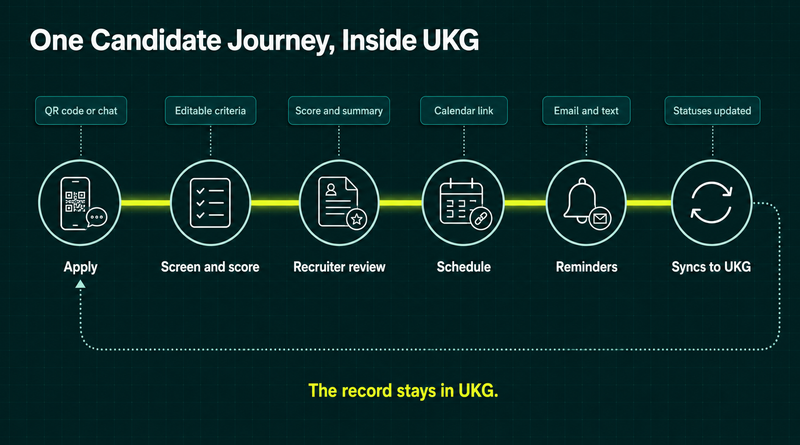
AI Recruiter for UKG works seamlessly in both UKG Pro and UKG Ready Recruiting. It runs in the UKG screens your recruiters already use and enhances your recruiting process without changing your system or workflows, so your UKG configuration stays as it is.
Candidates can apply by QR code or through a guided chat, and unfinished applications get a follow-up by text or email. The scoring matrix is generated automatically from the job listing, and recruiters can edit it for each role, such as removing a degree requirement. Recruiters see the score, a summary, gaps, suggested interview questions, and screening answers, plus an overview they can export. If a candidate gives a disqualifying answer, AI Recruiter ends the screening and notes it in the candidate summary. You can also set it to decline those candidates with a polite message during screening. Video questions are optional, and candidates receive the request by email or text.
After screening, candidates pick an interview time from a link sent by email or text, based on your recruiters’ Google or Outlook calendars, and the calendar invite is created automatically. Reminders go out by email and text, and candidate data, scores, summaries, and statuses sync with UKG.
Take these questions to your next demo
Adding AI to UKG recruiting comes down to three checks. Confirm the tool runs inside your existing UKG setup without changing it. Look at how candidates apply, how the scoring criteria are set, and what the recruiter sees when screening ends. Then make sure scheduling, reminders, and data sync keep every result in UKG. Ask any vendor to run these checks on your own requisitions, with your own job requirements and a few test candidates. If you want to see how CloudApper AI Recruiter for UKG handles each one, contact us and we will set up a demo.



November 10, 2026
When the Right Project Engineer Is Buried in 253 Applications: The Real Cost of a Slow Hire in Heavy Civil Construction
One recruiter. 253 applicants. For heavy civil contractors using UKG Pro, missing the right project engineer is not a bandwidth problem. It is a project margin problem. CloudApper AI Recruiter builds on UKG Pro to surface the right candidates immediately.

October 29, 2026
Recorded Phone Screens in UKG Ready Recruiting: Giving Hiring Managers a Seat at the First Interview
When recorded phone-screen links land in an area hiring managers cannot open, one talent acquisition leader ends up listening to every candidate. Here is how CloudApper keys the screen off a UKG Ready Recruiting status and writes the recording link back to the candidate record, with a manager alert and a fixed scope.

October 26, 2026
Candidate Disposition Automation in UKG Pro Recruiting: The Decision Layer Between the Requisition and the Hire
At a growing healthcare network, UKG Pro Recruiting handles posting and onboarding well, but screening, status changes and manager review pile up in the middle. This piece looks at 14 manual dispositions, missing drop-off data and clinical hiring managers, and how CloudApper adds a decision layer on top of UKG Pro Recruiting.

October 8, 2026
Multi-Round Interviews in UKG Pro Recruiting: Automating Executive Panel Scheduling for Fund Administrators
Senior hiring at a global fund administrator runs through many interview rounds and executive calendars across time zones. CloudApper AI Recruiter extends UKG Pro Recruiting to support every round, schedule executive panels through Outlook and Teams, and give recruiting leadership real-time KPIs on where each search stands.